
How to judge a utility app
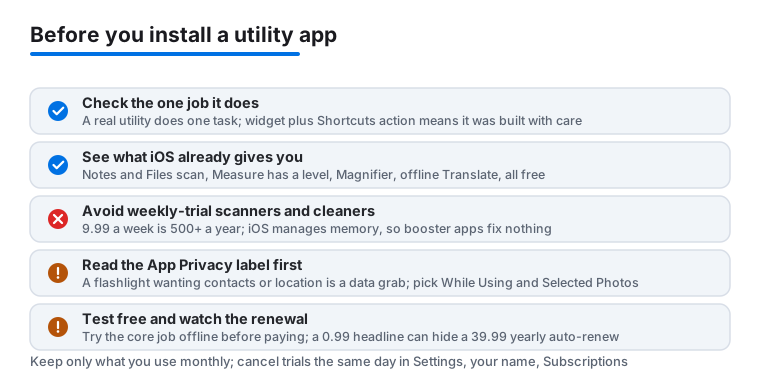
A good utility does one thing well. A scanner scans, a converter converts, a widget shows your battery level. When one app promises ten tools in a bundle, each tool is usually mediocre and the app fills up with ads and upsells. So before you install anything, ask what the one job is. Then check two practical things on the store page. Does it offer a widget or a Lock Screen control, so the tool sits one tap away? And does it list a Shortcuts action, so you can fold it into a routine? In 2026, with the Control Center now spread across customizable pages and the Lock Screen able to hold your own controls instead of just the flashlight and camera, those two answers are the quickest way to tell an app built with care from a quick port chasing downloads.
Check what your device already does
Plenty of paid utilities sell something Apple already gives you. Notes and Files both scan documents: open a note, tap the camera or attach icon, choose Scan Documents, and you get a straightened, searchable PDF that you can sign right there. Measure handles quick length checks and hides a spirit level on its second tab, so you can hang a shelf without buying a level app. Magnifier turns the rear camera into a reading glass and lets you bump up contrast or freeze a frame to read tiny print. Translate works offline once you download a language pack and switch on On-Device Mode in its settings, though Apple is upfront that on-device results are a step below the online version. Background sounds, document signing in Files, and even a basic measuring tape are all in the box. Before you pay for any small tool, spend two minutes poking around the built-in apps and through Settings. The tool you never install is the one that never asks for a subscription, never shows an ad, and never leaks anything.
The weekly subscription trap
The utility category has a well-known pattern worth naming plainly. A scanner or a phone cleaner offers a 3-day free trial that quietly rolls into 9.99 dollars a week. That is over 500 dollars a year for something the Notes app does for nothing. The tell is a price screen that leads with the trial in big type and tucks the renewal terms into grey small print near the bottom. Do the arithmetic before you tap: a weekly price is the one to fear, because the brain reads it as cheap and the calendar bills it as expensive. As a rule, a tool you will use for years is better bought once, for 5 to 20 dollars, than rented forever. A subscription is only a fair trade when the developer keeps doing real work on your behalf, like cloud processing, regularly refreshed data, or sync across your devices. If the thing just runs on your phone and barely changes, a one-time purchase is the honest deal, and plenty of good utilities still offer one.
Why cleaner and booster apps almost never help
Cleaner apps deserve their own warning because they sell a problem your phone does not have. iOS manages memory and background apps on its own; there is no junk cache for a third-party tool to safely sweep, and force-quitting apps to free RAM tends to make battery life worse, not better. When storage actually gets tight, the honest fix lives in Settings, under General, then iPhone Storage, where you get a real breakdown and can offload apps while keeping their data. Photos already finds duplicate shots under its Utilities section, no purchase required. Most cleaner apps simply wrap those free features in an alarming interface and a recurring charge. If an app's pitch is that your phone is slow, full, or infected, treat that as marketing, not a diagnosis.
Privacy red flags
A utility should ask only for what its job needs. A flashlight wanting your contacts, a QR scanner asking for precise location, a battery widget that requests full network access: those are data grabs dressed as features. Every store page carries an App Privacy section near the bottom that lists what the developer collects and whether any of it is linked to you or used to track you. Read it before you download, not after. A simple, offline-capable tool that admits to collecting data used to track you across other companies' apps is telling you exactly what its real business is, and there is always a cleaner alternative one search away. When you do grant a permission, reach for the narrow option: While Using rather than Always for location, and Selected Photos rather than full library access. You can change any of it later in Settings under Privacy and Security.
Concrete things to check before you install
Once a tool looks worth a closer look, the store page tells you most of what you need in about a minute. Read the latest reviews first, sorted by most recent, because a well-liked app can rot fast after a bad update or a change of owner, and the glowing reviews up top may be two years stale. Check the version history: a utility touched in the last few months is being maintained, while one left alone for two years may simply break with the next iOS release. Glance at the size and the screenshots for clutter, since a single-purpose tool buried under five tabs of ads and premium banners rarely respects your time. Test offline if the job does not need the internet, by switching on Airplane Mode and seeing whether a converter or calculator still works; one that demands a connection for an obviously local task is usually phoning home with your data. And confirm the conveniences that make a tool genuinely pleasant on Apple hardware: a Home Screen or Lock Screen widget, a Shortcuts action you can wire into automations, and where it matters, iCloud sync so your scans or settings follow you between iPhone, iPad and Mac.
Common mistakes people make
The biggest one is hoarding utilities you used once and forgot. A folder of nine flashlight, level and QR apps is nine sets of permissions and trackers sitting idle, so keep only what you reach for monthly and delete the rest. The second mistake is paying before testing. Almost every honest utility lets you try its core job free, so never hand over money on the strength of the screenshots alone. Third, people grant permissions on autopilot; when a tool asks for camera, photos, location or contacts, pause and ask whether that specific job actually needs it. Fourth, many users skim past the renewal price, and a 0.99 dollar headline often hides a 39.99 dollar yearly auto-renew that lands quietly twelve months later. Fifth, do not assume the most downloaded result is the cleanest; the top of a utility search is frequently the app with the biggest ad budget, so scroll past the first paid placements and judge on recent reviews and the privacy label instead. If you do start a trial you are unsure about, cancel it the same day in Settings, under your name, then Subscriptions; access runs until the trial ends either way, so cancelling early costs you nothing and saves you the surprise charge.
When you are ready for specific picks, see our tested lists of the best utility apps for iPhone and the best utility apps for Mac.