
Rotate services instead of stacking them
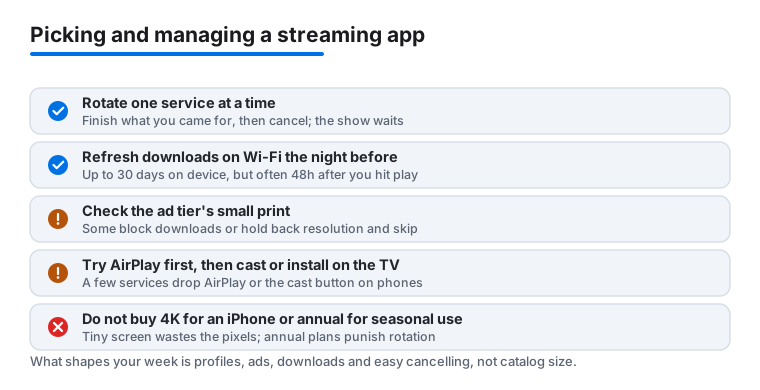
Streaming bills creep up because services are easy to start and easy to forget. The fix is rotation. Keep one anchor service you genuinely watch every week, then add one more at a time: subscribe, finish what you came for, cancel, move on. The shows are not going anywhere, so a series you miss in March is still waiting in August. If you subscribed through Apple, managing this takes a few taps. Open Settings, tap your name at the top, then Subscriptions, and every service Apple bills for is listed with its renewal date. One thing to know: plenty of services no longer let you sign up through Apple at all, so if a subscription is not in that list, you cancel it on the company's own site instead. Set a calendar reminder for the day before each renewal and the system mostly runs itself.
Downloads and iPad storage
If you fly or commute, offline downloads matter more than catalog size, and services handle them very differently. The pattern across most apps in 2026 is two timers running at once. A downloaded title usually sits on your device for up to 30 days, but the moment you press play a second clock starts and the file often expires 48 hours later, whether you finished it or not. Some titles get a shorter window because of the licence behind them, so a film you grabbed weeks ago can still vanish faster than the show next to it. There are quieter limits too. A few services cap how many titles you can download in a month, or how many devices can hold downloads at once, and the cheap ad-supported tiers sometimes remove downloading completely. One large service lets ad-tier subscribers download but caps it at a set number per month, while another blocks downloads entirely on its ad plan, so do not assume a paid login means offline access. Check all of this before a trip, not at the gate. Storage is the other surprise. An hour of high-quality video can take 2 or 3 GB, so a binge-ready iPad fills up fast. Drop the download quality to medium in the app settings; on an iPad screen the difference is hard to spot and it roughly halves the space.
AirPlay or casting
AirPlay sends video from your iPhone, iPad or Mac to an Apple TV or a compatible television, and inside Apple's world it is usually the most reliable option. Casting hands playback over to the TV itself, which some apps prefer. The catch in 2026 is that you cannot count on either being there. One of the biggest services dropped AirPlay years ago and, more recently, pulled the cast button out of its mobile app for most modern TVs as well, so on a phone you are often left mirroring or nothing. That is not a bug, it is a deliberate choice some companies make over rights and quality control. So try AirPlay first, and if an app hides or limits it, look for a built-in cast button or simply install the app on the TV and use your phone as the remote. Hotel TVs are the usual holdout, which is one more reason your flight downloads earn their keep.
Free with ads is genuinely good now
Free, legal, ad-supported streaming has grown into a real option in 2026. Several big names run free tiers, and dedicated free services carry deep libraries of older shows and films along with live channels that play like old-fashioned TV. The price is a few minutes of ads per hour. For background TV and comfort rewatches that trade is easy, and a free layer makes rotation painless, filling the quiet gaps between paid months. The one rule worth keeping: a legitimate free service shows you a known catalogue funded by ads. An app promising every brand-new release for nothing is almost always a pirated stream in a thin wrapper, and those are the ones that get pulled, break mid-episode, or quietly help themselves to your data.
On the Mac: the floating window
Most services play happily in a browser on the Mac, and picture-in-picture is the underrated trick for slow workdays. Pop the video out into a small floating window that sits in the corner, above your other windows, while you get things done. In Safari, click and hold the audio icon in the address bar and choose Enter Picture in Picture, or right-click the video twice and pick it from the menu. The window stays put even when you switch desktops, and you can drag and resize it. For setup details and our current picks, see the best streaming apps for Mac and our iPad streaming guide.
How to judge a streaming app before you commit
The marketing always leads with the catalog, but the catalog is the part that changes the least between rivals; the big titles tend to circulate everywhere eventually. What actually shapes your week is the boring stuff. Start with the profiles question: does the plan cover the number of screens your household really uses at the same time, or are you about to pay for a tier you will never max out? Then check the ad rules in plain language, because the gap between tiers is wider than the price suggests. Some ad plans still block downloads, hold back the highest resolution, or refuse to let you skip recaps, and those limits are buried three screens deep in the signup flow rather than on the pricing page.
Next, look at how the app behaves on the screen you use most. A service can have a tidy TV interface and a clumsy iPhone app, or the reverse. The signals worth checking are concrete: how fast it resumes a half-watched episode, whether it remembers your audio and subtitle language across episodes, and whether continue-watching actually clears finished shows instead of leaving them to clutter the row. Audio and subtitle handling is the single most overlooked criterion. If you watch foreign-language shows, test whether the app keeps your subtitle choice through a binge or makes you reset it every episode, and whether it offers proper closed captions rather than text burned into the picture. These things sound small until you hit episode four and the app has forgotten everything.
Finally, treat the account controls as a feature, not an afterthought. The better services let you cancel in a couple of taps, pause a subscription for a month instead of losing your watch history, and set spending or maturity limits per profile. The worst make you phone in, or hide the cancel button behind a retention offer with a countdown on it. Since rotation is the whole money-saving game, an app that fights you on cancelling quietly costs more than its sticker price. While you are in there, glance at the privacy settings too. Most services track what you watch to feed recommendations and, on the ad tiers, to target ads, and many bury an opt-out for some of that sharing a few menus deep. It will not make the service free, but it is worth two minutes.
Common mistakes to avoid
Three errors show up again and again. The first is paying for the top resolution tier on a device that cannot show it: 4K on an iPhone is wasted money, since the screen and the seating distance flatten the difference. On a large iPad the gain is small, and the real reason to climb a tier there is usually better audio or the right to download, not the pixel count. The second is judging a free trial by its first night, when you have only sampled the catalog and not the friction; give it a real week before the renewal hits, and note the renewal date the moment you sign up. The third is stacking annual plans for the discount on services you watch seasonally. An annual plan only saves money if you would genuinely have paid for all twelve months anyway, and for most households a single sport, a single returning drama, or a holiday film run does not justify locking in a year you cannot pause.