
The app-hopping trap
The biggest productivity killer is not a bad app. It is trying ten of them. Every switch means moving your tasks, learning new buttons, and losing a week to setup that feels like work but is not. So make one rule for 2026: pick one task app and use it for two full weeks before judging it. Capture everything in it, even tiny things. By the end you will know whether the friction was the app or just a new habit forming, and forming the habit is the whole game.
You only need three things
A calendar for things with a time, a task list for things with a deadline, and notes for everything else. That simple trio covers almost any job or life. Most overwhelm comes from apps that try to be all three at once, or from keeping tasks scattered across four places. Pick one app per job, follow one rule such as anything with a date goes in the calendar, and stop there. The point of three buckets is not tidiness. It is that when a thought arrives you never have to decide where it lives, so capturing it costs you nothing.
Start with what is already on your device
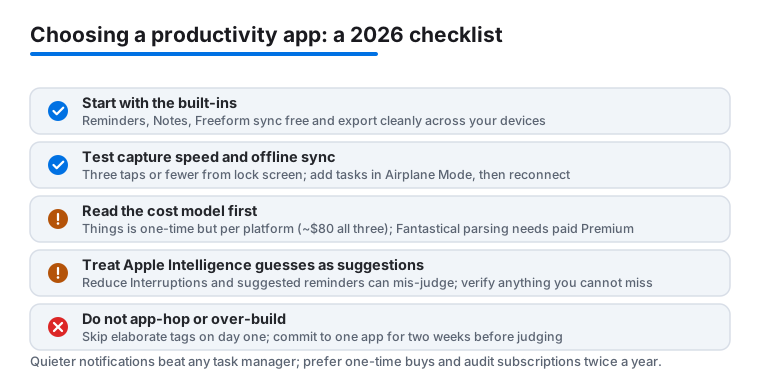
Apple's built-in apps are genuinely good now, which was not always true. Reminders handles dates, locations, shared lists and smart lists, and on recent iPhones it will auto-sort a grocery list into sections like Produce and Dairy so you are not bouncing around the store. If you have Apple Intelligence turned on, it can also pull suggested reminders out of a message or an email, though it guesses and you will want to check what it adds. Notes does scanned documents, tables and quick sketches. Freeform is a free whiteboard that is pleasant for messy planning on an iPad, with an endless canvas you can fill with text, photos and links, and you can share a board if you want a second set of hands. Try the built-ins for your two-week test first. Plenty of people stop right there and spend nothing, and because these apps sync over iCloud at no cost across every device you own, there is no upgrade waiting to surprise you later.
When a paid app earns its price
Pay when an app removes a pain you feel every day. A task manager in the Things class feels calmer and quicker than anything free, and it is sold the old-fashioned way: one purchase, no subscription, sync included. Be ready for the catch, though, which is that each platform is priced on its own, so the Mac app, the iPhone app and the iPad app are three separate buys that add up to roughly eighty dollars if you want all three. You pay once and you are done, but you do pay per device.
Calendars in the Fantastical class are the other common upgrade. The selling point is typing a plain sentence like 'coffee with Sam on Friday at 9' and watching it land in the right slot. Worth knowing before you commit: that natural-language parsing is actually in the free version, so you can try the headline feature without paying anything. What sits behind the paid Flexibits Premium tier, about five dollars a month or forty a year, is the rest of the package, things like scheduling and proposals, weather and travel time, conference-call detection, email forwarding to create events, and unlimited calendar sets. If you plan your whole day in a calendar those extras may pay for themselves, but go in knowing the upgrade is a recurring bill, not a one-time one.
One honest warning that applies to the whole category: watch the subscriptions. Three small monthly fees quietly become a hundred dollars a year, so prefer one-time purchases where they exist and audit what you pay for twice a year.
The biggest free win is a quieter phone
No app saves more time than turning down the noise. Set up one or two Focus modes, such as Work and Personal, and let only the people and apps that matter break through. The path is Settings, then Focus, where you pick who is allowed and which apps can still reach you. Recent iPhones add a Reduce Interruptions option that uses Apple Intelligence to judge each alert and only surface the ones it thinks are urgent; it is handy but it is guessing, so do not lean on it for anything you cannot miss. The plainer, more reliable move is to walk your notification list and switch most apps to silent delivery, where alerts wait quietly in Notification Center instead of buzzing you. You can also turn on Scheduled Summary so the low-priority stuff arrives in one batch at times you choose. A phone that interrupts you fifty fewer times a day beats any task manager ever made.
iPad and Mac work better as a pair
If you own both, two free features are worth learning. Handoff lets you start an email or a document on one device and finish it on the other; the open app simply appears in the Dock or the App Switcher. Universal Control lets one keyboard and mouse glide between a Mac and the iPad sitting next to it, so the iPad becomes a place for your notes or sketches while you write on the Mac. You turn it on under Settings, General, then AirPlay and Continuity on the iPad, and under System Settings, Displays on the Mac. Both devices need to be on the same Apple Account with Wi-Fi, Bluetooth and Handoff on, and sitting close together. No extra app needed, though the link can be fussy and sometimes wants a toggle off and on to reconnect.
When you are ready to choose, see our tested picks for iPhone and Mac.
How to actually judge a productivity app
Once you have narrowed it to one or two candidates, stop reading reviews and test against criteria you can feel within minutes. The five that matter most: capture speed, sync, cost model, lock-in, and how it handles things you will not do today.
Capture speed. The single most important trait is how fast you can dump a thought into the app before it escapes. Count the taps from a locked phone to a saved task. Anything more than three is friction you will pay every single day. Look for a Lock Screen widget, a Share Sheet action, and a Siri or Shortcuts hook. An app you cannot reach in two seconds is an app you will stop trusting, and a task system you do not trust is just a second pile of guilt.
Real sync, not the demo. Add a task on your phone, then watch it appear on your iPad or Mac. Time it. A few seconds is fine; a minute is not. Then turn on Airplane Mode, add three tasks offline, and reconnect. If anything is lost or duplicated, walk away now, because you will only discover it later with something that mattered.
The cost model, read in full. Decide before you fall in love whether it is a one-time purchase, a subscription, or the freemium kind where the feature you actually need sits behind the paywall. Check whether the price covers all your devices or charges per platform, since a per-device app can cost far more than the headline number suggests.
Your exit plan, on day one. Before you pour a year of tasks in, find the export. Can you get your data out as a standard file, or are you locked in forever? Apple's Reminders and Notes sync free across every device you own and export cleanly, which is a quiet reason they remain the safe default.
Handling the someday pile. Good apps separate today from someday. Look for a way to defer a task to a future date so it disappears until then, and a place to park ideas you are not committing to yet. Without this, every list becomes a wall of stale items you learn to ignore.
Common mistakes that waste the most time
Watch for these traps, because nearly everyone falls into at least one. Chasing the perfect setup instead of using a good-enough one, which is procrastination wearing a productive costume. Building elaborate tag and project systems on day one, before you know what you actually need, so you spend an hour maintaining structure that serves five tasks. Keeping tasks in four places at once, your head, a notebook, the app, and your inbox, so you never trust any single list. Ignoring notifications while obsessing over the app itself, when a quieter phone would help more than any feature. And paying for power features you never open, then feeling locked in by the subscription you forgot to cancel.