What your iPhone already does for free
Honest answer first: most people do not need antivirus on an iPhone in 2026. Apps run in sandboxes, they cannot scan each other, and App Store review catches most malware before it ever ships. A classic virus scanner cannot even do its job on iOS, which is why many antivirus apps there are really just VPNs and web filters wearing a scary name. Save the money and the battery.
The one app everyone should add
A password manager beats everything else you could install. Reused passwords are how real people get hacked, not movie-style attacks. Apple's built-in Passwords app is genuinely good now, free, and syncs across iPhone, iPad and Mac. If your life also includes Windows or Android, a cross-platform manager makes more sense. Either way, add two-factor codes from a 2FA app or the built-in code generator, so a stolen password alone is not enough to open your accounts.
VPNs, the honest version
A VPN encrypts your connection so the network you are on cannot watch what you do. That is genuinely useful on hotel and airport wifi, and when you travel and a service you pay for is blocked. That is the whole pitch. A VPN does not make you anonymous, does not stop ads from following you, and does not remove viruses. Military grade encryption means nothing special either; it is the same encryption your bank app already uses. And if a VPN is free, ask how it pays for its servers. The honest ones charge you. Some of the others sell your traffic data.
Scam security apps sell fear
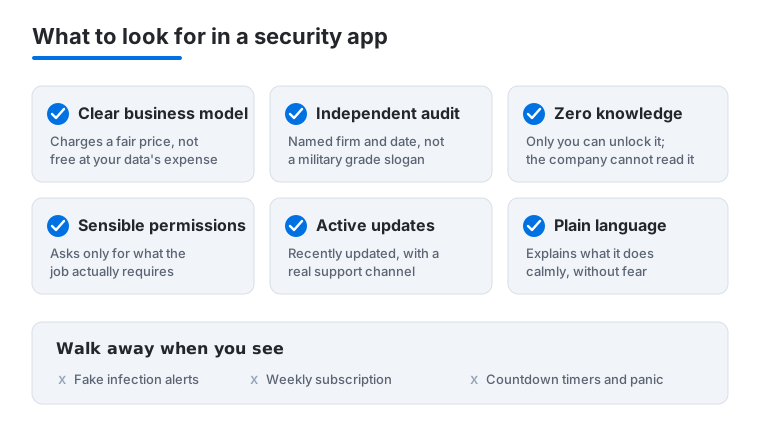
The App Store still has apps that flash red warnings, claim your phone is infected, and then ask for ten dollars a week to clean it. The pattern is always the same: panic language, a countdown, a subscription that is hard to cancel. A real security tool explains what it does in plain words and charges a normal yearly price. If the screenshots look like alarm screens, walk away.
Ten minutes in Settings beats most paid apps
Open Settings, then Privacy and Security, and turn on the App Privacy Report. After a few days it shows exactly which apps contacted which servers, no guesswork. While you are there, review location permissions and set most apps to While Using or Never, and keep answering Ask App Not to Track with a no. This costs nothing and quietly fixes more than most paid tools ever will.
Macs are a little different
On a Mac you can install software from anywhere, so the risk is real but still modest. Gatekeeper and built-in scanning block known malware, and people who stick to the App Store and well-known developers are usually fine. A Mac antivirus starts to make sense if you download lots of niche tools, share the computer, or run a business where one bad file gets expensive. Our tested picks are in the Mac guide and the iPhone guide.
How to judge a security or privacy app before you trust it
A security app sees more of your life than almost anything else you install. A password manager holds the keys to your bank. A VPN watches every site you visit. That is exactly why the bar should be higher here than for a photo editor or a game. Before you hand over that access, work through a few concrete checks.
Read the business model first, not the features. Ask one question: how does this company make money? If a password manager or VPN is free with no paid tier in sight, your data is the product, because servers and audits cost real money. The honest tools say plainly that they charge a yearly fee. Be especially wary of a free VPN, since the entire point is that it can see your traffic, and a company with no income has every reason to sell what it sees.
Look for an independent audit, not a marketing badge. Trustworthy password managers and VPNs pay outside security firms to inspect their code and publish the report. A real audit names the firm and the date and lives on the company site. Phrases like military grade, bank level, or NSA proof are decoration, not evidence. The same encryption they brag about is already running inside your banking app.
Prefer zero knowledge and end to end encryption. For anything that stores your data, the gold standard is that the company cannot read it even if it wanted to, because only your master password unlocks the vault. This is called zero knowledge. The trade off is real and worth understanding: if you lose that master password, nobody, not even the company, can recover your data. That is a feature, not a bug.
Check the permissions against the job. A flashlight wanting your contacts is a red flag everyone knows. The same logic applies here. A password manager needs autofill access; it does not need your location. A VPN needs to route your network; it does not need your photo library. On iPhone, open the App Privacy Report after a few days and see which servers the app actually talks to. A privacy tool that quietly phones home to ad networks has failed its own test.
Confirm it is current and supported. A security app that has not been updated in a year is a liability, not a tool, because threats move and abandoned code rots. Check the last update date on the store listing, look for a real support channel you could reach in a crisis, and favor apps with a long track record over a brand new name promising the world.
Common mistakes people make
The most expensive mistake is buying a security app to feel safe while ignoring the free habits that actually protect you. No app saves you if you reuse one password everywhere and skip two factor codes. A close second is installing several overlapping tools, three VPNs and two cleaners, which drains battery, slows the phone, and creates more places for something to go wrong. People also forget that the trial ends; that calm nine dollar app becomes a recurring charge you stop noticing. And many treat a VPN as a license to be careless, clicking sketchy links because they feel protected, when a VPN does nothing against a phishing page or a bad download. Pick fewer tools, understand what each one does, and keep the basics switched on.