
Best Security & Privacy Apps for iPhone (2026)
Your iPhone is already one of the more locked down devices you own, but a handful of well chosen apps close the gaps Apple leaves open. We carried these on our personal phones for weeks, from airport Wi-Fi to logging into work each morning, and kept the ones that pulled their weight. For the bigger picture, browse our security and privacy hub or the full best iPhone apps roundup, and if you protect more than one device, our Mac picks line up neatly with everything here.
1. Brave
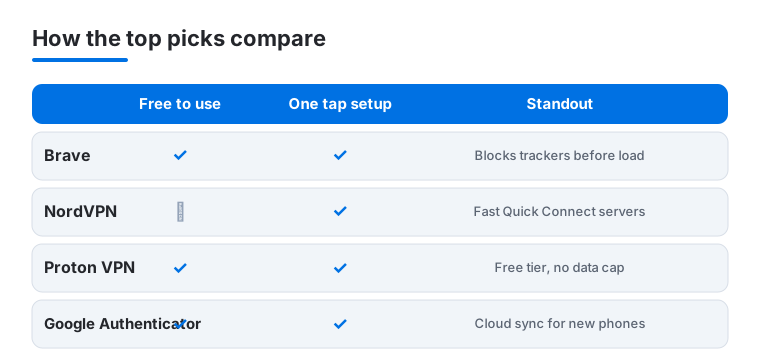
This is the browser we hand to anyone who wants instant privacy without tinkering. Brave blocks trackers and ads before a page loads, and in our testing news sites felt dramatically lighter and faster on cellular. It is free, with an optional paid Brave Search and VPN bundle. The built in shields counter on each site is oddly satisfying to watch climb.
2. Google apps
If you live in Gmail, Maps and Drive, the privacy controls matter more than the apps themselves. Our Google apps privacy walkthrough covers turning off ad personalization and tightening location history, which we found cut a surprising amount of background tracking. The apps are free. Spend ten minutes in the privacy settings and they behave far better on an iPhone.
3. Google Authenticator
The easiest way to add two factor codes across your accounts, and it costs nothing. Google Authenticator got much better once cloud sync arrived, so a lost or upgraded iPhone no longer means hunting for backup codes. It suits anyone who wants real protection without friction. Tapping a code and watching the timer ring count down becomes second nature fast.
4. NordVPN
This is the VPN we open first on an iPhone. Connecting takes a second or two from the app, and Quick Connect picks a sensible server so you are not fiddling on a train platform. In our testing speeds stayed strong for streaming and large downloads. It is paid only, roughly four dollars a month on a longer plan, but the reliability and clean app earn it.
5. Duo Mobile
If your school or workplace runs on Duo, this is the app that waves you through. It handles push approvals with a single tap, and in our experience the prompt lands on your iPhone the instant you sign in on a laptop. It is free and tied to whatever your organization sets up. Not built for personal logins, but for company and campus access it removes real friction.
6. Okta Verify
The app that gets you into work if your employer uses Okta. It sends push approvals and one tap sign in for company accounts, and we found the prompts arrive almost instantly when you log in each morning. It is free and configured by your IT team. It only matters for those work logins, but for them it quietly replaces a lot of password and code juggling.
7. Proton VPN
The VPN we recommend when budget is the deciding factor, because its free tier is genuinely usable with no data cap. From the Swiss team behind Proton Mail, it leans hard into privacy, and on an iPhone the app feels calm and uncluttered. Free covers a few countries, while paid unlocks faster servers and streaming. A solid choice if you want protection without a subscription.
8. Shadowrocket
A power user tool rather than a one tap VPN, Shadowrocket routes your traffic through custom rules and proxy configs. It suits travelers and tinkerers who already understand servers and want fine grained control over what gets tunneled. It is a one time paid app, a couple of dollars on the App Store. We would steer newcomers elsewhere, but for the technically minded it is flexible and fast.
9. V2Box
Another configuration driven client for people who manage their own proxy setups. V2Box lets you import server profiles and switch between them, which appeals to advanced users who want control rather than a polished consumer VPN. The core app is free. It assumes you know what you are doing, so for setting up that side of privacy on an iPad too, our iPad privacy guide walks through the same ideas.
Security and privacy apps for iPhone: how to choose
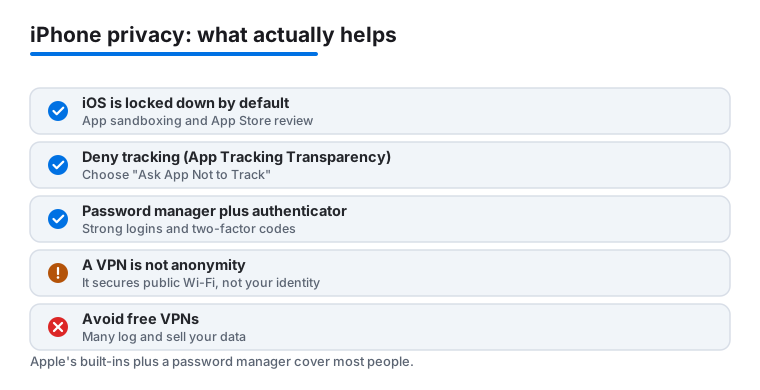
Before you install anything, it helps to know what your iPhone already does on its own. iOS is locked down by default. Every app runs in a sandbox, walled off from other apps and from most of the system, so a single app cannot quietly read everything else on your phone. Apps go through App Store review before they reach you, and on iPhone there is no general sideloading outside the alternative app marketplaces that exist in the European Union. In practice that means a lot of the malware and shady background behavior common on other platforms simply has fewer ways in here. It also means the loudest category of app on other systems, the antivirus scanner, has very little to do on iPhone, because the sandbox does not let one app rummage through another's files in the first place.
So the honest starting point is this: most people need very little beyond Apple's built in protections plus a password manager. The biggest privacy wins are not exotic apps, they are settings you turn on once and a couple of tools you actually keep using. Below is how we think about choosing, and what each category really buys you.
Start with settings, not downloads
Two changes do more than most apps, and they are free and built in.
- Turn on App Tracking Transparency and deny tracking. When an app asks to track you across other companies' apps and sites, say no. You can also switch off the option that lets apps even ask, so the answer is always no by default.
- Read the Privacy Nutrition Labels before installing. Every App Store listing has a privacy summary that shows what data an app collects and whether it is linked to you. If a simple flashlight or calculator wants your contacts and location, that label is your warning before you ever tap Get.
These cost nothing and quietly shut down a large share of the tracking that follows people around. Do them first, then decide whether you need anything more.
A password manager with an authenticator
If you add only one category of app, make it a password manager. It generates strong, unique passwords for every account so a leak at one site cannot unlock the rest, and it fills them in for you so you are not tempted to reuse an easy one. Apple's own Passwords app is built in and free, and it can also hold your two factor codes, which means your password and your login code live in one place you control. If you already use a cross platform manager on a Windows PC or an Android phone, a third party option may suit you better, but for an all Apple household the built in app covers the basics without a subscription.
Pair that with two factor login on your important accounts. A dedicated authenticator like Google Authenticator generates time based codes for sites that use them, and work tools like Duo Mobile and Okta Verify handle the push approvals your school or employer requires. The key idea is the same across all of them: even if someone learns your password, they still cannot get in without the code or tap on your phone.
- Backup matters. An authenticator is only as good as its recovery story. Google Authenticator now syncs to the cloud, so a lost or upgraded iPhone no longer means hunting for backup codes.
- Personal versus work. Duo Mobile and Okta Verify are set up by your organization for specific accounts. For your own logins, use a general authenticator or your password manager instead.
A private browser
Most of the tracking people worry about happens in the browser, so this is where a small change pays off. Safari already blocks cross site trackers by default with Intelligent Tracking Prevention, so out of the box it is a reasonable private option. If you want more, Brave blocks trackers and ads before a page loads, and DuckDuckGo's browser does the same with a simpler feel. Any of the three is a fine choice. The point is to pick one that limits cross site tracking and stick with it, rather than collecting browser extensions you never tune. It is worth being realistic here too: a private browser limits cross site tracking, but the sites you visit and the accounts you sign into can still recognize you, so it is a meaningful step rather than a cloak.
Understand what a VPN does, and does not do
A VPN is useful, but it is the most misunderstood tool in this list. Here is the honest version.
- What it does. A VPN encrypts your traffic and hides your IP address from the network you are on. On public Wi-Fi at an airport or cafe, that keeps the network and other people on it from seeing where you are going.
- What it does not do. A VPN is not anonymity. It does not block trackers, it does not stop malware, and it does not make you invisible. You are simply moving trust from your internet provider to the VPN company, so that company's honesty is the whole point.
- Avoid free VPNs that monetize you. Running servers costs money, and many free VPNs cover that cost by logging and selling the very data you installed them to protect. If you want free, Proton VPN is a real exception with an uncapped free tier. If you want speed and simplicity, NordVPN is the one we reach for. Power users who manage their own servers can look at Shadowrocket or V2Box, but those are not for newcomers.
A simple kit for most people
You do not need everything here. A calm, effective setup looks like this:
- Turn on App Tracking Transparency and check Privacy Nutrition Labels before installing.
- Use a password manager (Apple's Passwords app is fine) with two factor codes, adding Google Authenticator, Duo Mobile or Okta Verify as your accounts require.
- Pick one private browser you will actually use: Safari, Brave or DuckDuckGo.
- Add a VPN only if you are often on public Wi-Fi, choosing NordVPN for ease or Proton VPN for a free option.
That is most of the value, with the least clutter. Everything past this point is for specific needs, like a job that mandates a particular authenticator or a traveler who wants fine grained proxy control.
Frequently asked questions
Do I actually need a VPN on my iPhone?
Not every minute, but it earns its keep on public Wi-Fi, while traveling, or when you want your browsing kept from your network and provider. On your home connection it matters less. A good iPhone VPN connects in a second or two and adds barely any drag to your day.
Is the free version of these apps enough?
For authenticators, yes. Google Authenticator, Duo Mobile and Okta Verify are fully free and cover what most people need. VPNs are where paying changes things, though Proton VPN is a real exception with an uncapped free tier. NordVPN and the others reward a subscription with more speed and servers.
Can one authenticator app handle all my logins?
Often yes for personal accounts. Google Authenticator can store codes for most of your sites in one place. Work tools like Duo Mobile and Okta Verify are usually required by your employer for those specific logins, so many people end up running a personal app alongside a work one.
How do I make my iPhone more private without installing much?
Start with the browser. Switching to a privacy focused option like Brave, or adding a content blocker in Safari, cuts trackers right away and costs nothing. Then turn on two factor authentication for your important accounts. Those two steps close most of the gaps before you ever add a VPN.
Does a VPN make me anonymous or stop trackers and viruses?
No. A VPN encrypts your traffic and hides your IP address from the network you are on, which is genuinely useful on public Wi-Fi. It does not make you anonymous, block trackers, or stop malware. For those, lean on App Tracking Transparency, a private browser, and basic caution about what you install.
What is the single most useful privacy app for an iPhone?
A password manager. It gives every account a strong, unique password so one leak cannot unlock the rest, and it can hold your two factor codes too. Apple's built in Passwords app does this for free. Most people get more real protection from that one habit than from any VPN.