
Best Social & Dating Apps for iPhone (2026)
Your iPhone is where most of us flirt, gossip, and stay in touch these days, so the app you pick really matters. We spent weeks living inside these apps on an iPhone 16, paying for the premium tiers, and seeing which ones actually earn a spot on the home screen. This roundup sits inside our wider social and dating coverage and our hub of the best iPhone apps. If you also use a laptop, our guide to the best social and dating apps for Mac is worth a look too.
1. Tinder
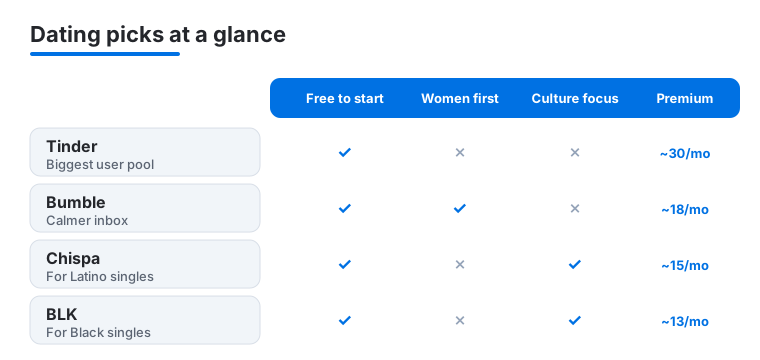
Still the app everyone opens first, and for good reason: the user pool is enormous, so even smaller towns have someone to swipe on. On iPhone the card stack feels buttery, and Face ID unlocks it discreetly. Free gets you swiping; Tinder Gold (around 30 dollars a month) adds Likes You and passport. In our testing the free tier was fine for casual browsing. Tinder rewards a little daily effort.
2. Bumble
Bumble flips the script: women message first, which cut down the junk in our inbox noticeably. It suits anyone tired of low effort openers. The iPhone app is clean and the 24 hour match timer nudges you to actually reply. Free covers the basics; Boost runs about 18 dollars a month. We liked the BFF and Bizz modes hiding inside. Read our Bumble profile tips.
3. Instagram
Half dating app, half scrapbook, Instagram is where a lot of connections actually move after the first match. It suits anyone who would rather show their life than describe it. On iPhone the camera and Stories tools feel native and fast, and DMs have quietly become a real messaging hub. It is free, with optional paid verification. We use it daily. Our Instagram editing guide goes deeper.
4. TikTok
TikTok knows you scarily well after a day or two, and the comments and duets make it genuinely social rather than passive. It suits anyone who likes discovering people through their humor. On iPhone the editor is shockingly capable, and recording vertical video feels effortless. Free, with in app coins for tipping creators. We lost a full evening to it, happily. See our TikTok editing hacks.
5. Facebook Messenger
Messenger remains the lowest friction way to reach people who are not on iMessage, which is most of the planet. It suits anyone juggling friends across Android and iPhone. The app is heavier than we would like, but voice and video calls connect quickly on a good link. It is free. In our testing the cross platform reach made it impossible to fully quit.
6. Patreon
Patreon is the social app for supporting the creators you love, with members only posts, chats and early drops. It suits superfans and the creators courting them. On iPhone the feed is tidy and notifications keep you current, though Apple's purchase rules can nudge prices up. Browsing is free; memberships start at a few dollars a month. It was the calmest creator space we tested. Our Patreon guide helps creators.
7. BeReal
BeReal pings everyone at a random moment each day to post an unfiltered photo from both cameras at once, which keeps the feed honest. It suits people tired of polished highlight reels who want to see what friends are actually doing. On iPhone the dual capture is quick and the daily prompt arrives as a normal notification. It is free, with an optional paid tier. In our testing it nudged us to check in with friends more often.
8. Chispa
Chispa is built for Latino and Latina singles, and the community focus shows in who you actually match with. It suits anyone wanting shared culture baked into the conversation rather than bolted on. The iPhone app mirrors the familiar swipe pattern, so there is no learning curve. Free to swipe, with premium near 15 dollars a month. We found the vibe warmer than the giants.
9. BLK
BLK is the dating app made for Black singles, and like Chispa it leans into community and shared references. It suits people who want their background understood from message one. On iPhone it is light and quick, and the prompts encourage more than one word bios. Free at its core, with a paid upgrade around 13 dollars a month. The daily match suggestions felt curated, not random filler.
10. MeetMe
MeetMe is less about dating and more about meeting nearby people to chat with right now, including live streams. It suits the socially curious who want low stakes conversation. The iPhone app is busy and ad heavy on the free tier, so guard your time and your details. It is free, with credits for sale. We treated it as a casual chat lounge, and on those terms it delivered.
11. Yubo
Yubo is a friend making app aimed at Gen Z, built around live streams and group chats rather than swiping for romance. It suits younger users looking to widen their circle. On iPhone the live rooms load fast and the safety prompts sit front and center. It is free, with optional Yubo Power perks. In our testing it felt more like a hangout than a meat market.
12. OmeTV
OmeTV pairs you with random strangers worldwide for video chat, a modern take on the old roulette idea with moderation added. It suits the genuinely curious who enjoy unpredictable conversations. On iPhone the camera switches smoothly and the next button is one tap away when things get awkward. Free, with paid coins to skip the queue. We had a few lovely chats and a few we ended fast.
13. TextNow
TextNow hands you a real second phone number for calls and texts, which is gold when you are not ready to share your main line with a new match. It suits cautious daters keeping work and dating separate. The app works over WiFi and data, and calls were clear in our testing. Free with ads, or a few dollars a month to remove them. We kept it as a throwaway.
14. Feeld
Feeld is the dating app for people who want to be upfront about what they are looking for, with room to list interests and relationship styles other apps skip. It suits open minded daters and couples who value clear intentions over guesswork. On iPhone the profile builder is thorough and the interface stays calm rather than gamified. Free to join, with a Majestic membership for extra filters. In our testing the conversations started more honestly than on the swipe giants.
15. Nicegram
Nicegram is a souped up alternative Telegram client, adding translation, cleaner chat tools and extra privacy touches for power messagers. It suits Telegram regulars who want more control than the official app gives. On iPhone it feels snappy and the built in translator is genuinely handy for international friends. It is free, with a premium tier for the advanced extras. We rarely went back to the original.
Social and dating apps for iPhone: how to choose
There is no single best app, only the best app for what you actually want this month. Before you download three at once, it helps to be honest about your goal. Some people want a serious relationship, some want casual chats, and some just want to widen a social circle in a new city. Each of those points you toward a different kind of app, so naming the goal first saves a lot of wasted swiping. It is also worth remembering that the same person can want different things at different times, so there is no shame in deleting an app for a while and coming back later with a clearer head.
Most of the apps on this list fall into two broad camps. The first is dating in the classic sense, where you build a profile and swipe or message toward a date. The second is social, where the point is conversation, shared interests or following creators, and romance is only a side effect if it happens at all. Knowing which camp you are in keeps your expectations sane, because judging a friend making app by how many dates it produces is a recipe for disappointment.
Match the app to your goal
- A relationship. Apps with fuller profiles and prompts, like Bumble, give you more to react to than a single photo. The extra friction tends to filter for people who are also putting in effort.
- Shared culture. If background matters to you, community focused apps such as Chispa for Latino and Latina singles or BLK for Black singles build that in from the first message rather than leaving it to chance.
- Sheer numbers. In a smaller town, the size of the pool matters more than features. Tinder still has the largest crowd, which is sometimes the deciding factor.
- Friends, not romance. Apps like Yubo or MeetMe are about meeting people to talk to, so judge them on the quality of conversation, not on dates.
Try before you pay
Almost every app here is free to download, and the free tier is usually enough to tell whether a community suits you. The paid upgrades (Tinder Gold, Bumble Boost and similar) mostly buy visibility and the ability to see who already liked you. Give a free week an honest try before you spend anything, because a bigger budget does not fix a crowd you do not click with. Note that prices inside the App Store can run a little higher than on the web, since Apple's purchase rules add a layer.
Safety and privacy: the part that actually matters
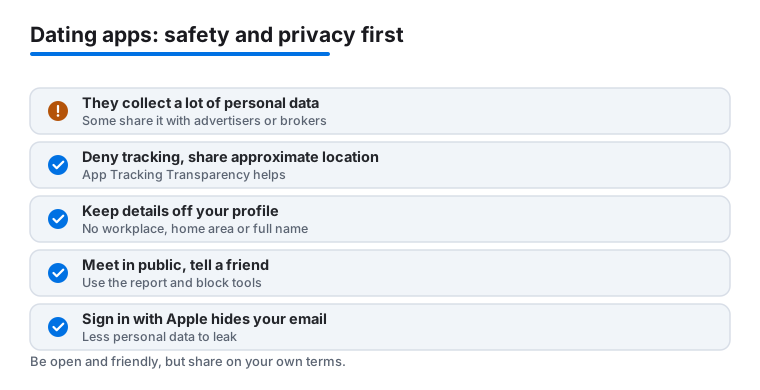
This is the section we wish more roundups took seriously. Dating and social apps collect a lot of personal and location data by design, because matching nearby people is the whole point. Some of that data is also shared with advertisers or data brokers. None of this means you should avoid these apps. It means you get to decide how much you hand over, and the iPhone gives you good tools to draw that line.
Limit what the app can collect
- Deny tracking. When an app first opens, iOS shows the App Tracking Transparency prompt that asks whether it can track you across other apps and websites. Choosing Ask App Not to Track is a reasonable default. You can review and change this later under Settings, Privacy and Security, Tracking.
- Share approximate location, not precise. Most dating apps work fine with a rough area. In Settings, Privacy and Security, Location Services, open the app and turn Precise Location off so it sees a neighborhood rather than your exact street.
- Use Sign in with Apple where it is offered. It can hide your real email behind a relay address, so the app and any partners get a forwarding alias instead of your personal inbox. You can turn that relay off at any time to cut the connection.
- Keep sensitive details off your profile. Your workplace, the exact area you live in, and your full last name are the pieces a stranger can use to find you offline. Leave them out, and be careful with background details in photos, like a house number or a work badge.
One more habit costs nothing and helps a lot: read the App Store privacy label before you install. Each listing has a section that summarizes what the developer says it collects and whether that data is linked to you or used to track you. It will not catch everything, but if a simple chat app claims to gather your contacts, browsing history and precise location, that is a useful signal to slow down and decide whether the trade is worth it.
Stay safe when you meet people
The digital settings protect your data. These habits protect you. They are simple, and daters who have been at this a while follow all of them without thinking. None of them require you to be suspicious of everyone, only to keep a little distance until trust is earned.
- Keep chatting inside the app at first. There is no need to share your phone number early. If you want a buffer, a second number from an app like TextNow keeps your real line private until you trust someone.
- Use photo verification. Several apps let users earn a verified badge by matching a live selfie to their photos. Favoring verified profiles, and verifying your own, is one of the better ways to spot fakes and catfish.
- Meet in public, and tell a friend. For a first meeting, pick a busy cafe or bar, arrange your own transport, and let someone know where you are going and when you expect to be back. Trust the instinct that says leave early.
- Know the report and block tools. Most of the dating and social apps here have report and block tools. If someone pressures you, asks for money, or makes you uncomfortable, block and report rather than arguing. You are not being rude, you are using the app as intended.
A calm way to think about it
Put plainly: assume anything you type or post could travel further than the person you sent it to, share location and identity on a need to know basis, and let the app earn more trust over time rather than starting with all of it. None of this is paranoid. It is the same caution you would use giving your address to a stranger in any other setting, just applied to a screen. Set these controls once and the apps stay fun without quietly costing you more than you meant to give.
Frequently asked questions
Which dating app should I try first on my iPhone?
Start with the one that fits your goal. For sheer numbers, open Tinder. If you are tired of low effort messages, Bumble lets women lead and felt calmer in our testing. There is no harm running two at once for a week to see which crowd suits you.
Are these apps free, or do I need to pay?
Almost all of them are free to download and use at a basic level. The dating apps make their money on upgrades like Tinder Gold or Bumble Boost, which add visibility and see who liked you. You can have a perfectly good experience without paying, so try the free tier before spending anything.
How do I stay safe meeting people through these apps?
Keep chats inside the app until you trust someone, and consider a second number from TextNow before sharing your real one. Video call first, meet in a public place, and tell a friend your plans. We also recommend reviewing each app's privacy settings, which on iPhone you can tighten further under Settings and the app's own controls.
What if I want these on my Mac or iPad too?
Several of these sync across your Apple devices once you are signed in. Many iPhone apps also run on Apple silicon Macs from the App Store. For the full picture, see our roundups of the best social and dating apps for Mac and the best social and dating apps for iPad.
What is App Tracking Transparency, and should I say no?
It is the iPhone prompt that asks whether an app may track you across other companies' apps and websites, usually for advertising. Choosing Ask App Not to Track is a sensible default for dating and social apps, since it limits how much of your activity is shared, and it does not stop the app itself from working. You can change your answer later under Settings, Privacy and Security, Tracking.
Can I hide my real email when I sign up?
Often, yes. When an app offers Sign in with Apple, you can choose Hide My Email, and Apple gives the app a random forwarding address instead of your personal one. Messages still reach your inbox, but the app and its partners never see your real email, and you can switch the relay off at any time to cut contact.