
Best Social & Dating Apps for Mac (2026)
Your Mac is a surprisingly good place to chat, scroll, and even swipe, once you know which apps respect the bigger screen and which just shove a phone window at you. We spent a few weeks living inside these on a MacBook Air and an iMac, checking what installs natively, what runs through the browser, and what genuinely feels better with a real keyboard. Below are our favorite social and dating picks, ordered best first.
If you want the wider view, browse our social and dating hub or our best Mac productivity apps roundup. Already syncing across devices? Our iPhone picks pair nicely with everything here.
1. Discord
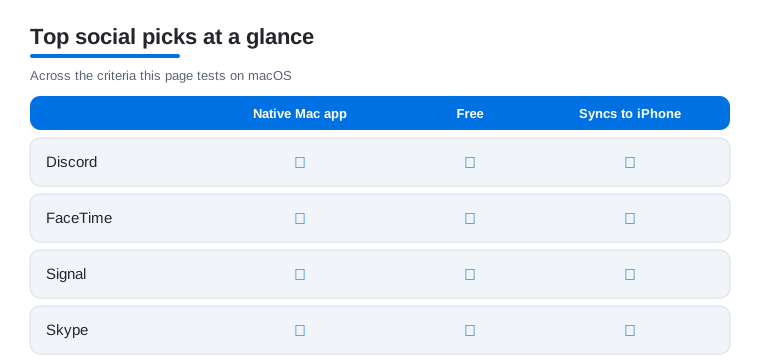
Discord is the one app on this list that feels born for a Mac. The native client is fast, voice channels stay crisp, and having servers in their own window beside your work is a quiet joy. We ran three busy communities at once with zero lag. It suits gamers, hobby groups, and anyone tired of group texts. Free to use, with optional Nitro for bigger uploads and better streaming.
2. FaceTime
FaceTime on a Mac just works, and that reliability is the whole point. Calls launch from the menu bar or Messages, the framing stays steady, and SharePlay lets you watch something together without the awkward screen share dance. In our testing, group calls held up better than most paid tools. It is free, built in, and ideal for family catch ups.
3. Signal
Signal is our pick when a conversation needs to stay private. The Mac app mirrors your phone, so full chats land on the desktop with end to end encryption intact, and typing long replies on a keyboard beats thumbing them out. We loved disappearing messages for sensitive threads. It is completely free, runs on donations, and carries no ads or data mining.
4. Microsoft Teams
Microsoft Teams earns a spot for group calls and shared chats that span clubs, classes, and work. The Mac app handles video meetings, screen sharing, and threaded conversations, and the wider window makes it easy to follow several channels at once. We found call quality steady on a wired connection. The app is free to download, with paid plans adding longer meetings and more storage. A dependable choice when your social circle overlaps with organized groups.
5. Viber
Viber is a quiet favorite for staying in touch overseas. The desktop app pairs with your phone number and brings messages, voice notes, and group chats onto the Mac, where the wider window makes long threads easy to scan. We liked the cheap Viber Out calling to non users. It is free for app to app messaging, and the sticker packs add a bit of personality if you want it.
6. <a href="/how-the-macbook-next-door-app-revolutionizes-local-networking/">Nextdoor</a>
Nextdoor turns your Mac into a window onto the street outside. It runs through the browser rather than a native app, and honestly that is fine here, since you mostly read posts about lost cats, local recommendations, and yard sales. We caught up on a whole week of neighborhood news over coffee. It is free and best for anyone wanting to feel rooted locally.
7. <a href="/security-and-privacy-staying-safe-with-imac-be-real/">BeReal</a>
BeReal is built around your phone camera, so the Mac is really a viewing companion rather than the main act. Through the web you can scroll friends' unfiltered daily posts on a roomy screen, which makes the candid photos feel oddly cinematic. We enjoyed it as a low pressure way to keep up. It is free, refreshingly free of likes and metrics, and best for small circles of close friends.
8. Tumblr
Tumblr on a Mac is a genuine pleasure, all that art and writing finally getting the canvas it deserves. The web dashboard scrolls smoothly, reblogging is quicker with a mouse, and curating a blog feels less cramped than on a phone. We lost a happy hour to niche fandom tags. It is free with optional ad removal. Our iPad guide covers the touch version too.
9. Grindr
Grindr is phone first by design, but the browser version on a Mac makes managing a busy inbox far less thumb cramping. Typing replies, reading profiles, and sorting through the grid all feel calmer on a big display. We used it mainly to keep conversations going at the desk. It is free with ads, and Xtra or Unlimited unlock filters and extra profile space for people who want more control.
10. OkCupid
OkCupid is one of the better dating apps to run in a Mac browser, thanks to its long, thoughtful profiles and question driven matching. Reading someone's answers on a full screen, then writing a real opener with a keyboard, leads to better conversations. We found the desktop flow ideal for slower, intentional swiping. It is free, with A list tiers adding extra filters for serious daters.
11. Badoo
Badoo is huge internationally, and its web app gives Mac users a comfortable way to browse a deep pool of profiles. The desktop layout shows more faces at once, and editing your own profile is easier with proper typing. We appreciated the verification badges that cut down on fakes. It is free with optional Premium for invisible browsing and priority placement, and it suits anyone dating across cities or countries.
12. Plenty of Fish
Plenty of Fish leans into volume and free messaging, which translates well to a Mac screen. The browser version lets you fire off openers, work through search filters, and read profiles without the cramped mobile feel. We liked being able to message matches without an instant paywall. It is free at its core, with Premium removing ads and adding extras, and it suits casual daters who want a wide net.
13. Feeld
Feeld is the open minded option for couples and singles exploring beyond the mainstream, but it is phone only. There is no Mac app and no website to sign into, so the swiping, the matching, and the messaging all happen on your iPhone. We mention it here because it comes up so often, and the honest answer is that the Mac sits this one out. It is free to join, with Majestic membership unlocking more visibility, and it suits anyone wanting a judgment free space on the phone.
14. Hily
Hily aims for meaningful matches with a clean, modern feel that carries over to its web version on a Mac. Reading the prompts and compatibility cues on a larger screen helps you judge fit before swiping. We liked the icebreakers that nudge a conversation past hello. It is free to start, with Premium adding unlimited likes and who liked you, and it suits people after relationships rather than quick flings.
15. Taimi
Taimi is an LGBTQ focused social and dating space that blends profiles, feeds, and group chats, and it travels well to a Mac browser. The desktop view makes scrolling the community feed and managing matches feel spacious. We valued the strong verification and safety tools. It is free to join, with Premium unlocking advanced filters and unlimited likes, and it suits anyone wanting community alongside dating in one welcoming place.
16. Chispa
Chispa is built for Latino and Latina singles, but it is a phone only app with no Mac app and no website to use in a browser. The profile browsing, the messaging, and the matching all stay on your iPhone, so the Mac has no part to play here. We include it because readers ask, and the straight answer is to keep it on the phone. It is free, with optional upgrades for unlimited likes and rewinds.
How to choose social and dating apps for a Mac
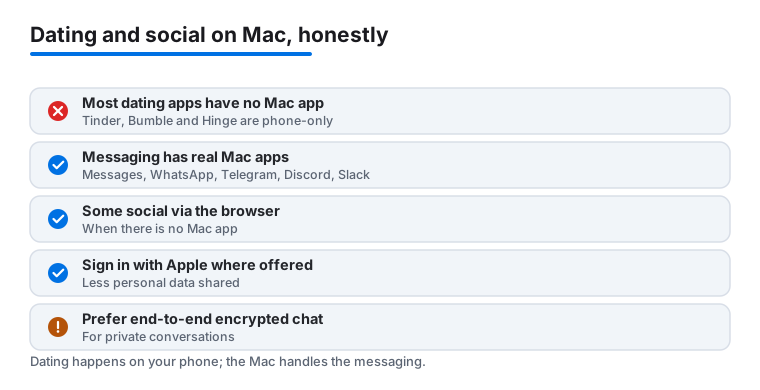
The honest starting point is this: most dating apps are built for the phone, and several of the biggest names have no Mac app at all. Tinder, Bumble, and Hinge are good examples. There is nothing to download from the Mac App Store for them, so the actual swiping, the location matching, and the photo taking still happen on your iPhone. A few dating services do offer a website you can sign into in Safari or Chrome, which is genuinely nicer for reading long profiles and writing a real first message with a keyboard, but that is a browser tab, not a native app. So the Mac is rarely where dating itself lives. Where the Mac shines is the social and messaging side, because those apps do have proper desktop versions.
That gives you a simple way to sort everything before you install a thing. Ask three questions in order. Does it have a real Mac app you download and run? If not, does it at least have a full website you can use in a browser? If neither, accept that it is phone only and keep it on your iPhone. Sorting your shortlist this way saves you from hunting the App Store for something that was never going to be there.
The messaging apps that really run on a Mac
For day to day chatting, the strong native picks are clear. Messages is already built into macOS and syncs your iMessage and text threads through your Apple Account, so a conversation you start on the phone is waiting on the desk. WhatsApp has a real Mac app that links to your phone number and mirrors your chats. Telegram offers a fast, fully native Mac client that can even run independently of your phone once you are signed in. Discord is excellent on the desktop for communities and voice channels. Slack rounds out the list when your social life overlaps with clubs, classes, or work groups. All five are things you download and run, not websites pretending to be apps. The practical payoff is the keyboard and the screen. Long replies, links you want to read in full, and group threads that sprawl are all far easier to handle at a desk than with two thumbs, and notifications arrive where you are already working instead of pulling you back to the phone.
Social networks you will mostly use in the browser
Many social platforms never shipped a Mac app, and that is fine. You open them in a browser tab and they work well on a wide screen. In our picks above, Nextdoor, BeReal, and Tumblr fall into this group, and the same is true of most large feeds and timelines. Reading is comfortable, typing is easier, and you avoid cluttering your Mac with wrappers. The one thing to remember is that camera first apps, like BeReal, still expect the phone for the part that matters, so the Mac is a viewing companion rather than the main screen.
Safety and privacy come first
This part is not optional, and it matters more on dating apps than almost anywhere else, because you are talking to strangers. The good news is that a handful of calm habits cover most of the risk.
Guard your personal details
Keep what you share thin until trust is earned. Leave your home address, your workplace, your daily routine, and your full name out of early conversations, and keep your location vague inside each app until you actually want a match to know where you are. Treat a request for money, gift cards, or intimate photos from someone you have not met in person as a reason to stop and report, not to explain yourself. If a chat rushes off the app, refuses every video call, or turns into a sudden emergency that only cash can fix, trust that feeling and walk away.
Use the Apple privacy controls you already have
Where you can, sign up with Sign in with Apple. It lets you hide your real email behind a relay address, so an app, or a leak from one, never gets your true inbox. When an app asks to track you across other apps and sites, choose Ask App Not to Track, or deny it outright; you lose nothing you wanted. On the Mac itself, the controls that count live in the Apple menu under System Settings, then Privacy and Security, where you decide which apps and websites can reach your camera, microphone, and location. Hand those out only to apps you trust, and watch for the orange dot for the mic or the green dot for the camera near the menu bar so you always know what is listening or watching.
On the messaging side, prefer end to end encryption
When a conversation is sensitive, the app you choose changes how private it really is. Signal is end to end encrypted by default, which means only you and the other person can read the messages, and its Mac app keeps that protection on the desktop. iMessage in Apple's Messages is also end to end encrypted between Apple users, and WhatsApp encrypts chats by default too. Telegram protects its cloud chats in transit but is end to end encrypted only in its separate Secret Chats, so know which mode you are in. Ordinary dating app inboxes are usually not end to end encrypted, so treat anything you type there as less private, and move a delicate conversation to an encrypted app once you trust the person.
A few habits for a shared Mac
If other people use the same Mac, do not save dating or messaging passwords in the browser, log out when you finish, and use a private window so sessions do not linger. None of this is dramatic. It is the digital version of not leaving your front door open, and once it is routine you stop thinking about it. If your Mac has more than one account, a separate login for each person keeps your conversations and your saved sign ins truly apart, which beats relying on memory to log out every time.
Frequently asked questions
Which of these apps actually have a native Mac app?
Discord, FaceTime, Signal, Microsoft Teams, and Viber all offer proper desktop apps that install and run natively on macOS. FaceTime is built right in. Some dating apps, like Grindr and OkCupid, do not have a Mac app but run through their websites in Safari or Chrome, while others such as Feeld and Chispa are phone only with no Mac app or website at all.
Can I use dating apps like Tinder or Bumble on a Mac?
Yes, through the browser. Most major dating services offer a web version that lets you swipe, message, and edit your profile from a Mac, which many people find easier for typing real messages. You will not find them in the Mac App Store, so just log in on the site instead.
Is it safe to log into dating apps on a shared Mac?
Be careful on any computer you share. Always log out when you finish, avoid saving passwords in a shared browser, and use a private window if others use the machine. For sensitive chats, Signal's disappearing messages add a layer of privacy that ordinary dating apps do not.
Do messages sync between my Mac and iPhone?
For most of these, yes. Signal, Discord, Viber, and Microsoft Teams mirror your conversations across devices once you sign in, so you can start a chat on your phone and finish it at your desk. FaceTime and iMessage sync automatically through your Apple Account with no extra setup.
Does Hinge work on a Mac?
Not really. Hinge is built for the phone and has no Mac app, and it does not offer a full web version the way Tinder and Bumble do, so the swiping and matching stay on your iPhone. You can use your Mac for the messaging apps that do have desktop versions, then keep Hinge itself on your phone.
What is the most private way to message a match on a Mac?
Move the conversation to an end to end encrypted app once you trust the person. Signal is encrypted by default and has a real Mac app, iMessage in Apple's Messages is encrypted between Apple users, and WhatsApp encrypts chats by default. Most dating app inboxes are not end to end encrypted, so treat anything typed there as less private.