
Planning apps and pocket apps are different jobs
Travel apps fall into two groups. Planning apps are for the weeks before: comparing flights, building an itinerary, booking rooms. On-the-ground apps are the ones you open while standing in a strange street: maps, translation, transit, your airline. Judge them separately, because a company with a good website can ship a clumsy app, and the map that works without signal will not find you a cheap flight. If you own both devices, treat the iPad as the planning table and the iPhone as the pocket guide. Our guide to the best travel apps for iPad covers the planning side in detail.
Offline first: download before you fly
The most useful travel habit in 2026 is also the simplest. Assume you will have no signal, then prepare for it. Both Apple Maps and Google Maps can save whole regions to your phone, so grab your destination city the night before you leave. There is a real difference once you are offline, though, and it is worth knowing. Apple Maps will give you turn-by-turn directions offline for driving, walking, cycling and transit. Google Maps offline only does driving directions; walking, cycling and transit routing stop working the moment you lose signal. If you expect to be on foot or on the metro, that gap matters, so I lean on Apple Maps for offline city walking and keep Google Maps for its place reviews when I have a connection.
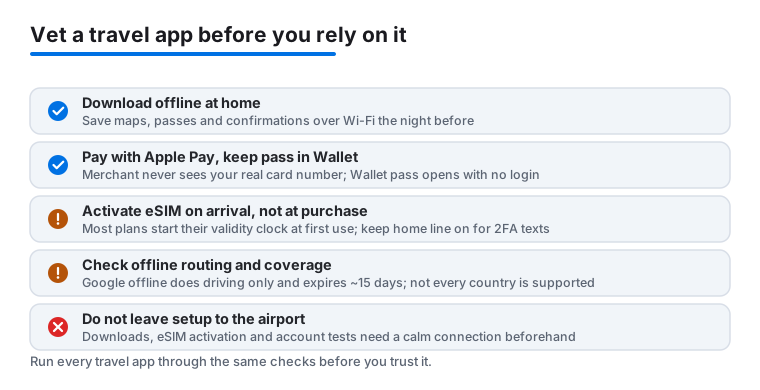
To save an Apple Maps region, tap your profile picture near the search field, choose Offline Maps, tap the add button, frame the area you want and tap Download. In Google Maps it is your profile picture, then Offline maps, then Select your own map. Two cautions. Google offline maps expire in about fifteen days unless the app refreshes them over Wi-Fi, so a map you saved months ago may be stale. And neither company offers offline maps in every country, usually for licensing reasons, so check that your specific destination is covered before you count on it. While you are at it, download your translation language packs, add boarding passes to Wallet, and save hotel addresses somewhere that opens without a connection. Ten minutes at home replaces an hour of standing confused at a foreign arrivals hall.
Use an eSIM and skip roaming
An eSIM app is the cheapest way to get data abroad for most people. You buy a data pack in the app, and on recent iPhones the phone loads a second digital SIM with no physical card to swap. The timing trips people up, so be clear on it: install the eSIM shortly before you travel, but do not activate the data plan until you land, because most plans start counting their validity window from first use rather than from purchase. iOS 26 added a guided setup that walks you through this, and when you arrive you can pick a Travel eSIM Only option so your home line stays quiet and you are not paying roaming by accident.
When you compare providers, look at the price per gigabyte, confirm one plan covers every country on your route rather than just the first stop, and read recent reviews from travelers in the exact country you are visiting, because speeds vary a lot by region. Two honest limits. Some cheaper plans are data only, with no local number for calls or SMS, which matters if a restaurant or a driver needs to text you. And keep your home line reachable for the bank texts and two-factor codes you will still need; leave it on for calls and texts while routing data through the eSIM. Set it up at home, where support is easy to reach if something goes wrong.
Before a booking app gets your card
A booking app holds your card details and your holiday, so vet it like you would a stranger. Read the newest one-star reviews and look for one theme: what happened when things went wrong? Cancellations, refunds, double charges and silence from support are the stories that matter, far more than complaints about the interface. Prefer apps that accept Apple Pay. When you pay that way the app receives a Device Account Number and a one-time code instead of your real card number, so the merchant never sees the digits on your physical card, and even Apple does not store that number on its servers. For flights specifically, booking directly with the airline usually makes problems easier to fix later, because a third-party agent sitting between you and the carrier can slow down every change and refund.
Your boarding pass lives in Wallet now
If your airline supports it, add the boarding pass to Apple Wallet rather than living inside the airline app. A pass in Wallet opens instantly with no login, which is exactly what you want at a gate with bad signal. On iOS 26 the boarding pass got a real upgrade for the airlines that have adopted it: live flight tracking, terminal and gate details pulled into Apple Maps, a way to share your flight status with someone meeting you, and a Find My shortcut to your AirTag-tagged bag. United shipped this first and American followed in spring 2026. Worth knowing: support is per airline, not universal, and Delta turned the new pass on and then reverted to the old style after running into bugs, so do not assume your carrier has it. Either way, add the pass before you leave for the airport while you still have Wi-Fi.
Battery and data on the road
Abroad, your iPhone works harder than usual: GPS running all day, photos every hour, a weaker signal in between that makes the radio strain to stay connected. Turn on Low Power Mode in the morning instead of waiting for the twenty percent warning; on iOS 26 the Battery settings can even schedule it for you and show how much time it buys. If you have an iPhone 15 Pro or any iPhone 16 or 17, the newer Adaptive Power mode learns your usage over about a week and trims background activity when it expects a long day, so it is worth leaving on for a trip. One more trick: in a true dead zone, switch to Airplane Mode, because a phone hunting for a signal it cannot find will drain fast. And carry a small power bank, since a dead phone abroad means no map, no tickets and no translator all at once. For our tested picks in every group above, start with the best travel apps for iPhone.
Concrete things to check before you trust a travel app
When you are deciding which apps earn a place on your home screen, judge them against the same short checklist every time. First, confirm it truly works offline: open it in Airplane Mode at home and see whether your saved maps, tickets and confirmations still appear, or whether the screen just spins. Second, check that login is recoverable. If you can only get back in through an email link, and your email needs the same data connection you do not have abroad, you are one bad signal away from being locked out of your own booking. Apps that keep tickets in Apple Wallet sidestep this, since the pass opens with no login at all. Third, look at how the app handles your money: Apple Pay support, clear cancellation terms shown before you pay, and a real support channel rather than a chatbot loop. Fourth, weigh the permissions. A maps app needs location; a currency converter does not. An app asking for your contacts, photos and microphone with no obvious reason is a flag worth pausing on.
Common mistakes that ruin a good app setup
The most common travel-app mistake is leaving everything to the airport. Downloads, eSIM activation and offline maps all want a stable connection and a few unhurried minutes, which is exactly what a departure gate does not offer. The second mistake is installing a dozen overlapping apps and trusting none of them; two apps you have actually opened and tested beat ten you grabbed in a panic. The third is ignoring the newest reviews. A travel app that was fine last year may have changed owners, added pushy ads or broken its refund flow, and only the reviews from the last month or two will tell you. The fourth is forgetting to log in and test before you fly: create the account, save one booking, and open it in Airplane Mode while you are still somewhere you can fix problems. A quiet ten-minute rehearsal at home is the single best predictor of a calm trip.