
Saving Money with the Southwest Airlines App on Your Mac and iPad
We book a lot of flights, and the Southwest Airlines app has become one of our regular tools for finding cheap seats without a travel agent. Here is the part most older guides get wrong: as of 2026 there is a real Mac version. The app you install from the App Store is the same iPad app, and on an Apple silicon Mac it installs and runs natively, no workaround needed. There is even a Vision build. The bigger news is that Southwest ended open seating on January 27, 2026, so the famous "check in at 24 hours for a good spot" trick is gone. We rewrote how we use the app around the new rules, and it still keeps real money in our pocket. Here is exactly how.
Getting it running on a Mac and iPad
On the iPad it could not be simpler. Open the App Store, search Southwest Airlines, tap Get, and sign in with your Rapid Rewards number. The app needs iPadOS 15.0 or later. The iPad layout is roomy and easy to read, which we prefer over a phone when we are comparing a stretch of dates side by side.
The Mac story changed for the better. The Southwest app now ships a native Mac version that needs macOS 14 (Sonoma) or later and an Apple M1 chip or newer. On those machines it shows up in the Mac App Store, and you can also find it under the iPhone & iPad Apps tab of your purchases if you have grabbed it on another device. It installs like any other Mac app and lives in your Applications folder.
If you are still on an Intel Mac, the app will not install, because the native build is Apple silicon only. That is the one case where the old advice still holds: open Southwest.com in Safari or Chrome instead. The website carries every booking and check-in feature the app has, so you lose nothing but the standalone window. In our testing the app and the website stayed in sync within seconds, so a fare we saved on the iPad showed up on the Mac and the browser right away. One honest caveat on the Mac app: because it is really the iPad app, a few touch-first screens feel slightly cramped in a resized window, and it does not always behave like a true Mac app with full keyboard shortcuts.
The features that actually save money
Most of the savings come from a handful of tools that are easy to skip past when you book in a hurry. These are the ones we lean on every trip.
- Low Fare Calendar: instead of checking one date at a time, this shows a full month of prices at a glance, so you can shift your trip a day or two and pay noticeably less. Moving a Friday departure to a Tuesday or Wednesday is where we tend to find the biggest gaps.
- Points view: the app lets you flip any fare between dollars and Rapid Rewards points. Because Southwest points are tied loosely to the cash price, comparing the two side by side makes it obvious when paying with points stretches further than cash, and when it does not.
- Fare alerts: save a route and the app watches it, then pings you when the price drops. We treat this as a background helper, not a guarantee, since the alert sometimes lands after the cheapest seats are gone.
- Flight credit tracker: if you cancel a flight, the value becomes a flight credit, shown under My Account then Payment, or under My Travel Funds near the bottom of the app screen. Watch the dates here. Basic fare credits now expire six months from when you booked, and Choice Extra, Choice Preferred, and Choice Transferable credits expire twelve months out. The app lists the exact expiration next to each credit, so check it before you assume the money is sitting there forever.
We have rebooked after a price drop more than once and kept the difference as a flight credit. That is genuinely useful, but be clear-eyed about it: the difference comes back as credit toward a future Southwest flight, not as cash to your card.
Seats and boarding under the new rules
This is the section we had to rewrite from scratch, because the rule everyone knew is gone. Southwest retired open seating on January 27, 2026. You no longer race to check in 24 hours out for an A boarding position. Now you pick an actual seat.
On every fare except Basic, you choose your seat right in the app when you book. Open the seat map, tap the seat you want, and you are set. Standard seats are included, while extra legroom and the new Premium seats up front cost more. If you are watching your budget, the move is simple: take a free standard seat and skip the paid upgrades unless legroom genuinely matters to you that day. We fly plenty of two-hour hops in a standard seat and never miss the extra inches.
If you book the lowest Basic fare, you do not pick your seat at booking. Your seat is assigned at check-in instead, and check-in still opens 24 hours before departure. So the old habit of being ready at the 24 hour mark still helps Basic flyers, just for a different reason now. Rapid Rewards credit cardmembers and members with tier status may still get seat selection on Basic, subject to availability, so check your account before you assume you are stuck.
Boarding also changed. The old A, B, C groups with numbered positions are gone, replaced by Groups 1 through 8. Groups 1 and 2 go to top-tier Rapid Rewards members and premium fares. Most travelers land somewhere in Groups 3 through 8 based on fare type and where their seat sits. EarlyBird Check-In and the old Upgraded Boarding both ended after January 26, 2026. In their place is a paid Priority Boarding option that bumps you to Group 1, available from 24 hours down to 60 minutes before departure, priced per flight and paid by card. Our take: with assigned seats, there is far less reason to pay for early boarding than there used to be. Your seat is already yours. We only consider Priority Boarding when overhead bin space for a carry-on is the real worry, and even then we usually pass.
Practical tips we use on every booking
A few habits make a real difference. First, turn on push notifications so fare alerts and check-in reminders actually reach you, then trust them only as a backup, not your sole safety net for a flight you cannot miss. Second, keep Southwest's no change fee policy in mind. It still holds in 2026. You can book early at a good price and rebook for free if the fare falls later, paying only the difference if your new flight costs more, or banking the difference as a flight credit if it costs less. We treat that as a built-in price watch.
On the iPad, use Split View to keep the app open beside your calendar or a hotel page while you compare dates. On the Mac you can do the same with two windows side by side. Store your payment details and passenger info in your account ahead of time, so when a low fare appears you can finish booking in about a minute before the cheap seats sell out. For day-of travel, the boarding pass lives in the app and adds to Apple Wallet, so the Mac or iPad handles planning while your phone handles the gate. One privacy note worth saying plainly: the app asks for location and notification access, and a logged-in account ties your travel history to your profile. None of that is unusual for an airline app, but if you would rather not leave the app signed in on a shared Mac, sign out when you are done.
Where it falls short
It is not perfect, and a couple of limits are worth knowing before you rely on it.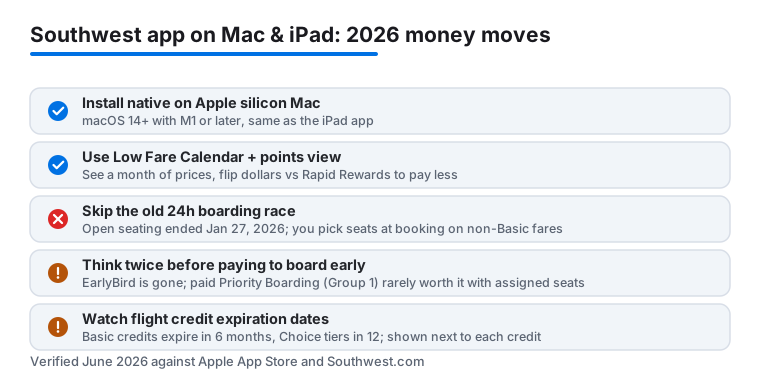
Beyond that, the app only books Southwest flights, so for trips that mix carriers you still need a broader search tool to compare. We have also seen the app feel sluggish during busy travel weekends, and notifications sometimes arrive a little late, which is exactly why we never treat a fare alert as our only safety net for a must-catch flight. The 2026 changes add their own learning curve too, since fare bundles, seat tiers, and the Group 1 through 8 boarding map take a minute to get used to. None of these are dealbreakers, but they are good to keep in mind.
Good alternatives worth keeping
The Southwest app is strong for Southwest fares, but it is not a one-stop travel tool. We keep a couple of others alongside it. If you fly budget carriers often, our notes on the Spirit Airlines app on Mac and iPad cover similar money-saving moves for a different airline. For getting around once you land, the Uber app on Mac and iPad is the one we reach for. To see how Southwest stacks up against the rest, browse our roundup of the best travel apps for Mac, or explore the full Travel category for more hands-on picks. Pairing the Southwest app with one solid flight aggregator covers both the Southwest-only fares and everything else.
FAQ
Is there a real Southwest Airlines app for Mac?
Yes, as of 2026. The Southwest app runs natively on Apple silicon Macs with macOS 14 or later and an M1 chip or newer, and it is the same app you get on iPad. On older Intel Macs it will not install, so use the Southwest.com website instead, which has every booking and check-in feature the app does.
How do I find the cheapest Southwest flights in the app?
Open the Low Fare Calendar to see a full month of prices at once, then shift your dates to a cheaper day. Save the route to get fare alerts, and flip between dollars and Rapid Rewards points to see which payment method costs you less for that flight.
Do I still check in 24 hours early to get a good seat?
Not for most fares. Southwest ended open seating on January 27, 2026, so on every fare except Basic you pick your seat when you book. Only Basic fare seats are assigned at check-in, which still opens 24 hours before departure. EarlyBird Check-In ended after January 26, 2026 and was replaced by a paid Priority Boarding option that moves you to Group 1.
Will my saved trips sync between my Mac and iPad?
Yes. As long as you sign in with the same Rapid Rewards account, your trips, flight credits, and saved searches stay in sync. In our testing a fare saved on the iPad appeared on the Mac and the website within seconds.