
Tinder on iPhone and iPad: A Hands On Guide for 2026
Tinder turned online dating into a swipe, and it is still the first app most people reach for when they install something new on their iPhone. We spent a few weeks living with it on both an iPhone and an iPad to see how it actually feels in 2026, not how the marketing describes it. The short version: it is quick to start, easy to use, and deeper than the swiping suggests, but the free version has more walls than it used to and the paid tiers have gotten expensive. One thing to clear up before you read on. Tinder is built for iPhone. There is no separate iPad app, so what you run on a tablet is the iPhone version scaled up. Here is what we learned about getting it going, the features that genuinely matter, the verification step you should not skip, and where it falls short.
Getting Tinder running on your iPhone or iPad
Setup is the easy part. Open the App Store on your iPhone, search for Tinder, and tap Get. On a recent iPhone the app opens in a couple of seconds. You can create an account with a phone number, your Apple ID, or a Google account. We went with the phone number because it kept the least amount of our data tied together, and the verification text arrived in under a minute. Sign in with Apple is the next best choice if you would rather not hand over a number, since it lets you hide your real email behind a relay address.
You can install the same listing on an iPad, and it works, but set your expectations first. There is no native iPad layout. Tinder runs as a blown up iPhone app in a phone shaped window, it does not rotate into landscape, and text and photos look softer than they do on the phone. Reading a long profile on the bigger screen is fine, but the experience is clearly an afterthought, not something Tinder built for. If you mostly swipe in bed or on the couch, the iPad is usable. For anything serious, the iPhone is the real home for this app.
The step we would not skip on either device is photo verification, which Tinder now calls Face Check. You record a short video selfie inside the app, and its system checks that you are a real, live person and that your face matches your profile photos. Pass and you get the blue Photo Verified badge. In many regions this liveness check is now mandatory for new accounts, so you may not get a choice. In our testing, verified profiles got noticeably more replies, and the badge filters out a lot of the obvious fakes on the other side. One honest caveat on privacy: Tinder says it deletes the video selfie after the check, but it keeps an encrypted face map derived from it to detect duplicate accounts and fraud. If storing any biometric data is a hard no for you, that is worth knowing before you tap through. Turn on notifications during setup too, since a match or message loses its spark if you find it three days later.
The features that actually matter
Once you are in, the swiping is exactly what you expect. Swipe right on people you like, left on those you do not, and you match when the interest is mutual. What surprised us is how much sits underneath that one gesture. A few features earned their keep during our weeks of testing, though several are gated behind a paid plan, which we will get to.
- Super Like: instead of a plain right swipe, this tells someone you are genuinely interested before they have even seen you. You get one free Super Like a day. We saw a real lift in match rate when we spent it thoughtfully on someone we actually wanted to reach, rather than spraying extras around.
- Explore: a hub that groups people by interest and intent, with modes like Hot Takes and Vibes and categories such as Serious Dater, Short Term Fun, Long Term Partner, and New Friends. It is a warmer way to browse than the endless main stack, and it is the closest Tinder gets to letting you say what you are actually here for.
- Passport: part of the paid tiers, it lets you set your location to another city and swipe there before you travel. Useful if you are moving or planning a trip and want to line a few things up. Free for a while during the pandemic, it is firmly a paid feature again now.
- Boost and Super Boost: Boost pushes your profile to the front of the local stack for thirty minutes. We saw a clear bump in profile views each time we used one, and evenings worked best. It is a paid extra or comes bundled with the higher tiers.
The interface is clean and messaging is reliable, with photo sharing and the occasional voice note. None of this reinvents the wheel, but it works.
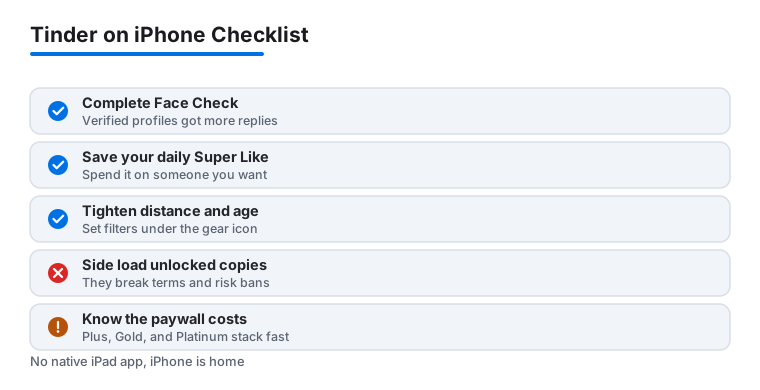
Keep one thing in mind while you swipe: most of the headline features are built to push you toward paying. That is just how the app makes money, and knowing it helps you decide what is worth your cash and what to skip.
Practical tips we picked up along the way
A polished profile does more heavy lifting than any paid feature. Use a clear, smiling photo as your first image, add a couple that show you doing something you actually enjoy, and write a short bio with a hook someone can reply to. We tested a generic bio against one that ended with a simple question, and the question version started far more conversations. If you want a deeper walk through of profile craft that applies here too, our guide on crafting the perfect profile on Bumble for iOS covers the same fundamentals.
Two settings are worth changing right away. Open Settings, tighten your distance and age range so you stop seeing people you would never realistically meet, and turn off the global toggle unless you genuinely want matches from anywhere. Both live under the gear icon on your profile tab. While you are there, decide whether you want your profile shown to people outside your stated preferences, which Tinder turns on by default. And do not let your photos go stale. Refreshing them with stronger shots, the same way you would tidy up an Instagram feed, made a measurable difference for us. Our piece on enhancing your iPhone Instagram posts with advanced editing tips has editing tricks that carry straight over to dating photos.
A few smaller habits paid off. Swipe in shorter sessions rather than marathon ones, because the algorithm seems to reward people who actually reply and meet rather than those who hoard right swipes. And if you are tempted by a side loaded "Tinder Plus unlocked" file from outside the App Store, do not. Those modified copies break Tinder's terms, routinely get accounts banned, and ask you to trust a stranger with login access to an app full of your messages and photos. Pay through the App Store or skip the paid features.
The limits and downsides worth knowing
Tinder is free to use, but the free tier has real walls. You get a limited number of right swipes per day, and once you hit that ceiling you either wait roughly twelve hours or pay. The people who have already liked you are blurred until you upgrade, which is the single feature most likely to nudge anyone toward a subscription. The tiers stack up fast. As of 2026 Tinder Plus runs around $24.99 a month for unlimited likes, Rewind, and Passport. Gold sits near $39.99 and adds the list of people who like you. Platinum lands around $49.99 and adds priority likes and the ability to message before matching. There is also an invite only tier called Tinder Select that costs roughly $499 a month and is aimed at a tiny slice of heavy users. Prices are not fixed. Tinder adjusts them by age, location, and other signals, and people under about 28 often see lower numbers than older users for the same plan, so the figure you see may differ from a friend's.
Beyond cost, the sheer volume can wear you down. Because Tinder is the largest dating app, the pool is huge but also noisy, and you will swipe past plenty of low effort or inactive profiles. The mandatory liveness check has cut down on bots compared with a few years ago, but it has not removed people who match and never reply. We also noticed battery drain during long swiping sessions, especially on an iPhone with the screen near full brightness, and the app is a steady background data user if you leave location and notifications on. None of this is a dealbreaker, but go in knowing Tinder leans toward fun and quantity rather than slow, intentional matching, and that the most useful features are the ones behind the paywall.
Good alternatives if Tinder is not your speed
Tinder is the obvious starting point, but it is not the only solid option on iPhone. If the swipe fatigue gets to you, a few others are worth a look. Bumble puts women in control of the first message and tends to feel a little more deliberate. Hinge markets itself as the app designed to be deleted and leans into prompts that spark real conversation, which suited us when we wanted fewer but better matches. For more specific communities, apps built around a shared identity or interest can feel less overwhelming than one giant general pool. Worth noting that Tinder, Hinge, and several others are all owned by the same parent company, Match Group, so you will see overlapping features and the same Face Check verification turning up across them.
Our honest take after testing is that Tinder is the best place to begin because the audience is simply the largest, so you will find people near you almost anywhere you live. If it starts to feel shallow, branch out from there rather than pouring money into the higher tiers. You can see how the whole field compares in our roundup of the best social and dating apps for iPhone, and browse more reviews across the Social and Dating category to find the right fit for how you actually want to meet people.
FAQ
Is Tinder free to use on iPhone and iPad?
Yes, the core app is free, and you can create a profile, swipe, match, and chat without paying. The free tier limits how many right swipes you get each day and blurs who has already liked you. Paid plans unlock more. As of 2026, Plus is around $24.99 a month, Gold around $39.99, and Platinum around $49.99, with prices varying by your age and location. There is also an invite only Select tier near $499 a month. The same listing installs on an iPad, but it is the iPhone app scaled up, not a native iPad app.
Does Tinder have a real iPad app?
No. Tinder is built for iPhone, and there is no separate iPad version. You can install the iPhone app on an iPad and it will run, but it shows up as a scaled iPhone window, does not rotate into landscape, and looks softer on the larger screen. Reading profiles is fine, but the experience is clearly an afterthought. For day to day use, the iPhone is where this app belongs.
What is Face Check and do I have to do it?
Face Check is Tinder's photo verification. You record a short video selfie in the app, and its system confirms you are a real, live person whose face matches your profile photos, then gives you a blue Photo Verified badge. In many regions this liveness check is now required for new accounts. Tinder says it deletes the video afterward but keeps an encrypted face map to catch duplicate accounts and fraud, so it does retain some biometric data. Verified profiles got more replies in our testing.
How do I get more matches on Tinder?
In our testing, the biggest gains came from a strong first photo, a short bio that ends with something easy to reply to, and completing Face Check for the blue badge. Saving your daily free Super Like for someone you genuinely want to reach, tightening your distance and age filters under Settings, and replying to new matches the same day all helped quality more than swiping faster did.
Is Tinder safe to use?
It is reasonably safe if you use common sense. The liveness check cuts down on fake accounts, and you can report or block anyone at any time. Keep personal details out of your profile, chat inside the app before sharing your number, and meet new matches in a public place the first time. Avoid side loaded "unlocked" versions of the app from outside the App Store, since they break Tinder's rules and put your account and data at risk. Those habits matter on any dating app, not just Tinder.