
Safety before chemistry
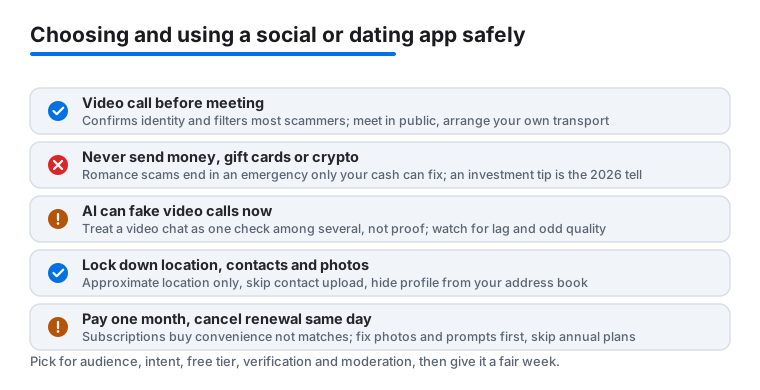
Three habits remove most of the risk. First, have a short video call before meeting anyone. Five minutes on a video call confirms the person matches their photos and quietly filters out most scammers, who will always have a reason to refuse. Second, never send money, gift cards or crypto to someone you have not met in person, no matter how convincing the story. The FTC and FBI both flag the same pattern every year: romance scams start warm, then arrive at an emergency that only your money can fix, often with a request to move funds onto gift cards, a money transfer app, or crypto to keep it safe. None of that is real. Third, run a reverse image search on profile photos; stolen pictures surface in seconds. For a first date, pick a public place, arrange your own ride there and back, and tell a friend where you are.
One newer wrinkle worth knowing in 2026: scammers now use AI to fake video calls and clone voices, so a quick video chat is not the airtight test it once was. Treat it as one filter among several, not proof. Watch for a face that does not quite track head movement, audio that lags, or a camera that stays oddly low-resolution. And keep the bar simple: anyone steering the conversation toward money or investment, however softly, is done.
The privacy settings that matter
Social and dating apps share more than you would choose by default, so spend two minutes in settings on day one. Location: allow only approximate location, never precise, and never the Always option. On iPhone you set this per app under Settings, Privacy and Security, Location Services, then the app name, where you can switch off Precise Location. Matching works fine on neighborhood-level accuracy. Contacts: skip the contact upload. If the app offers a way to hide your profile from people in your address book, switch it on. On the major apps this is often paired with a contact-block list or an incognito setting, and it is the feature that keeps coworkers and cousins out of your card stack. Photos: before uploading, check the background for street signs, a work badge, a house number or anything else that pins down where you live.
A few extra settings earn their keep. If the app lets you sign in with a phone number instead of linking a social account, use the phone number; linking accounts is how your real name and friend list leak into a place you meant to keep separate. Turn off any show me on the map or precise distance feature. And review what the app posts back to your linked accounts, because some still try to cross-post your activity unless you tell them not to. None of this makes you invisible, but it closes the easy doors.
What paid tiers really change
An honest summary: subscriptions buy convenience, not better matches. Seeing who already liked you, unlimited likes and an occasional boost genuinely save time, and during an active search one month can be worth it. The privacy extras some apps lock behind a paid tier, such as browsing without appearing in everyone else feed, can also be worth a single month if discretion matters to you. What no tier changes is who lives near you or how appealing your profile is. If a week of free effort on your photos and prompts changed nothing, a paid month will not rescue it.
Watch the billing, because this is where these apps make their money and where people lose theirs. Buy one month at a time and skip the long plans; the per-month price on an annual plan looks tempting precisely because the app wants a year of your money before you know whether anyone is here. The cleanest move is to cancel renewal the same day you subscribe, in your Apple account under Subscriptions, so you keep the full month you paid for and the decision to continue stays yours rather than the app default. Be wary of one-tap boosts and super likes sold as add-ons; they are easy to buy by accident and rarely change the week.
Red flags, breaks and your attention
Walk away from anyone who refuses video calls, pushes the chat to another app within minutes, declares love in the first week, or develops a crisis that needs your money. Those four patterns cover nearly every scam, and the push to move you onto a messaging app with looser verification is often the first step, not the last. Add one more to the list for 2026: an unprompted investment tip, or a match who is suddenly doing very well in crypto and wants to show you how. That is the single most common way romance scams end now.
Protect your attention too. These apps are built to keep you swiping, so turn off every notification except direct messages, and give the apps a daily limit. On iPhone you do this under Settings, Screen Time, App Limits, Add Limit, where you can cap Social Networking or pick individual apps and set something like thirty minutes a day; turn on Block at End of Limit if you want the cap to actually hold. Take a full week off whenever swiping starts to feel like a chore. The people worth meeting will still be there. One practical note: dating apps live on the iPhone, while the big social apps are often nicer on a larger screen. Start with our guide to the best social and dating apps for iPhone, or see the Mac list for desk-friendly picks.
How to choose an app that fits you
The right social or dating app is the one that matches how you actually want to meet people, not the one with the loudest ads. Before installing anything, run down a short checklist. Audience: is the crowd you want actually here? A polished app is useless if nobody near you uses it, so favour whichever apps your friends in your city already open. Intent: some apps lean toward serious relationships, others toward casual chat or friendship, and a few try to be everything. Pick one that names what you want rather than hiding it. Free tier: can you send and reply to messages without paying? An app that locks basic conversation behind a paywall is selling access, not matches. Verification: look for photo or ID verification and an easy in-app report and block flow. Those two features do more for your safety than any number of swipes. Moderation: read recent reviews for complaints about bots, spam and ghost profiles; a flood of fake accounts is the clearest sign an app has stopped caring.
Two more checks are worth a minute each. Read the app privacy label on its App Store page before you install, under the App Privacy heading, and be honest with yourself about whether you are comfortable with what it collects. And glance at how the app handles deletion. A real account-delete option, not just a deactivate toggle, tells you the company expects people to leave and is not holding your data hostage. If you cannot find one before installing, assume leaving will be a chore.
Common mistakes to avoid
A handful of habits quietly ruin the experience. Using the same recycled photos from your public social account makes you instantly searchable and erases any privacy setting you switched on. Filling every prompt with one-word answers gives a match nothing to reply to, then blaming the app for the silence. Paying for a year up front before testing whether the app even has people nearby is the most expensive mistake of all. Granting precise location and full contact access on the first launch hands over data you never needed to share. And treating a subscription as a fix for a weak profile keeps the real problem in place; spend that first week on better photos and sharper prompts, because that is the lever that actually moves results.
Two quieter mistakes round it out. Do not move a promising conversation off the app within the first day or two just because someone asks; staying on the platform keeps the report and block tools available if things go wrong, and rushing you off them is a tactic. And do not judge an app in a single evening. Give it a fair week with real effort, then decide with evidence rather than a bad first impression.