
Check the price history before you trust a sale
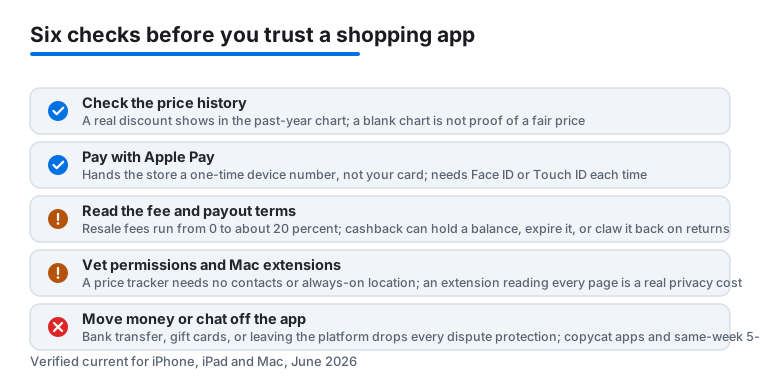
That 70 percent off banner means nothing if the price was raised last month. Before any big purchase, look up the item's price history. Price tracker apps chart what something actually cost over the past year, so you can tell a real discount from a dressed-up regular price. A simple habit helps: if you cannot see the history, assume the sale is marketing. Set an alert at the price you would happily pay and let the app do the waiting. It beats refreshing a product page, and it takes the pressure out of countdown timers.
One thing to know going in: most of these trackers cover the big online stores well and the smaller boutiques barely at all. If you shop a niche brand, the app may have no history to show, and a blank chart is not the same as a fair price. The free versions also tend to cap how many items you can watch, then ask a few dollars a month to lift the limit. Try the free tier first and only pay once you have proven the alerts actually fire on time. A tracker that pings you a day after the sale ends is worse than useless, because it teaches you to trust a tool that is letting deals slip past.
Cashback and coupon apps, honestly
Cashback apps are not charities. Stores pay them a commission for sending you over, and the app shares part of that cut with you. The money is real, but know the trade: they track what you buy, payouts can take weeks, and rates quietly drop on popular brands. They are worth it for things you were going to buy anyway. They are not worth it as a reason to buy. Coupon tools on the Mac are handy too, just check the final basket yourself, because the code they apply is not always the best one out there.
Read the payout terms before you count on the money. Many apps hold a minimum balance before they will pay out, and some let the balance expire if your account goes quiet. Returns usually claw back the reward too, so a refunded order can leave you owing the app rather than the other way round. The browser extension versions on Mac are the part most people forget to vet. An extension that watches every page you visit is asking for a lot of trust, so check who publishes it and what it says it collects. If a coupon tool wants permission to read and change data on every website, that is the price of the few dollars it saves you, and only you can decide if that trade is fair.
Resale apps without the headaches
Resale apps are the cheapest fashion upgrade around, with a little care. When selling, shoot photos in daylight, show flaws up close, and write honest measurements, because disputes cost more than a slow sale. Check the fee before you price an item; the spread is wide in 2026. Some marketplaces have dropped seller fees to zero and make their money on shipping or buyer-side charges instead, while others still take a fifth of anything you sell above a small threshold. None of that is hidden, but you have to read it, because two apps can leave very different amounts in your pocket on the same fifty dollar sale. When meeting a local buyer, pick a busy public spot in daytime and keep the payment inside the app, where there is a record if something goes wrong.
Buying secondhand has its own rules. Look at the seller's review history, not just the single item, and read how the platform handles a sale that arrives wrong or never arrives at all. A marketplace with no buyer protection is fine for cheap, low-risk items and a bad idea for anything you would be upset to lose. Keep the whole conversation and payment inside the app. The moment someone asks you to move to a chat tool, pay by bank transfer, or send a gift card, you have left every protection behind, and that is exactly why scammers ask for it.
Spotting fake shop apps
Fake storefront apps still slip into search results in 2026. Before you download, check the developer name under the app title. A real brand's app is published by that brand, not by a studio you have never heard of, and copycats often change a letter or add odd spacing to a familiar name. Look at the review pattern too. A wall of five star reviews posted in the same week, often with repeated wording or strange punctuation, is a red flag, and so are prices that beat every real store by half. Watch the download count and the listing's history: a shopping app that appeared last month yet claims to be a household name does not add up. When in doubt, go to the brand's website and follow its own App Store link rather than trusting search.
Impulse buying and the cooling-off rule
The best money habit is a wishlist. Move anything tempting onto it and wait 48 hours. Most of the urge fades, and what you still want after two days is usually worth buying. Pair this with Apple Pay where you can. It hands the store a one-time device number instead of your real card, so a leaky shop database cannot expose your card, and each payment needs Face ID or Touch ID, which adds one small pause before money leaves your account. Apple Pay works the same way across iPhone, iPad and Mac, so the protection follows you whether you tap in a shop or check out in Safari.
Notifications are where a lot of the damage gets done. Left fully on, a shopping app turns into a stream of fake-urgency pings that train you to buy faster, not smarter. Turn them down to price targets only, and the app starts working for you instead of the store.
When you are ready to choose apps, start with our tested picks for iPhone and iPad.
How to judge a shopping app before you commit
Most shopping apps look the same on the App Store screenshots. The differences show up after a week of real use, so it helps to check a few concrete things up front. Read the permissions the app asks for: a price tracker has no reason to want your contacts or your location around the clock. Look at how it makes money, because a free app earns somewhere, and that somewhere is usually your data or an affiliate cut on what you buy. Check whether prices and stock update in real time or sit stale for days, since an outdated price alert is worse than none. Finally, see if you can use the core feature without making an account; apps that wall the basics behind a sign-up are often more interested in your email than your savings.
Concrete criteria worth checking
Price accuracy comes first. Open the app, find an item you already know the price of, and compare. If it is off by more than a little, the alerts will be too. Next, look at how alerts reach you: a good app lets you set a target price and pings you only when it is hit, rather than nagging you daily. Payment safety matters as much as price; favour apps that support Apple Pay so you never type a card number into a form you do not control. For resale and marketplace apps, the fee structure and the dispute process are the whole game, so read both before you list anything. And check the update date on the App Store listing. An app last touched two years ago is a security risk, not a bargain. The App Store shows you the privacy summary too, so glance at the data the app says it links to you before you tap get.
Common mistakes that cost people money
The biggest one is trusting the in-app discount badge without checking the real price history. The second is installing five cashback apps and letting their small bonuses steer purchases you would never have made. People also skip reading resale fees and lose a chunk of the sale price they did not expect, or they take a deal off the app and pay by bank transfer, giving up every protection the platform offered. A quieter mistake is leaving notifications fully on, so the app becomes a stream of fake-urgency pings that push you to buy faster. Get these few things right and the apps in this category earn their place on your phone instead of quietly steering your spending.