
Best Shopping & Fashion Apps for Mac (2026)
A Mac turns out to be a calm, roomy place to shop, compare prices across tabs, and fill a cart without thumbing through tiny phone screens. Over a few weeks of real buying on a MacBook Air and an iMac, we checked which stores have a proper desktop presence, which lean on the web, and which feel better with a big display. Below are our favorite shopping and fashion picks, ordered best first.
For the wider view, browse our shopping and fashion hub or the full best Mac apps roundup. Shopping across devices too? Our iPhone picks and iPad guide pair neatly with everything here.
1. Walmart
Walmart is the one we reached for most, simply because the browser store is fast and the wide layout makes grocery pickup and big runs painless. Search is quick, your cart syncs to the phone for the actual store trip, and reordering staples takes seconds. It is free to use, and Walmart+ adds free delivery and fuel discounts if you shop often.
2. <a href="/the-future-of-desktop-apps-with-imac-temus-debut/">Temu</a>
Temu is dangerously fun to browse on a big screen, where the endless grid of cheap finds feels more like window shopping than doomscrolling. In a Mac browser we could open ten product tabs, compare them, and hunt coupons without losing our place. It is free and prices are startlingly low, but shipping is slow, so treat it as a patient treasure hunt.
3. IKEA
IKEA is a natural fit for a desktop, because planning furniture wants space to think. The web store on a Mac lets you read dimensions, check stock at your local warehouse, and build a list without squinting. We mapped out a whole desk setup in one sitting. It is free, the room planners run better with a mouse, and saved favorites keep a long term wishlist tidy.
4. <a href="/unveiling-the-ai-power-behind-vision-pro-alibaba-app/">Alibaba</a>
Alibaba is wholesale and bulk buying territory, and the Mac browser is honestly the only sane way to use it. The big window helps you read supplier details, compare minimum order quantities, and message sellers without the cramped phone feel. It is free to browse, suits small business owners and resellers, and the desktop chat tools make negotiating far less fiddly.
5. AliExpress
AliExpress is the consumer cousin to Alibaba, great for niche gadgets, phone parts, and oddly specific accessories. On a Mac the web store shines for reading the long review threads and zooming into buyer photos before you commit. We vetted a stack of cheap cables this way. It is free, prices are low, and shipping takes weeks, so it rewards planning ahead.
6. StockX
StockX is where the Mac genuinely beats the phone, because buying sneakers and collectibles at market rates is basically watching a stock ticker. The web view lays out bid and ask prices, size charts, and price history in one glance, which helped us time a buy patiently. It is free to use with fees folded into each sale. Authentication details are easy to read here.
7. <a href="/how-to-match-your-macbook-with-fashion-nova-finds/">Fashion Nova</a>
Fashion Nova is fast fashion built for scrolling, and a Mac screen makes outfit browsing feel like a proper lookbook. Through the browser the photos are large, sizing notes are easier to read, and building a cart for a night out is quick. We styled a few looks side by side in tabs. It is free to shop, and sales land constantly, so check the homepage first.
8. Kohl's
Kohl's earns its place on the strength of stacking deals, and the Mac browser makes juggling Kohl's Cash, coupons, and Rewards far less confusing than on a phone. We could watch the discounts add up in the cart before committing. It is free to use, and the desktop view helps you scan clearance and apply codes cleanly. A solid pick for household basics and clothes.
9. <a href="/revolutionize-your-macbook-with-jcpenneys-latest-apps/">JCPenney</a>
JCPenney is a dependable department store stop, and on a Mac the web shop is comfortable for browsing clothing, home goods, and the odd appliance. The wide layout makes filtering by size and reading the frequent coupon offers easy. We pulled together a small home refresh order without fuss. Signing into your rewards account keeps coupons and order tracking in one tidy place.
10. Groupon
Groupon is best treated as a browse and discover tool, and a Mac is ideal for reading the fine print before you buy. The desktop site makes scanning local deals, spa days, and restaurant vouchers easy, and the bigger view helps you actually read redemption terms. We booked a weekend activity in minutes. It is free, deals rotate fast, and watching expiry dates matters.
11. Craigslist
Craigslist is gloriously plain, and that is exactly why it works so well on a Mac. The text heavy listings load instantly in any browser, and the wide layout lets you scan furniture, gigs, and local finds far faster than on a phone. We furnished a room hunting deals over an evening. It is free, there is no app to bother with, and spotting scams is easier.
12. Mercari
Mercari is a friendly secondhand marketplace, and selling especially benefits from a Mac. Writing listings, uploading photos, and answering buyer questions all go quicker with a keyboard and a big screen. We listed a pile of old gear in one sitting. It is free to browse and list, with a selling fee at checkout, and it suits anyone clearing closets or hunting preowned bargains.
13. Bed Bath & Beyond
Bed Bath and Beyond, now living online, is a comfortable Mac browse for kitchen gear, bedding, and apartment basics. The web store reads cleanly on a large display, and comparing sizes and finishes across tabs beats pinching a phone screen. We kitted out a small workspace nook here. It is free to shop, and filtering by room while reading reviews is easy on the desktop.
14. Great Clips
Great Clips is the outlier here, more service than store, but checking in for a haircut from your Mac is genuinely handy. The online check in shows nearby salon wait times in a clear list, so you can claim a spot before you leave the house. We shaved a real wait off a Saturday trim. It is free, and picking the closest open chair is quick.
15. <a href="/revamping-your-digital-wardrobe-imacs-best-fashion-apps/">Fashion apps</a>
Beyond the big names, a cluster of smaller fashion and wardrobe tools run nicely in a Mac browser for outfit planning, closet cataloging, and style inspiration. The larger canvas makes building mood boards far more pleasant than on a phone. We sketched a seasonal capsule wardrobe this way. Most are free with optional premium tiers, and they suit anyone who likes to plan looks.
16. Mac optimization apps
All this tab juggling and cart filling can clutter a Mac, so it is worth pairing your shopping habit with a good cleanup tool. Optimization apps clear browser caches, manage downloads, and free up space after a heavy spree, with junk files laid out clearly. We reclaimed real storage after a month of deal hunting. Many offer a free scan with paid cleaning.
Shopping and fashion on a Mac: how to set yourself up
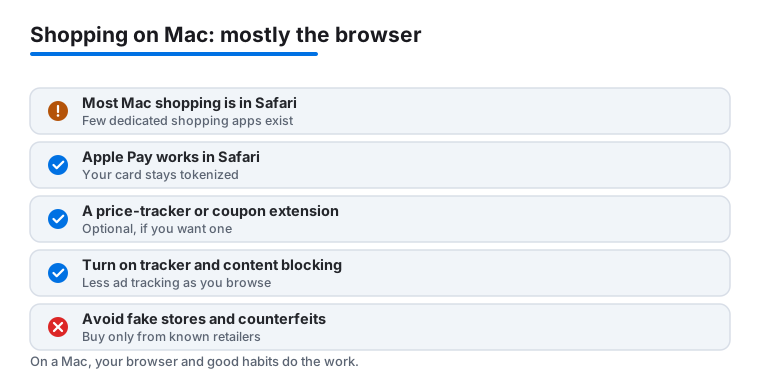
Here is the honest truth that shapes everything below. Most shopping on a Mac does not happen inside dedicated apps. It happens in Safari, or another browser, on retailer websites. The Mac App Store carries plenty of productivity and creative software, but very few real shopping apps, and most large retailers never built a native Mac app at all. So when we talk about the picks above, almost all of them are websites you open in a browser, not apps you install. That is not a downside. Retailer desktop sites are usually fuller than their phone apps, and a Mac gives you tabs, a real keyboard, and a wide screen for comparing.
Because the setup is mostly browser based, choosing your shopping setup on a Mac is really about four calm decisions: a trusted browser, how you pay, whether you want a price tracker or coupon helper, and a few habits that keep you out of trouble.
1. Pick a trusted browser and keep it current
Safari ships with every Mac and is a sensible default. It is fast, it respects battery life, and it has privacy features built in. If you prefer Chrome, Firefox, or Edge, all three run natively on macOS and are fine choices too. The point is not which one you pick. The point is that you keep it updated, since browser updates carry the security fixes that protect you while you type card numbers into checkout pages. Set macOS and your browser to update automatically and you have handled most of the risk already.
2. Decide how you will pay
This is the single most useful safety habit on a Mac. When a store supports it, use Apple Pay in Safari. Apple Pay does not hand the merchant your real card number. It sends a device specific token and a one time code instead, so the store never stores the digits printed on your card. You confirm the purchase with Touch ID on the keyboard, or on your iPhone or Apple Watch. Many of the retailers above support it at checkout, and it is faster than typing a card by hand.
When a site does not offer Apple Pay, PayPal is a reasonable fallback, because it also keeps your card details off the merchant. Failing that, lean on your browser's autofill or a dedicated password manager rather than letting every random store save your card to its own account. The fewer places that hold your raw card number, the smaller your exposure if one of them is breached.
3. Add a price tracker or coupon helper only if you want one
If you like, you can install a browser extension that watches prices or finds coupon codes. These are real and they live in your browser, not the Mac App Store. Honey, owned by PayPal, tests coupon codes at checkout. Camelcamelcamel tracks Amazon price history, and its companion extension, The Camelizer, adds a price chart to product pages. These can save money, but understand the trade. A coupon or price extension can see the pages you shop on, so install only ones from a maker you actually trust, review what permissions it asks for, and skip it entirely if you would rather keep your browsing to yourself. You do not need one to shop well.
Privacy and safety habits that actually matter
A Mac is not magically safe just because it is a Mac. The risks while shopping are mostly about the sites you visit and the data you leave behind, so a few habits go a long way.
- Turn on tracker and content blocking. Safari includes Intelligent Tracking Prevention, which limits how advertisers follow you between sites. You can go further with a content blocker extension such as AdGuard or 1Blocker, both real Mac App Store apps that plug into Safari. Less tracking means fewer creepy retargeting ads and a lighter, faster browse.
- Check the address before you type anything. Confirm the web address is the real retailer and that the connection is secure before you enter a card or password. Fake storefronts often copy a real brand's look but sit on a slightly wrong address, and they are built to harvest payment details.
- Be wary of counterfeits and too good prices. On open marketplaces, a designer item at a fraction of its price is usually a counterfeit or a scam. Read seller ratings, look at buyer photos, and on resale sites like StockX lean on the authentication step that exists for exactly this reason.
- Buy from known retailers. The simplest protection of all. Stores you recognize, like Walmart, IKEA, or Kohl's, have real return policies and real support. An unknown shop found through an ad does not.
- Do not shop over public Wi-Fi without care. If you are on cafe or airport Wi-Fi, stick to Apple Pay or finish the purchase at home. A secure connection on a network you trust is always the calmer choice.
Putting it together
For most people the whole setup is this small: open Safari, keep it and macOS updated, pay with Apple Pay or PayPal where you can, add a tracker blocker if privacy matters to you, and buy from retailers you already know. Treat the cheap overseas marketplaces as a patient treasure hunt rather than a place for anything you need by a deadline. None of this requires installing shopping apps, because on a Mac the browser is the store. Get those few habits in place and the big screen becomes what it should be, a relaxed way to compare, plan, and buy without the small screen squint.
How our top four picks compare
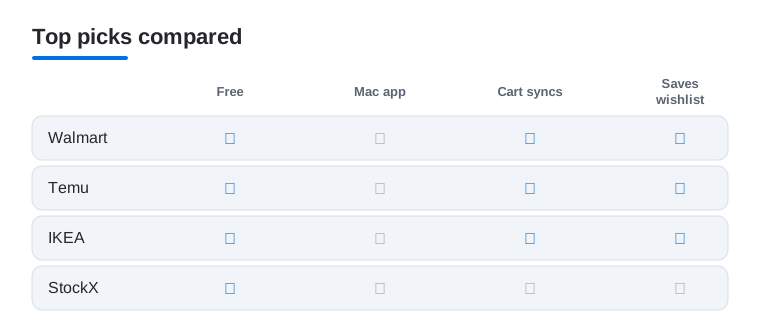
If you are deciding where to start, here is how our top four Mac picks stack up on the things this guide cares about most: cost, whether a real Mac app exists, cross device cart sync, and whether they save a wishlist.
Frequently asked questions
Do any of these shopping apps have a real Mac app?
Honestly, very few. Most major retailers, including Walmart, Temu, IKEA, AliExpress, and StockX, skip the Mac App Store and run through their websites in Safari or Chrome instead. The good news is that their desktop sites are usually fuller featured than the phone apps, so you rarely miss out by shopping in a browser.
Is it safe to save my card details when shopping on a Mac?
It can be, if you stick to trusted stores and use Safari's autofill or a password manager rather than letting random sites store your card. For the cheaper overseas marketplaces, paying through Apple Pay or PayPal at checkout adds a layer of protection and keeps your raw card number off the merchant's servers.
Why is shipping so slow from Temu and AliExpress?
Most of those orders ship directly from overseas warehouses, so two to four weeks is normal. That is the trade for the very low prices. Plan ahead for anything you actually need by a certain date, and lean on Walmart, Kohl's, or JCPenney when you want something quickly.
Does my cart sync between the Mac and my phone?
For most of these, yes. Once you sign into the same account, Walmart, IKEA, Temu, and Kohl's all carry your cart and wishlist across devices, so you can browse at your desk and check out on the phone later. Just make sure you are logged in rather than shopping as a guest.
What is the difference between a Mac shopping app and just using the website?
For these retailers there usually is no separate Mac app, so the website in your browser is the real shopping experience, not a lesser version of it. A handful of helper tools, like Safari content blockers or a coupon extension, are genuine installs, but the stores themselves are sites you open in Safari or Chrome.
Should I install a coupon or price tracking extension?
Only if you want one, and only from a maker you trust. Real options like Honey for coupon codes or The Camelizer from Camelcamelcamel for Amazon price history can save money, but a shopping extension can see the pages you browse. Review the permissions it requests, and if privacy matters more to you than a small discount, it is perfectly fine to skip it.