
Best Shopping & Fashion Apps for iPhone (2026)
Your iPhone has quietly become the place you clip coupons, chase sneaker drops and tap to pay at the register, so the shopping apps you keep installed earn their keep fast. We spent a few weeks actually buying things, watching for the apps that load deals without a fight, store your loyalty card where a cashier can scan it, and check out with Apple Pay in one thumb tap. Below are our favorites, ordered best first, from the big everyday stores down to the niche picks worth a tap. If you shop on a bigger screen too, our shopping apps for iPad guide covers the same stores with more room, and you can browse the full shopping and fashion category or our wider best iPhone apps roundup whenever you like.
1. Amazon
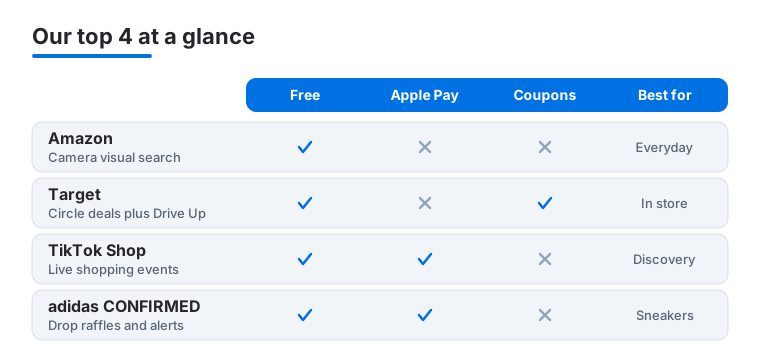
The app we open without thinking, and still the one that does the most. Amazon on iPhone handles search, one tap reorders, tracking and returns with a QR code the counter scans in seconds. It is free, and the visual search through your camera is the trick we tell everyone to try when they cannot name the thing they want.
2. Target
Target's app is the rare big retailer one that genuinely makes a store run smoother. Circle deals load up front, the wallet keeps your RedCard and coupons together, and the in store map points you to the right aisle. We used Drive Up on iPhone and had bags in the trunk before the playlist changed. It is free and the way we shop there now.
3. TikTok Shop
TikTok Shop turns the scroll into a checkout, and on iPhone the buying flow is dangerously smooth. You tap a product tagged in a video, see reviews and price without leaving the feed, and pay with Apple Pay in two taps. In our testing the live shopping events were the real draw. It is free, though we read seller ratings closely, since quality swings widely.
4. adidas CONFIRMED
For sneakerheads, adidas CONFIRMED is the gatekeeper to the drops you actually want. It handles exclusive releases, raffles and early access, and push alerts on iPhone tell you a launch is live the second it happens. We found the reservation flow tense but fair, with Apple Pay ready so you are not fumbling at checkout. It is free, and a must if you chase collab releases.
5. Publix
Publix is the grocery app Southern shoppers swear by, and it earns it. Digital coupons clip straight to your account, the weekly ad is easy to thumb through, and you can build a list that maps to the store. In our testing the deli and pharmacy ordering saved a real wait. It is free, and those BOGO deals stop slipping past you.
6. Aldi
Aldi's app is refreshingly no nonsense, just like the stores. You can browse the famous Aldi Finds aisle before you go, check prices, and order delivery or curbside pickup through Instacart without leaving the app. On iPhone it loads quickly and never buries the weekly specials. It is free, and the Finds preview tells you whether this week's middle aisle gadget is worth a detour.
7. JCPenney
JCPenney packs its coupons, rewards and maze of in store sales into one tidy app, the only sane way to shop there. On iPhone the barcode coupons scan cleanly at the register, and your rewards balance sits on the home screen. In our testing, stacking an app coupon with a sale was satisfyingly easy. It is free and pays for itself on the first trip.
8. Bed Bath & Beyond
The reborn Bed Bath & Beyond lives mostly online now, and the app is a clean way to browse its huge home and kitchen catalog. Search is quick, the wish list syncs across devices, and order tracking is clear from checkout to doorstep. We liked thumbing the deals tab on iPhone for a dorm refresh. It is free, and Apple Pay keeps checkout painless.
9. Family Dollar
Family Dollar's app is built for stretching a budget, and it does that job well. Smart Coupons clip to your account, the weekly ad highlights deals near you, and the store locator finds the closest shelf. On iPhone the accessibility support is better than you would expect, with clear text and working VoiceOver. It is free, and those coupons add up faster than they look.
10. American Eagle
American Eagle's app is a smooth way to shop jeans and basics without the desktop clutter. It remembers your sizes, Real Rewards points track on the home screen, and the fit guides help you skip a return. App exclusive drops and coupons make it worth the install over the mobile site. It is free, checkout runs through Apple Pay, and the rewards add up fast.
11. DHgate
DHgate is the wholesale marketplace for buyers who like a deep bargain and do not mind a wait. It connects you straight to overseas sellers, and on iPhone the filters and buyer protection make sorting the good listings from the noise manageable. The image search helped us track down a part we could not name. It is free, but start small before you trust a new seller.
Shopping and fashion apps for iPhone: how to choose, and how to stay safe
Shopping apps are designed to make spending feel effortless, and the good ones really do. The trouble is that the same design choices that make checkout fast also make it easy to buy more than you meant to, share more than you realized, or land on a store that is not what it claims. This guide walks through how we pick the apps worth keeping, then spends real time on the safety and privacy side, because that is the part most roundups skip.
Start with the stores you already use
The most useful shopping app is almost always one for a retailer you visit anyway. An app for a store you shop twice a year just clutters your home screen and collects data in the background. Before you install anything, ask whether the app does something the website cannot: scan a loyalty card at the register, push a real drop alert, hold your coupons in a wallet, or map the aisles inside the store. If the answer is no, the mobile site in Safari is usually the lighter choice.
Judge it on the boring details
A good shopping app loads its deals without a fight, remembers your sizes so you order the right fit the first time, and keeps order tracking clear from checkout to doorstep. Look for an app that lets you check out with Apple Pay, that does not bury the weekly specials under banners, and that handles returns with a code the counter can scan. Fit guessing is the top reason clothes come back, so apps that store your sizes and show an honest size chart save you the round trip.
Check the return policy before you tap buy
Return rules tightened across several large chains, with shorter windows and the occasional mail-back fee. Read the window and any restocking or label fee inside the app before you commit, especially on clothes you might send back. The app is also where your receipts live, so it is the easiest place to confirm what a store actually promised.
The safety and privacy part, in plain terms
This is the section to slow down on. Shopping apps sit on top of your card and your habits, so a few settings and instincts go a long way.
Pay with Apple Pay wherever it is offered
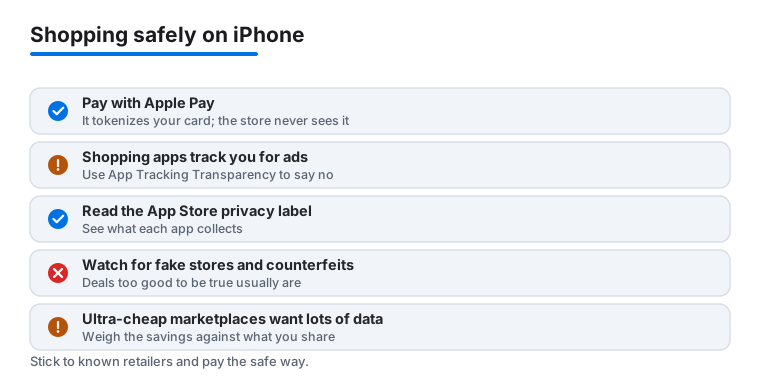
When you add a card to Apple Pay, your real card number is replaced with a device-only token (Apple calls it a Device Account Number) that lives in the iPhone's Secure Element. The store never sees your actual number, so if that merchant is later breached, what leaks is useless to a thief. Every payment is approved with Face ID or Touch ID, which means a stranger holding your unlocked phone still cannot quietly buy something. In any app you are even slightly unsure about, paying with Apple Pay beats typing a card into a form, because you hand over a token instead of the real thing.
Deny tracking with App Tracking Transparency
Shopping apps collect a lot of behavior data, what you tap, what you abandon in a cart, how long you linger on a product, and many of them want to follow that activity across other apps and websites to target ads. When an app asks for permission to track you, iPhone shows the App Tracking Transparency prompt. There is no downside to choosing Ask App Not to Track, the app still works, it just cannot tie your activity to your identity across other companies. You can also turn this off for everything at once in Settings under Privacy and Security, then Tracking, by switching off Allow Apps to Request to Track.
Read the Privacy Nutrition Label before you install
Every App Store listing has a privacy section, often called the Privacy Nutrition Label, that the developer must fill in. It tells you what data the app collects, whether that data is linked to you, and whether any of it is used to track you. Before installing a shopping app, scroll down to it. An app that wants your precise location, contacts, and browsing history to sell you socks is telling you something. Compare two apps for the same kind of store and the lighter one is usually the better neighbor on your phone.
Watch for fake stores, counterfeits, and deals that are too good
Scammers clone real retailer apps to capture card details or sneak in subscriptions, and a few slip past review every year. A handful of habits keep you clear of them:
- Match the developer to the brand. The developer line under the app name should read as the actual retailer or a name you can trace to it, not a random studio.
- Read recent reviews. Skim for words like scam, charged, or never shipped, and be wary of a brand new app with a tiny rating count claiming steep luxury discounts.
- Treat huge discounts as bait. Designer goods at seventy to ninety percent off are the classic lure. If a deal looks too good to be true, it usually is.
- Stick to known retailers. When in doubt, delete the app and reinstall it from a link on the retailer's official website.
- Watch the checkout. An app that pushes you to pay outside the app, or that asks for oddly broad permissions, is waving a flag.
Weigh ultra-cheap marketplaces against what you share
Ultra-cheap overseas marketplace apps can be heavy on data collection, and the convenience comes with a trade. Keep payment inside the app so the built-in buyer protection applies, buy small from a new seller before you trust them, and expect longer shipping and the occasional customs charge. The honest way to think about these apps is to weigh the savings against how much behavior and personal data you are handing over to get them. If a few dollars off means granting wide access to your phone, the math may not favor you.
A quick routine that keeps you safe
- Install only apps for stores you actually use.
- Check the Privacy Nutrition Label before downloading.
- Choose Ask App Not to Track when the prompt appears.
- Pay with Apple Pay so the store never sees your real card.
- Confirm the developer and the return policy before your first order.
None of this takes long, and once it becomes habit you barely notice it. The payoff is that shopping on your iPhone stays fast and easy without quietly costing you your card data or your privacy.
Frequently asked questions
Are these shopping apps safe to enter my card details into on iPhone?
The retailer apps here are from official stores in the App Store and use the same encryption as their websites. Wherever it is offered, we pay with Apple Pay so the merchant never sees your real card number, which is the safest option on iPhone. For marketplaces like DHgate and TikTok Shop, stick to in app checkout rather than off platform payment links, and lean on the buyer protection each one provides.
Do the app coupons really save more than shopping on the website?
In our testing, yes, more often than not. Apps like Publix, Target, JCPenney and Family Dollar push digital coupons and app only deals that the desktop site either hides or skips, and clipping them takes one tap. The loyalty cards living in the app also scan straight at the register, so you stop leaving points on the table because you forgot the physical card at home.
Which app is best for snagging limited sneaker drops?
adidas CONFIRMED is the essential one for adidas releases, since raffles and early access run through it and nowhere else. Turn on its push notifications so you know the moment a drop goes live, and set up Apple Pay in advance so checkout is instant. For everyday sneakers and clothing rather than hyped drops, the regular retailer apps cover you fine without the raffle scramble.
Can I use these same shopping apps on my iPad or Mac?
Most offer an iPad version or run as a scaled up iPhone app, and the browsing experience benefits from the bigger screen when you are comparing items or planning a big order. We cover that in our shopping apps for iPad guide, and our shopping apps for Mac roundup looks at the desktop side, where browser deal finders and a full keyboard make hunting for the best price a little easier.
How do I tell a real retailer app from a fake one on the App Store?
Start with the developer line under the app name, since it should read as the actual brand or a name you can trace back to it, not a random studio. Then skim recent reviews for words like scam, charged, or never shipped, and be wary of a brand new app with a tiny rating count claiming steep luxury discounts. Once installed, watch for surprise subscriptions, oddly broad permissions, or a checkout that pushes you to pay outside the app. When in doubt, delete it and install the app from a link on the retailer's official website instead.
How do I stop a shopping app from tracking me for ads?
When you first open the app, iPhone shows an App Tracking Transparency prompt asking whether the app can track you across other apps and websites. Choose Ask App Not to Track, the app still works, it just cannot follow your activity elsewhere to target ads. To set this once for everything, open Settings, then Privacy and Security, then Tracking, and turn off Allow Apps to Request to Track. It is also worth reading the Privacy Nutrition Label on the App Store listing before you install, since it shows what data each app collects and whether it is used to track you.
Are Temu and other cheap overseas apps still worth it in 2026?
They can be, but the math changed. After the U.S. ended its de minimis tax break on parcels under $800, sites like Temu and Shein raised prices and shifted to local sellers and warehouses, so the rock-bottom deals are less common and some items now carry duties. For wholesale picks like DHgate, expect longer shipping and the odd customs charge. These apps can also be heavy on data collection, so weigh the savings against what you share, buy small from a new seller first, keep payment inside the app so the buyer protection applies, and check the all-in price against a domestic store before you commit.