
Best Finance Apps for iPhone (2026)
Your iPhone is probably the first place you check a balance, split a bill or tap to pay, so the finance apps you keep on it matter more than almost anything else on the home screen. We spent weeks moving real money through these, watching for the ones that open instantly with Face ID, surface the number you need without three taps, and never feel like a website crammed into an app. Below are our favorites, grouped loosely from everyday banking to investing and payments. If you also work on a bigger screen, our finance apps for iPad guide covers the same ground with more room to breathe, and you can browse the wider finance category or our full best iPhone apps roundup any time.
1. Apple Wallet
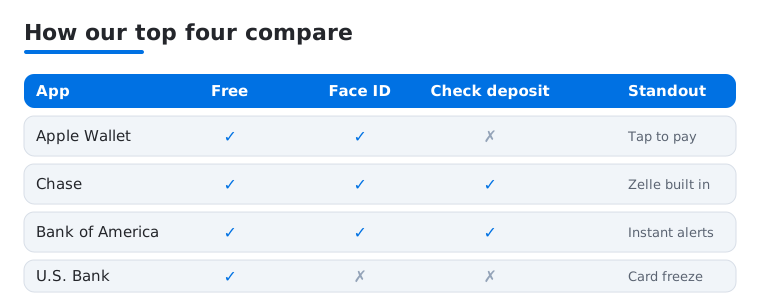
The one finance app you already own and the one we reach for most. Apple Wallet holds your debit and credit cards, transit passes and car keys, and a double click of the side button has you paying before the reader finishes beeping. In our testing the merchant logos made checking a charge pleasant. It is free, deeply private, and the bar every payment app is measured against.
2. Chase
Chase is the bank app we hold up as the standard for everyone else. Deposits go in by photo in seconds, Face ID login is instant, and Zelle is baked right in for splitting rent. We like how quickly transactions load even on a weak signal. It is free with your account, and the card rewards and travel portal tuck in neatly without a browser.
3. Bank of America
If Bank of America is your bank, this app does almost everything a branch can. Mobile check deposit, bill pay, Zelle and a spending tracker called Erica all live here, and Face ID makes daily balance peeks painless. In our testing the alerts were the standout, pinging us the moment a card was used. It is free, stable, and finally feels built for a phone.
4. U.S. Bank
U.S. Bank flies under the radar but quietly nails the basics on iPhone. Logins are fast, the dashboard puts balances and activity up top, and card controls let you freeze a misplaced card in a tap. We found the bill pay calendar especially clear when juggling due dates. It is free with an account and runs smoothly even on older iPhones.
5. Navy Federal
Military families know Navy Federal, and the app earns the loyalty. It handles checking, loans and credit cards in one clean place, with quick transfers and a member chat that actually answers. In our testing the biometric login and instant balance widget made it a daily open. It is free for members, and the rewards tracking reads clearly at a glance.
6. TD Bank
TD Bank pairs solid everyday banking with budgeting tools nicer than most. The app shows spending by category, lets you nudge funds between accounts, and deposits checks without fuss. We liked the uncluttered home screen, which surfaces the balance you care about first. It is free with an account, and the overdraft grace alerts saved us a fee during a busy month.
7. Truist
Truist brings the old BB&T and SunTrust worlds into one tidy app, and the cash flow view is its quiet highlight. It maps upcoming income against bills so you see if next week is tight before it arrives. In our testing setup took a few minutes but daily use was quick, with reliable Face ID. Free with an account.
8. SoFi
SoFi wants to be your whole financial life, and on iPhone it makes a strong case. Banking, investing, a credit score tracker and loans share one polished app, and the savings vaults are genuinely fun to set goals in. We found onboarding fast and the design refreshingly modern. Core accounts are free with no monthly fee, ideal for managing everything from a single login.
9. Robinhood
Robinhood made buying a share feel as easy as sending a text, and that ease still defines it. Stocks, ETFs, options and crypto trade commission free, and the stripped down charts read clearly on a phone. In our testing placing and tracking an order took seconds. It is free to start, with an optional Gold tier. Great for beginners who read up first.
10. Trust Wallet
If you hold crypto, Trust Wallet is the self custody option we reach for on iPhone. It stores hundreds of coins, connects to web3 apps, and keeps your private keys on your device rather than a company server. We liked how clearly it shows balances across chains without the jargon. It is free, and the recovery phrase is the one step to write down carefully.
11. Afterpay
Afterpay splits a purchase into four interest free payments, and on iPhone it doubles as a shopping app full of stores that accept it. We used it for a larger buy and liked seeing the exact payment dates up front. It is free when you pay on time, with fees only for late installments. It pairs well with our shopping and fashion apps picks.
12. Rakuten
Rakuten is the cashback habit that quietly pays you back for shopping you already do. Activate a store before you buy, and a slice of the purchase lands in your account, paid out by check or PayPal. On iPhone the in app browser makes activating offers a one tap affair. It is free, and in our testing the quarterly payout was a small but real boost.
13. DraftKings
For sports fans in legal states, DraftKings is a polished daily fantasy and betting app we tested on iPhone. Live odds update fast, withdrawals are straightforward, and the lineup builder is easy to thumb through before kickoff. It is free to download with real money play, so set a budget first. Face ID and quick bet slips kept it responsive on game day.
14. FanDuel
FanDuel is DraftKings' great rival, and which one wins comes down to taste and promos. The daily fantasy contests are deep, the sportsbook is clean, and same game parlays are easy to assemble on the iPhone. In our testing the app stayed snappy and cashouts processed quickly. It is free to download with real money wagering, so treat it as entertainment with a firm limit.
15. OPay
OPay is a capable all-in-one money app for banking across Nigeria and other African markets, bundling transfers, bill payments, airtime and savings into one app. On iPhone it loads quickly and the transfer flow is refreshingly direct, with clear fees shown before you confirm. We found the QR payments handy for everyday spending. It is free, and it strips out a lot of the friction other apps leave in.
16. Texas Lottery
The official Texas Lottery app is a small but tidy tool for players in the state. You can check numbers, scan tickets to see if they won, find draw results and locate retailers, all without the dodgy feel of unofficial apps. In our testing the ticket scanner was fast and accurate. It is free, and it sticks to information rather than ever taking a payment.
Not sure where to start? Here is how our four most reached for picks stack up on the things that matter day to day.
How to choose finance apps for iPhone
Finance apps fall into a few clear buckets, and it helps to know which one you are actually shopping for before you download anything. Banking apps come from a bank or credit union and let you check balances, deposit a check by photo, move money and pay bills. Budgeting apps help you see where money goes and plan ahead, sometimes by reading your transactions for you. Payment apps let you tap to pay in a store, send cash to a friend or split a bill. Some apps, like the all in one services, try to do several of these at once.
For most people the order of operations is simple. Start with the official app from the bank or card issuer you already use, because that is where your money actually lives. Add a payment layer that you trust, then add a budgeting or investing app only if you have a specific job for it. Avoid collecting half a dozen finance apps you barely open, since each one is another account, another login and another place your data sits.
What to look for before you download
- Who makes it. Check that the developer name in the App Store matches the real company. Search for the bank by name from inside the App Store rather than following a link from an email or a text.
- Recent updates and a real history. An app that has been maintained for years and updated in the last few months is a better sign than a brand new app with a handful of reviews.
- The Privacy Nutrition Label. Every App Store listing has an App Privacy section that shows what data the app collects and whether it is linked to you. A budgeting app that wants your contacts and location for no clear reason is worth a second look.
- Sign in options. Apps that support Face ID or Touch ID, two factor authentication and Sign in with Apple give you more ways to keep an account locked down.
- How it connects to your accounts. This one matters most, and it is covered in the security section below.
The security part, in plain terms
Financial data is some of the most sensitive information you own. A leaked bank login or a copy of your transaction history can do real damage, so it is worth slowing down and being deliberate about how finance apps get access to your money.
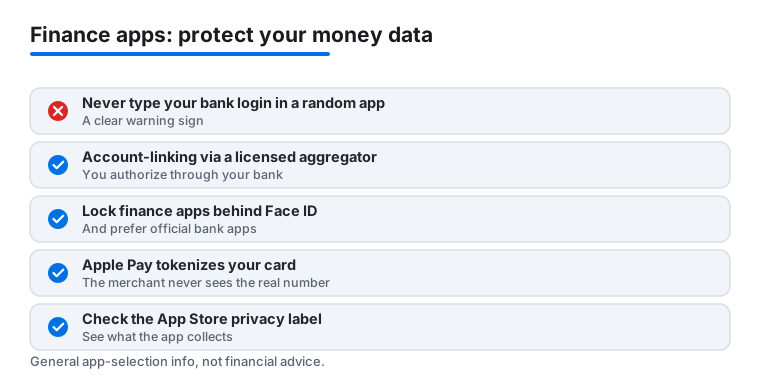
Never type your bank username and password directly into a random third party app. If an app asks you to enter your actual bank login on its own screen so it can read your accounts, treat that as a warning sign. The safer pattern that reputable apps use is a licensed account aggregator, for example Plaid, where you authorize the connection through your bank's own login flow. In that flow you are entering your credentials with your bank, not handing them to the app, and you can usually see and revoke the connection from your bank later. Official bank apps avoid the question entirely, since you are logging in directly with the institution that holds your money.
A few habits make a real difference:
- Prefer official apps. When you want to check a balance or move money, the app from your bank or card issuer is almost always the most trustworthy choice. Use search inside the App Store and confirm the developer.
- Lock finance apps behind Face ID or Touch ID. Most banking, investing and payment apps offer a biometric lock in their settings. Turn it on. It means a glance at your phone unlocks the app and a stranger holding your phone does not.
- Turn on two factor authentication wherever the app offers it, so a stolen password alone is not enough to get in.
- Read the App Store Privacy Nutrition Label before you commit, especially for budgeting or cashback apps that want to see across all of your accounts.
- Be careful on shared or public networks. Logging into your bank from open Wi Fi is best avoided. Your cellular connection is usually the safer choice.
Why Apple Pay and Wallet are a quiet win for safety
One of the most private ways to pay on iPhone is also one of the easiest. When you add a card to Apple Wallet and pay with Apple Pay, the merchant never sees your real card number. Apple Pay uses a tokenized number tied to your device, so what gets passed along at checkout is a stand in rather than the digits printed on your card. If a store later has a data breach, the token is far less useful to an attacker than your actual card number would be. Payments are also confirmed with Face ID or Touch ID, which adds a check that you, and not someone holding your phone, approved the charge.
Keeping your iPhone itself in good shape
The apps can only be as safe as the phone they run on. Keep iOS updated so security fixes land quickly. Use a strong device passcode rather than a simple four digit one. Be wary of links in messages and emails that push you toward a login page, since a convincing fake page is a common way credentials get stolen. If you lose your phone, the Find My feature lets you lock it remotely, and because finance apps sit behind Face ID or Touch ID, a lost phone is far less of a crisis than a lost password.
Picking the right mix for you
There is no single best finance app, only the right small set for how you live. If you mostly want to bank and pay, an official bank app plus Apple Wallet covers a lot of ground with very little risk. If you are building a habit of saving or investing, add one app with a clear job and learn it well rather than spreading thin across many. If you use a budgeting or cashback app that links your accounts, make sure it does so through a proper aggregator flow and check what it collects first.
Everything here is general information to help you choose apps and use them carefully. It is not financial advice, and it does not account for your particular situation, so weigh any money decision on its own merits.
Frequently asked questions
Are these finance apps safe to use on my iPhone?
The bank and brokerage apps here use the same encryption as their websites and lean on Face ID or Touch ID, which we recommend turning on. Stick to apps from official issuers in the App Store, enable two factor authentication, and avoid logging in over public Wi Fi. The iPhone's own security model adds a strong layer on top, so a stolen phone is far harder to misuse than a stolen password.
Which app is best for budgeting rather than just banking?
Several bank apps now include budgeting built in. We found TD Bank and Bank of America's spending tools genuinely useful, and Truist's cash flow view is great for seeing bills against income. If you want a dedicated tracker that pulls from all your accounts at once, that is worth a separate look, but for many people the tools inside their existing bank app cover the essentials without another login.
Do I need to pay for any of these finance apps?
Most are free to download and free with your account. Banking, payment and cashback apps like Apple Wallet, Chase and Rakuten cost nothing to use. The catch is in optional tiers, such as Robinhood Gold or premium SoFi features, and in the underlying products, like interest on a balance or fees for paying an Afterpay installment late. Read the terms before you opt into anything paid.
Can I use the same finance apps on my iPad or Mac?
Most offer an iPad version or run as a scaled up iPhone app, and a few have Mac apps too. Banking and investing translate well to a bigger screen for reviewing statements or charts. We cover the larger screen experience in our finance apps for iPad guide, and you can find device specific picks across the rest of the site if you split your money management between gadgets.
Is it safe to link a budgeting app to my bank account?
It can be, as long as the connection is made the right way. Reputable apps do not ask you to type your bank password into their own screen. Instead they use a licensed aggregator, for example Plaid, where you log in through your bank's own flow to authorize access. Before linking, read the app's Privacy Nutrition Label in the App Store, confirm the developer is who you expect, and remember you can usually revoke the connection from your bank later.
Why should I use Apple Pay instead of my physical card?
Apple Pay keeps your real card number out of the transaction. It uses a tokenized number tied to your device, so the merchant receives a stand in rather than the digits on your card, which limits the damage if a store is ever breached. Each payment is also approved with Face ID or Touch ID, adding a check that you authorized the charge. It is one of the simpler ways to make everyday spending a little more private on iPhone.