
Best Finance Apps for Mac (2026)
Managing money on a big screen beats squinting at a phone, and the Mac is a genuinely good place to pay bills, watch a budget, or check a portfolio over coffee. The catch is that most finance companies still treat macOS as an afterthought, so we sorted the real Mac apps from web shortcuts dressed up to look native. If you also live on your phone, our guide to the best finance apps for iPhone covers the pocket side, and you can browse the finance hub or the wider best Mac apps roundup.
1. Afterpay
Afterpay splits a purchase into four interest free payments, and on a Mac it shines at checkout in Safari rather than on a tiny phone. The dashboard makes upcoming due dates easy to read. It is free if you pay on time, with late fees if you slip. In our testing it suited planned tech buys, which we cover in our piece on Afterpay for iMacs.
2. Binance
Binance is the heavyweight for active crypto traders, and the larger Mac display finally gives its charts and order book room to breathe. You get spot trading, staking, and a wall of market data. The app is free, though trading fees apply. We would point newcomers elsewhere first, but if you track dozens of coins, watching them on a Mac with windows side by side is a real upgrade.
3. Capital One
Capital One runs cleanly in a browser on macOS, which is the honest way to use it since there is no dedicated Mac app. Balances, transactions, and the CreditWise score load fast, and locking a card takes one click. It is free for cardholders. We found the budgeting view genuinely useful for spotting a creeping subscription, and it reads well on a wide screen without endless scrolling.
4. Coinbase
Coinbase is the friendliest on ramp into crypto, and on a Mac it feels calm rather than frantic. Buying, selling, and moving coins is clearly labeled, and the charts are easy to scan. It is free, but convenience fees run higher than a pro exchange. We leaned on it for steady, occasional buys, and our guide to the best Coinbase tools for iMac users covers the extras.
5. Credit Karma
Credit Karma is the free way to watch your credit score without paying for monitoring. On a Mac the bigger window helps you actually read the factors moving your score instead of tapping through cards. You get two bureau scores, alerts on new accounts, and loan suggestions that are clearly ads. It costs nothing. In our testing the weekly refresh was reassuring and made a score dip simple to understand.
6. DraftKings
DraftKings sits in finance because of the money flowing through it, and on a Mac the wider board makes lineups and live odds far easier to manage. Building a roster with a full grid in view beats thumb scrolling. It is free to download, with real money at stake once you play. For sharper setup, our DraftKings fantasy tricks carry over nicely to desktop.
7. PayPal
PayPal remains the everyday glue for sending money, paying freelancers, and checking out online, and on a Mac it just works in the browser with a tidy dashboard. Splitting the screen to reconcile invoices against your activity feed is a real desktop win. Sending to friends is free from a balance or bank, while card and business payments carry fees. We still reach for it first.
8. Square
Square is for the seller side, and if you run a small shop or side hustle, the Mac dashboard is where the real work happens. Sales reports, inventory, and payouts are laid out clearly, and exporting a CSV for your accountant takes seconds. The software is free; Square keeps a cut of each card sale. At week's end it turns a pile of sales into a usable chart.
9. Venmo
Venmo is the social way to settle up after dinner or rent, and while it is phone first, the Mac web version is fine for reviewing history and cashing out. Reading a long transaction feed is simply nicer on a desktop. Standard transfers are free; an instant cash out costs a small percentage. We weighed it against rivals in our Macbook Venmo comparison, and it stays our default.
10. Chime
Chime is a fee light banking option, and on a Mac the browser keeps things simple: balance, recent spending, and early payday front and center. There are no monthly fees and no overdraft charges within its limits, which is the whole pitch. We liked checking direct deposits on a bigger screen, where the spending summary is easier to digest. As a clean primary account it holds up well.
11. DailyPay
DailyPay lets you access earned wages before payday, and reviewing your balance on a Mac feels less stressful than poking at a phone mid shift. The dashboard shows what you have earned and the fee for an instant transfer, with a free option if you can wait a day. It only works if your employer offers it. The desktop view makes the cost of cashing out early plain.
12. JPay
JPay handles money transfers, messages, and media for people staying in touch with incarcerated loved ones, and on a Mac the real keyboard and screen make composing messages far less painful. Sending funds and writing notes is straightforward once you are set up. It is free to install, but transfers and stamps carry fees that vary by facility. For families who rely on it, that is a quiet relief.
13. PalmPay
PalmPay is a mobile wallet popular across parts of Africa for transfers, bill payments, and airtime, and Mac users typically reach it through the browser to review activity. The interface is bright and quick, and seeing your history on a wider screen helps when you reconcile spending. It is free to use, with fees on certain transfers. The desktop view is a calmer place to check balances.
14. Truist
Truist is a full service bank, and on a Mac the web banking covers the essentials cleanly: transfers, bill pay, deposits, and a spending snapshot. The wider layout makes scheduling payments and scanning statements less fiddly than on mobile. It is free for account holders. We walk through it in our Truist financial management guide, and the bill pay calendar was the feature we used most.
15. Upside
Upside earns you cash back on gas, groceries, and dining, and while the offers live on your phone, the Mac is a fine place to track earnings and cash out to PayPal or a bank. The dashboard tallies what you have banked, which is satisfying on a bigger screen. The app is free and the cash back is real, if modest. We treated it as found money.
Choosing finance apps for your Mac
Finance software on a Mac falls into a few clear buckets, and knowing which bucket you are in makes the choice much simpler. The first is desktop banking, where you check balances, move money, and pay bills. Most banks do not ship a true macOS app, so this usually means their website in Safari or Chrome rather than something from the App Store. The second is budgeting and money tracking, where you watch spending, set categories, and plan ahead. The third is spreadsheets, which remain one of the most honest tools for personal finance because your data stays in a file you control. Apple Numbers ships free on every Mac, and Microsoft Excel is available through the Mac App Store if you prefer it. A spreadsheet has no servers to be breached and no terms of service that can change, which is part of why so many careful people still track their money this way.
For a lot of people the best setup is a small mix rather than one app. You might log in to your bank's site to move money, lean on a spreadsheet or a focused budgeting app to plan, and keep a payments tool like PayPal for sending and receiving. There is no prize for consolidating everything into one place, and spreading the work across a few trusted tools often means less of your data sits in any single basket.
Before you install anything, it helps to ask what the app actually needs to do its job. A budgeting tool that only reads your own typed entries asks for very little. A tool that connects to your bank and pulls transactions automatically asks for a great deal, because it sits between you and your money. That difference should shape how carefully you vet it.
How to compare options
A few practical questions narrow the field quickly:
- Does it run natively or in a browser? Many banks work fine in a browser, and that is often the safest path because the bank controls the page. A native app is only worth it if it adds something the website does not.
- What does it cost, and how does the maker earn money? Free apps usually monetize through ads, referrals, or selling anonymized data. None of that is automatically bad, but it is worth knowing before you trust it with your finances.
- Who is behind it? A bank, a long established payments company, or a well known software maker is easier to trust than an unfamiliar name you cannot research.
- Does it support the basics? Look for a clear privacy policy, two factor authentication, and a way to export or delete your data.
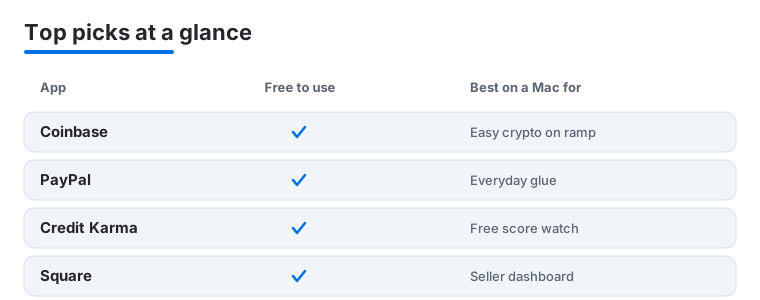
The four apps in the comparison below sit in different buckets, which is exactly why they are useful to look at side by side.
Security comes first with money
Financial data is among the most sensitive information you own. A leaked password to a streaming service is an annoyance. A leaked path into your bank account is a real problem. That is why the safest defaults matter more here than in almost any other category of app.
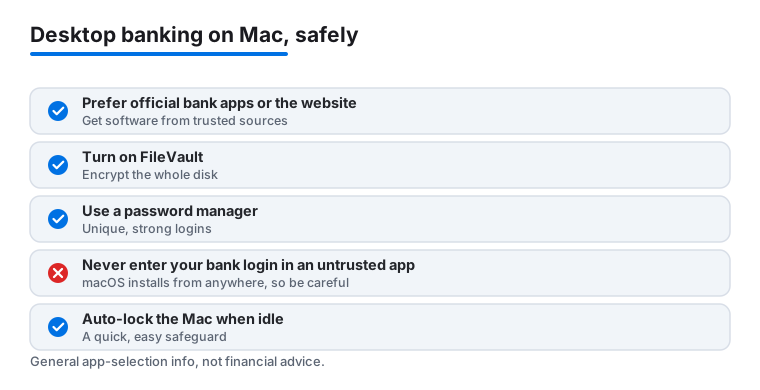
The single most reliable rule is simple. Prefer your bank's official app or its website over a third party app. When you log in directly to your bank, your credentials go to the bank and nowhere else. If you want a budgeting tool to see your transactions, the right way to connect is through a licensed account aggregator that you authorize through your bank, often using a token based flow where you sign in on the bank's own page and grant limited read access. You should never type your bank username and password into an untrusted third party app. A legitimate service routes you to your bank to approve the connection rather than asking you to hand over the login itself.
It also pays to slow down at the moments designed to rush you. Phishing pages copy a bank's look and push you to log in fast, usually arriving through an email, a text, or a search ad rather than a link you typed yourself. On a Mac you have the screen space to read the full address bar, so check that the domain is exactly your bank's before entering anything, and when in doubt open a new tab and type the address by hand. If a message asks for a verification code, your password, or remote access to your machine, treat it as suspect no matter how official it looks.
Set up your Mac to protect your data
A few built in protections do most of the heavy lifting, and they are worth turning on before you start managing money on the machine:
- Turn on FileVault. This is the disk encryption built into macOS. With it enabled, the files on your Mac are unreadable to anyone who does not have your login, which matters if the machine is lost or stolen. You will find it in System Settings under Privacy and Security.
- Use a password manager. Reusing one password across your bank, email, and shopping accounts is the most common way people get compromised. A password manager creates a long, unique password for every site and fills it for you. Apple's built in Passwords app works across your Apple devices, and standalone managers are widely available.
- Turn on two factor authentication everywhere it is offered. A code from an app or a hardware key means a stolen password alone is not enough to get in.
- Keep macOS updated. Security fixes ship in updates, and falling behind leaves known holes open.
Be careful where software comes from
Because macOS lets you install apps from anywhere, not just the App Store, the burden of trust falls partly on you. Apps from the Mac App Store are reviewed and sandboxed, which is a reasonable baseline. If you download finance software directly from a developer's site, make sure it is the real maker and not a copycat, and be wary of links sent by email or message. Only get finance software from trusted sources, meaning the official App Store listing, your bank's own site, or the verified website of an established company. A finance app that arrives through an unexpected message or a search ad deserves extra suspicion, since attackers often imitate well known brands.
One more habit pays off over time. Review which apps and services you have connected to your accounts every few months, and revoke anything you no longer use. The fewer doors into your money, the fewer that can be left unlocked.
This is general information to help you choose and set up apps. It is not financial advice, and it is not a recommendation to buy, sell, or hold any product or service. For decisions about your own money, talk to your bank or a qualified professional.
Frequently asked questions
Do these finance apps have real Mac versions or are they just websites?
It is a mix. Crypto apps like Coinbase and Binance, plus PayPal and Square, offer polished desktop experiences. Many banks, including Capital One and Truist, work through the browser rather than a dedicated Mac app. We noted in each blurb how the app actually runs so you know what to expect before installing.
Is it safe to do my banking on a Mac?
Yes, with the usual care. Keep macOS updated, use a strong unique password with two factor authentication, and avoid public Wi Fi for transfers. The Mac's larger screen actually helps you spot phishing pages and check URLs before you log in, which is harder on a phone.
Which app is best for sending money to friends?
For casual splitting, Venmo and PayPal are easiest since most people already have one. Venmo leans social, PayPal is more universal and better for anyone you would not normally text. Both let you send from a balance or bank for free, with a small fee only when you want an instant cash out.
Can I track my credit score on a Mac for free?
Yes. Credit Karma gives you two bureau scores and alerts at no cost, and Capital One's CreditWise is free even if you are not a cardholder. Reviewing the factors behind your score is genuinely easier on a desktop, since you can read the full breakdown at once.
Is it safe to link my bank account to a budgeting app?
It can be, if you do it the right way. Use a tool that connects through a licensed account aggregator and sends you to your bank's own page to approve a read only connection. Never type your bank login directly into a third party app. When in doubt, stick with your bank's official app or website, which keeps your credentials with the bank alone.
Should I use the Mac App Store or download finance apps from a website?
The Mac App Store is the safer default, since those apps are reviewed and run in a sandbox. If you download from a developer's site instead, confirm it is the genuine maker and not a copycat, and avoid links from emails or ads. Because macOS allows installs from anywhere, the responsibility for checking the source rests partly with you.