
Coinbase Tools for iMac Users: What Actually Works in 2026
For years the advice about Coinbase on a Mac was simple: there is no Mac app, so use the website. That advice is now out of date. The iPhone app, listed as Coinbase: Buy Crypto & Stocks, also runs on Macs with an Apple M1 chip or later, so a newer iMac can install it straight from the App Store. If your iMac is an older Intel model, you are still on the website, and that is fine too. I spent a few weeks buying, tracking, and moving small amounts of crypto across both setups. Here is what worked, the tools I kept going back to, the fees that quietly add up, and the spots where I wish Coinbase did more.
Native app or browser: which one your iMac gets
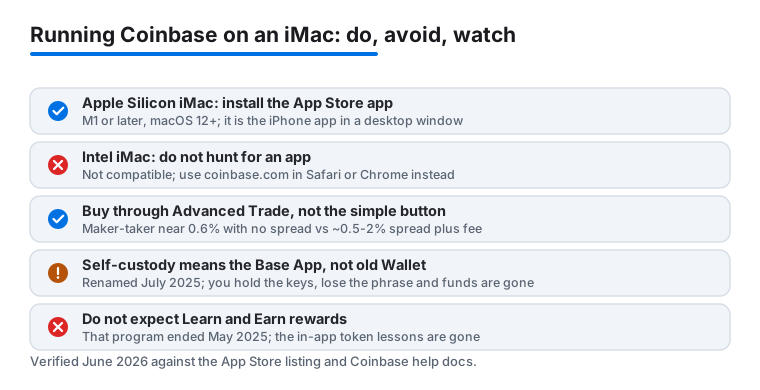
This is the part most older guides get wrong, so it is worth being precise. Coinbase does not ship a separate, purpose-built Mac program. What it does have is the iPhone and iPad app, and on Apple Silicon Macs that same app shows up in the Mac App Store and installs like any desktop app. The App Store listing spells out the requirement: macOS 12.0 or later and a Mac with an Apple M1 chip or later. As of this writing the version was in the 14.x range and updated often.
So which path is yours? If your iMac is a 24 inch model from 2021 onward, or any other M1, M2, M3, or M4 machine, you can search the Mac App Store for Coinbase and install it. If your iMac still runs an Intel processor, the app will not appear as compatible, and that is not a bug. Intel Macs are shut out. You use the full site at coinbase.com instead, which works in Safari and Chrome and gives you the same account.
Honestly, the gap between the two is smaller than you might expect. The installed app on an Apple Silicon iMac is essentially the touch app stretched onto a desktop window, so the layout still leans phone-shaped and some buttons sit where a thumb would reach, not a mouse. The website was built for wide screens and lays your charts, portfolio, and trade panel out side by side. For reading and for placing orders, I leaned on the browser more than the app even on an M-series machine. The app earns its place as a quick-glance balance check that lives in the Dock.
Two setup steps matter whichever route you take. Turn on two-factor authentication when you sign in, and use an authenticator app or a hardware key rather than text messages, since SMS codes can be intercepted. Second, if you keep Coinbase on an iPhone as well, that phone can act as your approval device: a buy you start on the iMac gets confirmed with Face ID on the phone. That handoff is quick and adds a real check before money moves. I also pinned the dashboard as a browser tab so it was one click away each morning.
The tools that actually matter day to day
Coinbase packs in a lot, and not all of it is useful. On a desktop a handful of features did the heavy lifting for me. These are the ones I reached for again and again.
- The portfolio dashboard. Seeing every coin, its current value, and your total balance on one wide screen is the strongest reason to use the iMac over the phone. On the website it is far easier to scan than the cramped mobile view.
- Advanced Trade. This is the order-book side of Coinbase, reachable from the main navigation, and it charges much less than the simple buy button. It gives you limit orders, market orders, and a live order book. If you buy more than once in a while, learning it is the single biggest money saver here. More on the fees below.
- Price alerts and the watchlist. I set alerts on a few coins and got a quiet notification when a target hit, instead of refreshing the page all day.
- Recurring buys. Setting a small weekly purchase took two minutes and then ran on its own, which suits a slow, hands-off approach. Note that recurring buys placed through the simple flow carry the higher simple fee, so weigh convenience against cost.
- Staking. For some assets you can earn a yield by locking them up. Rates and eligibility shift with your region and network rules, Coinbase takes a commission on the rewards, and staked assets often cannot be withdrawn instantly, so read the current terms first.
One feature that used to get recommended is gone. The old Learn and Earn program, where short lessons paid you a little crypto, was discontinued in May 2025. If a guide still tells you to farm free tokens by watching videos in the main app, it is describing something that no longer exists. Coinbase pointed people toward other earning paths instead, including quests inside its separate wallet app, which I cover next.
Practical habits that kept things calm and safe
A few small routines made the whole thing feel steadier. Use the trade preview every single time before you confirm. It shows the exact fee and the amount of crypto you will receive after costs, with no surprises. I caught myself about to overpay more than once, and the preview is what stopped me.
For anything you plan to hold for a while, self-custody is worth understanding. Coinbase used to point people to Coinbase Wallet, a separate product from the main exchange account that puts the private keys in your hands. In July 2025 that product was rebranded as the Base App, a wider social-and-trading app built on Coinbase's Base network. The original Coinbase Wallet still functions, but Coinbase is no longer actively developing it under the old name, so if you go this route you are really adopting the Base App. The keys live on your device, which means more control and also more responsibility: lose the recovery phrase and no support team can get your funds back. Move a tiny test amount first and confirm it arrives before you trust it with anything larger.
Two more habits. Bookmark the official site and only ever type the address yourself, because fake Coinbase pages are a long-running scam and clicking a link from an email is how people get drained. And export your transaction history as a CSV every so often. On the website it takes seconds, and your future self will thank you at tax time, especially if you trade across more than one coin.
The limits and the costs to know about
It is not all smooth. The biggest gripe is fees, and they are not always obvious. The simple buy button quotes a price that already has a spread baked in, usually somewhere around half a percent to two percent depending on the coin and the market, and then a separate transaction fee sits on top. On small purchases that combined cost can run several percent. When I priced the same hundred-dollar buy through Advanced Trade instead, the cost dropped dramatically, because Advanced uses a maker-taker fee that starts near 0.6 percent for smaller volumes and has no separate spread. If cost matters to you, switching from the simple button to Advanced Trade is the easiest saving you will make. Coinbase also sells a subscription called Coinbase One that waives trading fees up to a limit for a monthly charge; whether it pays off depends entirely on how much you trade, so do the math against your own volume before subscribing.
The other catch is the app itself. Because the Mac version is the iPhone app rather than a desktop-native build, it keeps a phone layout and is locked to Apple Silicon, so Intel iMac owners get no app and must use the browser. There is no proper menu-bar ticker from Coinbase directly, so a glanceable price means trusting a third-party tool with read access to your data. Support can be slow when something genuinely goes wrong, which is stressful if a transfer is stuck. And the coins, features, and staking options you see depend on your region, so your dashboard may not match mine. None of this is a dealbreaker for a beginner, but it is worth knowing first.
Good alternatives if Coinbase is not the fit
Coinbase is one of the easier on-ramps I have used, but it is not the only option, and the right pick depends on what you value. If lower trading fees are the priority and you do not mind a busier screen, Kraken runs well in a desktop browser and is a frequent pick for cost-conscious buyers. If you want a cleaner, mobile-first feel and you take security seriously, Gemini is worth a look. For people who want to hold their own keys, a self-custody route like the Base App, or a hardware wallet such as a Ledger or Trezor paired with any exchange, gives you the most control, at the cost of being fully responsible for your own backup.
That said, for most iMac users who just want to buy a little crypto without a headache, Coinbase is a sensible starting point, whether through the App Store on a newer Mac or the website on an older one. If you are still mapping out your finance toolkit, our roundup of the best finance apps for Mac puts Coinbase next to the rest, and you can browse everything in the Finance app hub. Curious how the desktop banking side compares? Our take on what makes the Chase app stand out and our Venmo versus other payment apps guide round out the picture.
FAQ
Is there a real Coinbase app for the iMac?
Yes, with a catch. The iPhone app, Coinbase: Buy Crypto & Stocks, also installs on Macs with an Apple M1 chip or later running macOS 12 or newer, so a recent iMac can get it from the Mac App Store. It is the touch app on a desktop window, not a purpose-built Mac program. Intel iMacs cannot install it and should use the full website at coinbase.com in Safari or Chrome.
How do I lower the fees when buying on Coinbase?
Switch from the simple buy button to Advanced Trade, which uses an order book and charges noticeably less, with no hidden spread. The simple button bakes a spread of roughly half a percent to two percent into the quoted price and adds a transaction fee on top. Always check the trade preview first so you see the exact fee and final amount before you confirm.
Is it safe to keep my crypto in Coinbase on a desktop?
It is reasonable for smaller amounts if you turn on two-factor authentication with an authenticator app or hardware key, and only ever type the official address yourself. For larger or longer-term holdings, consider moving funds to self-custody through the Base App, formerly Coinbase Wallet, or a hardware wallet, so you hold the keys. With self-custody, losing your recovery phrase means losing the funds, so back it up carefully.
Can I link my iPhone and iMac Coinbase accounts?
They are the same account, so signing in on the iMac, whether in the app or the browser, shows the same balances as your phone. The handy part is that the iPhone app can act as your approval device: start a buy on the iMac and confirm it with Face ID on the phone, which is quick and adds a real safety check before money moves.