
DraftKings on iPhone and iPad: Real Tricks We Use to Build Lineups Faster
I have spent more Sunday mornings than I would like to admit rebuilding fantasy lineups on my phone with thirty seconds left before lock. So when people ask whether DraftKings is worth keeping on the home screen, I answer from the trenches. In our testing across an iPhone 15 and an iPad, the DraftKings Fantasy Sports app is fast and well built, but a few settings and habits make the difference between a calm draft and a panicked one. One thing to clear up first, because the App Store listing confuses people: the daily fantasy app you install on Apple devices is an iPhone and iPad app. There is no separate Mac version in the App Store. On a Mac you use the DraftKings website in a browser, not a downloaded app. Here is what actually helped, what got in the way, and where I would point a friend who wants something a little different.
Getting DraftKings running and verified the first time
Installing is the easy part. Open the App Store on your iPhone or iPad, search DraftKings, and grab the app called DraftKings Fantasy Sports rather than one of the look alike pool trackers or the separate Sportsbook and Pick6 apps that sit near it in results. DraftKings actually publishes several apps under the same developer, so it is worth reading the name under the icon before you tap Get. The fantasy app needs iOS 17 or later, so check that your iPhone or iPad is up to date before you install, and it opens within a few seconds on any recent device. The step that trips people up is verification, because this is a real money app and it has to confirm who you are and where you sit.
Have a photo of your ID ready before you start, and turn on Location Services for the app when it asks. DraftKings checks your physical location every time you enter a paid contest, because paid daily fantasy is only legal in certain states and the rules vary. If location is off, you get blocked at the worst possible moment. In our testing the identity check cleared in under a minute when the ID photo was sharp and the glare was gone. If it stalls, retake the photo in daylight rather than retrying the same blurry shot. There is a privacy trade here worth naming plainly: you are handing over a government ID and constant location access. That is the cost of a regulated money app, but go in knowing it.
One more note on devices. Once you are verified on the iPhone or iPad app, the same login works on the DraftKings website if you open it in Safari or Chrome on a Mac or PC. You verify once, then your account, lineups, and balance follow you to the browser. You are not installing a second app on the Mac, because that app does not exist. You are signing in to the same account on the web.
The features that actually matter on a phone or tablet
Most of the app is contest browsing, and the parts I lean on are the ones that save taps when I am in a hurry. A few are worth turning on the day you install.
- Biometric login. If your device supports Face ID or Touch ID, the app can use it so you sign in with a glance instead of typing a password. Look for the toggle under your account or security settings after your first login. It is not always on by default, and on older hardware without Face ID you fall back to a passcode, so do not assume it is there until you see it.
- The lineup star button. Tap the star on a player to favorite them, then sort by favorites when you draft. It turns a long scroll into a short one.
- Live alerts. Allow notifications, but only the ones for contests you have entered. You get a nudge when a player is ruled out, which has saved me from leaving a benched guy in more than once. Be selective, because DraftKings will happily send promotional pushes too.
- Quick deposit with Apple Pay. Linking Apple Pay lets you fund a contest with a double tap instead of typing card numbers under pressure. Convenient, but it also makes spending frictionless, so pair it with the limits I cover below.
None of these are hidden, exactly, but the app does not walk you through them, so most people never flip them on. Spend five minutes in settings the day you install and you save yourself a lot of fumbling later.
Practical tricks for faster, smarter lineups
Here is where the time goes. Drafting on a small screen is slower than people expect, so the trick is to do the thinking before the clock starts. I build a short list of players I like in the Notes app the night before, then favorite each one inside DraftKings. When the lineup opens, I sort by my favorites and the whole roster comes together in a minute or two instead of frantic scrolling. The iPad helps here because the larger screen shows more of the player pool at once, so if you own one, draft on it and keep the phone for couch edits.
A second habit that helped: reuse a lineup structure when you enter the same contest type across several slates. Rebuilding an identical roster by hand is where mistakes creep in. DraftKings lets you edit and resubmit from an existing entry in many contest formats, so you carry your structure over and only swap the names that changed. Check the exact wording in the app for the slate you are in, since the option moves around between contest types and is not labeled the same everywhere.
Watch your salary cap as you build. Keep the remaining salary figure in view so the number updates as you fill slots. That live readout stops the classic mistake of assembling a lineup you cannot actually afford and then scrambling to downgrade a player with the clock running. On the iPad you can usually see the cap, the roster, and the player list together without pinching and zooming, which is the single biggest reason I prefer the tablet for the actual draft.
Last tip, and it is a boring one that matters: lock in your entries early. The location check runs at entry time, and if you wait until two minutes before kickoff to confirm a lineup, a weak indoor GPS signal can leave you stuck. Submit when you can, then make swaps as news breaks rather than building from scratch at the buzzer.
Limits, downsides, and the things nobody warns you about
I like this app, but it is not flawless and an honest review should say so. The biggest friction is location. If your phone GPS is weak indoors, the location check can fail right before lock, and there is no graceful way around it other than stepping toward a window or going outside. Plan for that on game day rather than discovering it at the buzzer. It is also worth repeating that the app tracks your location continuously while you use it, which some people are not comfortable with.
The app is also designed to keep you spending, and the steady stream of promos and contest nudges wears on you. The healthiest move I made was setting a deposit limit early. 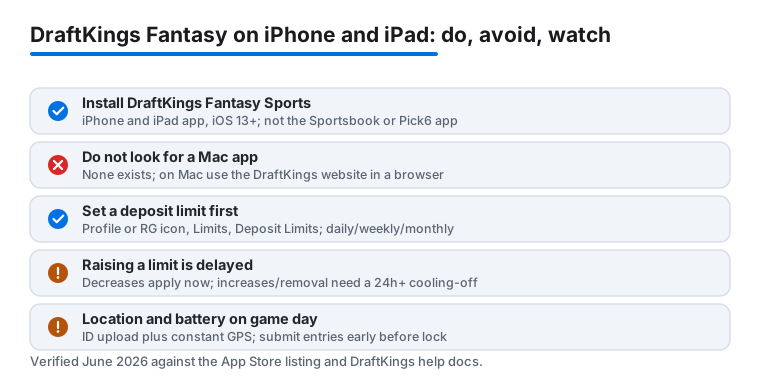
Battery is another honest caveat. Leaving live scoring open during a full slate drains the phone fast, partly because of the constant location and data activity, so I keep it backgrounded and only open it to make changes. Withdrawals are the last thing nobody warns you about. Support is responsive by chat, but cashing out can take a few days to land depending on your method, and some payment types are slower than others. Do not expect winnings to hit instantly, and read the withdrawal terms before you assume the money is liquid.
Good alternatives if DraftKings is not your fit
DraftKings is the one I keep, but it is not the only option and the right pick depends on how you like to play. If you want a similar daily fantasy experience to compare head to head, FanDuel is the obvious rival and its interface feels a touch cleaner to some players, though the contest mix and the same location and ID requirements are broadly similar. For people who prefer a lighter pick higher or lower style of game rather than full salary cap drafting, Underdog Fantasy is genuinely fun and far less fiddly on a phone. And if your real goal is simply tracking a season long league with friends, a free league manager like the ESPN or Yahoo Fantasy app does that without any of the real money machinery, which also means no deposit, no ID upload, and no location tracking.
My honest take after a lot of slates: keep DraftKings if you enjoy the deep contest variety and you have the discipline to set your limits first, and try one of the lighter apps alongside it if the daily grind starts to feel like work. All of these are phone and tablet apps, not Mac apps, so plan to play from your iPhone or iPad and use a browser if you want a bigger screen on a computer. For broader picks beyond fantasy, our roundup of the best finance apps for iPhone and the wider Finance app hub are good next stops. If you also bank and pay on your phone, the way we set up the Navy Federal iOS app and walked through what makes the Chase app stand out pairs nicely with keeping your contest funding tidy.
FAQ
Is there a DraftKings app for Mac?
No. The DraftKings Fantasy Sports app in the App Store is an iPhone and iPad app, and there is no separate Mac download. On a Mac you sign in to the DraftKings website in a browser like Safari or Chrome using the same account you verified on your phone. Your lineups and balance stay in sync.
Why does DraftKings keep asking for my location?
Paid fantasy contests are only legal in certain states, so the app verifies your physical location every time you enter one. Turn on Location Services for DraftKings, and if the check fails indoors, move closer to a window or step outside where your phone gets a stronger GPS signal. The app tracks location only while you are using it for contests.
How do I make drafting lineups faster on a small screen?
Build a shortlist of players the night before, favorite each one with the star button, then sort by favorites when the lineup opens. Keeping the salary remaining figure on screen helps you fill slots without going over the cap. If you have an iPad, draft on it for the bigger view and use the phone for last second edits.
Is there a way to control how much I spend?
Yes, and I recommend setting it up immediately. Tap your profile picture or the RG icon, open the Responsible Gaming Limits area, and set a daily, weekly, or monthly deposit limit. Lowering a limit takes effect right away, while raising or removing one triggers a cooling off period of at least twenty four hours, which is exactly what stops you from chasing losses.