
Best Gaming Apps for Mac (2026)
The Mac has quietly turned into a real gaming machine, and Apple Silicon is the reason. We spent weeks testing on a MacBook Air and an M-series iMac to see what actually runs well, what feels great with a controller, and what is just a quick break between meetings. Every pick below either runs natively on macOS, comes through Apple Arcade, or streams from the cloud in a browser. They are ordered best first. For more by platform, see the full gaming hub, the wider Mac apps guide, or jump over to our best gaming apps for iPhone roundup.
1. Steam
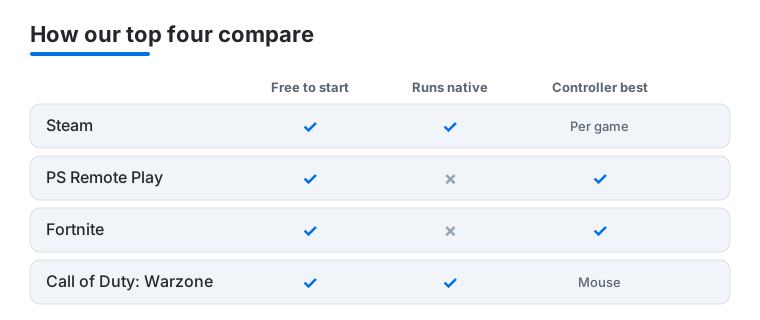
If you are serious about gaming on a Mac, Steam is the first thing we install. It is free, your whole library lives in one place, and the native client runs cleanly on Apple Silicon. Plenty of titles now ship with Mac builds, and Steam clearly flags which ones do with an Apple logo on the store page. In our testing the sales and cloud saves alone make it worth keeping pinned to the Dock.
2. PS Remote Play
PS Remote Play streams your PlayStation 5 straight to the Mac over your home network, and it is free if you already own the console. We paired a DualSense over Bluetooth and played from the kitchen table while someone else used the TV. On a solid 5GHz connection it felt close to native, with only a slight lag in fast shooters.
3. Fortnite
Fortnite has no native Mac build, but it is playable on a Mac through cloud streaming in a browser using Xbox Cloud Gaming or GeForce NOW. The battle royale is free, with cosmetics paid. A controller is far more comfortable than the trackpad here, and the build mode is easier to manage once you connect one. Your connection matters, so a wired or strong 5GHz link keeps a squad night steady.
4. League of Legends
League of Legends runs natively on macOS and Apple Silicon, so there is no streaming layer to fuss with. It is free to start, and the whole game is mouse driven, which suits a Mac well. In our testing matches felt crisp on a wired or strong Wi-Fi connection. Bring a gaming mouse and headphones, since a typical match runs longer than the quick breaks elsewhere on this list.
5. Chess.com
Chess.com is the app we open most on a quiet afternoon, and it works in any Mac browser. The board is crisp on a big iMac display, puzzles load instantly, and the lessons actually improved our game over a month. It is free to play with a membership for deeper analysis and unlimited puzzles. The post game review tool is a useful way to learn from your own games.
6. Solitaire
Sometimes you just want a calm game of cards, and Solitaire on a Mac is exactly that, with many free browser and Mac App Store versions to choose from. We appreciated dealing on a big, uncluttered display where every card is easy to read. It is a relaxed, no pressure break, ideal for unwinding or thinking through a problem while your hands stay busy with something simple.
7. Baldur's Gate 3
Baldur's Gate 3 has a native macOS build that runs on Apple Silicon, and it is one of the deepest role playing games you can play on a Mac. It is a buy once purchase with no ongoing fees, available through Steam and the Mac App Store. The story driven combat works well with a mouse and keyboard, and on a capable M-series machine it holds up over very long sessions.
8. Stardew Valley
Stardew Valley is a relaxed farming and life sim with a native Mac version, and it is a buy once game with no in-app purchases. It runs smoothly even on a modest Apple Silicon Mac, which makes it a fine fit for a machine you also use for work. We left it open in a window between tasks and tended the farm in short bursts, and it is just as happy on a controller as on the keyboard.
9. Hades
Hades is a fast, replayable action game with a native macOS build that runs well on Apple Silicon. It is a buy once title, sold through Steam and the Mac App Store, with no ongoing costs. Runs are short enough to fit a break yet build into a longer story over time. A controller feels natural here, though the keyboard works fine, and the pace suits both quick sessions and longer evenings.
10. Balatro
Balatro is a poker themed roguelike that is easy to learn and hard to put down, with a native Mac version available on Steam and the Mac App Store. It is a buy once game with no in-app purchases. The whole thing plays with a mouse or trackpad, so no controller is needed. We kept a run going in a small window beside our work, since each hand only takes a moment to play out.
11. World of Warcraft
World of Warcraft runs natively on macOS and Apple Silicon through the free Battle.net client, with a monthly subscription for play. It is built around a mouse and keyboard, which suits a Mac, and it scales nicely to a large iMac display. This is a long haul game rather than a quick break, so plan for a proper session and a strong connection when you sit down with it.
12. Civilization VI
Civilization VI is the turn based strategy classic, and it has a native macOS build sold through Steam and the Mac App Store. It is a buy once game, with optional expansions if you want more. The slower, thoughtful pace plays perfectly with a mouse and trackpad, and it sits comfortably in a window on a big display. Be warned that one more turn has a way of becoming an hour.
13. The Sims 4
The Sims 4 runs natively on macOS and Apple Silicon, and the base game is free to download with optional paid packs you can add later. Building homes and steering your Sims works well with a mouse on a roomy display. It is a relaxed, open ended game rather than a quick puzzle, so it suits an afternoon when you want something to tinker with rather than win.
14. Minecraft
Minecraft runs natively on the Mac, and the Java Edition in particular has long been at home on macOS. It is a buy once purchase. Whether you are building, exploring, or playing on a server with friends, it works well with the keyboard and mouse, and it scales from a quick visit to a long building session. A steady choice for solo play or a shared world with others.
15. Among Us
Among Us has a native Mac version on Steam and works well as a quick social game with friends. It is inexpensive to buy on the Mac and plays fine with a mouse and keyboard. Rounds are short, which makes it easy to fit a few in over a coffee break, and it shines most when you have a group on a voice call. Light, sociable, and easy to pick up.
16. Apple Arcade
Apple Arcade is a subscription that runs on the Mac with no ads and no in-app purchases, which makes it a calm way to play. The catalog is curated and built for Apple devices, so the games feel polished and your progress carries across iPhone, iPad, and Mac. It will not give you the latest blockbuster, but for clever indies and relaxed everyday play it is a tidy, predictable option.
17. GeForce NOW
GeForce NOW is cloud gaming that runs in a Mac browser, streaming games you already own on stores like Steam and the Epic Games Store. There is a free tier with wait times and paid tiers for longer, smoother sessions. It is the route we reach for when a game has no Mac build, and a wired or strong 5GHz connection keeps the picture steady and responsive.
18. Xbox Cloud Gaming
Xbox Cloud Gaming streams a rotating library of games to a Mac browser with nothing to install, as part of a Game Pass Ultimate subscription. It is a simple way to play Windows-first titles your Mac could never run on its own. As with any cloud service the experience depends on your network, so a steady connection and a Bluetooth controller make it far more comfortable.
Not sure where to start? Here is how our top four picks compare on the things that matter most when gaming on a Mac.
How to choose games for your Mac
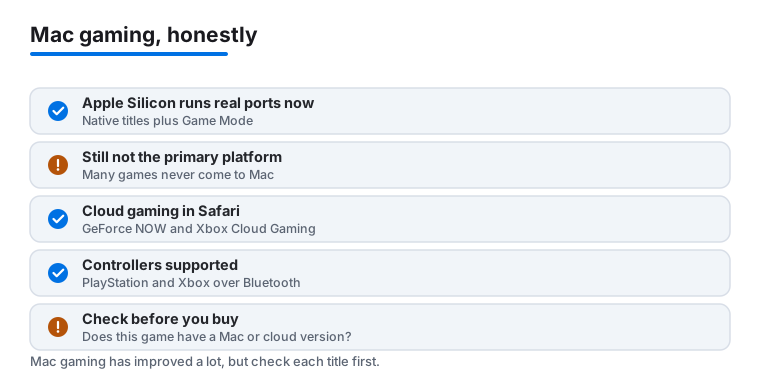
Mac gaming has improved a lot, and most of the credit goes to Apple Silicon. The M-series chips are fast and efficient, more studios now build real Mac versions, and macOS has a Game Mode that quietly hands the game priority for the processor and graphics while reducing input lag on Bluetooth controllers and AirPods. The honest part to keep in mind is that the Mac is still not the primary gaming platform that Windows is. Many big titles never get a Mac version at all, and others arrive months or years after the PC release. So the most useful thing you can do before spending money is simple: check that the specific game you want actually has a Mac or cloud version, rather than assuming it does.
It also helps to be clear about what you want from a session. A quick card game between tasks, a relaxed farming sim you check on through the day, and a demanding action or strategy game you sit down with for an hour all point toward different choices. A casual game can sit in a small window all day without bothering anything, while a heavy title wants your full attention and a charged battery. There are three realistic routes onto a Mac, and most people end up using more than one. Once you know what kind of session you are after, picking the right route is easy.
Route 1: Native Mac games
A native game is built to run directly on macOS and Apple Silicon, with no streaming and no extra layer in between. This is the smoothest experience when it is available, because the game uses the hardware directly. The library here has grown in a real way. Recent native titles include Baldur's Gate 3, Resident Evil Village, Death Stranding, and Lies of P, alongside long standing favorites like Stardew Valley, Civilization VI, and World of Warcraft, all of which run on a capable Apple Silicon Mac.
You will find native games in two main places:
- Steam. Install the free Steam client and look for the Apple logo on a game's store page, which marks a macOS build. Steam is honest about this, so if there is no Mac icon, there is no native version.
- The Mac App Store. A growing set of titles, from indies to bigger releases, are sold or downloaded directly here.
Before buying anything that is not free, confirm the Mac build exists and check the listed requirements. A game that runs well on an M-series chip may not run at all on an older Intel Mac, so your specific machine matters.
Route 2: Cloud gaming in a browser
Cloud gaming runs the game on a powerful server somewhere else and streams the video to your Mac, while your controller inputs travel back the other way. The big advantage is that the game does not need a Mac version at all, because the heavy work happens on the server. This is how you can play many Windows-first titles on a Mac, including Fortnite.
Two services run right inside a Mac browser, with nothing to install:
- GeForce NOW. Streams games you already own on stores like Steam and the Epic Games Store. It has a free tier with wait times and paid tiers for longer, smoother sessions.
- Xbox Cloud Gaming. Part of a Game Pass Ultimate subscription, it streams a rotating library of games with nothing to download.
Cloud gaming lives and dies by your internet connection. A wired Ethernet link or a strong 5GHz Wi-Fi signal gives a steady, responsive picture, while a weak connection adds lag and blurriness that fast games punish. It is the best route for demanding titles that have no Mac build, as long as your network is up to it.
Route 3: Apple Arcade
Apple Arcade is a subscription that gives you a curated set of games with no ads and no in-app purchases, all built to run on Apple devices. Because the titles are made for the platform, they tend to feel polished and consistent, and your subscription carries across iPhone, iPad, and Mac, so a game you start on the phone can continue on the Mac with the same progress. It will not give you the latest blockbuster shooter, but for family-friendly games, clever indies, and relaxed play it is a tidy, predictable option that avoids the constant prompts to spend more. If you mostly want something pleasant to dip into rather than the newest release, it is worth a look.
Controllers and a few practical tips
You do not need a controller for puzzle, card, and many strategy games, which play perfectly well with the keyboard and trackpad. For action games and anything you stream, a gamepad makes a real difference. The Mac supports modern Bluetooth controllers from both PlayStation (the DualSense) and Xbox, and pairing one takes a moment in System Settings under Bluetooth. The same controller works across native games and both cloud services, so you only need one.
A few habits make Mac gaming smoother:
- Match the game to the moment. Keep light games in a small window beside your work, and save demanding ones for when you can give them your full attention.
- Mind the heat on a laptop. Heavier games will spin up the fans and warm a MacBook, so a flat, hard surface helps airflow more than a couch cushion.
- Use Ethernet for cloud play when you can. A wired connection removes most of the lag and image wobble that hurt streamed games.
- Confirm before you pay. Whether the route is native, cloud, or Arcade, make sure the exact game you want is supported on your Mac before you spend anything.
Put together, these three routes cover most of what people want. Native games give you the cleanest experience when they exist, cloud gaming opens the door to Windows-first titles your Mac could never run on its own, and Apple Arcade is a calm, ad-free corner for everyday play. Start with what kind of session you are after, check the game really runs on your machine, and the Mac handles the rest more capably than it used to.
Frequently asked questions
Can you really game on a Mac in 2026?
Yes, and far better than a few years ago. Apple Silicon chips are genuinely capable, and more studios ship native Mac builds every year. Between Steam, cloud streaming, and remote play from a console, we comfortably played everything from casual card games to demanding role playing titles during testing. A recent M-series Mac gives you the widest, smoothest selection.
Do I need a game controller?
Not for everything, but it helps a lot. Card and strategy games like Solitaire, Balatro, and Civilization VI play perfectly with the keyboard and trackpad. For Hades, Fortnite over the cloud, and PS Remote Play, we found a Bluetooth controller such as a DualSense or Xbox pad made a real difference in comfort and performance.
Are these Mac games free to play?
It is a mix. League of Legends, The Sims 4 base game, and cloud-streamed Fortnite are free to start with optional spending, while titles like Baldur's Gate 3, Stardew Valley, Hades, and Civilization VI are buy once with no ongoing fees. Steam and PS Remote Play are free apps, and Apple Arcade, GeForce NOW, and Xbox Cloud Gaming are subscriptions. You can build a solid library without spending much up front.
Will these games slow down my Mac for work?
The light ones will not. Card and casual games sip resources and sit happily in a small window beside your other apps. Heavier titles like Baldur's Gate 3 and World of Warcraft will spin up the fans and warm the chassis, so we suggest closing them before a big work session. On an Apple Silicon Mac, switching back to work stays snappy.
How do I know if a game has a Mac version?
Check before you buy. On Steam, look for the Apple logo on the game's store page, which marks a native macOS build, and if it is missing there is no Mac version. For titles without a Mac build, see whether they are offered through GeForce NOW or Xbox Cloud Gaming, both of which run in a browser. When in doubt, the safest path is to confirm support first rather than assume it.
What is macOS Game Mode and do I need to turn it on?
Game Mode is a macOS feature that gives the active game first call on the processor and graphics while you play, and it lowers input lag for Bluetooth controllers and AirPods. You do not need to set it up. It switches on automatically when a game runs in full screen, so you simply get a steadier experience without changing anything.