
Best Security & Privacy Apps for Mac (2026)
A Mac feels safe out of the box, but a few well chosen apps turn that quiet confidence into real protection. We spent weeks running these on our own machines, from coffee shop Wi-Fi to handling client logins, and these are the ones we kept. For the wider picture, browse our security and privacy hub or the full best Mac apps roundup, and if you carry your security across devices, our iPhone picks pair nicely with everything here.
1. ExpressVPN
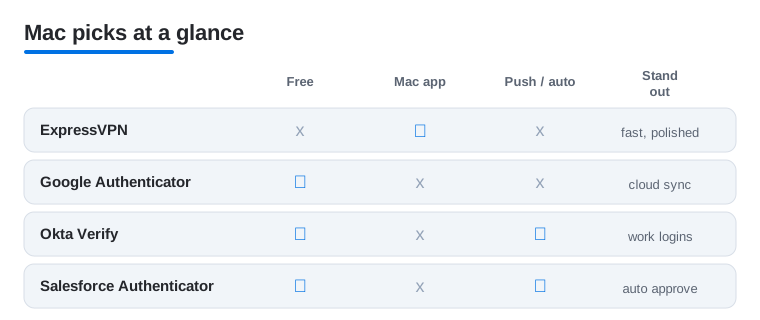
This is the VPN we reach for first on a Mac. The menu bar app connects in a second or two and stays out of your way, which matters when you just want coffee shop Wi-Fi to stop leaking. In our testing, speeds held up well for streaming and big downloads. It is paid only, a few dollars a month on a longer plan and more month to month, but the polish earns it.
2. Google Authenticator
The simplest way to add two factor codes to your accounts, and it is free. Google Authenticator shines once you turn on cloud sync, so a new Mac or a lost phone no longer means scrambling for backup codes. It suits anyone who wants protection without fuss. There is no Mac desktop client, so you read codes from your phone, but the workflow is quick and reliable.
3. Okta Verify
If your job runs on Okta, this is the app that gets you in. It handles push approvals and one tap sign in for work accounts, and in our experience the prompts arrive instantly when you log into a Mac each morning. It is free and tied to whatever your employer sets up. Not for personal logins, but for company access it removes real password friction.
4. Salesforce Authenticator
A focused, free tool for anyone living in Salesforce all day. It sends a push when you sign in, and the location aware automation can auto approve from trusted places like your office, which we found genuinely saves taps. There is no native Mac app, so when you log into Salesforce on your Mac you approve it by tapping the prompt on your iPhone or Apple Watch, the same way a phone only authenticator works. It only matters if your org uses Salesforce, but for those folks it is a quiet daily win.
5. Browser privacy apps
The fastest privacy upgrade on a Mac is taming the browser. A private browser like Brave or a good content blocker strips trackers and ads before pages even load, and in our testing sites felt noticeably lighter. Most options are free, with optional paid tiers. If you want a deeper walkthrough of locking things down, our iPad privacy guide covers the same browser ideas for tablets.
6. VPN apps
Beyond our top pick, the wider VPN field is worth knowing, since the right one depends on your budget and what you stream. We tried several on macOS and found the menu bar experience varies a lot, from one click connects to clunky apps that nag you. Free tiers usually cap data, while paid plans run five to ten dollars a month. Test one monthly before committing for a year.
How to choose security and privacy apps for your Mac
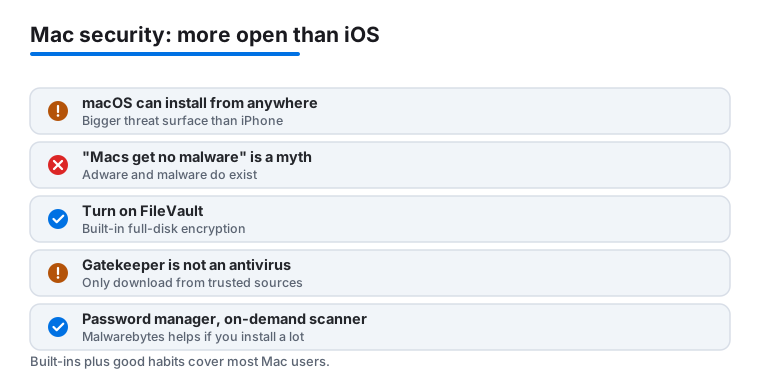
Before you install anything, it helps to understand one thing about macOS that trips people up. A Mac is not an iPhone. On iPhone and iPad, every app comes through one tightly controlled App Store, so the threat surface is small. macOS is far more open. You can install software from anywhere on the web, from indie developer sites to download portals, and that freedom is exactly why the threat surface is bigger. Macs do get malware, adware, and the occasional fake installer. The old idea that Macs cannot catch anything is a myth, not a feature.
The good news is that macOS already does a lot of quiet work for you, and a few well chosen apps plus good habits cover the rest. None of this requires you to become a security expert. It requires a handful of sensible defaults and a little skepticism about what you download. Here is how to think about it, in roughly the order that matters.
Know what the built in protections do (and do not do)
Apple ships two background defenses that most people never notice. Gatekeeper checks that an app is signed by a known developer and has passed Apple's notarization before it runs, and it warns you when something is not. XProtect is Apple's built in malware signature scanner that quietly blocks known bad files. Both are genuinely useful and run for free without setup.
The honest caveat is that they are not a full antivirus suite. Gatekeeper screens where an app came from, not everything it does after you approve it, and XProtect only catches threats Apple already has signatures for. A brand new piece of adware or a clever fake can slip past until Apple updates those signatures. That is why the single most effective habit costs nothing: only download apps from sources you trust, such as the Mac App Store or a developer's official site, and be skeptical of a random download that asks you to right click to bypass a security warning. If a site pushes you to disable a protection just to run its installer, that is the moment to stop and reconsider.
Turn on the encryption you already own
If you do one thing today, turn on FileVault. It is full disk encryption built straight into macOS, found in System Settings under Privacy and Security. Once it is on, a lost or stolen Mac is just an expensive paperweight to a thief rather than an open filing cabinet of your documents, photos, and saved logins. It runs invisibly in the background and you will not notice it day to day on modern hardware. When you switch it on, macOS gives you a recovery key. Store that key somewhere safe and separate, such as a password manager or a printed copy at home, because without it (and without your account password) the encrypted data really is gone for good. That permanence is the point, and it is also the one thing worth being careful about.
Use a password manager
Reused passwords are still the most common way accounts get broken into, and no app can protect you from a password you used on a site that later leaked. A password manager generates a long, unique password for every account and fills it for you, so a breach at one service does not cascade into all the others. macOS includes the built in Passwords app, which syncs across your Apple devices and handles passkeys and two factor codes. Standalone managers work well too if you live across Mac, Windows, and Android. Pair this with two factor authentication on your important accounts, using an authenticator app like the ones in our list above.
Add a VPN for public Wi-Fi, with realistic expectations
A VPN earns its place when you are on networks you do not control, such as a cafe, an airport, or a hotel. It encrypts your traffic so the person running that Wi-Fi cannot read it, and it hides your real IP address from the sites you visit. Those are real, useful benefits.
It is just as important to know what a VPN does not do. It is not anonymity. Your VPN provider can see your traffic instead of your network, so the provider you choose matters, and a free VPN that costs you nothing may be paying its bills by logging or selling what you do. A VPN does not block trackers, ads, or malware on its own. The sites you log into still know who you are, and cookies and account sign ins still follow you around. It does not make you immune to phishing or a bad download either. Think of it as a private tunnel for your connection, not a force field. At home on a network you trust, it matters far less, which is why we treat it as a travel and public Wi-Fi tool rather than something to leave on around the clock.
Consider an on-demand scanner if you install a lot
If you regularly install software from outside the Mac App Store, a reputable on-demand scanner is a sensible backstop. Malwarebytes for Mac is a well known option: you can run it when something feels off, let it sweep for adware and known malware, and clean up what it finds. The key word is reputable. The Mac has a long history of fake cleaner apps that are the very thing they claim to remove, so stick to names with a track record and ignore pop ups that scream your Mac is infected.
The honest bottom line
Most people do not need a heavy security stack on a Mac. The built in protections, Gatekeeper, XProtect, and FileVault, combined with a password manager and the simple habit of downloading only from trusted sources, cover the large majority of real risk. Layer in a VPN for travel and public Wi-Fi, and add an on-demand scanner if you install a lot from outside the store. Pick the few tools that match how you actually use your machine, and skip the rest.
Frequently asked questions
Do I really need a VPN on my Mac?
Not all the time, but it earns its place on public Wi-Fi, when traveling, or if you want to keep your browsing private from your network. At home on a trusted connection it matters less. A good Mac VPN runs quietly from the menu bar and only adds a second or two to your day. Just remember it is a private tunnel, not anonymity, and it does not block trackers or malware.
Is the free version of these apps enough?
For authenticator apps, yes. Google Authenticator, Okta Verify and Salesforce Authenticator are fully free and cover what most people need. VPNs are where paying makes a real difference, since free tiers tend to cap your data or slow you down right when you want speed.
Can I use one authenticator app for everything?
Often yes. Google Authenticator can hold codes for most personal accounts in one place. Work tools like Okta Verify and Salesforce Authenticator are usually required by your employer for those specific logins, so many people end up running a personal app alongside a work one.
How do I keep my Mac private without installing much?
Start with the browser. Switching to a privacy focused browser or adding a content blocker cuts trackers immediately and costs nothing. Then turn on two factor authentication for your important accounts. Those two steps alone close most of the gaps before you add a VPN.
Do Macs actually get malware, or is that just an iPhone thing?
Macs do get malware, mostly adware and fake installers that arrive when you download software from outside the Mac App Store. The idea that Macs cannot catch anything is a myth. macOS is more open than iOS, so the threat surface is larger. Gatekeeper and XProtect block a lot for free, but they are not a full antivirus, so downloading only from trusted sources is your best defense.
Should I turn on FileVault?
Yes, for almost everyone. FileVault is full disk encryption built into macOS, found in System Settings under Privacy and Security. Once it is on, a lost or stolen Mac is unreadable to a thief instead of an open book of your files and saved logins. It runs in the background and you will not notice it day to day on modern hardware.