
Best Streaming & TV Apps for Mac (2026)
Your Mac is a genuinely lovely place to watch TV once you know which apps pull their weight, and which just push you to a browser tab. We sat down with a MacBook and an external display and worked through the big streaming and live TV services to see which ones felt native, which buffered, and which were worth a subscription. Below are the picks we actually keep installed. For the wider category you can browse our streaming and TV guide, or see what else earns a spot in our best Mac apps roundup.
1. Apple TV
The one app that feels truly at home on macOS. Apple TV handles your purchases, rentals and the originals, and in our testing playback was instant with crisp 4K on a decent display. It suits anyone already in the Apple ecosystem, since your watch history syncs across iPhone and iPad. The app is free, though most content needs a rental or an Apple TV+ subscription.
2. Disney+
Disney+ looks gorgeous full screen on a Mac, and the catalog of Marvel, Star Wars and Pixar makes it an easy household pick. We found profile switching quick and the kids profiles genuinely locked down. Downloads are mobile only, so on Mac you stream everything. Plans start around ten dollars a month with ads, and the Hulu bundle is better value if you watch a lot.
3. HBO Max
If you care about prestige drama and big films, HBO Max is the one we reach for most. The Mac app held a stable 4K stream over Wi-Fi in our tests and the interface stays out of the way. It suits film buffs and anyone catching the latest series the night they drop. There is no free tier, but the ad plan is a few dollars cheaper.
4. ESPN
ESPN is the sports hub we lean on for scores, highlights and live games in one window. On a Mac it is brilliant for a second screen while you work, with a feed that surfaces your teams first. Some marquee events sit behind the paid ESPN tier, but plenty of news, clips and shows are free.
5. Twitch
Twitch is where the Mac really shines, since the big screen makes chat and stream easy to follow side by side. We watched for hours with no slowdown, and picture in picture lets you keep a stream floating while you do other things. It suits gamers, creators and fans of live community viewing. Watching is free, with subscriptions and Bits as optional ways to support streamers.
6. Apple Vision Pro
If you have stepped into spatial computing, the Vision Pro companion ties neatly into your Mac setup, letting you mirror a giant virtual screen and move content between devices. In our testing the handoff felt smooth and the cinema environments are a real treat for films. It is niche and the hardware is pricey, but for an immersive movie night nothing on this list comes close.
7. Showtime
Showtime earns its keep for originals, documentaries and the occasional big fight. On a Mac the player is clean and remembers where you left off across episodes, which we appreciated mid-binge. It suits people who want curated drama rather than an endless feed. There is no free option, though it often bundles with Paramount+, which is the route we would take to stretch the value.
8. ABC
ABC is the free network app we keep for next day catch up on primetime shows and live local news where it is supported. On a Mac it loads quickly and the episode pages are easy to scan. It suits cord cutters who still follow network series. Most recent episodes are free with ads, while the full back catalog usually wants a TV provider sign in.
9. CBS
The CBS app, now the front door to Paramount+, is a strong pick for sports, news and a deep library of shows. We found live CBS streaming reliable on Mac when signed in, and the on demand section is bigger than you expect. It suits NFL on CBS fans and daytime drama watchers alike. A few episodes are free, but live TV wants a Paramount+ login.
10. AMC
AMC is the one to open when you are chasing a specific series rather than browsing, and it works fine in a Mac browser window where available. In our testing playback was steady and a provider sign in unlocked the most. It suits fans of AMC originals who want them without a cable box. Some recent episodes are free, while the rest needs a provider login or AMC+.
11. NFL
For football, the NFL app on Mac is a tidy way to follow live scores, RedZone style highlights and league news through the season. We liked having it open in a corner on Sundays while doing other things. It suits any fan who wants the schedule, standings and clips in one place. The basics are free, but live out of market games and the premium film need an NFL+ subscription.
12. Fox Sports
Fox Sports covers a huge slice of live action, from NFL and college football to soccer and motorsport. On a Mac the live player was quick to start in our tests once we authenticated with a provider. It suits broad sports fans who follow more than one league. A lot of highlights and shows are free, while live games typically require you to sign in with a participating TV provider.
13. Telemundo
Telemundo is our pick for Spanish language TV, novelas, news and live soccer. The Mac experience is clean and the live schedule made it easy to catch matches we cared about. It suits Spanish speaking households and anyone learning the language through real broadcasts. Many shows stream free with ads, while live channels and full episodes generally ask for a TV provider sign in.
14. Roku
The Roku app is less about watching on the Mac and more about running the show, acting as a remote, a private listening relay and a way to cast. We used it to push content from the Mac to a Roku TV and it just worked. It suits anyone with Roku hardware who wants keyboard search instead of an on screen one. The app and the Roku Channel are free.
15. Xfinity
If Comcast is your provider, the Xfinity Stream app turns your Mac into a full TV, with live channels, your cloud DVR and on demand in one window. In our testing the guide loaded fast and DVR recordings played back cleanly at home. It suits existing Xfinity subscribers who want their package on a laptop. It is included with a qualifying plan rather than sold on its own.
16. Fire TV
Like the Roku app, Fire TV is most useful on a Mac as a companion, helping you search, control playback and manage a Fire TV device with a real keyboard. We found typing show names far less painful than pecking at an on screen grid. It suits Amazon device owners who want quick access to their Fire TV setup. The app itself is free to download and use.
Watching TV on a Mac is a slightly different experience from watching on a phone, a tablet, or a dedicated streaming box, and the choices you make up front decide whether it feels effortless or fiddly. This section walks through how to pick a streaming app for a Mac, what the trade offs actually mean in daily use, and one important safety note before you go looking for anything labeled free.
A real Mac app versus a browser tab
The first thing to check is whether a service ships a proper Mac app or just expects you to watch in a browser. The difference is bigger than it sounds. A native app, the kind you download from the Mac App Store or install from the service itself, tends to start playback faster, remember where you left off, and behave well with full screen mode and the menu bar. It also keeps your viewing in its own window, so closing a browser tab by accident does not stop your show.
A browser tab is not automatically worse. Plenty of services stream cleanly in Safari or another browser, and for something you watch once in a while, a tab is perfectly fine. The catch is that browser playback can be more sensitive to extensions, to having many tabs open, and to the browser updating underneath you. If a service you watch daily only works in a tab, it is worth pinning that tab or giving it its own window so it is not competing with the rest of your work.
AirPlay and picture in picture
Two macOS features quietly make a Mac better for viewing than people expect. AirPlay lets you send what is playing on the Mac to an Apple TV or a compatible smart TV, which is handy when you start something at your desk and want to finish it on the big screen. Not every app allows AirPlay for every title, since some content is restricted, but when it works the handoff is quick.
Picture in picture is the other one. It pops the video out into a small floating window that stays on top while you do other things, so you can keep a game or a stream visible in a corner while you work. Most native apps support it, and many browser players do too once you start playback. If you tend to half watch sports or live streams while doing something else, picture in picture is the single feature that makes a Mac shine for this.
Downloads for offline viewing
If you travel or face patchy Wi-Fi, offline downloads matter, and this is where the Mac is often weaker than the iPhone or iPad. Many services treat downloads as a mobile only feature, so on a Mac you stream and that is it. There are exceptions, but the safe assumption is that long flights and train rides are better served by downloading on a phone or tablet first. It is worth checking each service before you rely on it, because policies change and a few apps have started adding Mac downloads.
Ad supported versus ad free tiers
Almost every paid service now sells two versions of the same thing: a cheaper plan with ads and a pricier one without. The right choice is personal. If you mostly watch in the background or do not mind a few breaks, the ad tier saves real money over a year. If you sit down for films and find ads break the mood, the ad free tier is worth it. A couple of things to watch for: some ad tiers quietly drop features like the highest resolution, downloads, or certain titles, and a few live and sports streams still show ads even on the higher plan, since those breaks come from the broadcast itself rather than the service.
Regional availability
What you can watch depends heavily on where you are. Catalogs differ by country, some apps only exist in certain regions, and live sports in particular are carved up by local rights deals. An app that is full of content in one country can look sparse in another, and a show that is included in one place may be a separate rental somewhere else. If you travel, expect the lineup to shift, and do not be surprised when a title you were partway through is suddenly unavailable. This is a licensing reality, not a fault in the app.
A safety note worth taking seriously
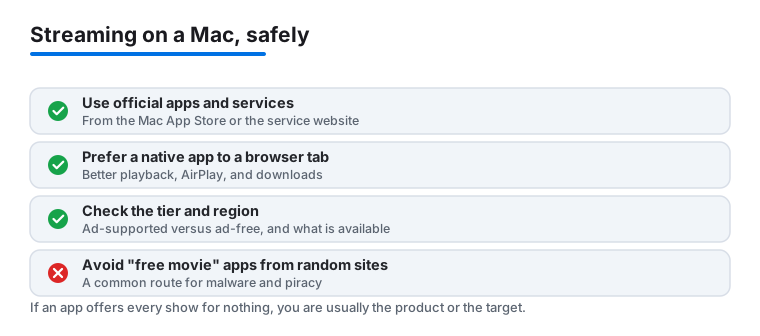
One honest warning before you go searching. Apps and websites that promise free movies, free live TV, or the latest releases at no cost, the kind found outside the Mac App Store or the known services listed here, are a common route for malware and pirated content. They often ask you to disable security settings, install a profile, or run an installer from an unfamiliar source, and that is exactly how unwanted software gets onto a Mac. The pirated stream is also the bait, not the product.
The practical advice is simple. Stick to legitimate services, install their apps from the Mac App Store or the company's own site, and treat any free streaming app you have not heard of as something to avoid. If a deal looks too good to be true, it usually is, and the cost of a cleanup or a compromised account is far higher than a subscription. macOS includes some built in protection, but it cannot save you from software you choose to install yourself.
Put together, choosing a streaming app on a Mac comes down to a few honest questions: does it run as a real app or a tab, does it support AirPlay and picture in picture the way you watch, can you download if you need to, which tier fits how you actually view, and is it available where you are. Answer those and the list below becomes much easier to navigate.
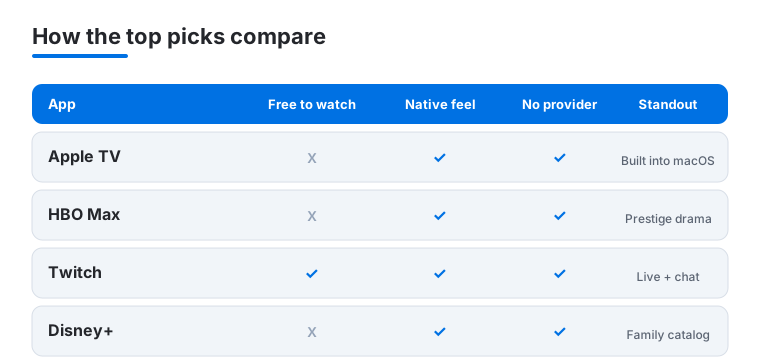
Not sure where to start? This quick comparison lines up four of our favourite Mac picks across the things that matter most: whether you can watch for free, how native the app feels, and whether you need a provider login.
Frequently asked questions
Which streaming app feels the most native on a Mac?
Apple TV, without question. It is built into macOS, syncs your library and watch progress across your Apple devices, and starts playback instantly. Everything else either runs as a separate app or, in some cases, sends you to a browser tab to watch.
Can I download shows to watch offline on my Mac?
Mostly not. Offline downloads are usually a phone and tablet feature, so on a Mac you stream. If offline viewing matters, grab the show on your iPhone or iPad version of the app first, then take it with you. Our best streaming apps for iPad guide covers the download friendly picks.
Do I need a cable provider to use these apps?
It depends. Subscription services like Disney+, HBO Max and Apple TV just need their own login. Network and live TV apps such as ABC, Fox Sports and Telemundo often let you watch recent episodes free, but unlock live channels and full catalogs only after you sign in with a participating TV provider.
Are these the same apps you would put on an iPhone?
Largely yes, the services overlap, but the experience differs. The Mac is better for long sessions, multitasking and side by side viewing, while the phone wins on portability and downloads. If you want the handheld take, see our best streaming apps for iPhone roundup.