
Showtime on Apple Vision Pro, iPhone and iPad: a Hands-On Guide
If you came here looking for a standalone Showtime app, here is the thing to know up front. Showtime stopped being its own service back on June 27, 2023, when it folded into Paramount+. On Apple devices the app you actually download is Paramount+ (the listing reads Paramount+ with SHOWTIME), and the old Showtime app is gone. We spent a couple of weeks watching prestige dramas, documentaries and live boxing across an Apple Vision Pro, an iPhone and an iPad, and this guide walks through what that experience is really like, where it holds up, and where it still trips you up.
Getting Showtime running on each device
Setup is mostly painless, but it differs a little depending on what you are holding. On iPhone and iPad you grab Paramount+ from the App Store, sign in, and you are watching in under a minute. If you already pay for the Paramount+ with SHOWTIME tier, or you carried over a legacy Showtime login through Apple, the same credentials work, which saved us from making yet another account. The app needs a fairly recent iOS or iPadOS build, so if the App Store will not let you install it, check that your software is up to date first.
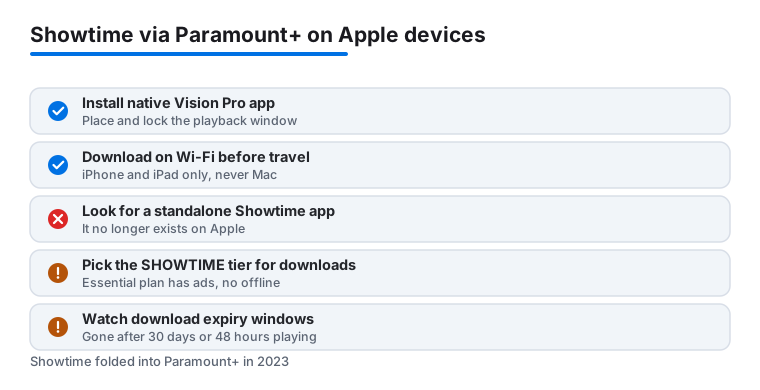
Apple Vision Pro is where this guide needed correcting. Paramount+ shipped a real visionOS app, and it was one of the streaming services ready at the headset's launch. So you are not stuck running a stretched iPad layout. Search the App Store on the headset, look for the version built for Apple Vision Pro, and install that. It needs visionOS to be reasonably current. Once it is open you get a proper big-screen player you can place and resize in your room, rather than a tablet window bolted into space. We mention this because a lot of older write-ups, including an earlier version of this page, claimed there was no native headset app. That is no longer true.
The Mac is the awkward one. There is no Paramount+ app in the Mac App Store. You have two honest options. The first is to watch in a browser at paramountplus.com, which handles full-screen playback fine but loses the living-room feel. The second, which the old version of this guide missed, is Apple's built-in TV app on macOS: Paramount+ shows up there as a connected channel, so you can browse and play Showtime titles without opening Safari at all. Either works. Neither lets you download for offline viewing, which we will come back to.
One small habit that smoothed things out: sign in once on your iPhone, and as long as every device uses the same Paramount+ account, your continue-watching list and history follow you to the iPad and Vision Pro with nothing to re-enter.
The features that actually matter day to day
Once you are in, a handful of features did most of the work for us. The library is the real draw. The full Showtime back catalog of dramas, documentaries and comedy specials now sits alongside the wider Paramount+ catalog, so one subscription stretches further than the old standalone Showtime app ever did.
- Offline downloads on iPhone and iPad. We leaned on these for flights and a patchy train commute. There are real limits here, covered further down, so read those before you rely on it.
- Up to 4K with Dolby Vision and Dolby Atmos on supported titles. Not everything is in 4K, and the Apple app has historically been pickier about 4K than some other platforms, so do not assume every movie hits the top spec.
- Live TV and live sports, including boxing, your local live CBS station, and SHOWTIME East and West feeds on the right plan, with a channel guide that loaded quickly for us.
- Profiles so your recommendations do not get tangled up with everyone else in the house.
- SharePlay for watching in sync with friends over FaceTime, which works on iPhone, iPad and Vision Pro and keeps everyone's playback lined up.
- Continue watching across devices, which held up reliably between iPhone, iPad and Vision Pro in our testing.
On Vision Pro specifically, the native app gives you a large floating screen with spatial audio, and paired with AirPods it genuinely felt like a private cinema. The recommendation rows are fine rather than clever. We still searched by title more than we trusted the home screen, but search itself is fast and forgiving of typos.
SharePlay was a pleasant surprise. Starting a FaceTime call and dropping a show into it kept playback synced for everyone, with shared pause and scrub controls, so nobody had to count down a manual press play.
Practical tips from our testing
A few settings made a real difference to how the app felt. Turn on autoplay for the next episode only if you actually binge, and turn it off if you keep falling asleep mid-season, because the app is happy to roll through a whole run overnight. On cellular, drop the streaming quality to the data-saver setting before a long trip. We watched a full episode on roughly the data a few songs would use, and on a phone screen the picture still looked fine.
On Vision Pro, take a moment to position and lock the playback window before you settle in. Anchoring it to a wall or a fixed point in the room, rather than letting it drift with your head, made long viewing far more comfortable and cut the floaty feeling. Pair AirPods for spatial audio and the whole thing steps up. If you share an account, set a profile PIN on the adult profiles so the kids cannot wander into a true-crime documentary at bedtime.
For offline watching, plan ahead on the device that supports it. Download on the iPhone or iPad while you are on home Wi-Fi, queue up more episodes than you think you need, and check the expiry on each title before you leave, since downloads do not last forever. We cover the exact limits next, because they caught us out more than once.
The limits, costs and downsides worth knowing
It is not all smooth. The biggest adjustment is that Showtime is no longer its own clean, focused app. You are inside the larger Paramount+ experience now, and at times it feels busy, with sports, kids content and network shows competing for attention next to the Showtime originals you came for. If all you ever wanted was Showtime, that extra noise can grate.
Money matters here, so be clear-eyed about the tiers. The cheaper Essential plan carries ads and, importantly, does not include offline downloads. To watch ad-free and to download for offline viewing you need the Paramount+ with SHOWTIME plan, which sits around $13.99 a month as of 2026. If uninterrupted prestige drama on a plane is the whole point for you, budget for the pricier tier, because the cheap one will not do it.
The downloads themselves have rules that are easy to trip over. They live only on iPhone and iPad, never on Mac. A download is removed after 30 days in your library, or 48 hours after you first start playing it, whichever comes first. There is also a cap of around 25 titles per account at a time. We hit that 48-hour expiry on a delayed flight and lost an episode we had started in the lounge, so treat downloads as short-term, not a personal archive.
A couple of smaller gripes. We had the occasional sign-in hiccup after an app update, fixed by logging out and back in. Live sports streams were generally solid but buffered a couple of times during peak evening hours on a busy home network. And on the Apple app, 4K coverage is inconsistent, so the same title can look sharper on another device. One privacy note worth a thought: profiles and continue-watching sync because Paramount+ ties your viewing to your account across devices, which is convenient but does mean your watch history travels with you, so use separate profiles or a PIN if that bothers you.
Good alternatives if Showtime is not the fit
If the bundled approach is not for you, or you want to round out your watchlist, a few are worth a look. Starz is the closest spiritual sibling, with a similar lineup of bold original dramas and movies, and a more focused app if that matters to you. For a deeper bench of blockbuster films and HBO originals, the HBO Max app is the obvious rival, and our HBO Max guide covers how to get the most from it on a tablet.
For the Vision Pro crowd in particular, it helps to understand what the headset does well for video in general before committing to any one service, and our piece on the streaming benefits of Vision Pro is a useful primer. To compare the broader field, browse the full Streaming and TV category, or start from our roundup of the best streaming and TV apps for Vision Pro to see how Showtime, now inside Paramount+, stacks up against everything else on the headset.
FAQ
Is there a separate Showtime app on Apple devices?
No. Showtime merged into Paramount+ in June 2023, and the standalone app is gone. On iPhone, iPad and Vision Pro you download Paramount+, listed as Paramount+ with SHOWTIME, and all of the Showtime content lives inside it. On Mac there is no App Store app, so you watch in a browser or through Apple's built-in TV app.
Does Showtime work well on Apple Vision Pro?
Yes. Contrary to some older write-ups, Paramount+ has a native visionOS app, so you are not stuck running the iPad version. You get a large floating screen with spatial audio that you can place and lock in your room, plus SharePlay for watching in sync with others over FaceTime.
Can I download shows to watch offline?
Yes, but only on iPhone and iPad, and only on the Paramount+ with SHOWTIME plan, not the cheaper ad-supported Essential tier. Downloads are not available on Mac. Each download expires after 30 days, or 48 hours after you first play it, and you can hold roughly 25 titles at a time, so plan offline watching close to when you travel.
Will my watch history sync across my iPhone, iPad and Vision Pro?
It will. Sign in with the same Paramount+ account and your continue-watching list and history follow you across devices. In our testing the handoff between iPhone, iPad and Vision Pro was reliable and picked up right where we left off. Use separate profiles if you would rather not share that history with others on the account.