
Best Streaming & TV Apps for iPad (2026)
The iPad is honestly one of the best streaming screens in the house. It is light enough for the couch, the display is gorgeous, and downloads make a flight or a long car ride disappear. After living with these apps on an iPad Air and a 13 inch iPad Pro, we pulled together the ones that genuinely earn a spot on your dock. If you want the same picks on a different device, our streaming and TV hub covers the iPhone lineup too, and you can browse everything else worth installing on our best iPad apps guide.
1. Netflix
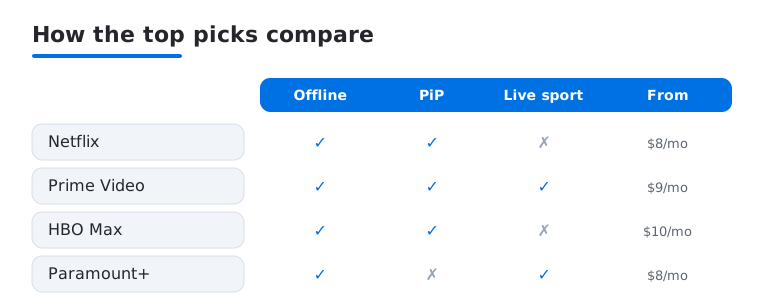
Still the one most people open first, and on iPad it just works. In our testing the interface stayed smooth, Picture in Picture let us scroll Safari while a show played in the corner, and downloads filled up fast for trips. You will want the standard plan or higher for a sharper picture. Plans start around 8 dollars a month. Hidden gems are everywhere once you know where to look.
2. Prime Video
If you already pay for Amazon Prime, this one is basically free, and the catalog runs deep across films, originals, and live sport. On iPad we loved the X-Ray feature for tapping an actor mid scene to see who they are. The interface can feel busy with rentals mixed in, but download quality is excellent for flights. Free with Prime, or about 9 dollars a month on its own.
3. HBO Max
For prestige drama and big films, this is our favorite catalog to scroll on a tablet. The iPad app handles 4K HDR titles beautifully on a Pro display, and profiles keep everyone's watchlist tidy. We hit the odd loading hiccup after an update, but it settled quickly. Plans run from roughly 10 dollars a month with ads. Our HBO Max on iPad walkthrough covers the settings worth changing first.
4. Paramount+
Quietly one of the better value picks, especially if you follow CBS shows, Star Trek, or live NFL on CBS. On iPad the live TV guide felt responsive, and casting to a bigger screen was painless. The home screen leans hard on its own originals. Plans start near 8 dollars a month, with a pricier tier that drops ads and adds Showtime. Here is how to get the most from it.
5. Peacock
NBC's service is a grab bag in the best way, mixing The Office reruns, live Premier League, WWE, and current NBC shows the day after they air. On iPad the sports streams held up well, and the layout is clean and quick. The free tier shrank a lot, so you really need a paid plan now, from around 8 dollars a month. We keep it for live events and next day catch up.
6. Roku
Even without a Roku player, the app is a tidy hub for free ad supported channels and the Roku Channel's watchable movie library. On iPad it shines as a remote and second screen, so you can browse and fling content to your TV. It is free, and works the same way on a Mac. Private listening, piping TV audio to your headphones, was our standout. More Roku tips here.
7. Crunchyroll
The home base for anime on iPad, with a large licensed catalog of simulcast series and back catalog. On our Air the app was simple to scroll, downloads worked for trips, and the picture looked clean. The ad supported tier is free, and a paid plan near 8 dollars a month drops ads and unlocks new episodes sooner. We keep it installed for the seasonal lineup.
8. Starz
Easy to overlook, but Starz has a good run of original series and a movie rotation that beats its reputation. On iPad the app is light and quick, and downloads behaved well on a recent road trip. It frequently runs new subscriber deals at a few dollars a month, which is when we tell people to jump in. At full price near 10 dollars it is a tougher sell. See its hidden gems.
9. MLB
For baseball fans, this is the gold standard, and the iPad is the ideal companion at the ballpark or on the couch. Live look ins, condensed games, and data overlays are genuinely fun, and the layout uses the tablet's space well. The free tier covers scores and highlights, while live out of market games need an MLB.TV subscription. Battery drains over nine innings, so here is how to stretch it.
10. NBA
The official app has come a long way, and on iPad the multi view and live stats turn a regular game into something more engaging. We liked checking real time box scores while a game played in the corner. Highlights, news, and scores are free, but live full games require an NBA League Pass subscription. A must for diehards, optional for casual fans. There are more hidden features worth finding.
11. Fox Sports
If your weekends revolve around the NFL, college football, or soccer on Fox, this app keeps it all in one place. On iPad the live streams were reliable in our testing, and the scores and alerts kept us in the loop. You sign in with a pay TV provider to unlock most live games. Free to download. We also looked at how it is evolving.
12. Fandango at Home
Formerly Vudu, this is the app to know for renting or buying a specific movie rather than paying for yet another subscription. It also has a solid library of free ad supported titles, handy on a slow night. On iPad the store is easy to browse and purchases sync across devices. Rentals typically run a few dollars, with no monthly fee. We keep it for new releases the subscriptions do not carry yet.
13. NFL streaming apps
Catching live NFL on an iPad usually means a few apps working together rather than one, depending on the matchup. NFL+ handles local and primetime games on mobile, while nationally televised games live across Paramount+, Peacock, and Prime Video. The iPad is great for following a game in one corner and stats in another. Costs vary by service, from free highlights to paid game access. Plan around the schedule.
14. Viki
A licensed service focused on Asian dramas and films, popular with fans of Korean, Chinese, and Japanese shows, with community subtitles in many languages. On iPad the catalog is easy to scroll, and a free, ad supported tier lets you try it with no commitment. A paid plan removes ads and unlocks newer episodes. Titles rotate as licensing shifts, so treat it as a supplement to the big names. We keep it for the niche library others skip.
How to choose a streaming app for your iPad
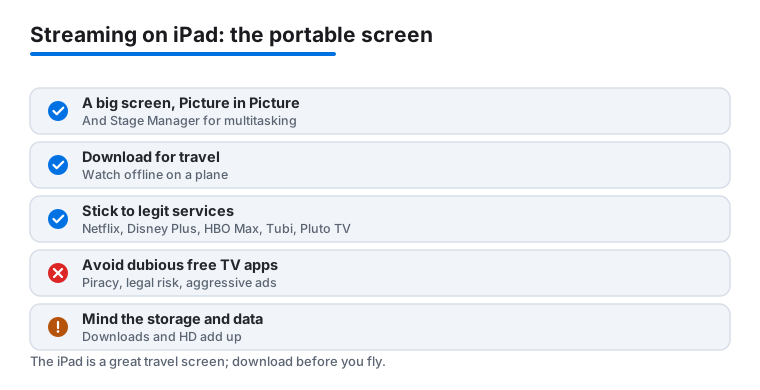
The iPad is a genuinely good place to watch TV and movies, and the hardware does a lot of quiet work in the background. The display is large and sharp enough that a film holds up on a long evening. Picture in Picture shrinks a show into a floating corner so you can answer a message or read a recipe without losing your place. On newer iPads, Stage Manager lets you keep a video window open beside Safari or Notes, which is handy when you are following a game and a stats page at the same time. And almost every major service supports offline downloads, which is the feature that turns a flight or a train ride into something watchable.
With so many services competing for the same monthly fee, the hard part is not finding apps. It is deciding which two or three are actually worth keeping installed. Here is the short list of things we weigh before paying for anything.
Catalog: does it carry what you actually watch?
Start with the shows and films you already return to, not the headline originals a service is promoting this month. Catalogs shift constantly as licensing deals come and go, so a title you loved last year may have moved elsewhere. Most services let you browse the library before you commit, and a free trial is the honest way to check whether the catalog matches your taste. If you mostly rewatch a handful of comfort shows, find the one app that holds them and skip the rest. It also helps to look past the marquee titles and check the back catalog, since the older films and complete seasons are often what you reach for on a quiet evening. A service can look thin from the home screen and still hide a deep library once you search by genre or actor.
Price and how the tiers work
Nearly every service now sells an ad supported tier that costs less and an ad free tier that costs more. The cheaper tier is fine for casual viewing, and you can always step up later. Watch for two things. First, prices tend to rise a little each year, so the figure you sign up at is rarely the figure you pay in eighteen months. Second, bundles can genuinely save money when two services you want are sold together. The practical move is to rotate: keep one or two services active, cancel when you finish a season, and come back when there is something new. Subscriptions are easy to cancel from the iPad in Settings under your account, so you are never locked in.
Offline downloads for travel
If you travel, downloads matter more than almost anything else. Saving episodes over home Wi-Fi the night before means you are not fighting hotel internet or burning cellular data on the road, and the video plays straight from the iPad with no buffering on a plane. Quality settings usually let you trade file size for sharpness, so a standard download is small enough to stack several episodes without filling storage. Not every service downloads equally well, so it is worth testing a single episode before a trip rather than discovering a gap at the gate.
Streaming quality and your connection
A higher tier often unlocks sharper resolution and HDR, which the iPad display can show off nicely. That only helps if your connection can keep up, though. On a strong home network the difference is real, while on a weak signal the app will quietly drop the resolution to keep playing. If you care about the best picture, check that both your plan and your Wi-Fi support it before paying for the premium tier. For most everyday viewing on a tablet held at arm's length, the standard tier looks perfectly good.
Getting the most from the iPad itself
A few iPad habits make any of these apps nicer to use. Turn on Picture in Picture so a show keeps playing in a corner when you swipe away, and pair the iPad with headphones or a small speaker, since the built in audio is fine but easy to improve. If you have a newer model with Stage Manager, try keeping the video in one window beside a browser or a notes app during a live game. For travel, set your download quality ahead of time and check how much storage a season uses, because high quality saves add up faster than you expect. And the Apple TV app is worth opening even if you mostly watch elsewhere, because it can surface where a film is streaming and pick up your watch history across several services, which saves the usual hunt through one icon after another. Profiles are also worth setting up for each person in the house, so recommendations stay sane and nobody loses their place in a series.
Stick to legitimate services
This is the part worth being plain about. The streaming apps worth installing are the established, legal ones: Netflix, Disney Plus, HBO Max, Hulu, Prime Video, Apple TV, Peacock, and Paramount Plus. There are also genuinely good free and legal options, including Tubi and Pluto TV, which are ad supported and ask for nothing more than your patience through a few commercials. The Apple TV app is useful here too, because it aggregates titles and your watch history across many of these services in one place, so you spend less time hopping between icons to find where a show lives.
It is worth steering clear of the apps that advertise free movies or free live TV from services you would normally pay for. Those apps tend to carry pirated content, which brings real legal risk, and they are usually wrapped in aggressive ads, pop ups, and trackers that have no business on your iPad. The quality is unreliable, links break, and you have no idea what the app is doing with your data. A legitimate free service like Tubi or Pluto TV gives you a clean, ad supported way to watch at no cost, with none of that baggage. Tubi leans toward an on demand library of films and shows, while Pluto TV runs themed live channels you can leave on in the background, so the two cover different moods. If something promises premium content for nothing, that is the signal to close it.
Put simply, the iPad earns its place as a streaming screen when you pair it with services you can trust. Pick the one or two catalogs you actually watch, lean on downloads for travel, let the free legal apps cover the casual nights, and let the Apple TV app tie it together. The list below walks through the specific apps we keep installed and what each one is good for.
Frequently asked questions
Which streaming app is best for downloading shows before a flight?
Netflix and Prime Video have the most reliable downloads in our testing, with quick saves over Wi-Fi and clear, sharp playback offline. HBO Max and Paramount+ also let you download. Just start downloads the night before, since large batches over hotel Wi-Fi can crawl.
Can I watch on my iPad and cast to the TV at the same time?
Yes. Most of these apps support AirPlay and Chromecast, so you can fling a show to the big screen and keep using the iPad to browse. The Roku app is especially good as a couch remote and second screen for this kind of thing.
Do I need to pay for all of these to watch live sports?
Not all, but live sport is where costs add up. MLB and NBA games need their own league subscriptions, and many NFL games are split across Paramount+, Peacock, and Prime Video. We suggest picking one or two services that match the teams you actually follow rather than stacking them.
Is Picture in Picture supported so I can multitask while watching?
Most of the major apps, including Netflix, Prime Video, and HBO Max, support Picture in Picture on iPad, so a show shrinks to a corner while you check email or browse. A few smaller apps do not, so test it once before you rely on it.
Are the free streaming apps that offer paid movies safe to use?
Treat them with suspicion. Apps that promise free access to content you would normally pay for usually carry pirated material, which brings legal risk, and they tend to be loaded with aggressive ads and trackers. Stick to legitimate free services like Tubi and Pluto TV, which are ad supported and completely above board, and use the Apple TV app to keep your legal services organized in one spot.
How can I keep my streaming costs from creeping up?
Rotate your subscriptions instead of stacking them. Keep one or two services active for what you are currently watching, cancel a service once you finish a season, and resubscribe when something new lands. Cancelling is quick from the iPad in Settings under your account, and the free legal apps like Tubi and Pluto TV can cover the quiet nights in between.