
Best Education & Learning Apps for iPad (2026)
The iPad is the rare device that works for a five year old tracing letters and a college student grinding through calculus, and the right app makes all the difference. We spent weeks living inside these tools on an iPad Air and an 11 inch iPad Pro, taking notes with the Apple Pencil and quizzing ourselves on the couch. Below are the learning apps we kept coming back to, with honest notes on what each one feels like to use. For more picks browse the education hub or our wider roundup of the best iPad apps.
1. Duolingo
Still the easiest way to build a daily language habit. On the iPad the bigger screen makes the matching and listening drills feel less cramped than on a phone, and the streak nudges are genuinely motivating. Free with ads, or Super removes them and adds unlimited hearts. In our testing five minutes a day actually stuck. Here are the Duolingo features worth knowing.
2. Kahoot!
If you teach or run a study group, Kahoot turns review into a fast, slightly chaotic game show. We hosted quizzes from the iPad and let everyone join on their own devices, and the energy in the room shifted instantly. Free for basic play, with paid tiers for teachers who want reports and bigger groups. The large iPad display makes a great shared host screen.
3. Photomath
Point the iPad camera at a handwritten equation and Photomath walks you through every step, not just the answer. We found the step by step explanations genuinely teach the method rather than letting you cheat past it. Free for core solving, with Plus adding deeper textbook style breakdowns. The roomy screen is perfect for reading each line of working without squinting.
4. Gauth
A solid second opinion when Photomath gets stuck, Gauth (the app formerly named Gauthmath) covers word problems and trickier topics with both AI solutions and human tutor help. We leaned on it for geometry questions that needed a diagram read correctly. Free to use with limits, and a subscription unlocks unlimited solving. On the iPad the split between question and explanation is easy to follow side by side.
5. Brainly
Brainly is a homework community where students post questions and get answers from peers and verified experts. We used it most for those oddly specific assignment questions a search engine never quite answers. Free with ads, and Plus removes them while unlocking expert verified responses. Reading threaded explanations on the iPad beats scrolling them on a phone, especially for longer science answers.
6. Google apps
Docs, Slides, Classroom and Drive together cover most of what school actually requires. We wrote essays in Docs with a paired keyboard and the iPad felt close to a laptop. Everything is free with a Google account, and the apps sync instantly across devices. Classroom in particular keeps assignments and due dates tidy, which matters more than any single fancy feature.
7. PowerSchool
Less exciting but essential, PowerSchool is how many families and students check grades, attendance and assignments. We appreciated being able to glance at a full gradebook on the iPad without pinching and zooming the way you do on a phone. It is free, provided your school district uses it. Think of it as the boring backbone that keeps everyone honest about deadlines.
8. Infinite Campus
Another school information system, Infinite Campus does the same grades and schedule job as PowerSchool for districts that chose it instead. We found the iPad layout clear for parents juggling more than one student, with quick switching between kids. Free where your school provides access. It will not win design awards, but it loads fast and surfaces the numbers you actually need to see.
9. ParentSquare
This one is aimed at parents rather than students, pulling school announcements, sign ups and teacher messages into one feed. We liked having permission slips and event reminders in a single place instead of buried in email. Free for families when the school adopts it. On the iPad the calendar and message threads are comfortable to read over morning coffee.
10. Skyward
Rounding out the school portal trio, Skyward handles grades, attendance and family messaging for its own set of districts. We tested the student and family views and found navigation a little dated but reliable. Free where your district uses it. If your school runs Skyward you will not have a choice, so the good news is it works fine on the larger iPad screen.
11. Busuu
Busuu leans into conversational practice, mixing structured lessons with speaking and writing exercises you submit for feedback from native speakers in its community. We used it on the iPad and the bigger screen made the dialogue lessons easy to follow. Free to start, with a Premium subscription for the full course path and offline lessons. A nice complement to flashcard heavy apps like Duolingo.
12. Mango Languages
Mango Languages teaches real conversations with native speaker audio and cultural notes, covering more than 70 languages. We found motivation is half the battle with a new language, and practising phrases you would actually say beats dry drills. It is free to download, and many public libraries give cardholders full access at no cost. On the iPad the side by side phrase breakdowns are big and crisp, which helps when you are decoding unfamiliar words.
13. Drops
Drops focuses on vocabulary through quick, picture based drills with native audio, so you build word recognition in short sessions. We tested it with headphones and the iPad speakers, and the clear playback made it easy to hear the sounds we were missing. Free to begin, with Premium removing the daily time limit and unlocking every language. It pairs well with a conversation app, letting you nail how words actually look and sound.
14. Hello Kitty
For the youngest learners, the Hello Kitty education apps wrap early reading and counting in a friendly, familiar character. We handed the iPad to a preschooler and the big tappable buttons and gentle voice prompts held their attention longer than most. Usually free to download with optional purchases. The iPad size suits small hands learning to drag and tap without frustration.
15. ABC learning apps
If you would rather not commit to one brand, the broad category of ABC learning apps covers letter tracing, phonics and simple spelling for toddlers and early readers. We tried several and the best ones use the Apple Pencil or a finger to trace letters with satisfying feedback. Most are free with upgrades. The iPad makes an ideal first learning slate, durable case permitting.
How to choose education apps for iPad
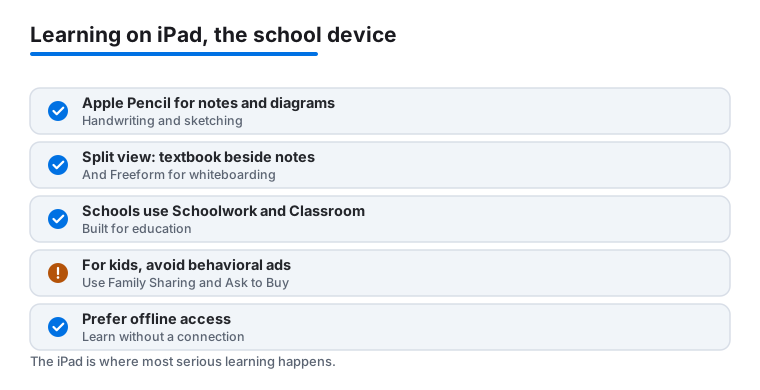
The iPad has quietly become the default learning device in a lot of homes and classrooms. It sits between a phone and a laptop in a way that suits study: the screen is big enough to read a full page of a textbook, the Apple Pencil turns it into a notebook for handwriting and diagrams, and Split View lets you keep notes open beside a reading. Apple also leans into this directly. Many schools run Apple School Manager with the Schoolwork and Classroom apps, which lets a teacher hand out assignments and see progress on managed iPads. None of that makes any single app good, but it does mean the platform itself is built for the kind of focused, hands on work that learning needs.
Before you fill a Home Screen with shiny icons, it helps to slow down and ask what you actually want the iPad to do. A toddler tracing letters, a high schooler revising for an exam, and an adult picking up a language all need very different things. The sections below are how we sort the good from the merely flashy.
Match the app to the iPad's strengths
The features that separate a real iPad learning tool from a phone app blown up to fill the screen are usually practical, not exciting. Look for these:
- Apple Pencil support. For math, science diagrams, language scripts, and annotating PDFs, handwriting beats typing. If an app lets you write equations or mark up a reading with the Pencil, it will get more use. Photomath and the note style sides of apps like Google Docs benefit here, though Pencil handwriting recognition varies app to app.
- Split View and Slide Over. The single most useful study trick on iPad is keeping two things visible at once: a textbook or video on one side and your notes on the other. Before you commit to an app, check that it behaves in Split View rather than forcing full screen.
- Offline access. Learning often happens on a train, in a waiting room, or somewhere with weak Wi Fi. Apps that cache lessons, downloaded courses, or saved problems for offline use are far more reliable than ones that stall the moment the connection drops.
- A real keyboard option. For older students writing essays, pairing a keyboard turns the iPad into something close to a laptop. The Google apps and similar document tools shine once you add a keyboard.
A quick honest note: a lot of education apps are simply web pages in a wrapper. They still work, but they will not give you Pencil handwriting or proper Split View. That is fine for a grade portal you check once a week, and worth knowing before you pay for a subscription expecting more.
Kids, privacy, and the bill
This is the part most app roundups skip, and it matters more than any feature list. Education apps are aimed at children more often than any other category, which makes privacy and cost the two things to get right before you hand the iPad over.
Read the Privacy Nutrition Label first
Most apps on the App Store show a privacy summary on their product page, the section Apple calls the privacy label. Apple only began requiring these labels in December 2020, so an app that has not been updated since then may not show one at all. It is not perfect, because developers fill it in themselves, but it is the fastest way to see what an app collects and whether any of it is linked to your child or used to track them. Before you install anything for a young learner, scroll down and read it.
Our simple rule: prefer apps that do not show behavioral ads to kids and do not link data to identity for tracking. A free app that funds itself by profiling a seven year old is not really free. Many genuinely good learning apps are either paid up front, funded by schools, or supported by adult facing subscriptions, and we would rather pay a few dollars than have a child be the product. When two apps do the same job, the one with the cleaner privacy label wins.
Use the controls Apple already gives you
You do not need a third party app to keep things sane. iPadOS has the tools built in:
- Set up Screen Time. You can cap how long an app is used, block specific categories, and require a passcode to go past limits. For a shared family iPad this is the difference between a study tool and an all day game machine.
- Use Family Sharing with a child account. Create an Apple Account for your child rather than letting them use yours. It keeps their data separate and unlocks the parental controls properly.
- Turn on Ask to Buy. With this on, any purchase or download a child tries to make sends a request to your device for approval. It is the single best defense against the trap where a free game quietly racks up in app charges.
Watch for subscription traps
The common pattern in this category is a free download, a short taste of content, then a recurring charge that is easy to start and quietly expensive to keep. None of the apps below are scams, but the business model is everywhere, so go in with eyes open. Check the price before you install by reading the in app purchase list on the App Store page. After installing, open Settings, then your name, then Subscriptions every so often and cancel anything you stopped using. Annual plans often look cheaper per month but lock you in, so try the monthly tier first if you are unsure a child will stick with it. A tool you use twice and forget is not a bargain at any price.
Pick a few, not a pile
One last practical point. It is tempting to install a dozen learning apps in a burst of good intentions, but a crowded Home Screen tends to mean nothing gets used. We had better luck choosing one app per goal, a language app, a math helper, a notes setup, and giving each a fair few weeks. The list that follows is meant to be sampled, not installed wholesale. Start with the picks below, watch what your learner actually opens, and trim the rest.
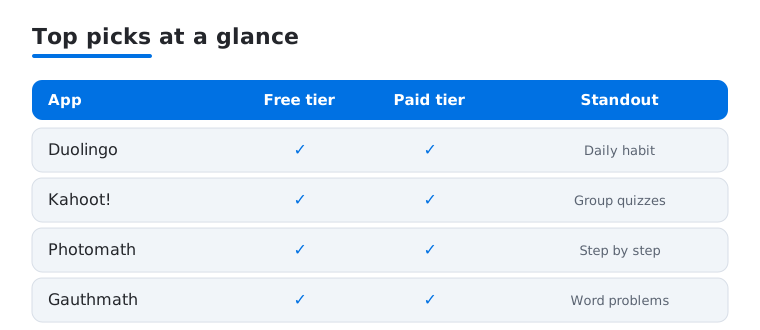
Not sure where to start? Here is how our four most-used picks compare on the things that matter day to day.
Frequently asked questions
What is the best free education app for iPad?
It depends on the subject. For languages we keep recommending Duolingo, for math Photomath is hard to beat, and for school organisation the Google apps and Kahoot cover a lot of ground at no cost. All four have genuinely useful free tiers, so you can build a strong setup without paying anything.
Do these apps work better on iPad than on iPhone?
For most of them, yes. Reading long explanations, taking Apple Pencil notes, hosting a quiz or working through math steps all benefit from the larger screen. If you want the same picks for a phone, see our guide to the best education apps for iPhone.
Are learning apps safe for young children?
The kid focused ones like Hello Kitty and most ABC apps are designed for young users, but we still suggest turning on Screen Time limits and disabling in app purchases. Set up a child account and review permissions before handing the iPad over. A quick check now saves surprises on your bill later.
Can I use these apps for studying on a Mac too?
Some have full Mac versions and others run through a browser, so coverage varies. If you split your study time between devices, our roundup of the best education apps for Mac covers what works well on a bigger keyboard and screen.
How do I check what an education app collects about my child?
Open the app's page in the App Store and scroll to the App Privacy section, the privacy label. It lists what the developer says it collects and whether any of it is linked to your child or used to track them. Prefer apps that do not show behavioral ads to kids and keep data unlinked from identity. It is a one minute check that tells you a lot before you install.
How do I avoid surprise subscription charges?
Turn on Ask to Buy through Family Sharing so a child's purchases need your approval, and read the in app purchase list on the App Store page before installing. Then review Settings, your name, Subscriptions every month or so and cancel anything you have stopped using. Trying a monthly plan before an annual one keeps you from locking into a tool that does not stick.