
Best Travel Apps for iPad (2026)
An iPad is a quietly brilliant travel companion. The big screen turns map scouting, flight juggling and hotel hunting into something you can actually see, and a propped up tablet on a tray table beats squinting at a phone. We planned two real trips on an iPad Pro and an iPad Air, then carried them through airports and rental cars to find the apps that earn their place. Browse more in our travel apps hub, or see everything we recommend on the best iPad apps page.
Packing light with just a phone, or planning at a desk first? Our iPhone travel guide and Mac travel guide cover the same trips on different screens.
1. Google Maps
Google Maps is the app we open first in any new city, and on iPad the larger canvas makes scouting a neighborhood genuinely fun. We loved pinning restaurants and saving lists before a trip, then reading reviews without endless zooming. Free. Download an offline area over hotel wifi and it keeps guiding you when your data drops, which saved us more than once abroad.
2. Google Earth
Google Earth is pure pre trip joy on a tablet. We used it to fly over a coastline and get a feel for a place before booking, and the 3D buildings look fantastic on the bigger display. Free. It is less a planning tool than a way to fall in love with a destination, though the measure tool is handy for judging how far that beach really is from your hotel.
3. Expedia
Expedia is the booking app that benefits most from a big screen. Comparing flights, hotels and the bundle deals side by side is far less painful on iPad than on a phone, where it all feels cramped. Free to use. We found the trip view tidy for keeping a whole itinerary in one place, and stacking a hotel onto a flight often shaved real money off the total.
4. Hopper
Hopper is the app for travelers who love a deal but hate refreshing prices. Its colorful charts predict whether a fare will rise or fall, and the extra room on iPad makes those graphs easy to read at a glance. Free, with optional paid price freezes. In our testing the watch feature pinged us a genuine drop on a route we were eyeing, so we treat it as a patient bargain hunter.
5. Southwest Airlines
If you fly Southwest, the iPad app is a comfortable home for boarding passes, fare alerts and that all important check in window. The bigger screen makes managing a Rapid Rewards account and scanning flight options easy from the couch. Free. We liked having the day of trip view large enough to read gate changes at a glance without fishing for a phone.
6. Uber
Uber on iPad is more of a planning tool than a curbside grab, and that is exactly how we used it. Setting up airport pickups and checking fare estimates is clearer on the larger map. Free, you pay per ride. Honestly your phone handles the actual hailing better when you are standing outside, but for sketching out how you will get around a city, the tablet view is lovely.
7. Lyft
Lyft is the ride app we keep as a backup, and comparing its prices against Uber on the same big screen often paid off. On iPad the map and fare breakdown are easy to read while planning a route. Free, charged per trip. We treat it as a desk side companion for working out airport transfers, then switch to the phone once we are actually on the pavement and waiting for the car.
8. Tesla
The Tesla app is a surprisingly nice travel companion if you drive one on a road trip. Pre conditioning the cabin, checking charge level and finding Superchargers along your route all feel roomier on the iPad screen. Free with your car. We used it to plan charging stops the night before a long drive, and the larger map made spotting the gaps between chargers far simpler.
9. Apple Vision Pro
The Apple Vision Pro app pairs naturally with iPad for travelers chasing better in flight entertainment. We used the iPad to manage downloads and settings, then slipped the headset on for a private cinema at 30,000 feet. The app itself is free, the hardware very much is not. It is a niche pick, but for long haul flights the combination turns a cramped seat into your own screening room.
10. Disneyland
The Disneyland app is a theme park day saver, and the iPad makes its busy park map far easier to read while you plan the morning over breakfast. Wait times, mobile ordering and ride reservations all sit in one place. Free. We found it best used the night before to map out a route through the park, then handed off to a phone once we were inside and walking between attractions.
11. Ticketmaster
Ticketmaster turns the iPad into a comfortable spot for snagging event tickets while you travel. Browsing seat maps and comparing sections is genuinely easier on the bigger screen than thumbing through a phone in a queue. Free, you pay per ticket. We used it to grab last minute concert seats in a city we were visiting, and the larger venue map made picking a decent view much less of a guessing game.
12. AAA
The AAA app is the kind of thing you forget about until a tire goes flat. On iPad it doubles as a planning tool, with member discounts, roadside requests and trip guides laid out clearly. Free with membership. We liked browsing the travel deals and mapping a route on the larger screen before a road trip, knowing the roadside help button was there if the drive went sideways.
13. Bolt
Bolt is the ride and scooter app we lean on when traveling in Europe, where it often undercuts the bigger names. On iPad the map is easy to scan while you work out which transport mode makes sense. Free, charged per ride. It is most useful for planning city hops before you arrive, then your phone takes over for the actual booking once you are standing on a foreign street corner.
14. ParkMobile
ParkMobile quietly removes one of travel's small headaches, paying for street and garage parking. On iPad it is handy for sorting out where to leave the car before a trip, with a clear map of zones and rates. Free, you pay for parking plus a small fee. We used it to scout airport and downtown lots in advance, and extending a session remotely meant no sprinting back to feed a meter.
15. Spirit Airlines
Flying Spirit means watching the add ons closely, and the iPad app makes that line by line breakdown easier to read before you commit. Boarding passes, bag fees and seat picks all sit in one tidy view. Free. We appreciated seeing the full fare picture on a larger screen, where it is much harder to accidentally tap into an upgrade you did not actually want.
16. Citymapper
Citymapper is the app we lean on for getting around a new city by bus, metro and train, and the iPad screen makes its route options easy to compare before you set off. It covers many major cities and lays out each leg, transfer and walking stretch clearly. Free. We used it the night before to work out how to reach a hotel from the airport on public transit, then carried the plan onto the phone for the walk itself.
How to choose travel apps for your iPad
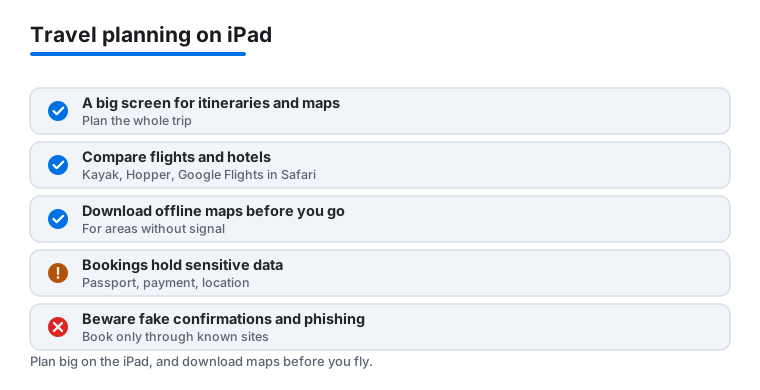
The iPad is at its best before the trip starts. The big screen is where planning actually happens: spreading out a map, reading hotel reviews without endless pinching, and lining up flight options so you can compare them side by side. Most travelers we know plan on the iPad and then carry out the trip on a phone, so think of the tablet as your planning desk rather than your curbside grab tool. With that in mind, here is how to pick the apps that earn a spot before you pack.
Start with flight and hotel search
Finding the trip comes first, and you have a few honest options. For flights, you do not actually need a dedicated app at first. Google Flights runs in the browser on iPad and is one of the clearest ways to scan dates, routes and price trends on a wide screen. When you want an app, Kayak compares fares across airlines and booking sites, and Hopper watches a route and tells you whether a fare is likely to rise or fall. None of these tools will book the flight for you in a vacuum: they hand you off to an airline or an agency to complete the purchase, which is exactly where you want to slow down and pay attention.
Sort out where you will stay
For places to stay, the two names most travelers reach for are Airbnb for homes and rooms, and Booking (Booking.com) for hotels and a wide spread of properties. Both have full iPad apps, and both benefit from the larger screen when you are comparing photos, reading the fine print on cancellation, and checking exactly where a property sits on the map. A good rule: read the location and the cancellation policy as carefully as the price. The big iPad map view makes it much easier to spot that a cheap room is actually a long bus ride from anything you came to see.
Keep the itinerary in one place
Once flights and stays are booked, the confirmations scatter across your inbox. An itinerary organizer pulls them back together. TripIt is the classic pick: forward your confirmation emails to it and it builds a single, ordered timeline of your trip, which is genuinely easier to scan on an iPad than hunting through email at a gate. If you would rather not add another app, even the built in Notes and Calendar apps on iPad will hold a tidy day by day plan. The point is to have one place to look, not five.
Download maps before you go
Navigation is where the iPad quietly shines, and where a little preparation pays off most. Google Maps lets you download whole areas while you are on hotel wifi, so the map keeps guiding you when your data drops or you are roaming abroad. Do this the night before, not when you are already lost. If you prefer apps built on OpenStreetMap data, options like Organic Maps are available on the App Store and are designed around fully offline maps, which is useful for hiking or for countries where you would rather not rely on a signal. Whichever you choose, the habit matters more than the brand: download the area first.
Handle the language gap
For translation, the built in Translate app on iPad covers a lot of ground and can download languages for offline use, which is the feature that actually matters when you have no signal. Google Translate is the other widely used option, with its camera mode for reading menus and signs. Download your destination language before you leave so a dead zone does not leave you stuck.
Privacy and safety: travel apps hold a lot about you
This is the part worth taking seriously. Travel apps end up holding some of the most sensitive information you own: passport and ID details, booking references, your home and hotel addresses, payment cards, and a running record of where you are right now. That makes them a natural target, and trips are exactly when people let their guard down. A few calm habits keep you out of trouble.
- Book only through known sites and apps. Go directly to the airline, the hotel chain, or a well known platform you sought out yourself. Do not book through a link in an unexpected email or text, however official it looks.
- Watch for fake booking confirmations and phishing. A common scam sends a message that looks like a confirmation or a problem with your reservation and pushes you to a lookalike site to re enter your card. If a message creates urgency, stop. Open the real app yourself and check your booking there instead of tapping the link.
- Be careful what you let apps see. An iPad will ask before an app uses your location. Granting it only while you are using the app is usually enough, and you can review these permissions in Settings under Privacy and Security at any time.
- Protect the device itself. Use a strong passcode and Face ID or Touch ID, and turn on Find My before you travel. A locked iPad is far less of a problem if it goes missing than an unlocked one full of bookings and payment details.
- Be cautious on public wifi. Airport and cafe networks are convenient and not always trustworthy. Avoid entering payment details on open networks, and stick to apps and sites you already know rather than ones a captive portal nudges you toward.
None of this requires paranoia. It is the travel equivalent of keeping your passport in a zipped pocket. Book through sources you chose yourself, treat surprise confirmations and urgent messages with suspicion, and download your maps and languages before you leave so you are never forced onto a sketchy network just to find your way.
With those habits in place, the apps below are the ones we kept coming back to on the iPad across two real trips. They are grouped by what they actually do well on the bigger screen, with honest notes on where a phone still does the job better.
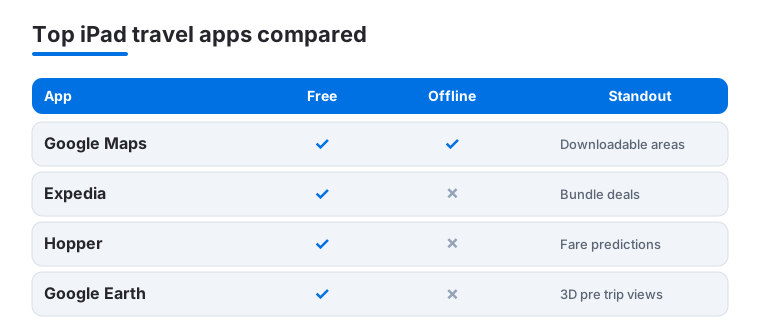
Not sure which to install first? Here is how our four most used iPad travel apps stack up on the things that matter on a trip.
Frequently asked questions
Is an iPad actually worth carrying for travel?
For planning, yes. Mapping routes, comparing flights and reading hotel reviews are all far more comfortable on the big screen, and it doubles as your in flight entertainment. For grabbing a ride or scanning a boarding pass on the move, your phone is quicker. Most travelers we know plan on the iPad and execute on the phone.
Which of these travel apps work offline?
Google Maps is the standout, letting you download whole areas to navigate without data. Airline apps store boarding passes for offline access, and a downloaded Apple Maps or Google Maps area keeps guiding you with no connection at all. Booking apps like Expedia and Hopper need internet to do their thing, so handle those over hotel wifi before you head out for the day.
Are these apps free to use?
Every app here is free to download. Maps, Earth and Citymapper cost nothing at all. Booking and ride apps are free to use but charge for the flights, hotels and rides themselves, while Hopper offers optional paid price freezes. You can plan an entire trip on an iPad without paying for a single app.
Should I book flights on the iPad or my phone?
The iPad wins for booking. Comparing fares, seat maps and bundle deals side by side is far clearer on the larger screen, and you are less likely to fat finger an expensive add on. We do the real searching and booking on the tablet, then keep the airline app on the phone for boarding passes and gate alerts on travel day.
How do I avoid fake booking confirmations and travel scams?
Book directly through the airline, hotel or a well known platform you opened yourself, never through a link in a surprise email or text. Scam messages often imitate a confirmation or claim a problem with your reservation to push you toward a lookalike site. If a message feels urgent, do not tap the link. Open the real app and check your booking there. Keep a passcode and Find My turned on so a lost iPad does not become a lost wallet.
What should I download before I leave home?
Three things while you still have good wifi: your offline map area in Google Maps or an OpenStreetMap based app like Organic Maps, your destination language in Translate or Google Translate for offline use, and your boarding passes and itinerary so they open without a signal. Doing this at home means you are never forced onto an untrusted public network just to find your way or read a menu.