
Best Travel Apps for iPhone (2026)
Your iPhone is the one thing you will never leave in the hotel safe, which makes it the device that truly runs a trip. Boarding passes, parking, rides and the hotel key all live in your pocket, so the apps you choose really matter. We carried an iPhone through three real trips this year, from a cruise terminal to a backcountry trailhead, to see which travel apps earn their spot. Browse the wider travel apps hub or see everything we rate on the best iPhone apps page.
Planning at a desk or packing a bigger screen too? Our iPad travel guide and Mac travel guide cover the same journeys on different devices.
1. Airbnb
Airbnb is where we start when a hotel feels too cookie cutter, and the iPhone app handles the whole stay in one thread. It suits travelers who want a kitchen, a neighborhood and a bit more room. Free to use, you pay per booking. In our testing the host messaging stayed reliable for sorting check in details, and saving places to a wishlist kept scattered ideas in one tidy spot.
2. Hilton Honors
If you stack nights at one chain, Hilton Honors turns the iPhone into a room key, a check in desk and a points tracker at once. It suits loyal returners more than one off bookers. Free with membership. We found the digital key genuinely useful for skipping the front desk after a late flight, and picking your room on a floor map beats whatever you get on a busy night.
3. Tesla
Road tripping in a Tesla? The Tesla app rides in your pocket as a remote, a charge gauge and a Supercharger finder. It suits owners far more than the curious. Free with your car. We used it to warm the cabin from a diner booth on a frosty morning, and checking charge before each leg meant never gambling on reaching the next stop.
4. Carnival HUB
Carnival HUB quietly saves a cruise once your phone loses its signal at sea. It suits anyone sailing Carnival who hates printed schedules. Free to download, with optional paid onboard chat. We leaned on it daily for deck plans, dinner times and the next show, all without burning roaming data. The paid messaging is worth it for keeping a group in sync across a giant ship.
5. Grab
Grab is the app we install the moment we land in Southeast Asia, bundling rides, food and payments into one. It suits anyone traveling cities like Bangkok or Singapore. Free, you pay per trip. In our testing the upfront fares removed the haggling that wears you down abroad, and pinning a hotel in the local script meant a driver actually found us.
6. Life360
Life360 is the app families lean on when everyone scatters in an unfamiliar place. It suits parents, group trips and anyone splitting up at a theme park. Free, with optional paid tiers for more history and alerts. We used it to keep a loose tab on each other across a sprawling resort without a stream of where are you texts. Battery use is noticeable, so pack a charger.
7. onX Hunt
onX Hunt is the off grid map we trust once the pavement and the cell bars both run out. It suits hunters, hikers and anyone roaming public land. Paid, with a free trial before the annual subscription. The standout is downloading detailed offline maps with property boundaries, which kept us oriented deep in a national forest. We treat it as a serious backcountry tool, not a casual city app.
8. ParkMobile
ParkMobile erases one of travel's small daily headaches, feeding a meter in a city you do not know. It suits road trippers and anyone parking downtown or near an airport. Free, you pay for parking plus a small fee. We settled a garage spot from inside a museum, and extending a session from the phone meant no anxious sprint back when lunch ran long.
9. PayByPhone
PayByPhone is the other parking app we keep installed, because the city you visit next may well use this one instead. It suits the same meter dodging traveler who never has the right coins. Free to use, parking charged per session. The reminder before time expired spared us a ticket more than once. Between this and ParkMobile, most metered lots in a strange town are covered.
10. SeatGeek
SeatGeek is how we grab a game or a show in a city we are only passing through. It suits travelers who want a night out without a box office queue. Free, you pay per ticket. The color coded deal score made it easy to judge a fair price from a hotel room, and the mobile tickets dropped straight into Apple Wallet for a quick tap at the turnstile.
11. hotel booking apps
Beyond a single chain, general hotel booking apps are the workhorses for finding a bed anywhere on short notice. They suit travelers comparing prices across brands rather than chasing one loyalty program. Most are free, you pay per stay. In our testing the same room often varied in price between apps, so we checked two before committing. Filtering by free cancellation gave us room to shift a loose itinerary.
12. transit apps
In a new city, a good transit app turns a baffling metro map into clear step by step directions. They suit anyone skipping cabs for buses and trains. Most are free. We relied on real time arrivals to avoid the wrong platform, and the transit directions built into Apple Maps covered most major cities with no extra download. Save your hotel and the trip home is one tap.
How to choose travel apps for an iPhone
Travel is the one time your phone has to work when the signal does not. A good travel kit is small, mostly free, and chosen before you leave rather than scrambled together at the gate. The list above shows the apps we reached for most, but the categories below matter more than any single name. Think of your home screen as a folder with one strong app per job, then make sure each one behaves when the bars drop to nothing.
Maps with offline downloads
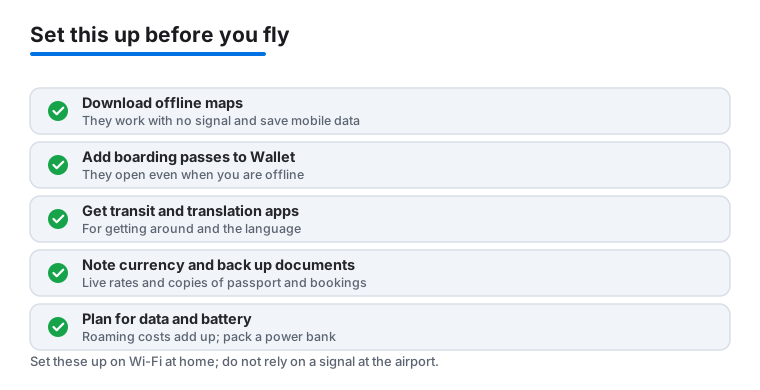
A maps app is the heart of the kit, and the feature that separates a travel map from an everyday one is offline download. Before you go, open your map of choice and save the area you are visiting while you still have wifi. Apple Maps lets you download a region for offline turn by turn, and most map apps offer something similar. Once a city or a trail is stored on the phone, you can navigate, search saved places and follow directions with the radio off, which also saves battery. For roads and walking, a mainstream map is usually enough. For trails, public land or anywhere far from a tower, a dedicated outdoor map with stored topographic detail is the safer choice.
Flights and boarding passes in Wallet
The smoothest airport mornings are the ones where the boarding pass is already in Apple Wallet. After you check in, add the pass to Wallet so it sits on the lock screen, updates the gate if it changes, and scans without a signal. Keep the airline app installed as a backup, since it holds the pass, shows delays and lets you rebook if a flight falls apart. Screenshot the pass too, as a last resort that works even if everything else fails. The same habit applies to event and transit tickets, which often drop into Wallet for one tap at the turnstile.
Transit, translation and currency
In an unfamiliar city, a transit app turns a confusing network into plain directions with real time arrivals. The transit layer built into Apple Maps covers many large cities with no extra download, and a local app often adds detail in places it does not reach. A translation app earns its place the moment a menu or a sign stops making sense. Download the language pack in advance so it works offline, and lean on the camera mode that translates text you point it at. For money, a simple currency converter keeps you honest at the market and the restaurant. Many converters cache the latest rate, so check that it has refreshed on wifi before you head out for the day.
Document storage
Trips generate paper that you do not want to lose: passport, visa, insurance card, vaccination record, the printout a border agent might ask for. Keep clear photos or PDFs of each in a place you can reach offline, such as a notes app with the items pinned or a files folder marked for offline access. Store them where they are protected behind your phone passcode and Face ID rather than loose in a camera roll. A small backup, such as a copy with a trusted person at home or in a second secure account, means a lost phone does not become a lost identity.
Practical habits that matter more than the app
The best app fails if the phone is dead or the data is gone, so a few habits carry more weight than any single download.
Download maps and passes before you fly
The night before travel, run a short checklist on wifi. Download the map region for your destination, add boarding passes and tickets to Wallet, save your hotel and the route from the airport, and pull language packs for offline use. Doing this at home, on a fast connection, means the moment you land you are not standing in an airport hallway waiting for a map to load over a weak roaming signal.
Expect spotty data and roaming costs
Plan for the phone to lose its connection often, because it will. Mobile data abroad can be slow, patchy or expensive depending on your plan, and roaming charges add up quietly if you forget. Check what your carrier charges before you leave, consider a travel plan or a local eSIM, and turn off background data for apps that do not need it on the road. Treat anything that needs a live connection, like booking a ride or comparing hotel prices, as something to handle on wifi when you can.
Battery on travel days
A travel day drains a battery faster than a normal one. Navigation, the camera, a hot car and constant searching for signal all take a toll, and a phone at zero percent is no use at the gate or the rental counter. Carry a charged power bank, top up whenever you sit down to eat, and switch on low power mode early rather than waiting for the warning. Location sharing and live tracking are useful for keeping a group together, but they are among the heavier features, so use them when they matter and pause them when they do not.
A short note on privacy
Travel apps ask for a lot: your location, your payment details, your itinerary and sometimes your contacts. Most of it is reasonable for the job at hand, but it is worth a moment of thought. Many apps only need your location while you are actually using them, so set location access to While Using rather than Always where you can, and review which apps keep a running location history. Booking and rideshare data records where you stayed and where you went, which is fine in the app but not something to post in detail in public. Share your live location with the people you trust, like a partner or a group you are traveling with, and turn it off when the reason for it has passed. The goal is not to lock everything down, but to give each app only what it needs to do its job on the trip.
How a few picks compare
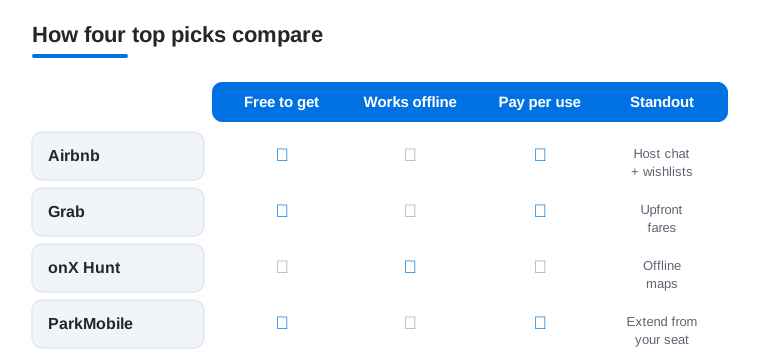
Not sure where to start? This quick comparison lines up four of our most-used picks against the things that matter on the road: whether they are free to download, whether they keep working with no signal, how you pay, and the one feature that earns each a spot.
Frequently asked questions
Which of these travel apps work without a signal?
onX Hunt is the offline champion, letting you download detailed maps before you lose service. Carnival HUB runs over a ship's own network when your phone has no bars at sea, and airline and hotel apps store passes and keys for offline access. Rideshare and booking apps need data, so sort those on hotel wifi before you head out.
Do I really need two parking apps?
It helps when you travel. Cities and even individual lots pick one provider, so ParkMobile covers many while PayByPhone covers others. Having both installed means you can almost always pay from the phone instead of hunting for coins. We keep both and let the meter signage tell us which one to open.
Are these travel apps free?
Most are free to download. Airbnb, Grab, SeatGeek and the parking and booking apps charge only for the actual ride, room or ticket. Life360 and Carnival HUB offer paid upgrades, and onX Hunt is a subscription after its trial. You can run nearly an entire trip on an iPhone without paying for an app itself.
Should I book on my iPhone or a bigger screen?
The iPhone is unbeatable for doing things on the move, like grabbing a ride, opening a room key or paying a meter. For comparing flights and hotels side by side, a larger display is easier on the eyes. We often plan and book on an iPad or Mac, then keep these apps on the phone to actually run the trip.