
Best Gaming Apps for iPhone (2026)
The App Store is stuffed with games, but only a handful survive a month on a real home screen. We put these through commutes, lunch breaks and the odd late night to see which ones earn their place. This is our short list of gaming picks for iPhone, part of our wider guide to the best iPhone apps. Playing on a bigger screen? Our iPad gaming roundup covers that.
1. Brawl Stars
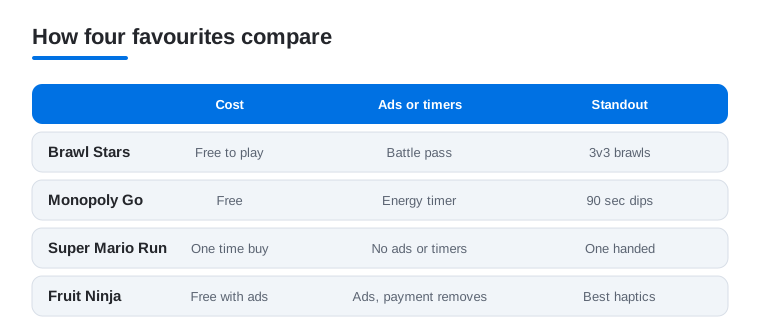
Three minute matches make Brawl Stars the one we open most while waiting for coffee. It is a top down brawler with quick 3v3 modes and a huge roster of characters. In our testing the touch controls felt natural after a single match, and the chunky art reads clearly even on a Mini. Free to play, with cosmetics and a battle pass you can happily ignore.
2. Monopoly Go
If you want something you can dip into for ninety seconds, Monopoly Go is the dice tapping comfort food of the list. You roll, collect, build and raid friends' boards, and the board animations are genuinely charming. We found the energy timer keeps sessions short, which is either a feature or a nudge to spend. Free, with optional dice packs.
3. Super Mario
Super Mario Run remains the cleanest one handed platformer on iPhone. Mario runs on his own and you tap to jump, so you can play it on a packed train without dropping a beat. We love the World Tour stages and the time pressure of the bonus modes. A one time purchase unlocks the full game, and there are no ads or timers once you pay.
4. Fruit Ninja
Few games feel as good under a thumb as Fruit Ninja. You swipe to slice flying fruit and dodge bombs, and the haptics on a modern iPhone make every combo land with a satisfying buzz. It is the game we hand to anyone who says they do not play games. Free with ads, or a small payment to remove them and unlock extra blades.
5. Stardew Valley
Stardew Valley is the farming and life game we keep coming back to on iPhone. You inherit a run down farm, then plant crops, raise animals, fish, mine and get to know the townsfolk at your own pace. It is a paid app with no ads and no in app purchases, so once you buy it the whole game is yours. We found the touch controls fine for a relaxed session, and a paired controller makes longer sittings comfortable. For native play, our Mac gaming picks go deeper.
6. Free Fire
For a full battle royale that runs on almost any iPhone, Free Fire is the lightweight choice. Matches are short at around ten minutes, the downloads are small, and the touch layout is fully customisable. In our testing it stayed smooth even on an older handset where heavier shooters stuttered. Free to play, with skins and a season pass on the side.
7. Monopoly
The classic Monopoly app is the one to grab when you actually want the proper board game, rules and all. You can play pass and play on a single iPhone or online with friends, and the 3D board with animated tokens keeps the family table feel. It is a paid app, but there are no energy timers or microtransactions, which after the free to play crowd feels like a relief.
8. One Piece
For anime fans, One Piece games turn the long running series into collect and battle adventures you can chip away at on the bus. Expect gacha style character pulls and story chapters voiced by the show's cast. We enjoyed the auto battle option for grinding, then taking manual control for tougher fights. Free to start, with the usual optional currency.
9. Crossy Road
Crossy Road is the endless hopper we never deleted. You guide a blocky chicken across roads and rivers, and the one tap control means you can play it half asleep. The voxel art looks crisp on any iPhone display, and unlocking new characters from a prize machine is quietly addictive. Free with light ads, and a small payment turns them off for good.
10. 8 Ball Pool
When we want a quick competitive hit, 8 Ball Pool delivers a real one on one match in about three minutes. Lining up shots with a drag of the thumb feels precise, and ranking up to fancier tables and cues gives it a nice pull. Free to play, with coins you can buy, though patient players do fine without spending a cent.
11. Bloons TD 6
Bloons TD 6 is the tower defence game we recommend to anyone who likes a proper think. You place monkey towers to pop waves of balloons, and the strategy runs surprisingly deep across dozens of maps. On iPhone the pinch to zoom makes placing towers on a small screen painless. It is a paid app, with frequent free updates and no pressure to spend after that.
12. Retro Bowl
Retro Bowl is the pick up football game that respects your time. You handle the passing plays and the team management, all wrapped in a lovely retro pixel look. We managed a full season in short bursts over a week of commutes. It is free with ads, and a cheap unlock removes them and adds extra customisation, which is well worth it if it sticks.
13. My Singing Monsters
My Singing Monsters is the oddly relaxing one we leave running in the background. You breed creatures that each add a layer to an evolving song, so your island slowly becomes a little band. It suits younger players and anyone who likes a cosy collector. The audio shines through headphones on an iPhone. Free to play, with optional currency to speed up breeding.
14. PS Remote Play
If you own a PlayStation, PS Remote Play streams your console straight to your iPhone over Wi-Fi. We paired a DualSense controller and ran full PS5 games from another room with very little lag on a strong network. The app itself is free. It is the closest thing to console gaming on the go without buying anything new.
15. Subway Surfers
Subway Surfers is the endless runner that has aged remarkably well. You dash along train tracks, swiping to dodge and grab coins, and the bright city themes refresh often enough to stay fresh. We keep Subway Surfers around as the perfect thirty second filler between meetings. Free with ads, and a one off purchase clears them out.
16. Rec Room
Rec Room is less a single game and more a social playground full of user made rooms and minigames. On iPhone you can join paintball, quests or party games with friends across other devices. It is the one we open when we want company rather than a solo session. Free to play, with cosmetics and a creator economy, and it leans best with a headset on for chat.
Games for iPhone, and how to pick ones you will keep
An iPhone is a genuinely good handheld. The screen is sharp, the speakers are loud enough for a quick session, and the haptics make even simple games feel responsive. The hard part is not finding games. It is finding the few that survive past the first week without nagging you for money or attention. The list above is what we kept. This guide is about how to choose your own keepers, and how to think honestly about cost and about handing a game to a child.
Start with how and where you actually play
Before you look at any chart or rating, picture the moment you will reach for a game. Short gaps in a queue or on a platform reward instant games that load fast and forgive interruption, like an endless runner or a three minute match. A longer sit on the sofa can support a strategy game or a story you build over weeks. If you play one handed on a crowded train, a tap only control scheme matters more than fancy graphics. Matching the game to the moment is the single biggest reason a game stays installed.
Next, think about your connection and your phone. Streamed console games are wonderful when the network is strong, and frustrating when it is not, so they suit a stable home Wi-Fi more than a patchy commute. Lighter games are built to run on older hardware, which is good news if your phone is a few years old. You do not need the newest model to enjoy almost everything worth playing.
Read the App Store page like a label
The App Store listing tells you most of what you need before you tap Get. Look at the age rating near the top. Scroll to the screenshots and the short preview video to see the real game rather than a stylised key art. Check the size, since a very large download hints at a heavier game that will lean on a newer phone. Most usefully, scroll to the In App Purchases list, which shows the named items a game sells and their prices. A long list of currency packs is a strong signal that the game is built around spending, even if it is free to download.
The honest part about cost
Free is the most misleading word in the App Store. Most free games make their money through in app purchases, ads, and sometimes loot boxes, so the sticker price tells you very little about what a game will actually cost you over a month. In app purchases range from a one time payment that removes ads to endless currency packs that speed up timers. Ads can be light banners or full screen videos between rounds. Loot boxes sell a random chance at an item rather than the item itself, which is the part worth watching most closely.
None of this is automatically bad. A free runner with a single ad removal purchase is a fair deal. The trouble comes with games designed so that spending always feels like the next natural step. A few honest habits help. Decide before you install whether you are willing to spend, and how much. Treat a paid up front game or a one time unlock as often the cheaper choice over time, because it ends the drip of small payments. If a game leans on energy timers that stop you playing until you pay or wait, ask whether you are enjoying the game or just managing its meter.
There is a calmer option worth knowing about. Apple Arcade is a flat monthly fee with no ads and no in app purchases. Every game in it plays in full for the one subscription, which removes the constant question of whether to spend. For people who are tired of being nudged, and for families in particular, that predictability is the whole point.
Games and kids
Children are exactly who the free to play model can catch out, because tapping Buy is as easy as tapping anything else. The good news is that the iPhone gives parents real, simple controls, and they take only a few minutes to set up.
- Turn on Ask to Buy. Inside Family Sharing, Ask to Buy sends every purchase and download a child attempts to the parent's device for approval. Nothing is bought without a yes from you.
- Use Screen Time. Screen Time lets you set limits on how long games run, schedule downtime, and restrict content by age rating, all from Settings.
- Disable in app purchases entirely. If you would rather remove the temptation altogether, you can switch off in app purchases completely in Settings, under Screen Time and content and privacy restrictions. With that off, the spend button simply does not work.
Two checks are worth making by hand before you pass a phone over. Look at the App Store age rating, which gives a quick sense of the content and any chance based purchases. And read the in app purchase list on the listing, so you know what the game is selling before a child ever sees it. Apple Arcade games sidestep both worries, since there are no ads and nothing to buy inside them, which is why so many families default to it.
Controllers, comfort and the long game
A game you keep is usually one that feels good to hold. Many iPhone games support Bluetooth controllers, including PlayStation, Xbox, and MFi pads. Pairing one in Settings takes about a minute and transforms console style games and streamed titles, while plenty of quick tap games stay better with thumbs on glass. Beyond controls, the games that last tend to respect your time, let you stop and start without losing progress, and do not punish a day away. When you find one like that, it earns its place without asking. 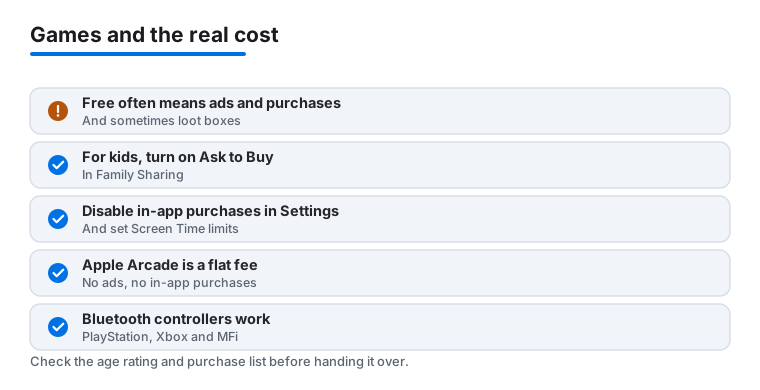
Quick comparison of four of our most-opened picks, covering cost, the ads or timers each one carries, and the single thing that earns it home screen space.
Frequently asked questions
What is the best free game to start with?
For most people we point to Brawl Stars or Subway Surfers. Both are free, download quickly and are easy to learn in a single session, so you get playing within a minute of install. If you prefer a slower pace, Monopoly Go is the gentle, tap and collect option.
Which games work well with a controller on iPhone?
iOS supports DualSense and Xbox controllers system wide, and they shine with PS Remote Play and with console titles streamed through Xbox Cloud Gaming in the browser. Many touch games stay better on the screen, but for console style play, pairing a controller in Settings takes about a minute and transforms the feel.
Are these games safe for kids?
Fruit Ninja, Crossy Road, My Singing Monsters and Subway Surfers are all family friendly. We still suggest turning on Ask to Buy and disabling in app purchases in Screen Time, since several free titles sell currency that is easy to tap through by accident.
Do I need the newest iPhone to play these?
No. Most picks here, including Free Fire, Brawl Stars and Crossy Road, are built to run on older hardware. Only streamed console play, such as PS Remote Play or Xbox Cloud Gaming in the browser, really asks for a strong, stable Wi-Fi connection rather than a fast chip.
How can I stop a free game from costing me money?
Decide your spending limit before you install, and check the in app purchase list on the App Store page so you know what a game sells. Removing ads with a one time unlock is often the cheapest long term choice, and you can disable in app purchases entirely in Settings under Screen Time if you want the spend button switched off completely.
What is Apple Arcade and is it worth it for families?
Apple Arcade is a single monthly subscription that unlocks a library of games with no ads and no in app purchases. For families it removes the constant question of whether to spend, since nothing inside the games can be bought, which makes it a calmer choice than the free to play crowd.