
Pets in Free Fire on iPhone and iPad: What Actually Helps
Pets in Free Fire look like a cute afterthought, a little companion trotting behind your character, and that is exactly how we treated them at first. Then we lost a close ranked match to someone whose pet quietly handed them a free Gloo Wall at the worst possible moment, and we started paying attention. We spent a couple of weeks running pets on an iPhone and an iPad to work out which ones earn their slot, how to unlock them without throwing diamonds away, and where the whole system is more sizzle than substance. One thing to clear up before we start: on iOS the version you will actually be installing in 2026 is Free Fire MAX, since that is the build Garena keeps current on the App Store. The pet system is shared between the two, so everything below applies whichever one you run. Here is what we found.
Getting Free Fire MAX and pets running on your device
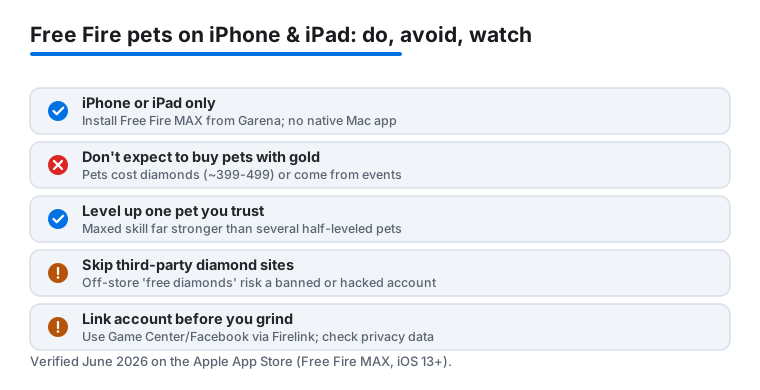
First the practical part. On the Apple App Store the listing you want is Free Fire MAX from Garena. It is a free download and there is no separate Mac version, so this is an iPhone and iPad game, full stop. If you try to find it on a MacBook or iMac you will only get the iPad app running in a window, and the touch controls make that a poor way to play. Stick to a phone or a tablet. The current iOS build needs iOS 13 or later, which covers a wide range of older hardware, but the game still pulls a large second batch of data the moment you first open it.
Do that whole first launch on Wi-Fi and keep the device plugged in. The opening download heats the phone up and drains the battery faster than you would expect for a setup screen, and on a metered connection it can eat through a chunk of your data in one sitting. Budget a few gigabytes of free storage too, because the game streams in assets as you play and gets stuttery when space runs low.
Pets are not unlocked from the start. You reach them through the Pets tab in the main lobby once your account is past the early tutorial matches. Here is the correction worth making, because the old version of this guide had it wrong and so do a lot of people: pets are bought with diamonds, the paid currency, not with the gold you earn from playing. A standard pet runs somewhere around 399 to 499 diamonds at full price. The good news is that Garena runs frequent events, Lucky Royale spins, and login rewards where pets show up cheaper or free, so patient players can build a decent stable without topping up much. Before you spend anything, link your account to Game Center or a Facebook login. Firelink ties your progress to the account rather than the device, but if you never set up a login and lose the phone, recovering a grind-heavy account is genuinely painful.
How pet skills actually work in a match
Here is the part the store screen does not explain well. Every pet has a single skill, and that skill is the whole reason to bring it, not the animation or the outfit. You equip one pet at a time, and most of the useful abilities are passive, meaning they trigger on their own under the right conditions while you focus on playing. A few are active and need you to tap them, but the passive ones are what shape a match without you thinking about it.
The skills fall into a few rough buckets, and knowing them saves you a lot of wasted diamonds:
- Healing and recovery. Detective Panda restores a small amount of health every time you score a kill, up to roughly 10 HP per kill at max level. That keeps you topped up through a fight instead of forcing a medkit between every engagement.
- Utility and survival. Mr. Waggor hands you a free Gloo Wall every couple of minutes as long as your inventory is empty of them, which is a real safety net if you panic-build walls in a pinch. Falco speeds up your whole squad's gliding and parachuting at the drop, so you hit the ground and the loot before the other teams do.
- Movement and tempo. Other pets shave time off specific actions like reviving a downed teammate or shortening an ability cooldown. These sound minor until one of them wins you a fight you should have lost.
You can also pair a pet skill with your character skills, and the setups people actually run in ranked are nearly always about that combination rather than any single hero or pet on its own. A pet that refreshes your character's cooldown a touch faster, for instance, is doing more work than its little health bar suggests.
The pets that earned their slot in our testing
We are not going to pretend every pet is worth chasing, because they are not. A handful stood out across the weeks we played. Mr. Waggor was the one we kept coming back to, because a free Gloo Wall when you are caught in the open is the kind of thing that turns a death into a survival, and that pays off in almost any match. Detective Panda earned its place on aggressive accounts, since the per-kill healing rewards exactly the play style that gets you killed otherwise. Falco is more of a squad pick: in a duo or squad it is great, but solo its drop-speed bonus is wasted on you alone.
The honest takeaway is that the pet that suits you depends on your character and your habits, not on which one looks coolest in the lobby. Garena reworks pet abilities from time to time, so a companion that was middling last season can quietly become a staple after a patch. Falco, for one, has had its numbers adjusted more than once. We got into the habit of skimming the patch notes after each big update, because that is usually where a buffed pet turns into the one everyone is suddenly running.
If you are starting out and only want to invest in one, Mr. Waggor is the safest first pick for the money, since its skill helps regardless of how good your aim is yet.
Tips that made pets genuinely useful
A few small habits made the difference between a pet that just trotted along and one that mattered. The biggest is to match the pet to your own play style rather than copying whatever a streamer used, because their character pairing and their aim are not yours. We also leaned hard on the level-up system. Feeding a pet raises its skill tier, and the jump from level one to a maxed ability is far bigger than most people assume; Detective Panda's heal, for example, climbs as you level it. Pour your spare pet food into one companion you trust instead of spreading it thin across five half-leveled ones.
On the device side, drop the in-game graphics a notch on an older iPhone and you will hold a steadier frame rate in the chaotic final circles, which is exactly when a pet skill is most likely to save you. The High and Ultra presets look nicer but they are the first thing to cause frame drops on aging hardware. On an iPad the extra screen real estate makes the whole game easier to read, and we found the larger view especially handy for spotting an enemy at distance before a fight even starts. Whichever device you use, keep a few gigabytes of storage free and close background apps before a ranked session so the game does not stutter while it streams in new assets mid-match.
The limits, and a couple of alternatives
Time to be straight about the downsides. Pets give a real but modest edge, and they will not carry bad positioning or shaky aim. The system also leans on grind and, more honestly, on spending. Pets are diamond purchases, diamonds cost real money unless you grind events for them, and the flashiest pet skins almost always sit behind the paid currency. None of that is a dealbreaker, but go in expecting a slow build rather than an instant power spike, and set yourself a spending limit before an event tempts you toward the wallet. The third-party sites promising cheap or free diamonds are a common route to a hacked or banned account, so buy only through the in-game store or official top-up.
One more privacy note: Free Fire MAX is an online game that ties into Game Center or a Facebook login and collects the usual gameplay and account data. If that matters to you, review the App Store privacy section before installing and think twice about linking a primary Facebook account.
If the battle royale grind starts to wear on you, there are gentler ways to spend a gaming evening on iOS. For a slower, collection-driven adventure with the same anime energy, the pirate games in our guide to One Piece on iPhone and iPad are an easy switch. And when you just want something quick and relaxing between ranked sessions, the slice-and-combo loop of Fruit Ninja is far kinder to your battery. To see what else is worth your storage, our roundup of the best gaming apps for iPhone and the full Gaming app hub are good places to browse before your next free evening.
FAQ
How do you unlock pets in Free Fire?
Open the Pets tab from the main lobby once your account is past the early tutorial matches, then buy a pet with diamonds, the paid currency, usually around 399 to 499 each. They are not bought with the gold you earn from playing. The cheaper route is to watch for events, Lucky Royale spins, and login rewards, where pets often show up discounted or free.
Do pets really make a difference in matches?
Yes, but a modest one. Each pet has a single skill, like Detective Panda's heal on kill or Mr. Waggor's free Gloo Wall, that triggers while you play. It will not fix poor positioning or aim, though the right skill paired with your character can swing a close ranked match.
Can you use more than one pet at a time?
No, you equip a single pet per match, so the choice matters. We recommend pouring your pet food into leveling up one companion you trust rather than spreading it across several, since a maxed skill is far stronger than a low-level one.
Is Free Fire on Mac, or just iPhone and iPad?
It is an iPhone and iPad game. The App Store listing you want is Free Fire MAX from Garena, and there is no native Mac version. You can run the iPad app in a window on an Apple Silicon Mac, but the touch controls make that a poor way to actually play.
Does Free Fire run better on iPhone or iPad?
Both work well. We preferred the iPad for its larger screen, which makes enemies easier to spot and crowded final circles simpler to read. The iPhone is fine for quick sessions, especially if you drop the in-game graphics a notch on an older model to keep the frame rate steady.