
Brawl Stars on iPhone and iPad: The Best Brawlers for Every Game Mode
After a few hundred matches across a couple of seasons, we stopped chasing whichever brawler looked flashy and started picking for the mode in front of us. That one habit moved our win rate more than any single unlock. Below is what worked for us, written for someone who just wants to install the game, learn a handful of reliable picks, and stop losing the same matches over and over. One thing up front, since a lot of guides get it wrong: Brawl Stars is an iPhone and iPad game on Apple devices. There is no real Mac version, and we will be honest about that further down instead of pretending otherwise.
Getting it running on your iPhone or iPad
On iPhone and iPad the install is the easy part. Open the App Store, search Brawl Stars from Supercell, and tap Get. It needs iOS or iPadOS 12 or later, which covers basically any device still getting updates in 2026. Open the game once on Wi-Fi so the first big asset download finishes, because that first load is a few hundred megabytes and you do not want it eating cellular data. The game runs the same build on iPhone and iPad, so an iPad just gives you a bigger screen and a slightly easier time reading the map, not a different version.
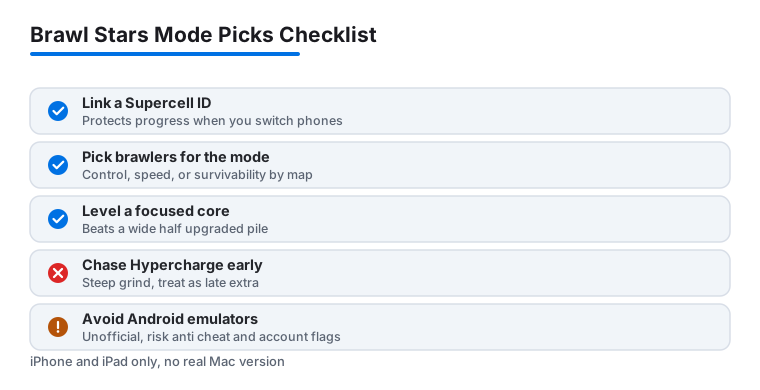
Before you touch a single match, link a Supercell ID. We learned this the hard way after switching phones and nearly losing months of progress. The Supercell ID option lives behind the settings gear at the top right of the main screen, and connecting it takes about a minute. Without it, your account is tied to that one device, and a lost or wiped phone means a lost account. With it, you can log in on a new iPhone or iPad and pick up exactly where you left off.
One more setup habit that pays off: turn on the practice and friendly room before you commit anything to ranked. The practice mode lets you run a brawler against bots, and a friendly room lets you test against a friend with no trophy risk. Ten minutes there teaches you a brawler's range and reload speed far cheaper than a string of live losses while you fumble the touch controls.
The systems that actually matter once you start
Brawl Stars hides real depth behind a friendly cartoon shell, and a few systems are worth understanding early. Super charge is the big one. Every brawler builds a Super by landing hits, and knowing roughly how many shots fill that bar tells you when you can play aggressive and when you need to back off. A brawler with a charged Super is a different threat than the same brawler with an empty one, and good players track that on both sides of the fight.
Gadgets and Star Powers quietly change how a brawler plays. They unlock as a brawler levels up, so a level nine or eleven brawler is often a sharper tool than the same character at level five. This matters for how you spend resources. A small, well leveled core beats a wide pile of half upgraded brawlers, because an underleveled pick loses fights it should win on paper.
Then there is Hypercharge, the newer top end upgrade that gives certain brawlers a temporary stat boost when their Super is used in a specific way. You do not need it to climb, and it sits behind a steep grind, so treat it as a late game extra rather than something to chase early. The meta shifts every few weeks as Supercell rebalances, so do not over invest in one character on the assumption it stays on top.
Best brawlers for each game mode
This is the part most guides overcomplicate. You do not need the whole roster. You need two or three dependable picks per mode that you actually own and have leveled. Tier lists churn constantly, so treat the names below as roles first and specific brawlers second. As of mid 2026 these held up well for us.
- Gem Grab: a controller who can lock down the center and protect the carrier. Cordelius and Gene pull this off, with a steady support like Byron or Poco keeping your gem holder alive.
- Brawl Ball: speed and pressure win. Max and Fang force openings, while a tanky scorer like El Primo or Frank can bully the ball into the goal once a lane opens.
- Showdown: survivability matters more than aim. Edgar, Leon, Crow, and a wall hugging Bull let you pick fights on your terms instead of getting third partied in the open.
- Knockout: long range control. Belle and Mandy punish anyone who steps out, which is exactly what a no respawn mode rewards.
- Heist: raw damage to the safe, plus enough pressure to keep enemies off it. Colette is a strong pick because she threatens both the safe and the brawlers defending it; Colt and Bull also melt the objective.
- Hot Zone: area control. Sprout, Jessie, and Rosa hold the circle while the rest of your team trades around it.
Notice the overlap. A handful of brawlers covers most of the rotation, so you can pour coins and Power Points into a focused group instead of spreading them thin. If you only level five or six brawlers well, pick ones that show up across several modes.
Practical tips we wish we knew sooner
Map awareness beat mechanical skill for us almost every time. Walls are not decoration. Throwers like Barley and Sprout are useless against a brawler who stays behind cover, so learning each map's bushes and bottlenecks turned a lot of coin flips into clean wins. Before a match starts, glance at the map preview and decide where you want to fight before the gates open.
Play with the gem and score counters, not against them. In Gem Grab, the moment your team hits ten gems, stop pushing and play safe for the countdown. We threw away more leads by greeding for one extra gem than we ever lost from playing patient. The counter is telling you to stall; listen to it. In Knockout, treat your life as the resource it is, because there is no respawn to bail you out.
Use quick chat or voice with a duo when you can. Two Supers landed at the same time win team fights that two solo players would lose, and a one second heads up is enough to coordinate them. And keep your sound on, especially with earbuds. Footstep and reload cues tell you when an enemy is reloading or when a bush is occupied, and that information is hard to get any other way on a small screen.
The limits and the downsides worth knowing
We like Brawl Stars, but it is not flawless and pretending otherwise would not help you. Progression slows down hard once you clear the early brawlers, and the strongest characters often sit behind the Brawl Pass or a long grind. You can stay free start to finish, but expect to wait for the brawler you really want rather than buy your way to it. The shop got a big overhaul in 2026 and leans harder on offers, so it is easy to overspend if you are not deliberate.
Matchmaking can feel rough in solo queue, especially in modes that punish a single weak teammate. A duo partner smooths that out more than any brawler choice. On privacy, a Supercell ID ties your progress to an email or a linked account, and the game collects the usual analytics; if that bothers you, read Supercell's policy before linking. Like most live games, it leans on a steady connection, so spotty Wi-Fi turns a fun session into a stuttery one fast.
The biggest thing to correct, since older write ups get it wrong: there is no real Mac version. Supercell built Brawl Stars for iOS and Android only, and they have not published it to the Mac App Store or opted the iPhone app into running on Apple Silicon Macs. So you cannot just download it on a MacBook or iMac the way you would a normal app. People do play it on Mac through third party Android emulators like BlueStacks or MuMu, or by mirroring their phone screen, but those are unofficial. Emulators run an Android build, can trip anti cheat or account flags, and ask for system level permissions worth thinking twice about. If you want Brawl Stars on Apple hardware the clean answer is simple: play it on your iPhone or iPad.
Good alternatives if it is not your fit
If the short match arena style clicks but you want something different, there are solid options on iPhone and iPad. Mobile Legends scratches the team based, objective driven itch with a deeper hero pool and longer matches, which suits players who want more strategy per game. If your real goal is playing console games on a bigger Apple screen rather than Brawl Stars specifically, PS Remote Play streams from a PlayStation to a Mac or iPad, which sidesteps the touch control question entirely for those titles.
For a wider look at what runs well, our best gaming apps for iPhone roundup and the full gaming app category cover plenty of titles in the same family. Try a couple, keep the one that respects your time, and do not feel obligated to grind a game you have stopped enjoying.
FAQ
Can I play Brawl Stars on a Mac?
Not officially. Supercell made Brawl Stars for iOS and Android only, and it is not on the Mac App Store, nor has the developer enabled the iPhone app to run on Apple Silicon Macs. People play it on Mac through third party Android emulators like BlueStacks or by mirroring a phone, but those are unofficial, run an Android build, and carry account and privacy risks. On Apple hardware, the clean route is your iPhone or iPad.
Do I need to spend money to be competitive?
No, but patience helps. You can earn brawlers and upgrades for free, though the grind slows after the early unlocks and the 2026 shop pushes a lot of offers. In our experience a small, well leveled core of brawlers matters far more than owning the whole roster.
Which brawler should a complete beginner start with?
Pick something forgiving with good range, like Colt or Piper, plus one tanky brawler such as El Primo or Bull for close quarters. Those two cover most early modes while you learn map control and Super timing.
Why do I keep losing in Showdown?
Usually it is positioning rather than aim. Stick near walls and bushes, avoid open fights early, and let other players weaken each other before you commit. Survivability brawlers like Edgar, Leon, or Bull reward that careful, late game style.