
Best Education & Learning Apps for iPhone (2026)
Your iPhone is the one screen that is always with you, which makes it a surprisingly good place to learn a language on the bus or check a grade between classes. We tested these apps on iPhone over weeks of real homework, commutes, and parent emails to see which ones earn a spot on the home screen. For a wider look at school and study tools, browse the full education hub or the rest of our best iPhone apps.
Below are the picks worth keeping, ordered best first, with honest notes on free versus paid.
1. Duolingo
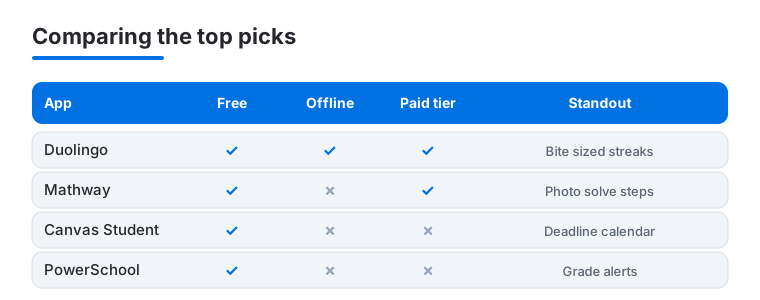
The app that made daily language practice stick for us. Lessons are bite sized, so five minutes in a waiting room actually adds up, and the streak nudges are motivating without being cruel. On iPhone the haptic taps and quick speaking drills feel natural one handed. Free with ads and a daily energy limit; Super removes both. See our Duolingo features guide for the settings we change first.
2. YouTube Kids
If you are handing the phone to a younger learner, this is the safer way to do it. Content is filtered by age, and the parental timer plus PIN gate are easy to set from your iPhone in under a minute. We use it for science explainers and read alongs more than cartoons. Completely free, ad supported, and you can block individual channels you do not trust.
3. Mathway
Stuck on an equation at 10pm? Type it in or snap a photo and Mathway walks through the answer. It covers algebra through calculus and statistics, which makes it a genuine homework lifeline for high school and early college. On iPhone the camera capture is quick and the keypad handles fractions well. Free for answers; the step by step explanations need a subscription, which is the part actually worth paying for.
4. Canvas Student
The student facing companion to the Canvas learning system, and the one most college students will live in. Assignments, due dates, grades, and discussion posts all sync to your iPhone, and push notifications mean you stop missing deadlines buried in email. In our testing the calendar view was the standout. Free, since your school pays for the platform. Pair it with our productivity picks to keep deadlines under control.
5. Canvas Teacher
The teacher and instructor side of the same platform. If you are running a course rather than taking one, this is where you post materials, grade submissions, and message a whole class from your phone. We found grading short answers on iPhone perfectly doable on the go, though long feedback still begs for a keyboard. Free with your institution, and it mirrors the desktop experience closely.
6. PowerSchool
The grade portal a huge number of US schools use, and the fastest way for students and parents to check marks and attendance. The iPhone app strips the clunky web login down to a clean dashboard, and you can set alerts for new grades so nothing is a surprise at report time. Free, provided your district has enabled mobile access. Setup just needs a district code or QR scan.
7. Infinite Campus
Another widely used school information system, and a direct alternative to PowerSchool depending on your district. Parents get a clear feed of grades, attendance, and lunch balances, while students can track assignments. On iPhone the layout is tidy and login held onto our session reliably between checks. Free through your school. The Parent and Student logins are separate, so grab the right one.
8. ParentSquare
Less a study tool and more the app that keeps the home to school line open. Teacher announcements, permission slips, sign ups, and direct messages land in one feed instead of scattered emails. We liked that you can reply or RSVP straight from an iPhone notification. Free for families, with auto translation that genuinely helps multilingual households stay in the loop.
9. English grammar apps
If you are polishing writing rather than learning to speak, a dedicated grammar coach beats a generic dictionary. The best of these flag tense slips and awkward phrasing as you type, and the daily drills build real habit on a phone screen. Most are free to start with a paid tier for advanced rewrite suggestions. We rounded up the standouts in our grammar apps guide.
10. math solver apps
Beyond Mathway there is a whole shelf of camera based solvers, and they are worth knowing if one app chokes on your handwriting or a specific topic. Point the iPhone camera at a problem and you get steps, graphs, and often a short video. Most give answers free and reserve the teaching breakdown for a subscription. Keep one as a backup; no single solver nails every question type.
Education and learning apps for iPhone
The iPhone is not where you write a term paper, but it is excellent at the small, frequent things that actually add up: a five minute language lesson, a flashcard run, a quick math check, a glance at this week's grades. The apps below split into two jobs that are not judged the same way. Some are apps you actively learn with. Others connect you to a school. A learning app earns its place by fitting into spare minutes and working without signal. A school portal earns its place only if your district or campus actually uses it, so the login your school hands you decides that one for you.
How to choose
Before you commit a slot on your home screen, run through a short checklist. None of it requires a spreadsheet, just a week of honest use.
- Free tier honesty. Almost everything here is free to start. What matters is what sits behind the paywall. With Duolingo the paid tier mainly removes ads and the energy limit. With Mathway and similar solvers the free version gives the answer and reserves the step by step explanation, which is the part actually worth paying for. Use the free version for a week before you decide.
- Offline use. A commute is prime study time and often a dead zone. Duolingo lets you download lessons. School portals like Canvas Student and PowerSchool need a connection to sync, so do not count on them underground.
- One handed, glanceable design. On a phone you want a fast lesson or a quick grade check, not a cramped desktop site squeezed onto a small screen. Favor apps with a clean dashboard and useful push alerts.
- The right login. School apps often ship separate Parent and Student versions and need a district code or QR scan. Grab the correct one up front to avoid staring at an empty screen.
- Accuracy you can trust. For a homework solver, an answer is only useful if it is right and shows its working. Treat a one tap answer with some skepticism, especially on word problems, and read the steps so you can catch where a misread of the question sent it wrong. The same caution applies to any app that summarizes or generates content: it is a study aid, not a final authority.
Kids, privacy, and what "free" really costs
This is the part most app roundups skip, and it is the part that matters most when the person learning is a child. A learning app for kids has a different bar to clear than one for an adult, and the App Store gives you real tools to check it.
Privacy for younger learners
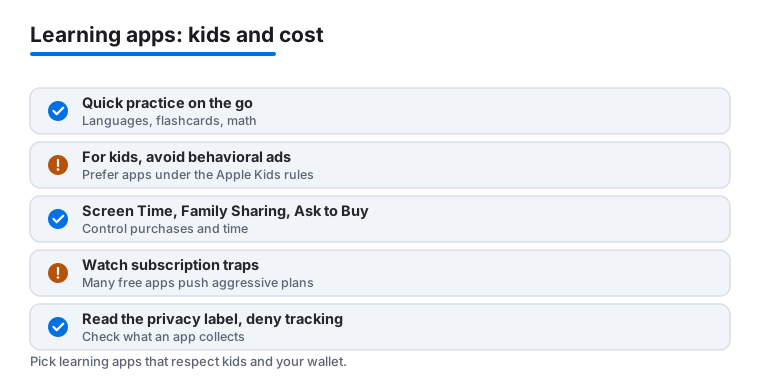
When an app is meant for children, prefer ones that do not run behavioral advertising aimed at kids and that have a clear, readable privacy policy you can actually find. This is not just a nice to have. Apps that Apple lists in the Kids category have to follow stricter rules, including limits on data collection and on the kind of advertising and tracking they can use. That category label is a useful signal, but it is a floor, not a guarantee, so still do the two checks below.
First, read the App Store Privacy Nutrition Label on the product page before you download. It shows what data the app says it collects and whether that data is linked to the user or used to track them across other companies' apps and sites. For a children's app, you want that list short and you want "Data Used to Track You" to be empty or close to it. Second, leave App Tracking Transparency doing its job. If an app asks for permission to track, you can simply decline, and on a child's device you can lock that down entirely in Settings so the prompt never even appears.
The subscription trap
Many apps that call themselves free learning apps are built around aggressive subscriptions or in app purchases, and the upsell often lands hardest on a screen a child is holding. The defenses are already in iOS, and they are worth setting up before you hand over the phone, not after the first surprise charge.
- Family Sharing with Ask to Buy. Set up Family Sharing and turn on Ask to Buy for a child's account. Every download and every in app purchase then needs an adult to approve it on their own device. A pushy "unlock everything" button becomes a request you can quietly deny.
- Screen Time. Use Screen Time to block in app purchases outright, to require a passcode for changes, and to cap how long an app can run. It is also where you keep the App Tracking Transparency and content settings locked so a child cannot flip them back.
- Check the real price. On the product page, scroll to the in app purchases list. A solver or language app that shows a yearly subscription near the top of that list is telling you where its business is. That is fine for an adult making a clear choice. It is a reason for caution on a kid's device.
Cost honesty cuts both ways. A paid subscription is not automatically bad, and sometimes it is the cleanest option, because an app you pay for directly has less reason to harvest and monetize attention. The goal is simply to know what you are agreeing to before the trial ends, rather than discovering it on a statement.
Where the iPhone fits
Play to the device's strengths. The iPhone is genuinely good for quick practice on the go: languages, flashcards, and math drills that take a few minutes and benefit from being done often rather than for long stretches. Push notifications make grade portals and school messaging apps far more useful than their websites, because the alert reaches you the moment something changes. For long reading, heavy note taking, or grading a stack of essays, a larger screen wins, and our iPad education picks cover that side. Used for what it is good at, the phone in your pocket turns dead time into study time without much effort. A practical setup is to keep one language app, one solver, and whichever school portal your campus runs, then leave everything else off so the home screen stays a place you actually open to learn rather than a folder of half tried trials.
Frequently asked questions
Which iPhone app is best for actually learning a language?
Duolingo is the easiest to stick with because lessons are short and the streak keeps you honest. It is free to use, and the paid Super tier mainly removes ads and the energy limit rather than unlocking secret content, so try the free version first.
Are the school grade apps like PowerSchool free?
Yes. PowerSchool, Infinite Campus, Canvas Student, and ParentSquare are all free to download because your school or district pays for the underlying platform. You just need the login or district code your school provides to connect your account.
Can these apps replace a tutor for math homework?
Not entirely, but they get close for stuck moments. Mathway and other solvers show the steps to an answer, which helps you learn the method rather than just copy it. The step by step explanations usually sit behind a subscription, so weigh that against a few tutoring sessions.
Is the iPhone a good device for this, or should I use an iPad?
iPhone is great for quick, frequent tasks: a language lesson, a grade check, a quick solve. For long reading, note taking, or grading a stack of essays, a bigger screen wins. See our iPad education picks if you want the larger canvas.
How do I stop a kids learning app from pushing subscriptions?
Turn on Ask to Buy through Family Sharing so an adult has to approve every download and in app purchase, and use Screen Time to block in app purchases and require a passcode for changes. Before installing, check the in app purchases list on the App Store product page so you know whether the app leans on a subscription.
How can I check an education app's privacy before downloading?
Read the App Store Privacy Nutrition Label on the product page to see what data the app collects and whether it tracks users across other apps. For a children's app, prefer one in Apple's Kids category with no behavioral ads and a clear privacy policy, and leave App Tracking Transparency on so you can decline tracking.