
Best Education & Learning Apps for Mac (2026)
A Mac is where the real work of learning happens once the quick phone checks are done: writing the essay, joining the class call, grading a stack of submissions on a screen big enough to think on. We spent weeks running these apps on macOS through actual coursework, parent emails, and a few late night study sessions to see which ones earn a place in the Dock. For the wider picture, browse the full education hub or the rest of our best Mac apps.
Here are the picks worth keeping, ordered best first, with straight talk on free versus paid.
1. Duolingo
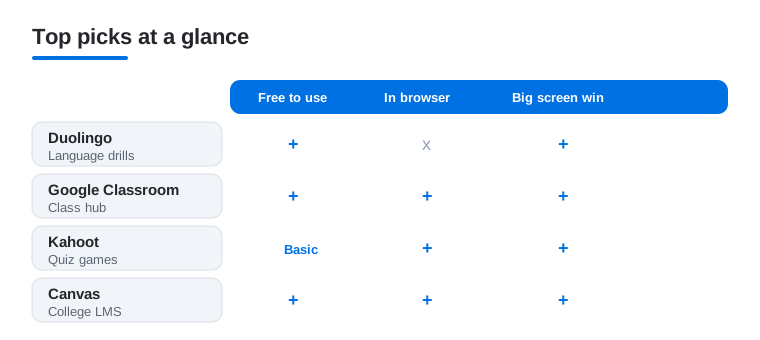
The app that finally made daily language practice a habit for us, and it translates nicely to a Mac. Typing answers on a full keyboard speeds up the written drills, and the bigger screen makes the speaking and matching exercises feel less cramped than on a phone. Free with ads and a heart limit; Super clears both. Our Duolingo features guide covers the settings we change on day one.
2. Google Classroom
If your school runs on Google, this is the hub students and teachers will open every day. On a Mac it shines in the browser: posting assignments, attaching Docs, and leaving feedback all feel quicker with a real keyboard and trackpad. We found grading written work far less tedious here than on a small screen. Free with a school account, and it syncs instantly with Drive so nothing goes missing.
3. Google Chat
The quiet workhorse for study groups and teacher to student questions. On Mac you can keep a Google Chat window parked beside your notes and fire off questions without reaching for your phone. Threads and spaces keep a class project from turning into chaos. Free with a Google account, and the desktop view handles file sharing and links far more comfortably than mobile.
4. Kahoot
The quiz tool that makes a dull review session loud and competitive. A Mac is the natural place to build and host games: the editor is roomy, and projecting the big screen while students answer on their phones is exactly how it is meant to run. We hosted a full revision round in minutes. Free for basic quizzes, with paid plans for larger groups and advanced question types.
5. Canvas
The learning platform a huge number of colleges live in, and the Mac browser is where it feels most complete. Assignments, grades, discussion boards, and the calendar all sit in one place, and writing long feedback or an essay submission is simply easier with a keyboard. In our testing the SpeedGrader tool was the standout for marking. Free, since your institution pays for the platform.
6. Schoology
Another full learning management system, common in K to 12 districts. On a Mac the gradebook and assignment views open up properly, and you can manage a whole course without the pinch and zoom of the phone app. Students get a clean feed of due dates and materials. Free through your school. We liked how cleanly it handled file uploads from Finder, which matters when a deadline is close.
7. PowerSchool
The grade portal countless US schools rely on, and the web version on a Mac is the fastest way for parents and students to scan marks, attendance, and report cards. The larger layout makes spotting a slipping grade obvious in a glance. Free, assuming your district has it enabled. Setup just needs the district code or login your school hands out, and the session stayed put across checks for us.
8. Infinite Campus
A widely used school information system and a direct alternative to PowerSchool depending on your district. On Mac, parents get a clear feed of grades, attendance, and lunch balances, while students track assignments without squinting. The web dashboard held our login reliably. Free through your school. Note that Parent and Student accounts are separate, so sign in with the right one to see the right view.
9. Zotero
A reference manager that earns its place on a Mac during any research heavy assignment. The native macOS app collects sources from your browser, files PDFs into folders, and drops formatted citations straight into your word processor, which saves real time on a long paper. The wide screen lets you read a PDF in one pane and your notes in another. Free and open source, with paid storage only if you sync a large attachment library. We leaned on it to keep a bibliography tidy across weeks of reading.
10. Merlin Bird ID
A delightful detour into real science from the Cornell Lab of Ornithology. While it is built for phones in the field, the Mac is where we sorted our sightings and explored the photo library afterward. For a nature or biology unit it turns a walk into a lesson. Completely free, no subscription, no ads. The sound ID that names birds from their calls still feels like magic.
11. Toca Boca
Open ended play apps for younger kids that lean on imagination rather than scores or timers. On a larger Mac screen the worlds are easier for small hands to explore alongside a parent, and there is no chat or open internet to police. Most titles are a one time paid download with no ads or in app purchases, which we appreciate. Think creative sandbox for early learners, not flashcards.
12. Hello Kitty
A gentle entry point for the youngest learners, wrapping early counting, colors, and matching in a friendly character they already adore. On a Mac the bright visuals fill the screen and the simple taps suit a child just getting comfortable with a trackpad. Usually free to start with optional paid extras, so check the purchase settings before handing it over. Best treated as playful practice, not a full curriculum.
13. Albert
A serious study companion aimed at exam prep, with practice questions for AP courses, SAT, ACT, and core subjects. A Mac is the right tool for it: long question sets and detailed explanations are far easier to work through with a keyboard and wide screen than on a phone. Schools often provide full access; individual plans are paid. We found the explanations after each question did the real teaching.
14. Anki
A spaced repetition flashcard tool that suits the Mac sit down session, where you actually settle in to read or revise. The native macOS app lets you build and review decks with a keyboard, and the roomy screen makes long card sets and image cloze cards easier to follow than a cramped phone view. The desktop version is free; only the iOS companion charges. We slotted it into longer study blocks; pair it with our Mac productivity picks to keep distractions at bay while you work.
15. English grammar apps
If you are polishing writing rather than learning to speak, a dedicated grammar coach beats a generic spell check. On a Mac the best of these sit right inside your browser and word processor, flagging tense slips and clumsy phrasing as you draft an essay. Most are free to start with a paid tier for advanced rewrites. We gathered the standouts in our grammar apps guide.
16. language learning apps
Beyond Duolingo there is a whole shelf of language tools, and a Mac is a great place to go deeper than a daily streak. Larger lessons, side by side reading, and longer listening drills all benefit from the bigger screen and keyboard for full sentences. Most are free to sample with a subscription for serious study. Keep one as your main course and a phone app for quick top ups.
Education and learning apps for Mac
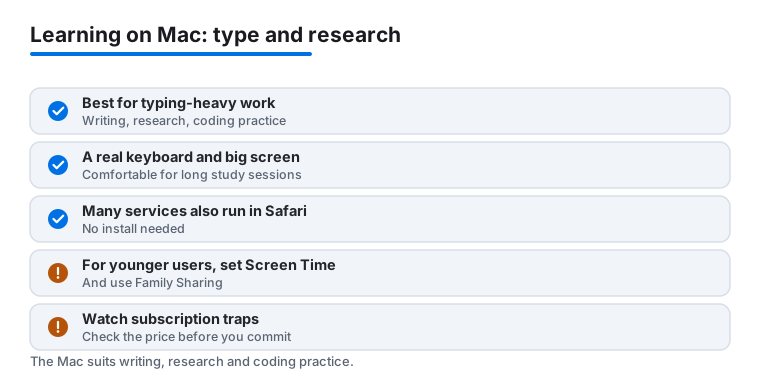
The Mac is built for the kind of learning that needs a real keyboard and a wide screen. Phones are great for a quick streak or a fast grade check, but the heavier work tends to land on the desktop: drafting an essay, reading three sources side by side, running through a long practice set, or writing detailed feedback on a class of submissions. If your study is typing heavy or research heavy, this is the device that pays off.
Think of learning on a Mac in five broad jobs. Writing covers essays, lab reports, and notes, where a full keyboard and a large document view make a genuine difference. Research and reference means having several windows open at once: a source, your notes, and a dictionary or encyclopedia. Coding practice benefits from the screen room to keep an editor and instructions visible together. Math and science tools handle graphs, equations, and diagrams that are awkward to pinch and zoom on a phone. And language apps let you type full sentences and work through longer listening drills than a mobile session usually allows.
How to choose
Start with the work you actually do most weeks, not the app with the longest feature list. A student living inside a school platform should make sure that platform runs smoothly first, then add practice apps around it. Someone polishing their writing needs a good grammar coach more than another flashcard deck.
- Match the tool to the task. A quiz builder, a learning management portal, and a language course solve different problems. Pick the one that removes friction from your real workload.
- Check that it uses the Mac well. The best of these feel roomy on a desktop: easy keyboard entry, several panels at once, no cramped phone layout stretched to fill the glass.
- Prefer apps that sync across your devices. Drafting on the Mac and reviewing on a phone is a common rhythm, so look for clean handoff between them.
- Try the free tier honestly before paying. Use it for a week of real work. If it saves you time and you keep reaching for it, then a subscription is a fair trade.
- Watch where your files live. Tools that save into iCloud, Google Drive, or a folder you control are easier to trust than ones that lock your work inside a single service.
Writing, research, and reference
For drafting, the Mac versions of mainstream writing tools and the browser based document editors are the natural home. A dedicated grammar coach can sit inside your browser and word processor and flag clumsy phrasing as you type, which beats a generic spell check. For reference, keep a dictionary or an encyclopedia open in a second window so checking a fact does not pull you out of your draft. Much of this work happens in Safari just as well as in an installed app, so you are rarely forced to download anything. The practical win is that you can keep the source open in one window and your draft in another, then copy a quote across without losing your place, which is the kind of small friction that adds up over a long assignment.
Coding, math, and science
If you are practicing code, the screen room lets you keep an editor open beside the lesson or the problem you are solving, which cuts the constant switching that slows a phone down. For math and science, the larger canvas makes graphs, equations, and labeled diagrams readable in a way a small screen never manages. Exam prep tools with long question sets and detailed explanations, such as the ones aimed at AP, SAT, and ACT study, are far easier to work through here with a keyboard and a wide layout. When a question set runs to twenty or thirty items, the difference between scrolling a phone and scanning a full page is the difference between finishing the set and giving up halfway.
Language learning with a real keyboard
Language apps reward the desktop because you can type full sentences instead of tapping word tiles, read passages side by side with their translation, and sit through longer listening drills without your thumb getting tired. A sensible setup keeps one app as your main course on the Mac and a phone app for quick top ups during the day.
A note on kids, privacy, and cost
If a child uses the Mac, a little setup protects both their attention and your wallet. The honest priorities are simple.
- Prefer apps that do not run behavioral ads to children. Open ended play apps and one time paid downloads with no ads and no in app purchases are the calmest choice for young learners. They also remove the pressure to keep tapping that ad driven apps build in on purpose.
- Use Screen Time and Family Sharing for younger users. Screen Time sets app limits and downtime, and Family Sharing lets you approve purchases before they go through, so a curious tap cannot quietly charge your card.
- Watch for subscription traps. Some apps are free to start but gate the useful parts behind a recurring fee, and a few make the trial easy to enter and the cancel button hard to find. Check the purchase settings before handing the Mac over, and read what happens when a free trial ends.
Cost wise, remember that a lot of school platforms are already paid for by your district, so the apps you sign into with a school account cost you nothing. For everything else, treat a subscription as something to earn over a week of real use, not a default to accept on the first launch.
One last practical point: many learning services are web based, so they also work in Safari on a Mac with nothing to install. For school portals in particular the browser is often the better experience, and for kids it means fewer downloads to manage. Use a mix that fits you, the browser for portals and quick web tools, installed apps for the practice you open every day.
Frequently asked questions
Is a Mac actually better than an iPad or iPhone for learning?
For the heavy lifting, yes. Writing essays, joining class calls, grading submissions, and long study sessions all go faster with a keyboard and a big screen. For quick daily tasks like a language streak or a fast grade check, a phone is fine. Many of these apps sync across devices, so you can switch between them. See our iPhone education picks for the on the go side.
Are the school portals like PowerSchool and Canvas free on Mac?
Yes. PowerSchool, Infinite Campus, Canvas, Schoology, and Google Classroom are all free to use because your school or district pays for the platform. On a Mac most run straight in the browser, so there is nothing to buy. You just need the login or district code your school provides to connect your account.
Do I need to download apps, or can I just use the browser on macOS?
For the school platforms, the browser is often the better experience on a Mac and needs no install. Some apps, like Duolingo and certain kids titles, have dedicated Mac versions in the App Store that can run iPad builds. We use a mix: browser for portals and Google tools, installed apps for practice you open daily.
Which apps work best for younger kids on a Mac?
Toca Boca and Hello Kitty are the gentlest, leaning on play rather than scores, and the bigger screen helps small hands explore. Look for one time paid downloads with no ads or in app purchases when you can, and check the purchase settings before handing the Mac over. These are creative practice, not a full curriculum.
How do I keep a child safe and avoid surprise charges on a shared Mac?
Set up Screen Time for app limits and downtime, and use Family Sharing so purchases need your approval before they go through. Favor apps with no behavioral ads to children, ideally one time paid downloads with no in app purchases. Before handing over the Mac, check each app's purchase settings and read what happens when any free trial ends, since that is where surprise subscriptions usually hide.
Can these learning tools run in Safari instead of as installed apps?
Many can. School portals like Canvas, Schoology, PowerSchool, Infinite Campus, and Google Classroom are web based and often work best in Safari with nothing to install. Several grammar and language services run in the browser too. A good rule is to use the browser for portals and quick web tools, and install apps only for the practice you open every day.