
Best Utilities Apps for Mac (2026)
Utilities are the quiet native apps that make a Mac feel like yours: the browser you live in, the launcher that opens anything from one keystroke, the clipboard history that remembers what you copied two steps ago. We pulled together the ones we keep coming back to after months of daily use, with plain notes on what is genuinely free and what is worth paying for. Everything named here runs as a real macOS app, not a phone app stretched onto a bigger screen. For more across the desktop, browse the wider utilities collection or our full best Mac apps roundup, and if you carry the work in your pocket too, our best utilities apps for iPhone picks up the thread.
1. Siri
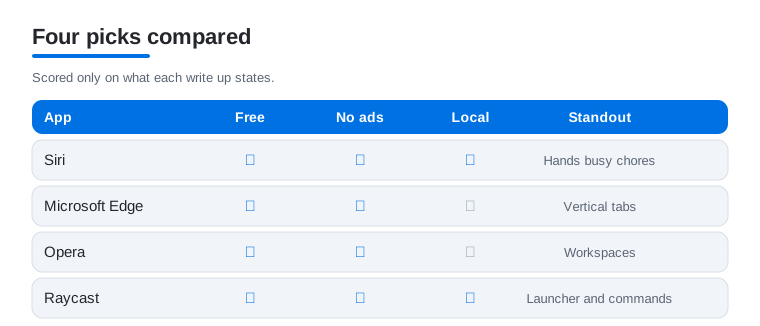
Built into macOS, Siri earns its keep when you stop treating it as a gimmick and start using it for small chores: setting timers, converting units, pulling up files, toggling Do Not Disturb. In our testing it is fastest for hands busy moments, like asking the weather while cooking. It is free, deeply tied to Apple silicon, and quietly handy. We dug into where it is heading in our look at Apple assistance.
2. Google Chrome
Chrome is still the browser most of us default to on a Mac, mainly for its extension library and how cleanly it syncs tabs, passwords and history across your devices. It is free. The honest tradeoff is battery and memory, which it eats more of than Safari, so we keep it for heavy research and reach for something lighter when unplugged. Profiles for separating work and personal browsing are the standout here.
3. Microsoft Edge
Edge surprised us. It is built on the same engine as Chrome so your extensions carry over, but it runs noticeably gentler on a MacBook battery and adds genuinely useful reading and vertical tab tools. Free, with a clean import from whatever you use now. We reach for it when we have thirty tabs open and want them stacked down the side, and the reading view strips clutter from long articles beautifully.
4. Opera
Opera is the browser for people who like their tools opinionated. A built in ad blocker, free VPN, and a sidebar that docks WhatsApp and messaging right next to your tabs make it feel different from the pack. It is free. We found the workspaces feature, which groups tabs into named sets, great for juggling a project and personal browsing without thirty tabs blurring together across the top of the screen.
5. Amazon Alexa
If your home runs on Echo speakers, the Alexa app on your Mac becomes the command center: building routines, tweaking smart home device settings, and managing shopping lists from a real keyboard instead of poking at a phone. It is free. We like it most for the fiddly setup work, like naming twelve light bulbs, which is miserable on mobile but quick on a wide Mac display with a trackpad.
6. Raycast
Raycast is a free native Mac app that turns one keystroke into a command center: opening apps, doing quick math, searching clipboard history, and running small extensions without your hands leaving the keyboard. It is the launcher we install first on a fresh Mac. In our testing the time it saves adds up every day, and the extension store keeps growing. Learn three or four shortcuts in the first week and it quietly becomes how you get around the machine.
7. Alfred
Alfred is the long standing native Mac launcher, free at its core with a paid Powerpack that adds custom workflows and text expansion. It opens apps, searches files, runs calculations and chains multi step actions from a single keystroke. We reach for it when we want to build a workflow that strings together several tasks, which is where the Powerpack pays off. Pick it or Raycast, learn a handful of shortcuts, and it becomes a fast way to drive the machine without touching the trackpad.
8. Maccy
Maccy is a free, open source native Mac clipboard manager that keeps a scrollable, searchable history of what you copy. macOS only remembers the last item, which you notice the moment you copy something new and lose what you needed two steps ago. Maccy does this one job and nothing more, which is its charm: it is light, fast, and stays out of the way. We set a keyboard shortcut to summon it and stopped re copying things we had already grabbed minutes earlier.
9. Rectangle
Rectangle is a free, open source native Mac app that snaps windows into halves, quarters and full screen with keyboard shortcuts you set once and then use without thinking. Dragging windows into tidy positions by hand gets old fast, especially on a large display. Recent macOS added some built in tiling, but Rectangle still offers faster shortcuts and finer control over sizes and positions. It pairs well with our security and privacy apps for Mac.
10. The Unarchiver
The built in Archive Utility handles ordinary zip files fine, but it stumbles on RAR, 7z and a long tail of older formats. The Unarchiver is a free native Mac app that opens nearly every archive format you will meet and lets you set it as the default for the ones macOS quietly refuses. Install it once, set your preferences, and the "I cannot open this file" message stops appearing. It does a small job reliably and never asks for attention again, which is exactly what you want from a utility.
11. Bartender
Run a few of these utilities and your menu bar fills up quickly, with icons competing for space against the clock and battery readout. Bartender is a paid native Mac app that hides the icons you rarely need behind a single click and keeps the ones you use often in easy reach. It is the kind of thing you do not realize you wanted until the bar is a cluttered row of symbols you can no longer scan at a glance. If you keep your menu bar sparse, you can skip it without missing anything.
12. Clock
The humble Clock app is easy to overlook, but on a Mac it quietly handles world clocks for remote teammates, a stopwatch for focused work blocks, and timers you can start by voice. It is free and built in. We keep a couple of city clocks pinned so we never miscalculate a colleague's local time again, and the full screen timer is oddly satisfying during a pomodoro session at the desk.
13. Magnet
Magnet is an inexpensive native Mac app from the App Store that snaps windows into halves, quarters and thirds through a friendly menu bar interface, handy if you prefer clicking to memorizing shortcuts. Where Rectangle leans on keyboard shortcuts, Magnet puts the same arrangements one menu click away. macOS added some built in tiling, but Magnet still gives finer control over sizes and positions, and we found it the gentler way in for people who do not want to learn a shortcut grid before they can tidy two windows side by side.
14. Keka
Keka is a free native Mac app for creating archives, the companion to The Unarchiver when you need to make a file rather than open one. It compresses to 7z, zip, tar and more, splits large archives into parts, and lets you set a password on a bundle before you send it. We reach for it when emailing a folder that needs to stay together or shrinking a pile of files for upload. It does the packing side of the job cleanly and stays out of the way the rest of the time.
15. CleanShot X
CleanShot X is a paid native Mac app that replaces the built in screenshot tools with sharper capture, scrolling captures of long pages, quick annotation, and a way to hide desktop clutter before you shoot. We use it for marking up an image with arrows and text before sending, and the scrolling capture saves stitching screenshots of a long thread by hand. The built in Shift Command 5 tools cover the basics, so reach for this only once you take and annotate shots often enough to feel the gaps.
16. Paste
Paste is a polished paid native Mac clipboard manager built around a visual board you scroll through, with pinned snippets for text you reuse often and sync across your Apple devices. Where Maccy keeps things minimal, Paste leans into organizing what you copy, which helps if you juggle a lot of reusable text through the day. It removes a daily papercut you may not have realized you were living with, and the visual layout makes finding an item from yesterday quick.
How to choose a Mac utility (and what to skip)
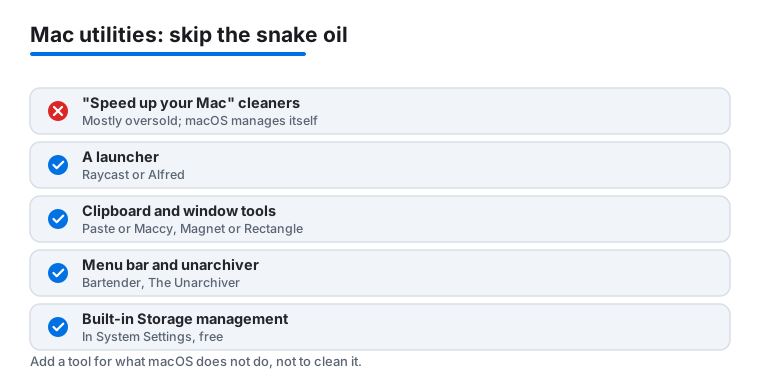
Before you install anything, it helps to hear the honest version: macOS already does most of the housekeeping people buy utilities for. Modern Macs manage memory automatically, compressing and swapping in the background so that high RAM usage is normal and not a sign of trouble. They also handle storage cleanup through built in tools. That is why the whole category of "speed up your Mac" apps and one click "cleaner" apps is, for most people, oversold. You rarely need them, and the aggressive ones can delete caches the system was happily reusing, which makes the next launch slower rather than faster. If your Mac feels slow, the usual culprits are a nearly full disk, a runaway browser tab, or an app launching at login, none of which a cleaner fixes better than you can yourself in a few minutes.
It is worth being clear about what those cleaners actually do, because the marketing rarely is. Most of them scan for cache files, log files, and language packs you do not use, then offer to delete the lot in one sweep. The trouble is that caches exist on purpose. They hold data an app would otherwise have to rebuild, so wiping them just means the app repeats that work the next time you open it. The space you reclaim is usually small and short lived, and many of these apps nag you with subscription prompts to keep doing it. None of that makes your processor faster or frees up the memory that actually governs how smooth the machine feels day to day.
So the useful question is not "which utility makes my Mac faster," but "what does macOS not do smoothly that I do every day." The genuinely worthwhile utilities fill those small gaps. Below are the categories worth your attention, with native Mac apps we actually trust. Everything named here runs as a real macOS app, not a phone app stretched onto a bigger screen.
A launcher: Raycast or Alfred
Spotlight is fine for finding files, but a dedicated launcher turns a single keystroke into a command center. Raycast is a free, native Mac app that opens apps, does quick math, manages your clipboard history, controls calendar events, and runs small extensions without your hands ever leaving the keyboard. Alfred is the long standing alternative, also a native Mac app, free at its core with a paid Powerpack that adds custom workflows and text expansion. Pick one, learn three or four of its shortcuts in the first week, and it quietly becomes the fastest way to do almost anything on the machine. This is the one utility we would install first on a fresh Mac, because the time it saves compounds every single day.
A clipboard manager: Paste or Maccy
macOS only remembers the last thing you copied, which you notice the moment you copy something new and lose what you needed two steps ago. A clipboard manager keeps a scrollable history you can search and paste from. Maccy is a free, open source native Mac app that does exactly this and nothing more, which is its charm: it is light, fast, and stays out of the way. Paste is a polished paid native Mac app with a visual board, pinned snippets for text you reuse often, and sync across your Apple devices. Either one removes a daily papercut you may not have realized you were living with until it is gone.
Window management: Magnet or Rectangle
Dragging windows into tidy halves and quarters by hand gets old fast, especially on a large display. Rectangle is a free, open source native Mac app that snaps windows into position with keyboard shortcuts you set once and then use without thinking. Magnet is an inexpensive native Mac app from the App Store that does the same job with a friendly menu bar interface, handy if you prefer clicking to memorizing shortcuts. Recent versions of macOS added some built in window tiling, and it is genuinely useful, but these apps still offer faster shortcuts and finer control over sizes and positions, so they remain worth the small effort to set up.
A menu bar organizer: Bartender
If you run several of these utilities, your menu bar fills up quickly, and the icons start competing for space with the clock and the battery readout. Bartender is a native Mac app that hides the icons you rarely need behind a single click and keeps the ones you use often in easy reach. It is a paid app, and it is the kind of thing you do not realize you wanted until the bar is a cluttered row of symbols you can no longer scan at a glance. If you keep your menu bar sparse, you can skip it without missing anything.
An unarchiver: The Unarchiver
The built in Archive Utility handles ordinary zip files perfectly well, but it stumbles on RAR, 7z, and a long tail of older formats. The Unarchiver is a free native Mac app that opens nearly every archive format you will ever meet and lets you set it as the default for the ones macOS quietly refuses. Install it once, set your preferences, and you can forget about the "I cannot open this file" message for good. It is one of those tools that earns its place by doing a small job reliably and never asking for attention again.
For storage, start with what is built in
Before reaching for any third party cleaner, open System Settings, then General, then Storage. macOS gives you a clear breakdown of what is using space, with one click options to empty the Trash automatically, store older files in iCloud, and review large files and old downloads. For most people this built in Storage management is the right first stop, and often the only stop they need. If you still want to find space, sorting your Downloads and Desktop folders by size in Finder usually turns up the real offenders, old installers and forgotten video files, faster than any scanning app. Emptying the Trash and deleting a few of those is most of the cleanup people pay apps to do.
The honest bottom line
Add utilities the way you would add tools to a drawer: one at a time, in response to a real annoyance, not in a single hopeful spree. A launcher and a clipboard manager are the two most people grow to love. Window management and an unarchiver come close behind. A menu bar organizer matters only once the bar is genuinely crowded. And the speed boosters and cleaners can almost always stay on the shelf, because the system you already paid for handles that job quietly in the background. The apps listed below this guide lean toward browsers and the launchers, clipboard tools, window snappers and archivers that cover the small gaps in macOS itself, the everyday companions you reach for.
Frequently asked questions
Do I actually need utility apps, or does macOS already cover this?
macOS handles the basics well, with Siri, Spotlight, Clock and a capable browser built in. Where third party utilities earn their place is the stuff Apple does not do smoothly: a launcher faster than Spotlight, a clipboard history Apple does not keep, finer window snapping, and opening archive formats the built in tool refuses. Start with what is built in, then add only the apps that solve a problem you genuinely hit.
Are these Mac utility apps free?
Many here are free to download, including Chrome, Edge, Opera, Raycast, Maccy, Rectangle, The Unarchiver and Keka. Alfred is free with a paid Powerpack, while Bartender, Paste, Magnet and CleanShot X are paid apps. We have flagged the free versus paid line in each write up so there are no surprises after install.
Do I need a clipboard manager when macOS has copy and paste?
macOS only remembers the last thing you copied, so the moment you copy something new you lose what you grabbed two steps ago. A clipboard manager keeps a searchable history you can paste from. Maccy is a free, light option that does just that, while Paste adds a visual board, pinned snippets and sync across your Apple devices. It removes a daily papercut you may not notice until it is gone.
Which browser is best for a MacBook on battery?
For unplugged use we lean toward Edge or Safari, both of which sip less power than Chrome during long sessions. Chrome and Opera are still excellent for their extensions and built in tools, so we keep one of them for heavier research at the desk. If you want privacy extras baked in, Opera's free VPN and ad blocker are worth a look.
Do cleaner or speed up apps actually make a Mac faster?
For most people, no. macOS manages memory and storage automatically, so high RAM use is normal and not a problem to fix. Aggressive cleaners can even remove caches the system was reusing, which slows the next launch. If your Mac feels sluggish, check free disk space, a heavy browser tab, or apps launching at login before installing anything.
What is the single most useful Mac utility to start with?
A launcher like Raycast or Alfred, both native Mac apps. Once you can open apps, do quick math, and run small actions from a single keystroke, it becomes the fastest way to get around the machine. A clipboard manager such as Maccy or Paste is a close second, since macOS only remembers the last thing you copied.