
Best Photo & Video Apps for Mac (2026)
A Mac is a joy to edit on once you pick tools that respect your time. We spent weeks pushing raw photos, 4K clips, and quick social edits through the apps below on an M series MacBook to see which feel fast and which earn their price. This is the photo and video corner of our wider photo and video guides, and it sits alongside the rest of our best Mac apps.
1. Adobe
Adobe still anchors most serious Mac workflows, and Lightroom Classic plus Photoshop is what we reach for when a job has to be right. Lightroom keeps thousands of raw files organized, while Photoshop handles retouching nothing else matches. It is subscription only, from about 10 dollars a month, so it suits working creatives more than casual editors. Masking felt noticeably snappier on Apple silicon.
2. Acorn
Acorn is a native Mac image editor built by a small team, and it covers layers, masks, curves, and text without a subscription. It launches fast, stays light on memory, and handles the everyday retouching most people need. It is a one time purchase that sits below the price of the bigger suites. If you want a capable photo editor that feels at home on macOS without a monthly bill, this is an easy pick.
3. Final Cut Pro
If you edit video on a Mac and Adobe feels heavy, Final Cut Pro is the answer. Apple tuned it for its own chips, so 4K timelines scrub without stutter and exports finish fast. The magnetic timeline takes a day to click, then you fly. It is a one time purchase near 300 dollars on the Mac App Store with a generous trial. As of January 2026 you can also get it through the Apple Creator Studio subscription at 12.99 dollars a month, which bundles Pixelmator Pro, Logic Pro, Motion, and Compressor. We cut a full travel video without a single beachball.
4. DaVinci Resolve
Resolve is the free download that genuinely embarrasses paid editors, and on a Mac it runs beautifully. The color page is Hollywood grade, the edit page is fast, and the audio tools are proper. Most people never need the paid Studio version. It suits anyone serious about grading. In our testing the free tier handled a multi clip 4K edit and color pass on a MacBook Air.
5. Pixelmator Pro
Pixelmator Pro is the photo editor we recommend most to Mac owners who do not want a subscription. It feels native because it is, with tools that remove backgrounds and upscale images in a click. The interface is calm and it is a one time purchase around 50 dollars on the Mac App Store. Apple now owns the Pixelmator team, so it is also included in the Apple Creator Studio subscription alongside Final Cut Pro. For everyday retouching, it hits a sweet spot pricier iPad photo apps rarely match on a big screen.
6. Affinity Photo
Affinity is now a single free app since Canva relaunched it in late 2025, combining the old Photo, Designer, and Publisher tools in one window with Pixel, Vector, and Layout modes. The photo side still has layers, masks, raw development, retouching, and a panorama and HDR merge. It runs on Intel and Apple silicon, and you download it with a free Canva account. Existing Affinity V2 license holders can keep using their purchased version if they prefer it. Optional AI tools like generative fill and background removal sit behind a paid Canva subscription. We edited a 42 megapixel raw file with no lag.
7. Photomator
Photomator is Lightroom's friendliest rival on the Mac, built by the Pixelmator team. It reads your Photos library directly, applies smart adjustments with one tap, and syncs edits across devices. There is a free tier, with a subscription or one time unlock for everything. It suits anyone who lives in Apple Photos and wants better results without learning a catalog. The denoise tool saved a few low light shots.
8. CapCut
CapCut is the free video editor most people should try first, especially for social clips. The Mac app is surprisingly capable, with auto captions, trendy transitions, and effects that make short videos look polished in minutes. It is free with optional paid extras, and the learning curve is gentle. We turned a pile of phone clips into a tidy one minute edit, captions and all.
9. iMovie
iMovie comes free on every Mac, and for many people it is all the video editing they will ever need. Drag in clips, trim, drop a title and a soundtrack, and export. It is genuinely good for home movies and quick recaps, and the trailers feature is a delight. When you outgrow it, projects open straight in Final Cut Pro, making it a smart free Mac app to begin with.
10. Darktable
Darktable is a free, open source raw developer that runs natively on macOS, and it is the closest free answer to Lightroom for cataloging and processing. It reads raw files from most cameras, keeps your originals untouched with non destructive edits, and gives you deep control over tone and color. There is a learning curve, but the price is zero. It suits photographers who shoot raw and want a real workflow without a subscription.
11. GIMP
GIMP is a free, open source image editor that runs natively on macOS, including Apple silicon. It covers layers, masks, paths, and a deep set of filters, so it handles retouching and compositing without a subscription. The interface takes some getting used to, but the price is zero and the feature set is wide. It suits people who want a capable photo editor on a Mac and do not mind a learning curve.
12. Luminar Neo
Luminar Neo is a native Mac photo editor from Skylum that leans on AI tools for sky replacement, relighting, and noise reduction. It works as a standalone app and reads raw files, with adjustments that handle a lot of routine editing in a few clicks. It is sold as a one time license or a subscription. It suits photographers who want guided edits on a Mac without building everything by hand.
13. Canva
Canva makes non designers look capable, and it runs well as a Mac app rather than just a browser tab. Templates cover social posts, thumbnails, simple video edits, and presentations, so it pulls double duty for creators and small businesses. The free tier is generous, with Pro adding brand kits and background removal. It pairs naturally with your other Mac productivity tools when a project needs polish and speed.
14. Capture One
Capture One is the raw editor many studio and portrait photographers run on a Mac, and it is native to macOS. Its tethered shooting, color tools, and layer based adjustments are built for people who develop large shoots and care about precise color. It is sold as a subscription or a one time license, so it leans toward working photographers rather than casual editors. The color grading and skin tone handling are why people stay with it.
15. ON1 Photo RAW
ON1 Photo RAW is a native Mac raw editor and organizer that works as a standalone app or a plugin. It covers cataloging, non destructive edits, layers, masking, and a set of AI tools for noise and resizing, so it can stand in for a Lightroom and Photoshop pairing. It is sold as a one time purchase or a subscription. It suits photographers who want browsing and editing in one app on a Mac.
Photo and video apps for Mac
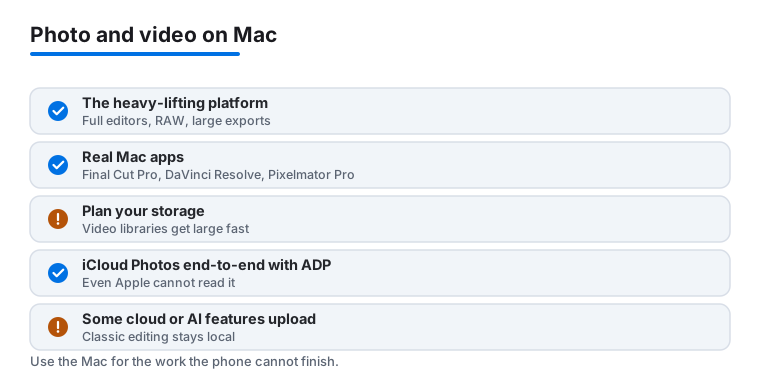
The Mac is where the heavy lifting happens. On an iPhone or iPad you trim a clip and post it. On a Mac you grade a full film, develop a folder of raw files, and export something you are proud of. The screen is bigger, the storage is larger, and the chips can chew through 4K without complaint. That is also why choosing well matters more here. The apps below are real macOS apps, and the differences between them come down to how much power you need and how you want to pay for it.
The full editors that anchor a Mac
For video, two apps lead. Final Cut Pro is Apple's own editor, tuned for its silicon, and it is a one time purchase. DaVinci Resolve is free at its base tier and its color grading is the kind professionals use on real productions. Either one will handle far more than most people ever ask of it.
For photos, you have genuine choice without a subscription. Pixelmator Pro and Photomator come from the same team and feel completely native, reading your Photos library and applying smart adjustments in a tap. Affinity is now a single free app since the Canva relaunch, with layers, masks, and raw development all in one window. Adobe Lightroom and Photoshop remain the reference tools for many working creatives, though they are subscription only.
It helps to think in terms of two jobs rather than one. The first is the heavy edit, where you reach for a full app and care about precision. The second is the quick pass, where you just want a clip captioned or a photo brightened before it goes out. Most people end up keeping one serious tool and one light one, and that is a perfectly sensible setup. There is no prize for using a professional grader to fix the exposure on a snapshot.
How to choose
Ignore feature checklists for a moment and think about how you actually work. A few practical questions sort most people quickly.
- Performance. If you are on Apple silicon, apps built for it (Final Cut Pro, Pixelmator Pro, Photomator) feel noticeably smoother. Cross platform tools like Resolve and Affinity Photo also run well, but the gap shows up on long timelines and big files.
- RAW and codec support. Photographers should confirm the app reads their camera's raw format. Video editors should check codec support, because some apps handle H.265 and ProRes far better than others, and a fast computer cannot rescue a clip the software will not decode cleanly.
- Storage. This is the one people underestimate. A single hour of 4K footage can fill tens of gigabytes, and raw photos add up faster than JPEGs. Plan for an external drive before you need it, not after your boot disk fills.
- Export. Look at where your work is going. Final Cut Pro and Resolve give you precise control over format, bitrate, and resolution. Lighter apps export sensible defaults quickly, which is often all a social clip needs.
One more practical note on budget. A subscription is not automatically the wrong choice, it simply suits a different rhythm of work. If you edit every day and need the newest tools, a monthly fee can be worth it. If you edit in bursts (a trip, a project, a season) a one time purchase you own forever usually makes more sense, because you are not paying in the months you do not open the app. Match the payment model to how often you actually sit down to edit, not to how often you imagine you will.
There is no single right answer. A hobbyist editing family videos and a freelancer delivering client work want very different things, and both are well served on a Mac.
Privacy and safety, honestly
Editing on a Mac is one of the more private things you can do on a computer, but only if you understand where your files actually go. Here is the honest picture.
Classic editing stays on your device
When you open a raw file in Affinity Photo or cut a timeline in Final Cut Pro, that work happens locally. The files sit on your drive, the processing runs on your own chip, and nothing leaves the machine. This is the quiet strength of desktop editing. For sensitive material (family photos, unreleased client work, anything personal) a traditional offline editor is hard to beat.
Some cloud and AI features upload your files
The exceptions are worth knowing. Cloud sync, collaborative projects, and many AI features (background removal in the cloud, generative fill, photo restoration, automatic captioning) often send your image or video to a server to be processed. Sometimes that is clearly disclosed, sometimes it is buried in a settings toggle. If a feature feels magical and instant on an older machine, it is probably running somewhere else. Read what an app says about where processing happens, and turn off cloud features you do not want when the content is private.
iCloud Photos and Advanced Data Protection
If your photos sync through iCloud Photos, the default setup encrypts them in transit and on Apple's servers, but Apple holds the keys. Turning on Advanced Data Protection in your Apple Account settings upgrades many iCloud categories, including Photos, to end to end encryption, which means only your trusted devices can decrypt them. That is a real privacy gain. The trade off is that you become fully responsible for recovery, so set up a recovery key or recovery contact before you enable it.
Plan for storage like it is part of the work
Large video libraries are not just a privacy question, they are a survival question. A drive failure can erase years of footage, and cloud sync alone is not a backup if a bad edit syncs everywhere. Keep a real plan: an external drive for working files, a separate backup (Time Machine or a second drive), and ideally one copy somewhere off site. The boring version of this advice is the one that saves people. Decide now where the master copies live, and check that the backup actually ran.
The short version: pick the app that matches your work, keep sensitive editing local, understand which features reach for the cloud, and treat storage and backup as part of the craft rather than an afterthought.
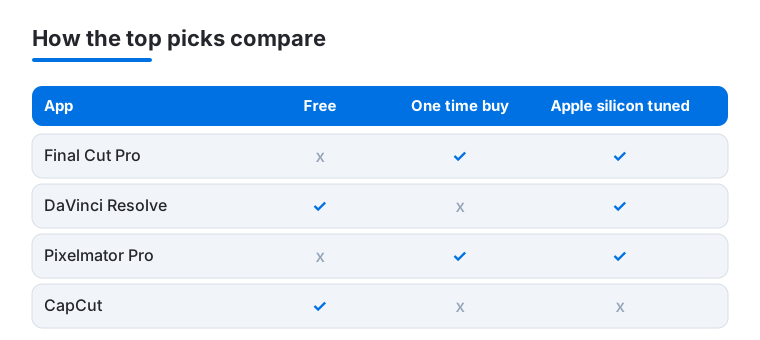
Not sure where to start? The chart below compares four of our favorite Mac picks on the things that matter most: whether they are free, whether you can buy them once instead of subscribing, and whether they are tuned for Apple silicon.
Frequently asked questions
What is the best free photo and video app for Mac?
For video, DaVinci Resolve and CapCut are the standouts, with iMovie built right in for simpler edits. For photos, Photomator, Darktable, and Pixelmator Pro's free trial give you real quality at no cost. Most people can build a complete editing setup on a Mac without paying a cent, then upgrade only the one app they outgrow.
Do I really need an Adobe subscription, or is there a one time option?
You do not need Adobe unless a job demands it. Affinity is now a free download that covers most photo work, and Pixelmator Pro is a one time purchase if you want an Apple native option. For video, Final Cut Pro is a single payment, or you can subscribe to Apple Creator Studio. We only point readers to Adobe when they need Photoshop's exact tools or have to share files with an Adobe based team.
Which video editor runs fastest on an Apple silicon Mac?
Final Cut Pro, because Apple optimized it for its own chips. In our testing on an M series MacBook, 4K timelines scrubbed smoothly and exports finished much faster than in cross platform editors. DaVinci Resolve is a close second and also runs beautifully, so the free option is no compromise if you prefer it.
Can I move my edits between these apps?
Some, yes. iMovie projects open directly in Final Cut Pro, which makes iMovie a safe free starting point. Photos edited in Photomator or Pixelmator Pro stay inside your Apple Photos library. Adobe and Affinity keep their own project formats, so plan to finish a given edit in the app you started it in.
Do these apps keep my photos and videos private?
Classic editing in apps like Affinity Photo, Pixelmator Pro, and Final Cut Pro happens entirely on your Mac, so your files never leave the device. The exceptions are cloud sync and some AI features (cloud background removal, generative fill, photo restoration), which upload your file to a server to process it. Check an app's settings to see what runs locally and turn off cloud features you do not want for private work.
How should I store and back up a large video library on a Mac?
Treat storage as part of the workflow, not an afterthought. A single hour of 4K can use tens of gigabytes, so keep working files on a fast external drive rather than your boot disk. Then keep at least one real backup (Time Machine or a second drive) and ideally an off site copy. If you sync photos through iCloud, you can also turn on Advanced Data Protection for end to end encryption, just set up a recovery key first.