
Best Photo & Video Apps for iPhone (2026)
Your iPhone camera is already excellent, so the right editing app is what turns a good shot into something you are proud to post. We have spent months living inside these tools, trimming clips on the train and fixing harsh midday photos over coffee, to see which ones actually earn a home screen spot. Below are our favorites for editing, collage, and quick fixes, with notes on what each feels like to use day to day. If you want the bigger picture, browse the photo and video hub or our wider list of the best iPhone apps.
1. CapCut
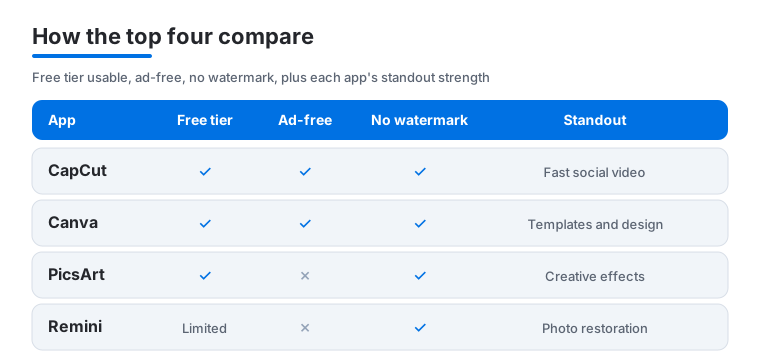
CapCut is the app we reach for first when a clip needs to go from camera roll to caption fast. The timeline is genuinely usable on a phone screen, auto captions are scarily accurate, and trending templates drop your footage into a finished edit in under a minute. It suits anyone making Reels, TikToks, or Shorts. Most of it is free, though some premium effects sit behind a subscription.
2. Canva
Canva is the friendliest design tool we have used on iPhone, going far beyond photos into posters, stories, and thumbnails. In our testing the template search saved real time, and dragging your own pictures onto a layout just works. It is ideal for people who do not think of themselves as designers. The free tier is generous, while Pro unlocks background removal and a much larger stock library.
3. PicsArt
PicsArt is the playground of the bunch, packed with cutouts, stickers, double exposures, and AI effects that reward a bit of experimenting. We found it best for bold, creative edits rather than subtle color work, and the cutout tool is sharp enough for quick product or meme shots. Beginners and tinkerers will love it. The free version is fully usable, but ads and a Gold paywall guard the flashiest filters.
4. Remini
Remini does one thing like magic: it sharpens blurry, low resolution, or old scanned photos back to life. We fed it grainy concert shots and faded family pictures, and the face restoration was the most impressive we tested. It is the app to keep for rescuing memories rather than styling new posts. You get a few free enhancements, then it leans hard on a subscription or ads to unlock more.
5. PicCollage
PicCollage is our pick when you want several photos in one frame without fighting a layout grid. Pinch, drag, and rotate pictures freely, drop in seasonal stickers, and you have a birthday or trip recap ready in minutes. It suits casual storytellers and anyone making quick gifts or cards. The core collage tools are free, with a paid tier removing the small watermark and opening extra templates and backgrounds.
6. YouTube Studio
YouTube Studio is less about editing and more about running a channel from your pocket, which is exactly why creators keep it installed. We used it to check analytics over breakfast, reply to comments, and swap thumbnails without a laptop. It is built for anyone who already publishes to YouTube and wants control on the go. The app is completely free, the mobile companion to your existing account.
7. Happy Color
Happy Color is the gentle outlier here, a color by numbers app rather than an editor, and it has become our go to wind down on the iPhone. Tapping numbered sections to reveal an image is oddly soothing, and the animated finish is a small delight. It suits anyone who wants creative calm without a learning curve. It is free with ads, and a modest subscription strips them away.
How to choose a photo or video app
The best app depends entirely on what you are trying to make, so start with the job rather than the feature list. A short social clip, a printed poster, a rescued family photo, and a color graded video each ask for different tools, and very few apps do all of them well. Decide on your main task first, then pick the app built for it. That single choice saves you from paying for power you never touch and from learning an interface that fights the job in front of you.
Editing, RAW, and color
For everyday photo edits, look at how the app handles exposure, contrast, and color, and whether it lets you undo cleanly without flattening your work. If you shoot in RAW using the iPhone camera or a pro capture app, check that your editor actually reads RAW files rather than quietly converting them to JPEG, because a RAW file holds far more detail in shadows and highlights to recover. Some apps keep your original untouched and save edits separately, which is the safer habit when you are still learning.
Filters and quick fixes
Filters are fine for speed, but the ones worth keeping let you dial the strength down rather than forcing a heavy look. For rescues, a tool like Remini is built for sharpening blurry or aged photos, while a layout app like PicCollage or a design app like Canva is the faster route to a finished post. Match the tool to the task instead of asking one app to do everything passably.
Video tools
For social video you want a real timeline, accurate auto captions, music, and clean transitions, which is where CapCut earns its place. Two things matter most when you export. First, check that the app saves at full resolution (1080p or higher) rather than downscaling your edit. Second, watch for watermarks and ads on free tiers, because if you post often a clean, watermark free export is worth more than another pack of effects.
What to look for
- A genuinely usable free tier. Most editing here is possible for free, and paid plans mainly buy convenience. Test the free version on a real project before subscribing.
- Watermarks and ads. Some free tiers stamp your exports or interrupt you. If you publish regularly, a watermark free export matters more than extra filters.
- Export quality. Confirm the app exports at full resolution instead of shrinking your work.
- Learning curve. A template driven app gets you to a finished result faster if you do not think of yourself as an editor.
- The standout job. Pick the tool built for your main task rather than one that does a bit of everything.
Privacy and safety
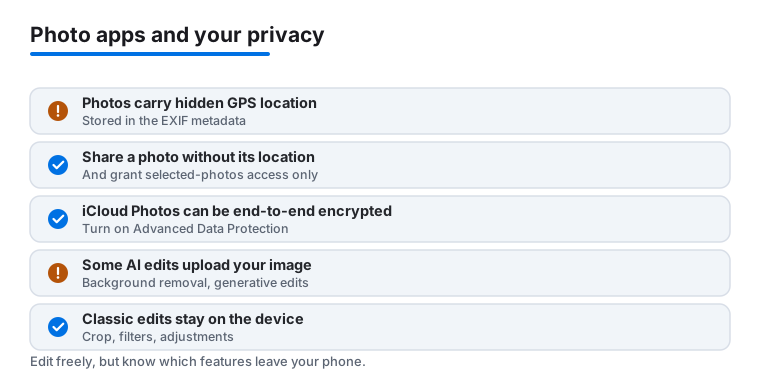
Photos and videos carry more than the image. Most pictures store hidden metadata, often called EXIF, which can include the date, the camera settings, and the GPS location where the shot was taken. That means a photo posted publicly can quietly reveal your home or a regular spot. The good news is that iOS gives you real control, and a few minutes of setup goes a long way. None of the steps below cost anything or slow your phone down, and once you have set them you rarely need to think about them again. They simply mean that the version of a photo other people see does not carry details you never intended to share.
Share without your location
On modern iOS you can share a photo without its location. In the share sheet, tap Options at the top and turn off Location, and the copy you send or post drops its GPS data while your original stays intact. This is worth making a habit for anything that goes to strangers or the open web.
Grant access to selected photos only
When an app asks to reach your photos, you do not have to hand over the whole library. iOS lets you grant access to only selected photos, so an editor sees just the few images you picked and nothing else. Choose this over full access whenever you can, especially for apps you are trying for the first time. You can change the choice later in Settings under the app's permissions.
What stays on the device, and what gets uploaded
This is the part people miss. Classic edits such as cropping, exposure, color, and most filters happen entirely on the iPhone, so the image never leaves your hand. But some AI editing features, including background removal and generative edits that add or replace parts of a scene, work by uploading your image to a server for processing. That is not automatically bad, but it is a real difference, and it is worth knowing which features send your photo away before you use them on something private. A useful rule of thumb is that anything described as smart, generative, or one tap magic is probably doing its work in the cloud, while basic sliders and crop tools stay local. When in doubt, you can test on a throwaway image first and watch whether the edit needs a connection to finish.
iCloud, encryption, and Advanced Data Protection
If you back up to iCloud Photos, your library is encrypted in transit and on Apple's servers by default. Turning on Advanced Data Protection goes further and makes iCloud Photos end to end encrypted, which means the keys live only on your devices and even Apple cannot read your photos. It takes a minute to enable in Settings, and it is the strongest option if your library is sensitive.
Read the Privacy Nutrition Label
Before installing, scroll to the Privacy Nutrition Label on the App Store page. It lists what each app collects and whether that data is linked to you or used to track you across other apps. Pair that with a simple question for any editor: does this feature run on my device, or does it upload my image? When the answer is unclear, prefer the on device path for anything you would not want to leave your phone.
Frequently asked questions
What is the best free video editor for iPhone?
For most people CapCut is the strongest free option. It handles trimming, captions, transitions, and music without charging for the basics, and the templates make short social clips quick. If you mainly run a channel rather than cut footage, YouTube Studio is also free and pairs well with it.
Which app should I use to fix a blurry old photo?
Remini is the one we recommend for restoring blurry, pixelated, or aged photos, especially anything with faces. It rebuilt detail better than any other tool we tried. You get a handful of free enhancements, so test it on your most important picture before deciding whether the subscription is worth it.
Do I need a paid subscription to make good edits?
No. CapCut, Canva, and PicsArt all produce polished results on their free tiers, and PicCollage will make a clean collage for nothing. Paid plans mainly buy convenience, such as removing watermarks, background removal, and premium effects, rather than unlocking the core quality.
Are these apps good on iPad too, or just iPhone?
Most of them scale up nicely. Canva, CapCut, and PicsArt all feel even better with more screen, so it is worth checking our guide to the best photo and video apps for iPad. If you edit on a bigger machine, the best photo and video apps for Mac covers desktop class tools.
How do I stop my photos from sharing my location?
When you share a photo, tap Options at the top of the share sheet and turn off Location. The copy you send drops its GPS data while your original keeps it. You can also limit any editing app to selected photos instead of your whole library, and the choice is changeable later in Settings under that app's permissions.
Are my edits processed on the iPhone or uploaded to a server?
It depends on the feature. Classic edits like cropping, exposure, color, and most filters run on the device, so the image never leaves your phone. Some AI features, such as background removal and generative edits, upload your image to a server to do the work. Check the App Store Privacy Nutrition Label if you want to see what an app collects before installing.