
Exploring the Hidden Features of Subway Surfers on iPad
Subway Surfers looks like a game you already understand the second you open it, but after running it on an iPad Air and a 12.9 inch iPad Pro for a few weeks, we kept finding small things the tutorial never mentions. The bigger screen changes how you read the track, and a handful of buried settings and Game Center features quietly make the whole thing better. Here is what we actually used, what we skipped, and how to get it set up cleanly on your iPad.
Getting it running well on an iPad
The download is straightforward. Open the App Store, search for Subway Surfers from SYBO Games, and tap Get. The app is universal, so the same download runs on both iPhone and iPad. The catch is that the game is built phone first, so on a large iPad the menus and the runner sit in a slightly letterboxed frame rather than filling every pixel. In our testing that never hurt play, but it surprises people who expect an edge to edge layout designed for the tablet.
A few things made our sessions steadier right away. We turned off Low Power Mode before longer runs, because the frame rate dipped once the battery saver kicked in. We also closed background apps, which helped older iPads hold a steady pace during the busier seasonal maps. If your iPad has a 120Hz ProMotion display, the motion does feel smoother here than on a standard 60Hz phone, which is one of the better reasons to play this one on a tablet.
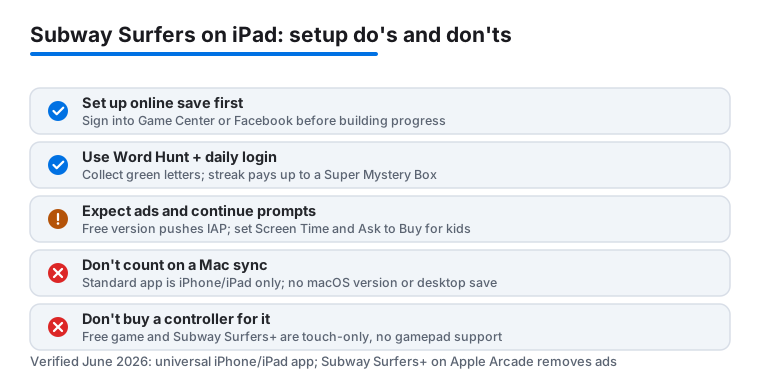
One practical note before you sink hours into a save: set up your online save first. The game offers Game Center on iOS, and you can also link a Facebook account. Sign in at the start menu so your coins, keys, and World Tour progress are backed up from day one. We learned the slow way that starting fresh and trying to merge a local save later is more hassle than it should be, and in some cases the device with the higher progress simply overwrites the other. Pick the account you actually want to keep before you build anything up.
The version we tested was the free, ad supported Subway Surfers, which is the one most people mean. SYBO also released Subway Surfers+ on Apple Arcade in December 2025. That is a separate app behind the Arcade subscription, with no ads and no in app purchases, and we cover the trade there further down. For now, the steps above apply to the standard free game.
The hidden features that actually matter
Most of the good stuff is not advertised on the start screen. These are the ones we kept coming back to:
- The Word Hunt. This is the daily challenge, renamed from the old Daily Challenge. During a run you collect the green letters scattered along the track to spell the day's word, and finishing it pays out without spending coins. The reward grows the more days you keep the streak going: a Mystery Box on the first couple of days, Coins around days three and four, and a Super Mystery Box from day five onward. On an iPad the green letters are far easier to spot and grab than on a phone.
- Hoverboards with real abilities. Beyond looking different, some boards change how you play. The Bouncer's power is a higher jump, which helps you clear trains and reach coins and power ups you would normally miss. Others tweak things like your magnet reach. We kept one ability board on for scoring runs and a fun one for casual play.
- The World Tour and Season Hunt. The World Tour rotates to a new city roughly every couple of weeks, so rather than chase a specific stop by name, just open the game and check the city showing in the app right now. Each tour runs a Season Hunt where you collect that update's themed token to climb a reward track. Chasing these gave us a reason to keep returning instead of running the same map on autopilot.
- Mystery boxes and the daily login. Opening up the game each day quietly stacks better rewards over time. We almost missed how much this adds up across a couple of weeks of casual play.
None of these are secret in a cheat sense. They sit under a busy interface, and the larger iPad screen makes every one of them easier to actually use.
Controls and settings worth changing
The default swipe controls work fine, but the iPad rewards a small change in how you hold it. Resting the tablet on a stand, or against your knees, and swiping with the thumb of one hand gave us far more consistent jumps and rolls than holding it up and reaching across the glass. The extra width of an iPad means your swipe gestures can be shorter and more relaxed, which matters during the faster stretches of a long run.
One thing to set expectations on: the free game is touch only. There is no controller support, so a Backbone or an MFi gamepad will not drive it. If controller play is a deal breaker for you, that lives in a different SYBO release rather than this one, so do not buy hardware expecting it to work here.
Open the settings menu and you can toggle music and sound effects independently, which helps more than it sounds. We kept sound effects on, because the audio cue for an incoming train genuinely helped us react, and turned the music off so we could play our own. Some builds expose a graphics quality option worth checking if you would rather favor a steady frame rate over visual flourish on an older iPad. You will also find the account and online save controls here, which is the place to confirm you are signed into the Game Center or Facebook account you intend to keep.
If you play across an iPhone and an iPad, the online save is what keeps your coins, keys, and progress in step. Sign both devices into the same account and the game syncs automatically the next time it connects. Worth knowing up front: the standard Subway Surfers is a mobile game, so this is an iPhone and iPad story, not a Mac one. The original free app does not run on macOS, and there is no separate desktop save to chase, so plan your continuity around your iOS and iPadOS devices.
The limits and the things we did not love
Honesty matters here. The standard Subway Surfers is free, and it pays for that with ads and a steady push toward in app purchases. On iPad the interstitial ads feel slightly more intrusive simply because they fill a bigger screen, and the prompts to spend keys to continue a run arrive at the worst possible moment, right after a great run ends. You can play happily without paying a cent, but you will be saying no to a lot of pop ups, and younger players in particular may need a hand resisting the continue button.
On privacy and money, two quick caveats. The continue offers and the timed video ads are designed to keep you in the loop, so if you are setting this up for a kid, turn on Screen Time purchase limits and Ask to Buy before you hand the iPad over. The game also collects the usual analytics and ad identifiers, which you can blunt by leaving App Tracking Transparency set to deny when the prompt appears. None of this is unusual for a free mobile game, but it is worth a deliberate setup rather than tapping through.
The other honest note is that this is not built to be a tablet showcase. There is no exclusive iPad layout, no Stage Manager polish, and no controller support, so it stays a touch only, lean back arcade game. That is fine for what it is, but do not expect a console style experience just because the screen is large.
Seasonal content is also on a timer. Miss a World Tour event and that themed reward is usually gone until it cycles back, which can sting if you only play now and then. If you want the game without the ads and the upsell, the cleanest fix is the paid route below rather than fighting the free version.
Good alternatives if you want more
If the ads wear on you, the most direct swap is Subway Surfers+ on Apple Arcade. It is the same core game with the ads and in app purchases stripped out and the coin and key economy rebalanced so you unlock characters and boards through play. It needs an Apple Arcade subscription, so it is not free, but if you already pay for Arcade or share a family plan, it removes nearly everything we griped about above. Note that it does not add controller support either.
If you want a different endless runner with the same pick up and play rhythm, Temple Run delivers a similar heartbeat with its own look and feel. If you would rather slow down and chase progression and rewards, a tile and resource game like the one we cover in our Coin Master guide for iPad scratches a different itch while keeping that casual, return often loop.
And if precision and timing are what you actually enjoy about dodging trains, a skill game such as the one in our 8 Ball Pool tips for iPad rewards the same careful, deliberate input on the bigger screen. For a wider shortlist of what runs and feels good on a tablet, our roundup of the best gaming apps and the full Gaming hub are good next stops.
FAQ
Is Subway Surfers free on iPad?
Yes. The standard version is a free download from the App Store with no upfront cost. It earns money through ads and optional in app purchases for coins, keys, and boards, but you can play the whole game without spending anything. If you want it without ads, the paid Subway Surfers+ on Apple Arcade is a separate option.
Does Subway Surfers look better on a large iPad?
The game runs in a slightly letterboxed frame rather than filling every pixel, so it has no dedicated iPad layout. That said, the bigger screen makes collectibles easier to grab, and on a 120Hz ProMotion iPad the motion feels smoother than on a standard phone.
How do I move my Subway Surfers progress between my iPad and iPhone?
Sign into the same Game Center account, or link the same Facebook account, on both devices. Your coins, keys, and World Tour progress then sync through the online save. The standard game is iPhone and iPad only, so there is no Mac save to sync; plan your continuity around your iOS and iPadOS devices.
What is the Word Hunt in Subway Surfers?
It is the recurring daily challenge, renamed from the old Daily Challenge. You collect the green letters scattered along the track during a run to spell the day's word. Completing it gives a free reward that grows with your streak, from a Mystery Box on the early days to a Super Mystery Box from day five, and the letters are easier to spot on the larger iPad screen.