
How to Safeguard Your Village in Coin Master on iPad
There is a special kind of heartbreak in Coin Master when you log in and see a stranger has smashed half your village to rubble. We have spent more hours than we will admit spinning the wheel on an iPad, and the truth is that protecting your village is less about luck and more about a few habits you can build. This guide walks through getting the game running smoothly on your iPad, the defenses that actually matter, and the spending traps to sidestep so your hard earned progress stays put.
Getting Coin Master running well on your iPad
Coin Master is a free download from the App Store, and on an iPad it feels right at home. The bigger screen makes the slot reels easy to read and gives you more room to aim during attacks and raids, which honestly beats squinting at a phone. In our testing on both an iPad Air and an older iPad, the game launched fast and stayed steady, though the first load after an update can take a minute while it pulls in seasonal events.
Before anything else, it helps to understand the loop the whole game is built on, because every defense later in this guide makes more sense once you see how the pieces fit. You spin a slot machine to earn coins. You spend those coins to build and upgrade your village, one building at a time, until the village is complete and you move on to the next one. Spins also land you raids and attacks: a raid lets you dig coins out of another player's village, and an attack lets you damage a building in someone else's village. The catch is that the same thing happens to you. Other real players, often your own Facebook friends, spin into raids and attacks aimed at your village, which is exactly why protecting it matters.
A few setup steps save you grief later. Sign in with Facebook the very first time you play. This is the single most important thing you can do, because it ties your village, your coins, and your card collection to an account you can recover. Without it, your progress lives only on that one iPad, and a lost or wiped device means starting from zero. Turn on notifications too, since the game alerts you when your free spins refill and when a friend sends gifts, both of which are easy to leave sitting on the table otherwise. If your iPad is shared with kids, dip into Screen Time settings first, because the in app purchases add up quickly and we will come back to that in detail.
The defenses that actually keep your village safe
Your village can be attacked by other players, and the only thing standing between them and a damaged building is a shield. You can hold up to three shields at once, and they sit in the top corner of the screen. Each attack against you eats one shield instead of harming a building, so the goal is simple: try to stay shielded, especially before you log off for the night when you cannot react. A building that takes a hit is not lost forever, but you do have to spend coins to repair it, and that is coin you would rather put toward moving the village forward.
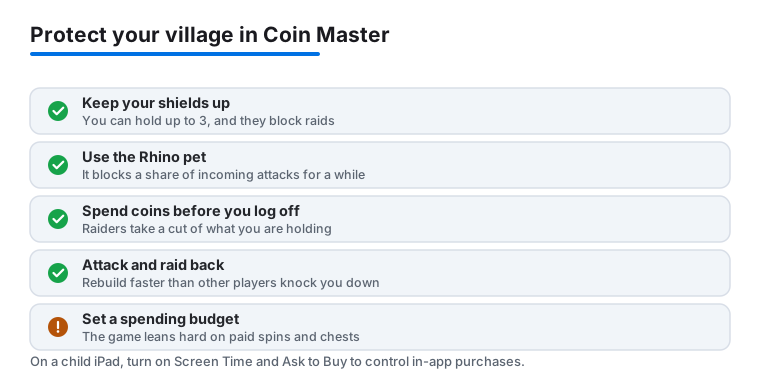
Here is what we lean on to protect a village in Coin Master:
- Keep shields up. When the slot machine lands three shield symbols, you bank one shield, up to a maximum of three. Because you can only hold three, it is worth spending a few spins right before you put the iPad down to top them off, so you walk away with a full set rather than an empty corner.
- Rhino, your guardian pet. Rhino has a chance to block an incoming attack entirely, even on top of your shields. Pets stay active for a set window once you feed them, so we time Rhino for busy evening hours, when raids and attacks spike, and it has saved our buildings more times than we can count.
- Spend your coins before you log off. This is the defense most people miss. When someone raids you, they take a slice of the coins you are currently holding, not coins you have already spent. If you pour your balance into upgrading the village before stepping away, there is far less sitting there to loot. Do not hoard a giant pile of coins overnight.
- Attack and raid back to rebuild. The game shows you who hit you. When a raid or attack costs you coins or a building, the fastest way to recover is to keep spinning and turn your own raids and attacks back on other players, including the friend who just hit you. Defense and offense are the same economy here, so rebuilding is mostly a matter of getting back on the wheel.
None of these are guarantees, because the slot machine is random and you cannot summon a shield on demand. But stacking these habits, full shields plus an active Rhino plus a low coin balance at bedtime, turns a soft target into a frustrating one that most players will spin right past.
Smart spending so your coins are not wasted
The slow leak in most players' progress is not raids at all, it is careless spending and careless hoarding, two sides of the same coin. Every village level costs more than the last, and it is tempting to either dump coins the moment you have them or sit on a mountain of them. Both hurt you. Spending blindly leaves you with nothing banked for the next building, and hoarding paints a target on your back, because a raider who catches you with a huge balance walks away with a huge cut. We learned to spend with purpose: when you have enough for a meaningful upgrade, take it, and try not to log off carrying more than you would mind losing.
Betting is the other lever worth understanding. You can raise your bet multiplier to win more per spin, which sounds great, but it burns through spins at the same rate, so a bad run empties your spin bank fast. We only raise the multiplier when we have a healthy pile of spins from gifts or events, never when we are scraping the bottom. The card collection deserves a mention too, since completing a set rewards you with spins and sometimes a pet, so trading duplicate cards with friends is one of the few genuinely free ways to get ahead without touching your wallet. On the iPad, the trade screen is roomy and easy to tap through, which makes managing a collection less of a chore. Put together, the habit is the same one that keeps your village safe: keep your coins working for you, in upgrades or banked for a known purpose, rather than left exposed.
The limits and downsides worth knowing
We like Coin Master, but it would be dishonest to pretend it is for everyone or that it is a neutral little game. The core loop is built around waiting for spins to refill or paying to skip the wait, and that pacing can feel like a wall once you reach the higher villages. Progress slows to a crawl, and the nudges to buy spin packs get louder right when patience runs thin.
That ties into the bigger thing to be clear eyed about. Coin Master leans heavily on in app purchases, and the spins themselves work like loot boxes: you pay, you pull the lever, and you do not know what you will get. The slot machine, the bet multipliers, and the timed events are all designed to keep you spinning and, often enough, spending. This is not a reason to panic, plenty of people play for free and enjoy it, but it is a reason to decide on a budget before you start and to stick to it. We have found the game most enjoyable when treated as a casual thing to dip into a few times a day rather than something to grind or fund.
That budget point matters even more if a child plays on your iPad. Set up Screen Time with content and purchase limits, or turn on Ask to Buy through Family Sharing, so a tap on a spin pack needs your approval instead of going straight through. There is also a social wrinkle worth a heads up, since attacks and raids come from real people, including your own Facebook friends, which can sting if you are competitive. And because so much hinges on that Facebook login, losing access to your social account can mean losing your village, so keep those recovery details current.
Good alternatives if Coin Master is not your fit
If the waiting or the spending pressure wears on you, the App Store is full of other casual games that play beautifully on an iPad and ask nothing of your wallet beyond the download. For something with the same quick, colorful, pick up and play feel but a slicing twist instead of slots, take a look at our piece on Fruit Ninja on iPad, which is endlessly replayable and great for short breaks without any of the timed pressure. If you would rather have a faster paced, more action driven game where your reflexes matter more than a refill timer, our guide to Free Fire and its pets is a solid next stop.
For the full landscape of what plays well on Apple's tablet, our roundup of the best gaming apps for iPad covers everything from cozy puzzlers to competitive shooters, and you can browse the wider Gaming category for more hands on guides. The right game is the one that fits how you actually like to spend a spare ten minutes, and there is no shortage of choices that will not nudge you toward a purchase every time the reels stop.
FAQ
Can my village really be destroyed in Coin Master?
Yes. Other players, including your Facebook friends, can attack your village and damage buildings if you have no shields. The buildings are not gone forever though, since you can rebuild them with coins. Keeping shields up and an active Rhino pet is the best way to avoid the repair bill.
How do I protect my Coin Master progress if I get a new iPad?
Connect the game to Facebook the moment you start playing. Your village, coins, and cards are tied to that account, so when you install Coin Master on a new iPad you simply log in with the same Facebook profile and everything comes back. If you never linked an account, progress stays locked to the original device.
Is Coin Master free to play on iPad?
It is free to download and you can play without spending a cent, earning spins through gifts, daily refills, and completed card sets. There are optional in app purchases for extra spins and coins, and the game leans on them at higher levels, so set up Screen Time limits if a child has access to your iPad.
What does the Rhino pet do for defense?
Rhino has a chance to block an incoming attack outright, saving the building that would have been hit. Pets need to be fed to stay active for a set period, so we time Rhino for busy evening hours when raids are most common to get the most protection out of it.
Why do I keep losing coins, and how do I stop it?
Raiders take a portion of the coins you are holding at that moment, so a big balance makes you a richer target. The simplest fix is to spend your coins on village upgrades before you log off, which both moves you forward and leaves little for anyone to steal. Pair that with full shields and an active Rhino for the best result.
How do I keep my child from overspending on spins?
Coin Master relies on in app purchases and spin packs that work like loot boxes, so it is worth putting a guard in place. On your iPad, use Screen Time to restrict or password protect in app purchases, or turn on Ask to Buy through Family Sharing so any purchase needs your approval first. Agreeing on a spending budget up front helps too.