
Crafting the Perfect One Piece Adventure on Your iPhone and iPad
There is no single One Piece app, and that is the first thing worth knowing before you go searching the App Store. Tap that name and you get a wall of pirate games, each with its own combat style, art, and very different demands on your battery. We spent a few weeks playing the ones that are genuinely live on iPhone and iPad to figure out which is actually worth your storage, and how to set them up so the Grand Line runs without stuttering. Worth saying up front: a couple of the slickest looking One Piece games people share screenshots of do not exist on the App Store at all, so we will be clear about what you can and cannot install on Apple hardware. Here is what we found.
Picking the right One Piece game first
The mistake we made early on was downloading three games at once and hoping one would stick. Better to know what you want first. As of mid 2026, the two One Piece games you can actually install on an iPhone or iPad in most regions are both from Bandai Namco. ONE PIECE Bounty Rush is a 3D team brawler where you fight four versus four and grab treasure points in short matches, ideal if you only have ten minutes at a time. A recent update even added a one versus one mode. ONE PIECE TREASURE CRUISE leans into tap based turn combat and a roster of well over two thousand characters, so it suits people who like collecting and chipping away at a long story over months.
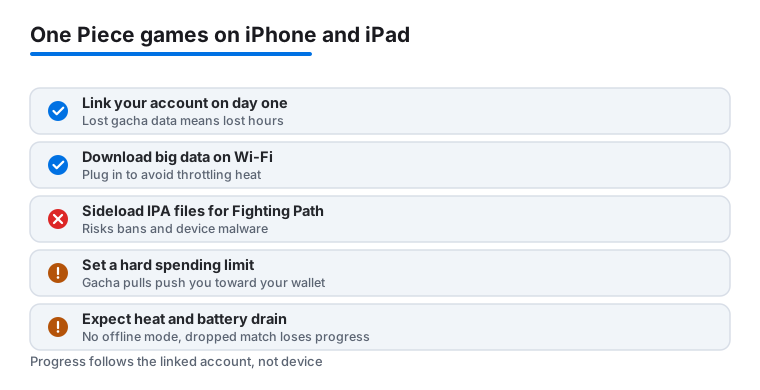
Now the honest correction, because this trips up a lot of people. The gorgeous cel shaded action games you see in trailers, the ones with full 3D camera control and console style combat, are mostly not on iOS. One Piece: Fighting Path is an Android game built for the Chinese market, and there is no real App Store version despite what some sketchy download sites claim. One Piece: Project Fighter, later renamed One Piece: Ambition, has been rolling out in limited regions and was not generally available on the global App Store when we checked. If a site offers you an IPA file for either of those, walk away. Sideloaded copies are how accounts get banned and devices get malware.
One more thing worth a calendar note. ONE PIECE: GRAND GOURMET, a pixel art restaurant management game from Kairosoft, is set to land on the App Store on 23 October 2026. It is a very different, calmer kind of game from the brawlers, so if combat grinding is not your thing, that one may be worth the wait. Before you fall for any art online, check the developer name and the latest reviews on the actual App Store page to confirm the game is live in your country.
Getting it installed and running smoothly
These games are not small. Both Bounty Rush and Treasure Cruise pull a chunky first download in the App Store, then grab another big batch of data the moment you open them. Do the whole thing on Wi Fi unless you enjoy watching your cellular plan evaporate. Plug in too, because that initial setup heats the phone up fast and you do not want it throttling halfway through.
A few things we always do on a fresh install to keep frame rates steady:
- Free up space first. Aim for several gigabytes clear, since a cramped iPhone will stutter during the data download and the busy battle scenes. You can check this in Settings, then General, then iPhone Storage.
- Close other apps before launching. The four versus four combat in Bounty Rush is genuinely demanding, and it drops frames if you have a dozen things open in the background.
- Look in the in game settings for a graphics or frame rate option and drop it one notch on an older iPhone. Bounty Rush in particular has a quality toggle. You lose a little shine and gain a lot of smoothness, which is the trade most people actually want.
- Link your account on day one. Treasure Cruise uses a transfer code or a Bandai Namco ID, and Bounty Rush ties into your platform login. Lose your data on a gacha game and you lose hundreds of hours, so do this before you sink any time in. Game Center alone is not always enough, so set the in game transfer password too.
On an iPad the extra screen makes the team battles much easier to read, and we kept reaching for the tablet whenever we had a longer session at home. Both games run on iPhone and iPad from the same App Store listing, and your progress follows the account, not the device, once you have linked it. There is no Mac version of either game, so if a page somewhere tells you to grab One Piece for your MacBook, that is wrong. The closest you get on a Mac is running the iPhone app through Apple silicon, and even then the developers do not officially support it, so do not count on it.
The features that actually matter day to day
Once you are past setup, a handful of features end up deciding whether you keep the game on your home screen. Auto play is the big one in Treasure Cruise. The game will grind through easier stages for you, which sounds like cheating until you realize how much repetition these games ask for. We leaned on it constantly for daily missions and saved manual play for the bosses that needed real timing. Bounty Rush does not auto play its PvP matches, for obvious reasons, but it does let you set up loadouts and a preferred character so jumping into a match is quick.
The other thing that keeps you coming back is crew building. Half the fun of a One Piece game is assembling a team of your favorite characters and watching their special moves fire mid fight. Treasure Cruise builds whole teams around a captain whose ability boosts certain character types, so picking a captain is a real puzzle rather than just stacking the highest numbers. Bounty Rush sorts characters into attacker, defender, and runner roles, and a good squad balances all three. Daily login rewards and the limited time anime tie in events round things out. Those events are genuinely worth checking each day, because that is where most of your free currency and pulls come from. Miss a week and you miss a banner.
One feature people overlook is the friend or guild system. In Treasure Cruise you can borrow a friend's captain for a stage, which can carry you through content your own roster cannot handle yet. In Bounty Rush a decent team of regulars makes the ranked matches far less frustrating than playing with random strangers. If you stick with either game, plug into that social side early.
The downsides nobody puts in the trailer
Time to be blunt, because this is where these games can bite. Both run on a gacha model, which means you spend a premium currency, rainbow gems in Treasure Cruise and diamonds in Bounty Rush, to pull for random characters. The ones you really want sit behind low odds. It is easy to feel pushed toward your wallet, especially during a flashy event with a banner character you love. Our advice from experience is to set a hard spending limit before you start and treat the free pulls as the main way to play. Plenty of people enjoy these games for months without paying a cent, and you can lock down purchases entirely in Settings, then Screen Time, then Content and Privacy Restrictions if you are worried about overspending or about a kid using your phone.
A privacy note while we are here. These are connected, account based games that collect play data and, in places, show targeted offers. They are rated for teens partly because of the in app purchases and simulated combat, not because anything is hidden from you, but read the App Store privacy label before you sign in if that matters to you. There is no offline mode worth mentioning. Lose your connection and you lose your match.
The other real cost is heat and battery. A long Bounty Rush session warms an iPhone noticeably and drains the charge quicker than most games we tested, which is normal for a real time 3D PvP game. Storage creeps up over time too, as events keep adding assets, so expect to clear space every few months. None of this is a dealbreaker. Just go in knowing the game wants both your attention and, if you let it, your money.
If you ever do hit a wall, both games have in app support and active community forums where the answers to most account and transfer problems already exist. Search before you panic about lost data.
Worthy alternatives if One Piece is not clicking
If you tried a couple of these and the gacha grind wore you down, you are not stuck. There are plenty of other ways to scratch the same itch on iOS. For fast, pick up and play matches with the same anime energy, Free Fire on iPhone and iPad gives you quick competitive rounds without the collecting treadmill. If you want something lighter and more relaxing between sessions, the slice and combo loop of Fruit Ninja from Halfbrick is easy to dip into and far gentler on your battery. Both are live and free to download on the App Store as of mid 2026.
It is also worth keeping an eye on the official Bandai Namco One Piece accounts, since the mobile lineup shifts every year. Grand Gourmet is the next confirmed iOS title, and others come and go on regional servers, so the picture in a year may look different. For a wider look at what else is worth your storage right now, our roundup of the best gaming apps for iPhone and the full Gaming app hub are good places to browse before you commit your next free evening.
FAQ
Is there one official One Piece app for iPhone?
No, and that trips people up. One Piece is a franchise with several separate games. On the iOS App Store in 2026 the two main live ones are ONE PIECE Bounty Rush and ONE PIECE TREASURE CRUISE, both from Bandai Namco. Decide what kind of game you want before you download, rather than grabbing the first result.
Can I play One Piece: Fighting Path on my iPhone?
Not really. Fighting Path is an Android game made for the Chinese market, and there is no genuine global App Store version, whatever download sites claim. Project Fighter, now called Ambition, has only rolled out in limited regions and was not on the global iOS App Store when we checked. Avoid any site offering an IPA file for these, since sideloaded copies risk bans and malware.
Are the One Piece games free to play?
The ones on iOS are free to download and play, but they run on a gacha system that asks you to spend for random character pulls. You can absolutely enjoy them without paying, and we did. Set a spending limit up front, lean on the free daily rewards, and use Screen Time restrictions if you want to block purchases entirely.
Do these games run well on an older iPhone?
Mostly, yes, with a couple of tweaks. Clear a few gigabytes of space, close background apps before you play, and drop the in game graphics a notch. Expect the phone to warm up during busy battles, which is normal for an action game this demanding. Treasure Cruise is lighter on hardware than the 3D combat of Bounty Rush.
iPhone or iPad for One Piece games?
Both work, and both install from the same App Store listing. We preferred the iPad for longer sessions because the larger screen makes crowded team battles much easier to follow, while the iPhone won out for quick matches on the go. If you have both, your progress syncs once you link your account, since the data follows the account, not the device. There is no Mac version.