
Best Social & Dating Apps for iPad (2026)
The iPad is a strange place for social apps. Some feel like a stretched out phone, while others use the extra room beautifully for video calls, photo editing and long chats with a real keyboard. We spent weeks living with these on an iPad Pro and an iPad Air to find the ones worth your home screen. For more picks across the category, see our social and dating apps hub, or browse everything we recommend on the best iPad apps page.
If you carry your phone everywhere too, the companion iPhone social and dating guide covers the small screen versions in detail.
1. Instagram
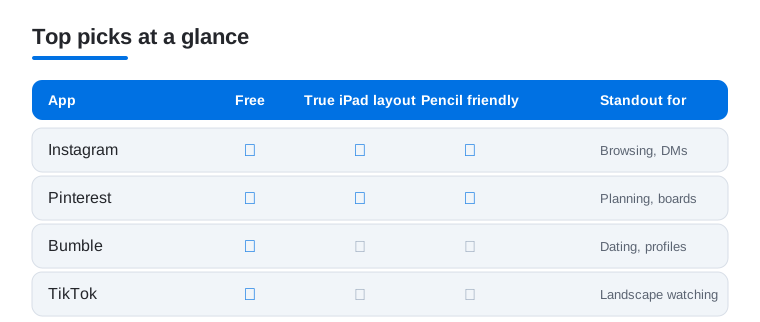
Instagram on iPad finally feels intentional, with a wider feed, a roomy Reels view and a side rail that makes jumping between DMs and your profile quick. In our testing it shines for browsing and replying, less so for posting from scratch. It is free, with optional Meta Verified. Editing a carousel with the Apple Pencil is genuinely pleasant. Our advanced editing tips carry over nicely.
2. Bumble
Bumble is the dating app we most enjoyed on a tablet. Profiles get more room to breathe, photos look great and the swipe gestures feel natural propped up on the Smart Keyboard. It suits anyone who likes that the first message comes from women. Free to use, with Boost and Premium tiers. Read our take on building a standout profile before you start.
3. Pinterest
If any app was made for a big bright screen, it is Pinterest. Mood boards, recipes and home ideas spread out in a grid that begs to be scrolled with two hands. We used it constantly for planning, and pinning with the Pencil feels tactile. It is free, with no paywall for the core experience. The tablet layout shows far more pins per screen than your phone ever will.
4. TikTok
TikTok in landscape turns your iPad into a tiny TV, and that is the best way to describe lazy evening scrolling here. The For You feed looks crisp and comments sit neatly to the side. Creating is trickier on a tablet, so we treat it as a watching device. Free, with in app purchases. Our editing hacks guide helps if you do want to film.
5. Tinder
Tinder works as you expect on iPad, just larger and easier to read on the couch. The bigger photos help you actually judge a profile, and typing replies on a real keyboard beats thumb tapping. It suits casual browsing more than serious searching. Free, with Plus, Gold and Platinum upgrades. See how the app reshaped modern dating for context.
6. Microsoft Teams
With Skype now retired, Microsoft Teams Free is the natural home for those long family video calls, and the iPad makes a fine kitchen counter screen. We found call quality steady on wifi, with clean screen sharing for showing photos to relatives. Free for app to app calls and chats, with paid plans aimed at work. Your old Skype contacts and chats carry over when you sign in with the same account, so the move is painless.
7. Facebook Messenger
Messenger on iPad is comfortable for the kind of long catch up chats where a keyboard helps. Threads, reactions and shared photos all have room, and the wider window keeps your conversation list visible. It suits anyone whose whole circle already lives on Facebook. Free. We liked using it for group planning, with the larger screen making shared albums far easier to scan than on a phone.
8. Twitter
Twitter, now X, reads well on a tablet, especially for following live events or long threads with images. The multi column feel of the wider layout makes doomscrolling oddly organized. It suits news followers and lurkers more than heavy posters. Free, with an optional Premium subscription. In our testing the iPad version handled video and image heavy timelines smoothly, which is where the extra screen really pays off.
9. Patreon
Patreon is a quietly great iPad app for consuming what you back. Long posts, podcasts and high resolution art look fantastic on the bigger display, and creators get a tidy dashboard. It suits supporters and makers alike. Free to browse, with paid memberships to each creator. If you run a page, our guide to growing your Patreon audience pairs well with it.
10. Nextdoor
Nextdoor is the neighborhood noticeboard, and on iPad it is easier to actually read the long local threads about lost cats and contractor tips. Maps and photos benefit from the space. It suits homeowners and anyone new to an area. Free. We found the larger view made scanning local marketplace listings much less of a chore than squinting at a phone while comparing items side by side.
11. Google Meet
Google merged its old Duo app into Google Meet, so Meet now handles the casual video calls many people used to make there, and on iPad the front camera and bigger screen make group calls feel less cramped. We used it for face to face chats and it just worked. Free with a Google account, with paid tiers for longer meetings. It pairs naturally with Gmail and Google Calendar if you call colleagues as well as friends.
12. WeChat
WeChat is an everything app, and the iPad gives its sprawling mix of chat, payments and mini programs room to spread out. We found it most useful for messaging contacts in China and reading long group threads on the larger screen. Free. The split layout keeps chats on one side and content on the other, which suits anyone juggling business and personal conversations in a single, busy account all day.
13. OnlyFans
OnlyFans is a web first platform, and on iPad we simply used Safari, where the bigger screen makes browsing and messaging creators far nicer than on a phone. It suits both subscribers and creators uploading content. Free to join, with paid subscriptions per creator. Photos and longer posts look sharp on a tablet, and the on screen keyboard makes replying to messages quick at a desk.
14. Plenty of Fish
Plenty of Fish gives you a generous free tier, and the iPad makes its busier interface easier to navigate without accidental taps. We liked reading full profiles and longer messages on the larger screen. It suits daters who prefer chatting before meeting. Free, with optional upgrades. The roomier layout lets chat and search sit together, so you bounce between screens less than on mobile.
15. Feeld
Feeld is the open minded dating app for couples and curious singles, and its clean design looks elegant on a tablet. In our testing the calmer layout made browsing feel more considered than the usual swipe race. It suits people exploring non traditional connections. Free, with a Majestic membership. If you also use a desktop, our Mac social and dating guide covers the same scene there.
16. Bigo Live
Bigo Live is built around live streaming, and the iPad is a great way to watch broadcasts at a comfortable size rather than hunched over a phone. We enjoyed it as a viewer, with the chat overlay sitting neatly beside the video. It suits fans of live talent and casual streamers. Free, with paid gifts and coins. Hosting works too, though the camera framing takes practice.
Social and dating apps on iPad: what the bigger screen changes
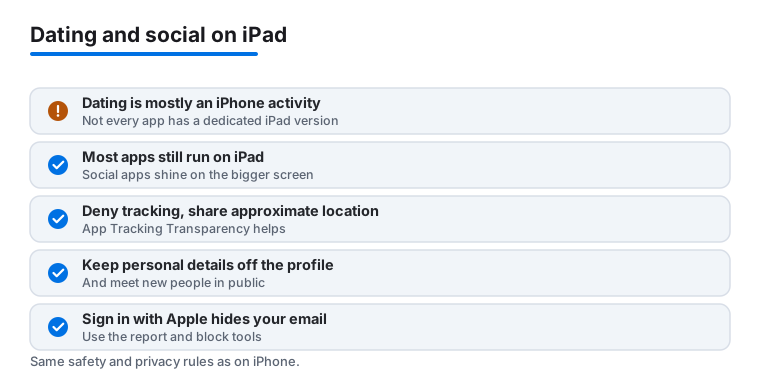
The iPad sits in an odd spot for this category. Social apps often gain the most from the extra room, since wider feeds, side rails and a real keyboard turn passive scrolling into something more comfortable. Dating apps are a different story. Dating is mostly an on the go iPhone activity, the kind of thing you do in a queue or on the sofa, so most companies build for the phone first. Not every dating app ships a dedicated iPad version, and some of the ones that run on a tablet are simply scaled up phone apps. The good news is that most still run on iPad through the same App Store download, and they work fine. You just should not expect every one of them to feel redesigned for the larger display.
So the honest framing is this. If you want to swipe quickly while out and about, your iPhone is the better tool. If you want to read full profiles, write longer first messages, edit photos or hold a video call, the iPad is genuinely more pleasant. Many people use both, and that is a reasonable plan rather than a compromise.
How to choose
Start with how you actually behave, not with the longest feature list. A few questions sort most of it out.
- Watching or creating? Apps like Instagram and Pinterest are excellent for browsing and light editing on a tablet, while heavy creation still leans toward the phone for many people.
- Chatting or calling? If video matters, the front camera and a stand make the iPad a tidy little call booth. Messaging apps with a wide split layout keep your conversation list visible while you type.
- Casual or serious dating? The larger screen rewards reading carefully and writing a real message rather than racing through swipes. If that matches how you want to date, the iPad helps.
- True iPad layout or scaled up phone app? Check whether the app uses the space with side panels and wider feeds, or just enlarges the phone view. Both can be fine, but it sets your expectations.
Price is usually simple here. Almost everything is free to download and use at a basic level, with optional paid tiers for boosts, badges or individual creator subscriptions. You can get real value from these apps without paying, so treat the upgrades as genuinely optional.
Safety and privacy first
This is the part that matters most, and it applies to social and dating apps alike. A bigger screen does not make you safer, so the habits below are worth building before you fill out a single profile. None of this requires technical skill. It is mostly about what you choose to share and which permissions you grant.
Lock down tracking and permissions
- Deny tracking. When an app asks to track you across other apps and websites, say no. Apple's App Tracking Transparency gives you that choice on every iPad, and you can also turn off the system wide prompt in Settings under Privacy and Security so apps cannot even ask. Declining does not break the app.
- Share approximate location, not precise. In the app's location settings, choose While Using and turn off Precise Location. Dating and social apps work perfectly well knowing your rough area, and there is no reason to hand over your exact spot on a map.
- Sign in with Apple where you can. When an app offers it, Sign in with Apple lets you hide your real email behind a private relay address. That keeps your true inbox out of the app's database and out of any future data breach or marketing list.
- Review what else you granted. Photos, microphone, camera and contacts should each be on only when you actually use that feature. The iPad's Settings app lists every permission per app, so a quick check now saves trouble later.
Keep personal details off your profile
Treat your profile as public, because in practice it is. Keep personal details out of it. That means no full name, no employer, no home neighborhood, no school, and nothing in your photos that reveals where you live or work, such as a house number, a street sign or a uniform with a logo. Reverse image searches are easy, so avoid reusing a profile photo that is already tied to your real name elsewhere. The aim is simple. A stranger should not be able to find your address, your workplace or your other accounts from what you posted.
Meet in public and use the tools you are given
- Move slowly and keep chat in the app at first. Scammers push to move you to private messaging quickly, often to a different platform. Staying in the app a little longer keeps the report and block tools within reach.
- Meet in public for the first few times. Pick a busy cafe or similar spot, arrange your own transport there and back, and tell a friend where you are going and when you expect to be home.
- Use report and block freely. Every reputable app on this page has report and block built in. If someone makes you uncomfortable, pressures you, or asks for money, block them and report them. You owe a stranger nothing, and reporting helps protect the next person too.
- Never send money. Requests for money, gift cards or crypto, however sympathetic the story, are the clearest sign of a scam. No genuine match needs your bank details.
None of this is meant to make dating or socializing feel grim. These are the same quiet habits that let you relax and enjoy the good parts. Set the permissions once, keep your profile sparse, meet sensibly, and you can spend your attention on the conversations rather than on worrying about them.
Our picks at a glance
Our four most used picks compared at a glance, across the things that matter most on a tablet.
Frequently asked questions
Are dating apps actually better on an iPad?
For reading profiles and typing replies, yes. The bigger photos and a real keyboard make browsing and chatting more comfortable. For quick swiping on the move, your phone still wins, so most people use both. We cover the small screen versions in our iPhone social and dating guide.
Do these social apps have proper iPad layouts?
It varies. Instagram, Pinterest, Patreon and Twitter use the extra space well with wider feeds and side panels. Others, like TikTok and some dating apps, are essentially scaled up phone apps that still work fine but do not transform. We note which is which in each entry above.
Which of these are free to use?
Nearly all are free to download and use at a basic level. Dating apps like Bumble, Tinder and Feeld add paid tiers for boosts and extra features, while Patreon and OnlyFans charge for individual creator subscriptions. You can get real value from every app here without paying anything.
Can I video call on an iPad with these?
Absolutely. Microsoft Teams, Google Meet and Messenger all handle video calls well, and the iPad front camera plus larger screen make group calls feel roomier than on a phone. Prop it up on a stand and it becomes a tidy little video booth for the kitchen or desk.
How do I keep my privacy safe on dating and social apps?
Start with permissions. Deny app tracking when asked, share approximate location instead of precise, and use Sign in with Apple so your real email stays hidden. Then keep personal details off your profile, such as your full name, employer and neighborhood. Meet new people in public the first few times, tell a friend your plans, and use the in app report and block tools without hesitation. Never send money to someone you have not met.
Is Skype still an option for video calls on iPad?
No. Microsoft retired Skype in May 2025 and now points people to Microsoft Teams, which is free for personal video calls and chats and runs well on iPad. If you used Skype before, signing in to Teams with the same account brings your contacts and chats across. Google Meet and Messenger are solid alternatives too.