
Telemundo on iPhone, iPad and Mac: How It Stacks Up Against Other Spanish-Language Apps
The Telemundo app is where I land when I want my nightly telenovela, a Telemundo Deportes match, or the news in Spanish without flipping on the TV. I have run it on an iPhone, an iPad, and through a browser on my iMac for a few months now, watching everything from La Casa de los Famosos to weekend futbol, so I know where it holds up and where it left me reaching for another app. One thing to clear up before we start: there is no separate Mac app in the Mac App Store, and the old standalone Telemundo Deportes apps are gone too. In this guide I will walk you through getting it set up on each device, the features that earned their place, the tips that smoothed out my viewing, the limits worth knowing, and the Spanish-language alternatives I keep installed alongside it.
Getting the Telemundo app running on iPhone, iPad and Mac
On the iPhone and iPad this is a two minute job. The app is called Telemundo: Series y TV en vivo, from NBCUniversal, and it is a single universal download that runs on both. Grab it from the App Store, open it, and you can start watching a chunk of on demand telenovelas and clips right away without signing in. The free tier is more generous than I expected. If you create a free NBCUniversal Profile you get a few episode credits and the app remembers your favorites, which is worth doing even before you think about a provider login.
To unlock live TV and the newest episodes, you tap the profile icon and choose the TV provider sign in. I used my cable login and the app verified it in a few seconds. The list of accepted providers is long, covering Comcast Xfinity, Spectrum, DirecTV, DISH, Verizon Fios, Cox, Optimum and many more, plus some internet providers. If you have cut the cord entirely, you will not have one of these, and that is the single biggest thing to understand about how the app is gated.
On the Mac the situation is more nuanced than a simple yes or no. There is no Mac-specific app built for the desktop. What you can do, if you own an Apple silicon Mac, is install the iPhone or iPad version from the Mac App Store under the Designed for iPhone or iPad label, since NBCUniversal allows it to run there. In practice that window is just the phone app stretched onto a desktop, and video apps with provider logins can be finicky in that mode. I had a smoother time skipping it and watching at telemundo.com in Safari instead, signing in with the same provider credentials. The website behaves almost exactly like the phone app on a far bigger screen. For a two hour block of telenovelas the iMac was the nicer way to settle in; the iPhone won for catching a match or a news segment on the move; the iPad split the difference. My honest tip is to sign in on the phone first, because that is where AirPlay, downloads, and notifications feel most reliable, then move to the iPad or the Mac browser when you want a bigger picture.
The features that actually matter
After months of regular viewing, these are the parts of the Telemundo app I lean on most:
- Live TV plus next day episodes. New telenovela episodes show up the morning after they air, so I never feel behind even if I miss the broadcast. This part needs the provider sign in.
- Telemundo Deportes, now built in. The standalone Telemundo Deportes and Telemundo Deportes En Vivo apps were retired and folded into this one app, so all the live futbol lives here now. Full Spanish commentary, and it is the main reason the app stays on my devices.
- FIFA World Cup 2026 coverage. Telemundo is the Spanish-language home of the tournament in the United States this summer, with the bulk of matches available free over the air and streaming in the app. If you only install Telemundo for one thing this year, this is it.
- Free content without a login. A real slice of the catalog is watchable with no provider, which is rare and genuinely useful for the price.
- AirPlay support. One tap from the iPhone or iPad throws the stream onto an Apple TV, so the small screen is never a hard limit.
- Continue watching. The app remembers where you stopped across episodes, which matters when a telenovela runs a hundred plus chapters.
The interface is in Spanish by default and easy to read, and nothing important is buried. For a free, ad supported app, it is cleaner than I expected. Downloads for offline viewing exist but are limited to certain on demand titles, not live content, so do not count on saving a match for the plane.
Practical tips from real viewing
A few small habits made the Telemundo app more pleasant. First, I turned on episode notifications so the app pings me when the next chapter of whatever I am following drops. With telenovelas airing five nights a week, that reminder keeps me from hunting through the menu. If you find the alerts noisy, you can switch them off per show rather than killing them all.
Second, on a slower connection I drop the video quality manually in the settings rather than letting it auto adjust, which stopped the buffering I hit on weekend match days. Auto mode tends to chase the highest bitrate and stutter when the network dips.
Third, if you split time between devices, sign in with the same NBCUniversal Profile and provider on the iPhone, the iPad, and the Mac browser so your continue watching list follows you. I start a telenovela on the iMac at night and finish it on the phone at lunch without losing my place. 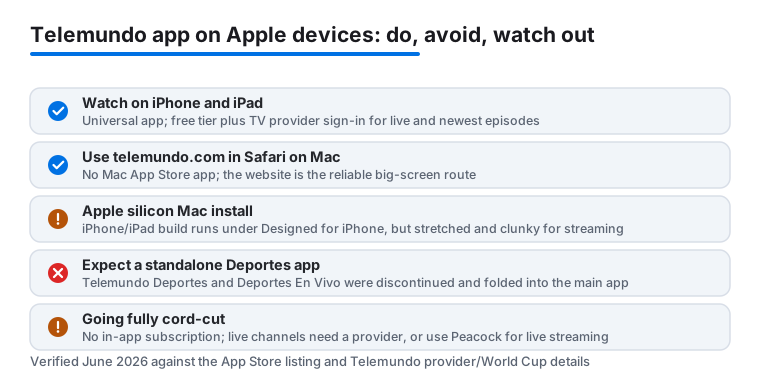
Fourth, for live futbol I plug the iPhone into a charger before kickoff. Streaming a ninety minute match in Spanish over cellular drains the battery faster than almost anything else I run, and a dead phone at the eighty fifth minute is its own kind of heartbreak. On the iPad the bigger battery buys you more room, but I still keep it on power for a full match. Finally, if a title shows up in search but will not play, try it again later or check whether it is a sports event that is geo restricted; that is usually the cause rather than a bug in the app.
The limits and downsides to know
The Telemundo app is good, but it is not flawless, and a few of the catches are worth weighing before you build your viewing around it. The biggest one is that the best live content is gated behind a pay TV provider login. If you have cut the cord, you lose the live channels and a portion of the newest episodes, and there is no standalone subscription you can buy inside the app to get past that. Telemundo's strategy is to send cord cutters to Peacock for live streaming and full replays, so the free app alone will not give you everything.
The lack of a true desktop app also stings if you do most of your watching at a Mac. Running the iPhone version on an Apple silicon Mac is possible but clumsy for a streaming app, so most people end up on the website, which is fine but not a polished native experience. There is no app at all for an older Intel Mac beyond the browser.
Ad breaks are frequent on the free tier, and unlike a paid service there is no way to remove them. I also ran into the occasional title that was listed but not actually playable in my region, which is common with sports and licensed shows where rights vary. On privacy, this is an ad supported NBCUniversal app, so it collects viewing and device data tied to your profile and provider for personalization and advertising; if that bothers you, review the tracking permissions iOS prompts for on first launch and skip the optional profile. One more thing worth flagging: the app is built around Telemundo's own programming, so it is a companion to your Spanish-language viewing, not a one stop catalog. For films and series beyond the network's slate, you will want something broader, which brings me to the alternatives.
Good Spanish-language alternatives worth comparing
Telemundo covers telenovelas, news, and futbol well, but I keep a few other apps installed to fill the gaps. The closest rival is ViX, the free, ad supported service from TelevisaUnivision that absorbed the old Univision Now and PrendeTV apps. ViX has a large free library of telenovelas and carries Liga MX, so it often overlaps with what Spanish-speaking viewers want most, and it runs on both iPhone and iPad. There is also a paid ViX tier for more sports and films if the free catalog leaves you wanting.
For Spanish-language films and prestige series, Netflix has a deep catalog of regional originals, and my walkthrough of Netflix's hidden gems on your iPhone shows how to surface the ones the home screen buries. If you lean toward novelas with a different flavor, Paramount Plus carries a solid Spanish-language slate alongside its sports, and my guide to getting the most from the Paramount app on iPhone is worth a look before you subscribe. And since the World Cup matches stream on Peacock too, that app is worth having installed this summer if you want every game rather than the free over the air slate. To see how Telemundo sits next to every other service I have tested, browse my best streaming and TV apps for Mac roundup, or step up to the wider Streaming & TV hub for the full lineup.
FAQ
Is the Telemundo app free, or do I need a subscription?
The app itself is free to download, and a real portion of the on demand library plays without any login. A free NBCUniversal Profile adds a few episode credits and saves your favorites. To watch live TV and the newest episodes, though, you sign in with a pay TV provider account. There is no separate subscription you can buy inside the app to unlock the live channels; for live streaming without a provider, Telemundo points you to Peacock instead.
Is there a native Telemundo app for Mac?
No, there is no Mac-specific app in the Mac App Store. On an Apple silicon Mac you can install the iPhone or iPad version under the Designed for iPhone label, but it runs as a stretched phone window and can be clumsy for a streaming app. Most people watch at telemundo.com in Safari with the same provider login. I treat the phone or iPad as the control center, since downloads, AirPlay, and notifications work best there, and the Mac as the big screen.
What happened to the Telemundo Deportes app?
The standalone Telemundo Deportes and Telemundo Deportes En Vivo apps were discontinued, and their live sports were folded into the main Telemundo app. So there is no separate Deportes download to hunt for anymore; the futbol, including the FIFA World Cup 2026 coverage that Telemundo carries in Spanish, all lives inside the one Telemundo app.
Can I watch live futbol on the Telemundo app?
Yes, Telemundo Deportes streams live matches with full Spanish commentary, and during major tournaments like the 2026 World Cup the coverage is one of the app's strongest features. Live sports usually require the provider sign in, though World Cup matches that air free over the air on the Telemundo channel are also free in the app. I always start with a charged phone or iPad since a ninety minute stream drains the battery quickly.
How does Telemundo compare to Univision or ViX for Spanish content?
They overlap a lot. Telemundo is my pick for its own telenovelas, news, and futbol, while ViX, the free TelevisaUnivision app that replaced the old Univision Now and PrendeTV, has a larger free catalog and Liga MX coverage. Both run on iPhone and iPad. I keep both installed and switch depending on which network is airing the show or match I want that night.