
Best Security & Privacy Apps for iPad (2026)
An iPad is the device we read, bank, and travel with, so the apps guarding it matter more than most. In our testing the picks below kept things private without nagging us every five minutes, and they all play nicely with the larger screen and Split View. For the wider picture, browse our security and privacy hub or the full list of the best iPad apps. Phone or laptop user too? See the iPhone and Mac editions.
1. ExpressVPN
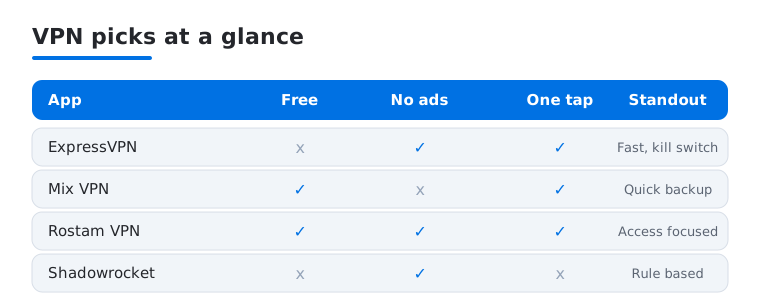
This is the VPN we reach for first on iPad. Connecting is a single tap, servers are fast enough to stream in HD over hotel Wi-Fi, and the kill switch quietly stops leaks if the tunnel drops. It suits anyone who wants protection without fiddling. There is no real free tier, but a refund window lets you test it risk free.
2. Google Authenticator
Google Authenticator is the no-fuss way to add two-factor codes to your logins, and it is completely free. We like that codes now sync to your Google account, so a lost iPad no longer means a panicked recovery. It suits people who want something simple that just works. On iPad the larger digits are genuinely easier to read at arm's length than on a phone.
3. Microsoft Authenticator
If your life runs on Microsoft 365 or a work account, this free app is the smoother choice. Approving a sign-in is a single push notification, no typing six digits at all, and it still generates standard two-factor codes when you need them. It is now an authenticator only, since Microsoft moved password management over to Microsoft Edge. We found the setup friendly for less technical family members, and on iPad the approve and deny buttons are big and unmistakable.
4. Shadowrocket
Shadowrocket is the power user pick, a flexible proxy and rule based tool rather than a one tap VPN. It costs a few dollars once, no subscription, and rewards people who like to route specific apps their own way. We would not hand it to a beginner, but on iPad the roomy rule editor makes building configs far less cramped than on a phone.
5. Mix VPN
Mix VPN is a lightweight free option for when you just need a quick encrypted hop on public Wi-Fi. It is plain and ad supported, and speeds vary by server, so we treat it as a backup rather than a daily driver. It suits casual users who want protection at no cost. On iPad the interface is uncluttered, and connecting took only a couple of taps.
6. Rostam VPN
Rostam VPN is built with access in mind, aimed at people in regions where the open internet is blocked or filtered. It is free, simple, and focused on getting you connected rather than on extra settings. We found it reliable for reaching everyday sites when other tools stalled. On iPad it stays out of the way, with one large connect button anyone can find.
Security and privacy apps for iPad
An iPad sits in a slightly different spot than a phone. It is often the household reading device, the one that travels in a bag for everyone to share, and the one with a screen big enough for the whole family to glance at. That changes what privacy means in practice. The good news is that an iPad runs the same protections as an iPhone, so you start from a solid base before you install anything at all.
What iPadOS already does for you
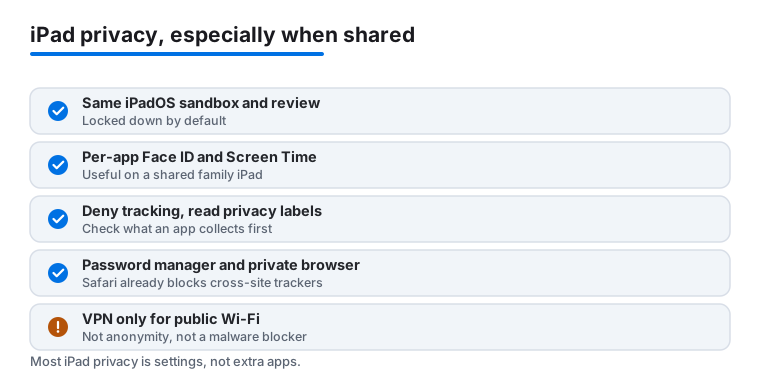
It helps to know what is built in, because it changes which apps are actually worth adding. iPadOS runs every app in a sandbox, which means one app cannot freely read another app's data or rummage through the system. Apps in the App Store also pass App Store review before they ship, which is not perfect but filters out a lot of obvious bad behavior. On top of that, App Tracking Transparency requires an app to ask before it tracks you across other companies' apps and websites, and you can simply say no.
Safari adds another layer. Its Intelligent Tracking Prevention already blocks most cross-site trackers by default, so a lot of the tracking people worry about is handled without any extra download. This matters because it sets a realistic baseline. You are not starting from zero, so you only need a few targeted tools rather than a pile of security apps. In fact, many of the apps that promise to clean, speed up, or protect your iPad are doing very little that the system does not already do, and a few collect more data than they prevent. Knowing the baseline is the best defense against that.
This is the same privacy model that runs on iPhone, so if you have set things up there, you already know the controls. The difference is context. A phone tends to stay in one person's pocket, while an iPad is more likely to be passed around, propped on a kitchen counter, or handed to a child for a while. The threats you actually face are less about clever attackers and more about everyday access, so the practical advice below leans that way.
The shared iPad problem
The biggest privacy gap on an iPad is usually not a hacker. It is the fact that other people in the house pick it up. If everyone uses the same unlocked tablet, your email, your banking app, and your messages are one tap away for anyone holding it. A few habits close most of that gap.
- Use per-app locks where they exist. Many sensitive apps, including some banking and notes apps, can require Face ID or Touch ID each time they open. Turn that on for anything you would not want a guest to read.
- Set up Screen Time limits. Screen Time is not only for kids. It can lock specific apps behind a passcode and keep certain content off the device entirely, which is handy on a tablet that children also use.
- Give people separate logins where you can. iPadOS supports shared use in schools, and at home you can at least keep separate profiles inside apps like browsers and streaming services so your history and saved passwords stay yours.
The short list of apps worth installing
You do not need many. Most people are well covered by four kinds of app, and several of them you may already have.
- A password manager plus an authenticator. A password manager creates and stores strong, unique passwords so you are not reusing the same one everywhere. An authenticator app, such as Google Authenticator or Microsoft Authenticator, generates the second code that protects a login even if the password leaks. The big iPad screen makes those codes easy to read at arm's length, and Microsoft Authenticator can approve a sign-in with a single tap.
- A private browser. Safari already blocks cross-site trackers, so for many people it is enough on its own. If you want more, Brave and DuckDuckGo are both available on the App Store and go further, blocking more trackers and ads by default and making it easy to clear your history in one tap. Running one of these alongside Safari is perfectly fine, and it costs you nothing. A common setup is to keep Safari for everyday browsing and reach for the stricter browser when you want a clean, trackerless session.
- A VPN for public Wi-Fi. This is the most misunderstood tool on the list, so it is worth being clear about what it does and does not do.
What a VPN really does (and does not do)
A VPN does two honest, useful things. It encrypts your traffic so that other people on the same network, the cafe, the airport, the hotel, cannot read what you are sending. And it hides your IP address from the sites you visit, replacing it with the VPN server's address. On public Wi-Fi that encryption is genuinely worth having.
What a VPN is not is just as important. A VPN is not anonymity. You are still signed in to your accounts, and those accounts still know who you are. It does not block trackers, because tracking happens through cookies and account logins rather than your network connection. It does not stop malware either, since that comes from what you download and tap, not from the tunnel itself. Treat a VPN as one tool for one job, not a magic shield.
There is also a real catch with free VPNs. Running a VPN costs money, so a free provider has to earn it somewhere, and too often that means logging what you do and selling it on. That defeats the entire point of using one. If you only need an occasional encrypted hop on public Wi-Fi, a simple free option can do, but for daily use or anything involving banking, a paid service that is clear about not keeping logs is the safer choice. Avoid free VPNs that are vague about what they record.
One habit that beats any single app
Before you install anything, scroll down to the Privacy Nutrition Label on its App Store page. Apple requires every app to declare what data it collects and whether that data is linked to you or used to track you. A flashlight or VPN that wants your contacts, location, and browsing history is telling you something. Reading that label takes ten seconds and rules out the worst apps before they ever reach your iPad. It is the cheapest privacy habit you can build, and on a shared family device it is the one that pays off most.
Frequently asked questions
Do I really need a VPN on my iPad?
Not always, but it helps. If you use public Wi-Fi at cafes, airports, or hotels, a VPN like ExpressVPN encrypts your traffic so others on that network cannot snoop. At home on your own connection it matters less, though some people still like it for privacy from their internet provider.
Is a free VPN safe to use?
It depends on who makes it. Free apps such as Mix VPN are fine for the occasional quick connection, but free providers sometimes show ads or log more data than paid ones. For anything sensitive like banking, we lean toward a paid, audited service. Read the privacy policy before you trust any of them.
Which authenticator app should I pick?
Either Google Authenticator or Microsoft Authenticator works well, and both are free. Choose Microsoft if your job uses Microsoft accounts and you want one tap push approvals. Choose Google if you want the simplest possible code generator with cloud backup. You can even run both, one per account if you like.
What is the difference between Shadowrocket and a normal VPN?
A normal VPN sends all your traffic through one encrypted tunnel with a single tap. Shadowrocket is a rule based tool that lets you decide exactly which apps or sites get routed where. It is more powerful and more hands on, so most people are happier with a straightforward VPN unless they specifically want that control.
How do I keep my apps private on a shared family iPad?
Start with the lock screen passcode, then turn on Face ID or Touch ID for any sensitive app that offers it, such as banking or notes. Screen Time can lock specific apps behind a separate passcode, and inside browsers or streaming apps you can keep separate profiles so your history and saved logins stay yours. None of this needs an extra download.
Does a VPN make me anonymous or block trackers?
No. A VPN encrypts your connection and hides your IP address from the sites you visit, which is useful on public Wi-Fi. It does not make you anonymous, because you are still signed in to your accounts, and it does not block trackers or malware. For trackers, lean on Safari, Brave, or DuckDuckGo instead.