
10 Hidden Features of the Publix App on iPad and iPhone
The Publix app is the one I open every Wednesday morning when the new weekly ad drops, coffee in hand, planning the week's shop from the couch. Most people use it just to clip a coupon or two, but after months of building real grocery runs with it on both an iPad and an iPhone, I have found a stack of tools that quietly hide in the menus. I will also be straight with you about the parts that have changed: Publix has split some functions into separate apps, and it killed its in-store scan-and-pay tool in early 2026. In this guide I walk you through getting set up on your device, the buried features that actually save money and time, the habits that make it click, the spots where it frustrates me, and a few alternatives if your store is not a Publix.
Getting the Publix app running on your iPad and iPhone
The main Publix app is a free download from the App Store. As of 2026 it needs iOS 16 or later on an iPhone and iPadOS 16 or later on an iPad, so anything from the last several years will run it. It installs the same way on both, but the two screens earn their keep differently. On the iPhone it lives in my pocket for the digital wallet and quick list checks while I am standing in an aisle. On the iPad I lean on the bigger canvas for planning, because the weekly ad and the recipe pages are easier to read on a ten inch screen than on a phone.
Open the app, sign in or create a free Publix account, and the first thing to do is set your home store. This one step changes everything that follows, because prices, weekly ad deals, aisle locations, and pickup slots are all tied to that specific location. When I skipped it once, I spent ten minutes looking at deals that did not exist at the store I actually shop. After your store is set, turn on location access and notifications. The first lets the app show the right aisle information, and the second is how you hear about personalized digital coupons and buy one get one free deals before they expire.
One honest note about the iPad. There is no separate tablet layout. You are running the iPhone app scaled up, and as of 2026 it still does not rotate into landscape on an iPad, so if you keep your tablet in a stand or keyboard case sideways, the app stays stubbornly portrait. Shoppers complain about exactly this in the App Store reviews, often comparing it unfavorably to Kroger, which does support landscape. I keep the iPad upright when I plan, and that sidesteps the annoyance.
The features that actually matter (and the ones Publix moved out)
Once you dig past the home screen, these are the tools I reach for on nearly every shop. A few of them are not where people expect, so this is worth reading closely.
- Digital coupons that clip in one tap. Go to Savings > Digital Coupons and tap to clip. They attach to your account and apply automatically at checkout when you enter your phone number. One catch worth knowing: digital coupons are a Club Publix benefit, so you do need the free membership to use them. There is no paper and nothing to scan.
- The full weekly ad, searchable. Instead of scrolling the flyer page by page, tap the magnifier and type an item. You can also filter by category or by savings type. Club Publix members get a sneak peek of the ad a day early, which is handy for planning.
- List Builder tied to the ad and your history. The shopping list pulls in weekly ad items, BOGOs, and clipped coupons, and it remembers your past purchases so you can re-add the staples fast. It also shows aisle locations once your store is set.
- Deli, sub, bakery, and platter ordering. You can order custom subs, sliced meats and cheeses, cakes, and party platters for in-store pickup straight from the app. This is the feature most people never notice, and it has saved me a wait at the counter more than once.
- Recipes that pair with the weekly ad. Publix publishes recipes built around items that are on sale that week, and you can add ingredients to your list as you browse. It is not a perfect one-button "send the whole recipe to my list" tool in my experience, but tapping the plus next to each ingredient gets you there quickly.
- Club Publix perks. The free membership unlocks member prices, the coupon access above, and the occasional surprise offer, all surfaced inside the app.
Now the two big changes, because the old version of this advice is out of date. Pharmacy refills are no longer inside this app. Publix runs a separate Publix Pharmacy app for refilling prescriptions, checking status, scanning a bottle to reorder, and managing a household's medications. If you came looking for that in the grocery app, you will not find it. Delivery and curbside are also split into a separate app, Publix Delivery & Curbside, powered by Instacart. The main app's "Shop Online" path hands you off to that service rather than handling the order itself.
Practical tips from real grocery runs
A few habits turned the app from a nice-to-have into the center of how I shop. First, I clip every relevant digital coupon the moment the new ad lands, even items I am only half sure I will buy. Clipping costs nothing, and an unclipped coupon simply does nothing at the register, so there is no downside to being generous. Just remember the coupons live behind the free Club Publix membership, so set that up once and you are done.
Second, I build my list on the iPad the night before and check it against the weekly ad and the BOGO deals, which Publix is known for. There are usually at least thirty buy one get one free offers each week, and spotting one on something I already needed is where the real savings hide. Third, I keep my ten digit phone number memorized and tied to my account, because that number, typed on the PIN pad at checkout, is what pulls in every clipped coupon and Club Publix price automatically.
Fourth, a note on paying in the store, because this is the part that changed. Publix used to let you scan items and pay through the app with a tool called Publix Pay. That feature was shut down in March 2026. You can no longer scan-and-go or check out with a QR code in the app. What still works: keep a gift card balance in your virtual wallet, and use Apple Pay at the register like any contactless card. The app is now my planning and savings tool, and Apple Pay is my payment tool. Finally, because the same account syncs across devices, I build the list on the iPad and pull it up on the iPhone in the store without losing anything.
The limits and downsides to know
The Publix app is genuinely useful, but it is not perfect, and a few things wear on me. The biggest is reach. Publix only operates in the southeastern United States, so if you live outside Florida, Georgia, and the neighboring states, the app is simply not for you. There is no getting around that.
The iPad experience leaves polish on the table. Because there is no tablet layout and no landscape rotation, you are using a stretched phone app, and on a large iPad Pro the oversized buttons and text can look clumsy. It functions, it just does not feel built for the screen.
The bigger friction now is that Publix has scattered its functions across three apps: the grocery app for ads, lists, coupons, and store orders, a separate Publix Pharmacy app for prescriptions, and a separate Instacart-powered app for delivery and curbside. That is more downloads and logins than a single app would need, and it surprises people who remember the older, unified experience. On the money side, delivery runs through Instacart, which adds service fees, a delivery fee, and a tip, and Instacart prices can sit higher than the in-store shelf price. Read the cart summary before you confirm, because the final number can climb well past what the ad suggested. One privacy point worth naming: coupons and member prices are tied to your phone number and purchase history, so Club Publix keeps a record of what you buy in exchange for the savings. Fair for most people, but it is a trade.
Good alternatives worth comparing
If Publix is not in your area, or you want to weigh your options, a few other grocery apps cover similar ground. Instacart is the obvious one, since it stitches together many regional chains under a single delivery app, which helps when you shop across several stores. Worth knowing: Publix's own delivery already runs on Instacart, so you may end up using it either way. Kroger, through its own app and its many banner brands, offers comparable digital coupons and fuel points where those stores operate, and as the reviews point out, its iPad app actually supports landscape, which the Publix one does not. Walmart's grocery app is worth a look too, especially for curbside pickup at scale and the nationwide coverage that Publix cannot match.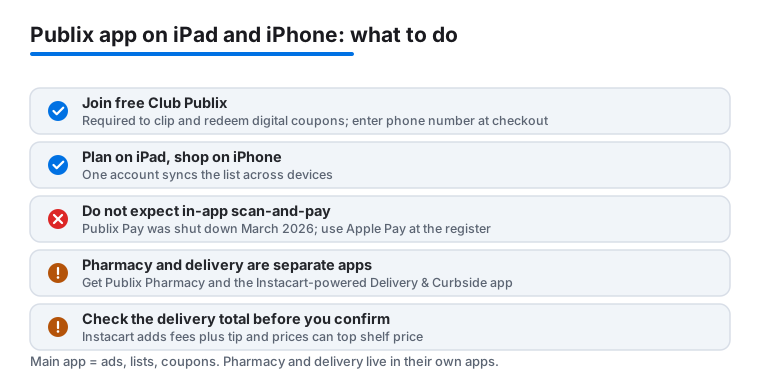
It also helps to see how a grocery app sits next to the restaurant and ordering apps you probably already use. We dug into one in our guide to using the Olive Garden app on your iPad, and if you are chasing deals on a meal out rather than groceries, our look at maximizing savings on Popeyes is a useful companion read. For the full roundup of what we recommend on a tablet, browse our best food and drink apps for iPad guide, or step up to the wider Food & Drink hub to see every app in this category.
FAQ
Does the Publix app have a real iPad version?
No separate iPad layout. The app is the iPhone version scaled up to fill the larger screen, and as of 2026 it does not rotate into landscape on an iPad, a point shoppers raise in the App Store reviews. It runs fine on an iPad and I still prefer the bigger display for planning, but go in expecting a blown-up phone app rather than a tablet design.
Can I still scan items and pay through the Publix app?
No. Publix shut down its Publix Pay scan-and-pay tool in March 2026, so there is no in-app QR checkout anymore. You can keep a gift card balance in the app's virtual wallet, but to pay at the register you now use Apple Pay or a regular card. The app is for planning, lists, and savings; payment happens at the terminal.
Are pharmacy refills and delivery inside the main Publix app?
No, both were split out. Prescription refills live in a separate Publix Pharmacy app, where you can reorder, check status, and scan a bottle. Delivery and curbside live in a separate Publix Delivery & Curbside app powered by Instacart. The main grocery app's "Shop Online" option hands you off to that service rather than processing the order itself.
Do I need a Club Publix account to use the coupons?
Yes. Digital coupons are a Club Publix benefit, but membership is free. Once you join, clip coupons under Savings, and they apply automatically when you enter your ten digit phone number on the PIN pad at checkout. The membership is also how you get member prices and the early weekly ad peek.
Does the app work outside the southeastern United States?
Not really. Publix only operates in a handful of southeastern states, so the app is most useful if there is a Publix near you. If there is not, an app like Instacart, Kroger, or Walmart grocery will serve you better.