
The JCPenney App on Your Mac and iPhone: A Hands-On Shopper's Guide
JCPenney is the app I open when I want department store basics, a new coffee maker, and a pile of kids clothes in one cart without paying full price for any of it. I have run it through a back to school haul, a bedding upgrade, and more than a few coupon runs, so I know where it helps and where it makes you work. One thing up front: there is no Mac version built for the Mac, but if you have an Apple Silicon machine you can still install the iPhone app on it, and I will explain when that is worth doing and when the browser is the smarter call. In this guide I cover getting it going on your Mac, iPhone, and iPad, the features that save money, the tips I wish someone had told me, the rough edges, and a few alternatives.
Getting JCPenney running on your Mac, iPhone, and iPad
The app you want is called JCPenney - Shopping & Coupons. It is an iPhone and iPad app, and it needs iOS 16 or iPadOS 16 or later, so anything from the last several years is fine. Download it from the App Store, open it, and either sign in or create a JCPenney account with your email. If you already have a JCPenney Rewards membership or a JCPenney credit card, log in with those same details so your points and saved coupons follow you in. The sign up took about a minute, and linking an existing rewards number pulled my offers in right away. On an iPad the same app stretches to fill the screen, and the larger view makes browsing clothes and home goods more comfortable than on a phone.
Now the Mac question, because the old advice on this is half wrong. JCPenney has never shipped a true Mac app written for macOS. What changed is that on Macs with an Apple M1 chip or later, the same iPhone app shows up in the Mac App Store under the heading that says Designed for iPhone. You can install it and it will run. Be honest about what that means though: it is a phone app in a small window, the layout was never tuned for a trackpad, and you press and hold the Option key to fake touch gestures. It works, but it is clumsy, and I rarely bother. On any Intel Mac it is not an option at all.
So my real workflow on a Mac is the website. I browse and build the cart at jcpenney.com in Safari or Chrome and sign into the same account. The site carries the full catalog and every coupon the app has, so nothing is locked away from desktop shoppers. A big screen makes comparing dresses, shoe sizes, and home goods far easier, then I finish the order on my iPhone where Apple Pay and Face ID make checkout quick. Your cart syncs across the website and the app as long as you are signed in, so handing the purchase from laptop to phone takes no extra steps.
The features that actually matter
After months of regular use, these are the parts of the JCPenney app I lean on the most.
- JCPenney Rewards and CashPass points. The program was relaunched in 2024 and now runs on CashPass points. If you pay with anything other than a JCPenney card you earn 1 point per dollar on qualifying purchases. With a JCPenney credit card or Mastercard you earn 1.5 points per dollar in JCPenney stores and on the site. Hit 200 points and you get a 10 dollar reward to spend. The app keeps your point balance on the home screen, so you always know how close you are.
- Coupons in your wallet. This is the real draw. JCPenney often lets you combine a percent off coupon with a reward, and the app shows which offers apply at checkout. You can also show a coupon barcode to an associate in store to apply it to a register order.
- Price Check Scanner in store. Point your iPhone camera at a price tag and the app pulls up the item and its details. The newer version shows the final price after coupon discounts and keeps a running subtotal of everything you have scanned, which has saved me from overpaying on the floor more than once.
- Snap to Shop. Take a photo of something you like and the app surfaces similar items it sells. It is hit or miss on exact matches but handy for finding a close substitute.
- True Fit sizing. Answer a few questions about your body and the brands you already wear, and the app suggests a size per item. It is not magic, but it cut my returns on jeans.
- Curbside and same day store pickup. Order in the app, pick a store, and grab it without shipping waits. The pickup status updates as the order moves along.
None of this is buried. The coupon wallet in particular is one tap from the home screen, which is more than I can say for a lot of retail apps I have tested.
Practical tips from real shopping trips
A few habits made the JCPenney app pay off rather than frustrate me. First, I always open the coupon wallet before I check out, then I read the fine print on each offer. Some coupons exclude clearance or certain brands like Nike and Levi's, and the app will quietly drop a coupon that does not qualify, so I confirm the discount actually landed on the total before I pay. The savings are real, but they are not automatic.
Second, I turn on push notifications but only for deals, and I keep them on the phone since the website cannot send them. The flash sale alerts are where the deepest cuts show up, and a couple of my better buys came from a notification I would have missed by email. Third, when a big purchase is coming, like a mattress or a full bedding set, I add it to favorites and watch the price for a week. Prices swing often here, and a little patience usually shaves off real money.
Fourth, a word on the CashPass math. If you do not carry a JCPenney card, you are earning a point per dollar and a reward at 200 points, which works out to roughly five percent back in store credit, and only on qualifying purchases. That is fine, but do not sign up for a store credit card just to chase the 1.5 point rate unless you pay the balance in full every month, because the interest on these cards wipes out the reward fast. Finally, if you shop here even a few times a year, set up Apple Pay in the app. It makes the iPhone checkout instant and keeps you from abandoning a cart because typing card numbers on a phone is a pain. JCPenney also takes Apple Pay in its physical stores, so the same wallet card works at the register.
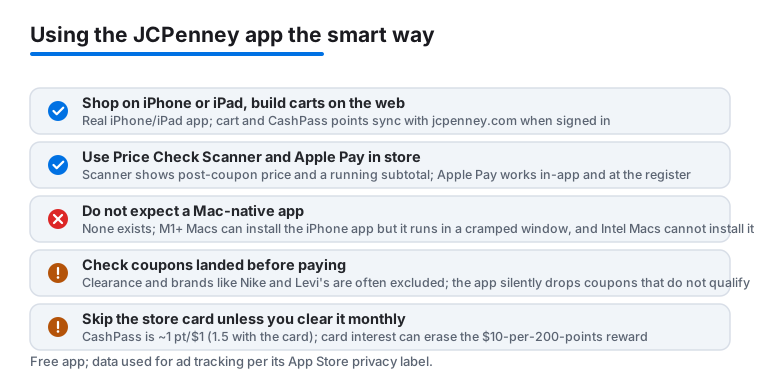
One more habit: I treat the in store scanner as a price check, not a payment tool. Scanning confirms the shelf price and any coupon, but you still pay at a register or through the app, so do not expect to walk out by waving your phone over a tag.
The limits and downsides to know
The JCPenney app is useful, but it is not flawless, and a few things genuinely test my patience. The biggest is performance. The app can feel sluggish when a major sale hits, with images loading slowly and the occasional crash mid checkout. When that happens I switch to the website on my Mac, which tends to hold up better under load.
The coupon system, as much as I rely on it, is also where most of the friction lives. Exclusions are everywhere, and figuring out which coupons stack can take trial and error at the cart. It pays off once you learn the pattern, but newcomers often feel like the discount they expected just vanished. Search is another weak spot, since broad terms return a flood of loosely related products, so I lean on the category filters.
On privacy, this is a shopping app, so assume it tracks what you browse and buy to feed those personalized deals. Apple's App Store privacy label lists data linked to you, including purchases, location, and identifiers used for tracking. If that bothers you, turn off ad tracking in your iPhone privacy settings and keep precise location off unless you need store pickup directions. The app is free, but it is paid for with your shopping data, which is normal for the category.
And the Mac story bears repeating. There is no app built for the Mac. On an Apple Silicon Mac you can install the iPhone version, but it runs in a cramped window with awkward controls, and on an Intel Mac you cannot install it at all. Either way the website is the better desktop experience, which means desktop shoppers miss the price scanner and the deal notifications that only the phone app gives you. None of these are dealbreakers, but go in knowing the savings take a little effort.
Good alternatives worth comparing
JCPenney is one of several department and retail apps, and the best fit depends on what you buy. If your shopping leans toward trendy clothing, Fashion Nova is worth a look, and I broke down how I pair its finds with a desktop setup in our guide on matching your MacBook with Fashion Nova finds. For home goods and dorm or apartment basics, the Bed Bath & Beyond app covers a lot of the same ground JCPenney does on the home side, and our piece on workspace accessories at Bed Bath & Beyond shows how I use it for desk and storage upgrades. Kohl's is the closest direct rival on the coupon stacking front, since Kohl's Cash and percent off codes behave a lot like JCPenney's rewards and coupons. Target is hard to beat for one cart that mixes clothes, home, and groceries with fast pickup.
If you want the wider view, browse our best shopping and fashion apps for Mac roundup to see how JCPenney compares, or step into the full Shopping & Fashion hub to explore every retail app we have put through real shopping trips.
FAQ
Is there a real JCPenney app for Mac?
No, there is no app built for macOS. On a Mac with an Apple M1 chip or later you can install the iPhone app from the Mac App Store under the Designed for iPhone heading, but it runs in a small window with clumsy controls. On an Intel Mac you cannot install it at all. For desktop shopping the website at jcpenney.com is the better route, though the price scanner and deal alerts stay on the phone app.
Can I really stack coupons in the JCPenney app?
Often yes. JCPenney frequently lets you combine a percent off coupon with a reward, and the app shows which offers apply at checkout. Watch the exclusions though, since clearance and certain brands like Nike and Levi's are commonly left out, and confirm the discount landed on your total before paying.
How do JCPenney Rewards and CashPass points work?
The program runs on CashPass points. Without a JCPenney card you earn 1 point per dollar on qualifying purchases. With a JCPenney credit card or Mastercard you earn 1.5 points per dollar in stores and on the site. Once you reach 200 points you get a 10 dollar reward to spend, and the app tracks your balance on the home screen.
Do my cart and rewards sync between my iPhone and Mac?
Yes, as long as you are signed into the same JCPenney account in the app and on jcpenney.com. I regularly build a cart on my Mac in the browser, then finish the purchase on my iPhone with Apple Pay, and the items and my point balance carry over without any extra steps.
Why does the JCPenney app feel slow during sales?
Traffic spikes during big promotions can bog the app down, leading to slow images or the rare crash at checkout. When that happens I switch to the website on my Mac, which usually handles the load better, and I come back to the app once the rush passes.