
Best Shopping & Fashion Apps for iPad (2026)
The iPad is a lovely place to shop. A roomy screen turns flat product photos into something close to a storefront, and zooming into a fabric weave or a sneaker stitch is far nicer than squinting at a phone. We spent a few weeks browsing, filling carts, bidding in live sales and chasing deals on iPad to find the shopping and fashion apps that genuinely earn the home screen.
Here are our favorites, ordered best first. For more picks across categories, browse the wider shopping and fashion hub or see everything we recommend in our best iPad apps roundup.
1. Nordstrom
Nordstrom is the app we reach for when we want to browse properly rather than just buy a thing. On iPad the photography fills the screen, and tapping into a dress to study the cut or read the fit notes feels like real window shopping. It is free, with an easy path to in store pickup. We liked saving items to lists, then comparing two coats side by side.
2. Lowe's
For home projects, Lowe's on iPad is the one we kept propped on the counter. The bigger screen makes browsing appliances, paint and patio sets genuinely pleasant, and the room visualizer is more usable when you can see it. It is free, with store stock checks and curbside pickup baked in. In our testing, comparing two grills tab to tab while reading reviews saved a trip to the aisle.
3. Dollar General
Dollar General is the everyday savings app of the bunch, built around digital coupons and weekly deals rather than glossy browsing. On iPad it works best for planning: clip coupons, build a list and scan the ad before you drive over. It is free, and the savings stack quietly. We found the larger screen handy for spotting buy one get one offers easy to miss on a phone.
4. Poshmark
Poshmark is our pick for secondhand fashion, and the iPad screen suits both sides of it. Buyers get roomy photos to judge condition, and sellers get a comfortable canvas for editing listings and replying to offers. It is free to use, with Posh taking a cut of each sale. We liked bundling several items from one closet to score a shipping discount, which is easier on a tablet.
5. Whatnot
Whatnot brings live shopping to life, and honestly it is more fun on iPad. The bigger screen turns a seller's livestream into something you actually want to watch, whether you are after trading cards, sneakers or vintage finds. It is free, with bids placed live during auctions, so set a limit before you join. In our testing the larger video plus the chat made fast sales easy to follow.
6. OfferUp
OfferUp is the local marketplace we lean on for furniture and bulky finds, and the iPad layout gives those listings welcome breathing room. Browsing nearby deals, messaging sellers and arranging a meetup all read clearly on the larger screen. It is free, with optional paid bumps to feature a listing. We liked studying a couch from every angle and checking the seller's ratings before committing to the drive.
7. American Eagle
American Eagle is a friendly stop for everyday denim and basics, and its app is pleasant to scroll on iPad. The fit guides and customer photos are easier to judge at tablet size, which takes some guesswork out of ordering jeans online. It is free, with rewards and frequent sales worth a look. We liked filtering by size and length up front, so the grid only showed pieces that fit.
8. Hollister
Hollister is the casualwear pick for a younger, beachy wardrobe, and it browses nicely on the bigger screen. Lookbook style imagery and the latest drops fill the iPad display well, making it easy to put an outfit together in one sitting. It is free, with rewards and regular markdowns. In our testing the saved favorites list was the standout, letting us park a few pieces and wait for the sale.
9. PrettyLittleThing
PrettyLittleThing leans into fast, trend led fashion at low prices, and the iPad screen flatters its bold, image heavy catalog. Scrolling new arrivals feels like flipping a digital magazine, and the size and fit details are easier to read at tablet size. It is free, with steep discounts running almost constantly. We found the wishlist useful for collecting pieces, then checking back when an event sale dropped the prices further.
10. Flight Club
Flight Club is the specialist here, a marketplace for rare and collectible sneakers. On iPad those detailed product shots really sing, and zooming into a pair to inspect condition and authenticity notes is far better than on a phone. It is free to browse, though the kicks command resale prices, so it leans aspirational. We liked tracking specific models on a watchlist and reading the verification details before buying.
11. fashion apps
Beyond any single store, a dedicated styling or wardrobe app can change how you shop. We dig into the standouts in our look at the best fashion apps for planning a digital wardrobe, since the right one depends on whether you want outfit inspiration or closet organization. Many offer a free tier, with extras behind a small subscription. The iPad screen makes laying out a capsule wardrobe genuinely enjoyable.
12. shopping apps
If you would rather have one app that pulls deals from everywhere, a general deals and discounts app is worth a slot. These surface coupon codes, price drops and cashback across hundreds of retailers, and the iPad screen is roomy enough to compare offers. The good ones are free, earning through affiliate links. We treat one as a quick gut check whenever a cart total looks too high.
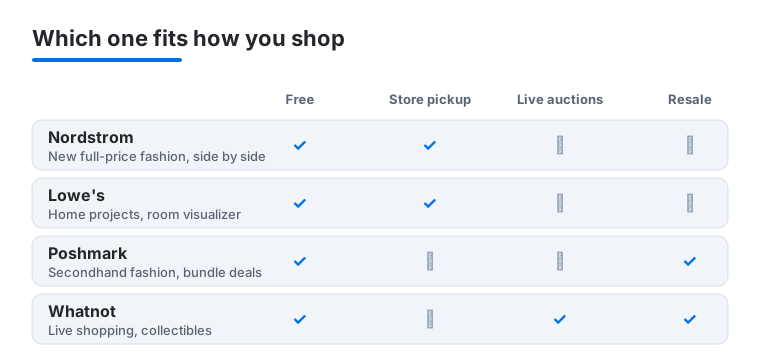
Not sure which to open first? This snapshot lines up our top four iPad picks against what each one is actually built for, so you can match the app to the way you like to shop.
Why a shopping app feels different on iPad
Most of the time the iPad is not a different store, it is a better seat in the same one. The extra screen gives product photos room to breathe, so a coat, a couch or a pair of sneakers reads closer to how it looks in real life. You can zoom into a fabric weave or a stitch line without losing your place, and you can hold a tablet flat on a counter while you measure a wall or check a paint chip against the room.
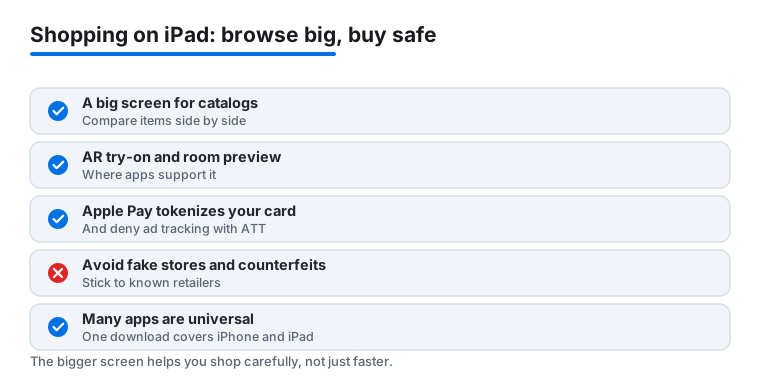
Three things tend to shine on the bigger display. The first is browsing a catalog, where a wide grid lets you take in a whole collection at a glance instead of scrolling one thumbnail at a time. The second is comparing items side by side, since many iPad apps show more detail per screen, and Split View lets you park two products or two stores next to each other. The third is any augmented reality try on or room preview feature, where the larger canvas makes it easier to see how a sofa sits in your living room or how a frame looks on your wall before you buy. If an app offers AR, the iPad is usually the nicer place to use it.
How to choose the right shopping app
Start with how you actually shop rather than with the longest feature list. A few honest questions narrow the field quickly.
- What are you buying? A department store app suits clothes and gifts, a home improvement app suits projects and appliances, and a marketplace suits secondhand and local finds. Match the tool to the task.
- New or secondhand? Resale and peer to peer apps save money and keep items in use, but they ask more of you. You judge condition from photos and lean on seller ratings, so read carefully.
- Do you want pickup or delivery? If you like grabbing orders in store or at the curb, check that the app supports it in your area before you commit.
- How does it make money? A free store app earns from your purchases, a marketplace takes a cut of each sale, and a deals app usually earns through affiliate links. None of that is a problem, but it helps to know.
It is also worth a quick look at how an app behaves before you trust it with a card. Check the App Store rating and recent reviews, confirm the developer is the real retailer and not a copycat, and skim the support and returns information. A store that is easy to reach when something goes wrong is worth more than a slightly lower price.
Shopping safely and protecting your privacy
The fun part of shopping is finding the thing. The boring part, paying and sharing data, is where a little care pays off. The good news is that iPad gives you several tools, and they take seconds to use.
Pay in a way that protects your card
Use Apple Pay whenever it is offered. Apple Pay tokenizes your card, which means the store receives a device specific number and a one time code rather than your real card details. Your actual card number is not shared with the merchant, and you confirm each purchase with Face ID or your passcode. For marketplaces like Poshmark, OfferUp and Whatnot, keep payments inside the app where the platform can help if a deal goes wrong, and do not move a conversation to an outside payment link.
Decide who gets to track you
When you first open a shopping app, iPadOS shows an App Tracking Transparency prompt asking whether the app may track you across other companies' apps and websites. You can decline, and for most shopping you should. Declining limits the data shared for cross app advertising and does not stop the app from working. You can review and change these choices later in Settings under Privacy and Security, then Tracking.
Read the label before you download
Every App Store listing includes a Privacy Nutrition Label that summarizes what data the app says it collects and whether that data is linked to you or used to track you. It is worth a glance, the same way you would check a food label. If a simple coupon app wants your contacts, your precise location and your browsing history, that is a reason to pause. You can also limit location to While Using the App and turn off precise location for apps that do not need it.
Avoid fake stores, counterfeits and too good deals
Most trouble comes from going somewhere you should not, not from the checkout itself. A few habits keep you safe.
- Stick to known retailers and verified developers. Download from the App Store, and confirm the listing belongs to the real brand rather than a lookalike with a slightly off name or logo.
- Treat too good deals with suspicion. A designer item at a tiny fraction of its price is usually a counterfeit or a fake store. If it seems impossible, it often is.
- Read seller ratings and recent reviews on marketplaces. Patterns matter more than any single glowing comment, and a thin or brand new seller history is worth caution.
- Keep iPadOS and your apps updated, and lock sensitive apps behind Face ID for extra peace of mind.
One download, two devices
One last practical note. Many shopping apps are universal, which means a single download runs on both iPhone and iPad and adapts to each screen. You do not need separate versions, and signing in once keeps your cart, wishlist and order history in sync wherever you pick up. That makes it easy to start a browse on the couch with the iPad and finish the order on your phone later, or the other way around.
Frequently asked questions
Are these really better on iPad than on a phone?
For browsing, yes. Bigger product photos, side by side comparisons and live shopping streams all benefit from the extra screen, and in our testing Nordstrom, Lowe's and Whatnot felt noticeably nicer than on a phone. A few apps still scale up the iPhone layout rather than building for iPad, but they remain perfectly usable for filling a cart.
Is it safe to shop and pay through these apps?
The major retailers here use secure checkout, and paying with Apple Pay adds another layer since your card number is never shared. For peer to peer apps like Poshmark, OfferUp and Whatnot, keep payments inside the app rather than moving off platform, and check seller ratings first. Keep iPadOS updated and lock sensitive apps behind Face ID for extra peace of mind.
Can I use the same apps on my iPhone and Mac too?
Mostly, yes. Sign in once and your cart, wishlist and order history follow you across devices. If you split your shopping between screens, our best shopping and fashion apps for iPhone and best shopping and fashion apps for Mac guides cover the picks that shine on each.
Which app should I start with for the best deals?
It depends on what you buy. For everyday essentials, Dollar General's digital coupons add up fast. For fashion, the constant sales at Hollister and PrettyLittleThing are hard to beat once you stack a wishlist. And for one off bargains across any store, a general deals app paired with a quick price check tends to catch the savings you would otherwise miss.
Do I need a separate iPad version of each app?
Usually not. Many shopping apps are universal, so one download from the App Store runs on both iPhone and iPad and adjusts to each screen. Sign in once and your cart, saved items and orders stay in sync, so you can start on one device and finish on the other.
How do I stop a shopping app from tracking me?
When the app first opens, iPadOS asks whether it may track you across other apps and sites through App Tracking Transparency, and you can choose Ask App Not to Track. You can change it later in Settings under Privacy and Security, then Tracking. Checking the Privacy Nutrition Label on the App Store listing before you download also tells you what the app says it collects.