
Temu on Mac: How I Actually Shop the Deals on a Desktop
Temu landed on my radar the way it lands on most people's, with absurdly cheap prices and a feed that never seems to end. What surprised me was how much better the whole thing felt on my Mac than on a tiny phone screen. There is no real desktop app to install, but after a few weeks of ordering everything from phone stands to kitchen gadgets, I worked out a setup that is fast, safe, and genuinely pleasant. Here is how to get Temu running on a Mac, the features that matter, the tips that saved me money, and the catches nobody warns you about.
Getting Temu running on your Mac
Let me clear up the first question right away, because I had it too. There is no native Temu app in the Mac App Store. Temu is built as an iPhone and Android app first, and the listing you see on Apple's App Store is the iPhone and iPad version. On the desktop you shop almost entirely through the browser. That is not a downside in practice. I open Safari or Chrome, go to temu.com, and either sign in or create an account with an email address. The site is responsive and quick, and a large monitor makes browsing the endless catalog far easier on the eyes than scrolling a phone.
There is one wrinkle worth knowing if you own a newer Mac. Macs with Apple silicon (the M1, M2, M3 and later chips) can sometimes run iPhone and iPad apps directly, and those show up in the Mac App Store under a "Designed for iPhone" or "Designed for iPad" label. Whether Temu appears there depends entirely on a setting the developer controls, and many developers switch it off. When I checked, the experience was inconsistent: even when an iPhone app does install on a Mac this way, it runs in a fixed phone-shaped window and is not built for a mouse and keyboard. So do not count on it. The browser is the reliable path, and it is the one I use every time.
My honest tip is to set up the account on your iPhone first if you have one, then sign in with the same login on your Mac. Doing it that way keeps your cart, your saved addresses, and your order history in sync across both. In my testing the desktop site mirrored the phone almost perfectly, so you can start a basket on the couch and finish it at your desk without losing anything. If you want a ping when a package moves, the phone app handles push notifications properly, while the Mac is where I do the actual browsing and buying. Think of the two as a pair rather than a choice.
The features that actually matter on desktop
After dozens of orders, these are the parts of the Temu desktop experience I lean on most:
- The full size product gallery. Cheap goods live or die on their photos and reviews, and a large screen lets me zoom into buyer images to judge real quality before I commit. On a phone those same photos are postage-stamp small.
- Side by side comparison. I open similar listings in separate browser tabs, which makes spotting the better seller far easier than swiping back and forth. Two near-identical items at the same price often have very different review counts once you line them up.
- Buyer reviews with photos. The review section is the single most useful tool on the site. I sort by most recent and scan the customer pictures, since they tell the truth that the listing photos sometimes do not. I also read the one and two star reviews first, because that is where the real flaws surface.
- The running discount cart. Temu stacks coupons and bundle savings as you add items, and watching the total drop on a wide screen makes the math obvious. It also makes it obvious when a "discount" is just an inflated starting price, which happens.
- Order tracking in the account area. Every purchase sits in "Your orders" with a tracking link, which is handy when several small parcels are in transit at once. The desktop view shows them all on one page instead of buried in a phone menu.
None of this is hidden, and none of it needs an app. The desktop layout is calmer than the busy phone feed, which honestly made me a more deliberate shopper. Fewer impulse taps, more actual comparing.
Practical tips from real orders
A few habits turned Temu from a gamble into a reliable source of small wins. First, I read the reviews before the price tempts me. If a listing has fewer than fifty ratings or no customer photos, I treat it with caution no matter how good the deal looks. Quality on Temu swings wildly, and the buyer pictures are the best filter you have. A four-star average built on three reviews tells you almost nothing.
Second, I batch my purchases. Temu often sets a free shipping threshold, so I keep a running cart of small wants and check out once it crosses the line rather than paying for delivery on a single trinket. Be aware that thresholds and promo coupons shift constantly, so the price you see today may not hold tomorrow.
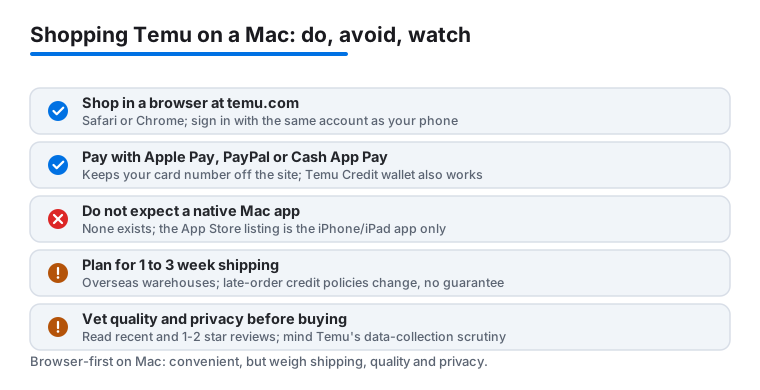
Third, I screenshot the listing right after ordering. Titles and photos on these marketplaces can change or vanish, and having a record makes any refund conversation much smoother. Fourth, on the money side, I pay through Apple Pay or PayPal at checkout when those show up, so my main card number never sits on the site. As of early 2026 Temu also accepts Cash App Pay, all the major credit and debit cards, and its own Temu Credit wallet, and in the US it supports "buy now, pay later" at checkout through partners like Klarna, Afterpay and Affirm, so you can split a larger order into installments if you want to. I also use a dedicated email for the account, which keeps the steady stream of Temu promo mail out of my main inbox. None of this is foolproof, but it lowers how much of my real identity and payment data lives on a store I am still learning to trust.
The limits and downsides to know
Temu is not magic, and a few things genuinely test my patience. The biggest is shipping time. Most of my parcels came from overseas warehouses and took one to three weeks, so this is not the place to buy something you need this weekend. Temu does post delivery estimates and has at times offered small account credits when an order arrives late, though those credit policies change, so treat any promise of compensation as a maybe rather than a guarantee. Plan ahead either way.
Quality is the other gamble. For every phone stand that punched above its price, there was a flimsy gadget that felt every bit as cheap as it cost. The reviews help, yet you will still get the occasional dud, so I keep my orders to low stakes items I would not mind replacing. There is also a real privacy cost to weigh. Temu collects a lot of data and pushes hard for app permissions on mobile, and the company has faced scrutiny and lawsuits over its data practices. Shopping in a desktop browser, ideally with tracking protection on, gives you a bit more distance from that than the phone app does.
The site itself can feel pushy, with constant countdown timers, spin to win popups, free-gift wheels, and urgency banners designed to rush you. A lot of those deadlines reset the moment they expire, so the pressure is mostly theater. On a Mac they are easier to ignore than on a phone, but they are relentless. And because there is no genuine desktop app, you lean on the browser for everything, which means no native push alerts on the Mac when a package finally moves. If live tracking pings matter to you, keep the phone app installed alongside.
Good alternatives worth comparing
Temu is one of several bargain marketplaces, and the right pick depends on what you are shopping for. AliExpress covers similar ultra cheap goods straight from overseas sellers and often has a wider range of niche parts and hobby items, though shipping is just as slow and, like Temu, it has no real Mac app either. For faster delivery on everyday basics, Amazon is the obvious counterweight, costing more per item but landing in days rather than weeks. If clothing is your focus, Shein plays in the same low price lane with a stronger fashion catalog, and the same browser-first reality applies on a Mac.
It also helps to see how Temu sits next to other desktop shopping picks. I compared notes in my look at matching your Mac setup with Fashion Nova finds, and if you would rather refresh your closet than your gadget drawer, my guide to the best fashion apps for a digital wardrobe is a useful next read. For the full rundown of desktop shopping tools, browse my best shopping and fashion apps for Mac roundup, or step up to the wider Shopping and Fashion hub to see every store I cover.
FAQ
Is there a real Temu app for Mac?
No, there is no native Mac app. On a Mac you shop Temu through the browser at temu.com using Safari or Chrome. Sign in with the same account you use on your phone so your cart and order history stay in sync. On some Apple silicon Macs the iPhone app can technically install through the Mac App Store, but that depends on a developer setting and the app runs in a fixed phone-shaped window, so the browser is the path I rely on.
Is it safe to enter my card details on Temu?
Temu uses standard checkout encryption, but for a store I am still getting to know I prefer to pay through Apple Pay or PayPal when offered, so my card number never touches the site directly. Cash App Pay is also accepted as of early 2026. Using a dedicated email and shopping in a desktop browser with tracking protection are two more simple layers, especially given the data-privacy scrutiny Temu has faced.
How long does Temu shipping actually take?
In my orders, most parcels arrived in one to three weeks because they ship from overseas warehouses. Temu shows an estimated date at checkout and has at times offered small account credits when an order runs late, though those policies change. This is not the place for anything you need in a hurry.
Is the quality on Temu any good?
It is a genuine mixed bag. Some items punch well above their price while others feel exactly as cheap as they cost. The buyer reviews with real photos are your best guide, so I read the recent ratings and the one and two star comments carefully, stick to low stakes purchases, and skip any listing with only a handful of reviews.