
How to Shop Fashion Nova on Your MacBook and Match the Looks You Love
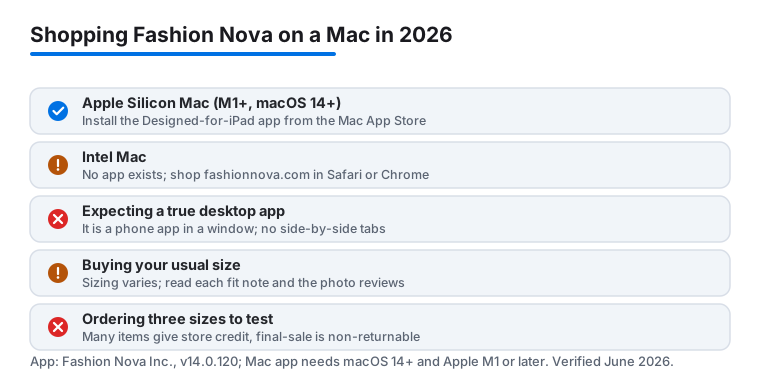
Here is the thing most write-ups get wrong: Fashion Nova does have a Mac app now, but only on the newer machines. If your MacBook runs an Apple chip (M1, M2, M3, M4 or later) on macOS 14 or newer, the Fashion Nova iPad app installs straight from the Mac App Store and runs in its own window. On an older Intel Mac there is no app, so you shop the website in a browser. I spent a few weeks doing both on a 14 inch MacBook Pro, and the big screen really is the easier place to compare two dresses and read the fit notes before you commit. Here is how I set it up and the habits that kept my returns down.
Which route you get depends on your Mac
First, find out what is inside your machine. Click the Apple menu in the top left, choose About This Mac, and look at the Chip line. If it says Apple M1, M2, M3, M4 or anything similar, you can run the app. If it says an Intel processor, you are on the browser route, and that is fine too.
On an Apple Silicon Mac, open the Mac App Store and search Fashion Nova. You will likely need to click the iPhone & iPad Apps filter near the search results, because the listing carries a Designed for iPad label rather than being a purpose built Mac program. Click Get, sign in with your Apple Account, and it lands in your Applications folder like any other app. As of mid 2026 the listing sat at version 14.0.120 and required macOS 14.0 or later. It is the same app the developer, Fashion Nova Inc., ships for iPhone and iPad, just running in a resizable window.
Worth being honest about: a Designed for iPad app on a Mac is not rebuilt for the desktop. Some buttons feel like they were sized for a touchscreen, and there is no trackpad gesture support beyond the basics. To tap and hold something, you press and hold the Option key to turn your trackpad into a virtual touch surface. It works, but it is a phone app in a window, not a tailored Mac experience.
On an Intel Mac, or if you would rather not bother with the app, just open fashionnova.com in Safari or Chrome and sign in with your usual account. Your bag and saved items sync, so a bag you started on the train shows up on the laptop the moment you log in.
Making either option feel less cluttered
If you take the browser route, two small moves make it feel closer to an app. In Safari, open the File menu and choose Add to Dock. That pins Fashion Nova as its own clean window with no address bar in the way, and it launches from the Dock in one click. In Chrome, open the three dot menu, go to Cast, Save, and Share, and choose Create Shortcut, then tick Open as window. Either way you get a focused window instead of a tab lost among twenty others.
Let the browser save your login if the Mac is yours alone, since reordering a favorite tee then takes two clicks. If you share a family Mac, skip the saved password and use a private window so your bag and address details do not sit in someone else's session. The installed app keeps you signed in by default, so the same caution applies there: do not install it on a shared login if you would rather keep your shopping private.
The features that actually matter on a bigger screen
Whichever way you shop, the reason a Mac beats the phone is detail. Product photos open large enough to judge whether a knit is chunky or thin, and the zoom reads sharper than pinching on glass. A few tools earned a permanent spot in how I shop:
- Side by side compare. In a browser, open two products in separate tabs and flip between them with Command and the number key. Picking between two bodycon dresses took seconds. In the app you cannot tab like this, which is one quiet point in the browser's favor.
- The fit guidance. Many listings note whether an item runs small, true to size, or large, plus the model's height and the size she is wearing. Read it before you add to bag, not after.
- Filters that hold. Narrow by size, color, and price once, and the results stay filtered as you browse the category. This alone cut my scrolling in half.
- Saved favorites. The heart icon builds a wish list tied to your account, and that is where outfit planning really happens. It syncs across the app, the site, and your phone.
Building matching outfits without the guesswork
Matching is where the laptop pulls ahead. I kept one tab, or one app screen, open on the favorites page and treated it like a mood board. When a top caught my eye, I hearted it, then searched for bottoms in a tone that talked to it and hearted those too. Seeing eight saved pieces in one grid made it obvious which colors worked together and which clashed in person.
A trick that paid off: shop by color family rather than by item. Search a shade like sage or mocha across the whole store, and Fashion Nova surfaces dresses, sets, and accessories in that palette at once. That is how I pulled a head to toe look together in one sitting instead of hunting piece by piece. The favorites grid does the heavy lifting here, because you are comparing real photos side by side rather than holding a color in your memory. If you like planning a full closet this way, our roundup of fashion apps for Mac pairs with this workflow.
One caveat on color: screens lie a little. Mocha on a calibrated MacBook display can read warmer or cooler than the fabric in daylight. When two pieces are meant to match exactly, the customer photo reviews are a better guide than the studio shot, because you see the real tone under ordinary lighting.
Habits that saved me money and returns
Fashion Nova moves fast and prices shift, so a little discipline pays off. These are the habits I leaned on after a couple of orders went sideways:
- Read the reviews with photos. Customer images show how a piece sits on real bodies, which matters more than the studio shot. The bigger screen makes them easy to scan.
- Trust the fit notes over your usual size. Sizing is inconsistent between styles. When a listing said size up, it meant it, and ignoring that cost me a return.
- Watch the sale banner, but check the math. Sitewide promos rotate constantly. I added pieces to the bag, waited a day, and several dropped in price before I checked out. Just confirm the discount actually applied at checkout rather than assuming the banner did it for you.
- Measure once against the size chart. Comparing your own measurements to the chart beats guessing, especially for jeans and dresses where the cut varies the most.
The limits and downsides to know
It would be unfair to pretend any route here is flawless. If you shop only in a browser on a Mac, you miss the push notifications that alert phone shoppers to flash drops, so timed deals can pass you by. The installed Mac app can show notifications, but they are less reliable than on a phone that lives in your pocket. My fix was simple: keep the app on a phone for alerts and do the actual shopping on the Mac.
Sizing is the real friction point on any device. Fashion Nova leans toward fitted, junior style cuts, so the same medium can feel snug in one dress and roomy in another. Returns are possible, but the policy favors store credit over refunds on many items, and final sale pieces are not returnable at all, so order with intent rather than buying three sizes to test. Fabric can also feel lighter in person than it looks on screen, which is exactly why those photo reviews are worth the extra minute.
On privacy, treat the app and the site the same way you would any retail account. You are handing over an address and payment details, and the company uses your browsing to target what it shows you. If that bothers you, shop signed out in a browser and only sign in at checkout, and pay with a method like Apple Pay so your card number is not stored in the account.
Good alternatives if Fashion Nova is not the fit
Fashion Nova works well for trend driven, going out pieces at a low price, but it is not the only stop. If you want department store range with frequent coupons, the JCPenney shopping experience on Mac covers basics, home, and brand names under one roof. For browsing across many retailers and chasing the lowest price, a general marketplace can fill the gaps Fashion Nova leaves. You can see the full lineup we tested in our guide to the shopping and fashion apps for Mac, or browse everything in the shopping and fashion category to compare your options. The right pick really comes down to whether you want one bold outfit tonight or a slower, broader haul.
FAQ
Is there a Fashion Nova app for Mac?
Yes, but only on Apple Silicon Macs. If your MacBook has an M1 chip or later and runs macOS 14 or newer, you can install the Fashion Nova iPad app from the Mac App Store under the iPhone & iPad Apps filter. On an Intel Mac there is no app, so you shop fashionnova.com in your browser, which in our testing was a perfectly good way to compare pieces and read fit notes.
How do I know if my MacBook can run the app?
Click the Apple menu, choose About This Mac, and read the Chip line. If it names an Apple chip such as M1, M2, M3, or M4, the app will run. If it lists an Intel processor, use the website instead. You can check the App Store listing too, since it states it needs macOS 14.0 or later and a Mac with Apple M1 chip or later.
Does Fashion Nova really run small?
It varies a lot by style, which is the honest answer. I learned to trust the fit note on each listing rather than my usual size. When a dress said to size up, sizing up was the right call, and the customer photo reviews helped me judge the cut before buying.
Will my bag and favorites sync between my phone and Mac?
Yes, as long as you sign in with the same account. I started a bag on the phone and finished it on the laptop without losing anything, and the heart icon wish list followed me across the app, the website, and my phone for easy outfit planning.