
How to Block Spam and Scam Calls on iPhone
Spam and scam calls are relentless, and no single switch makes them disappear. The good news is that your iPhone, your carrier, and a few well-chosen apps each handle a different slice of the problem. Used together, they can take you from a phone that rings all day to one that rarely buzzes with junk. This guide walks through every realistic option in plain language, with the exact menu paths to tap, and it is honest about the trade-offs. Some of these tools send unknown legitimate callers (a new doctor's office, a delivery driver, a recruiter) straight to voicemail, so the right setup depends on how much you value silence versus never missing a call. We will start with the built-in, no-cost, no-risk options and work up to third-party apps.
First, understand what you are fighting
Not all unwanted calls are the same, and that matters because different tools catch different types.
- Spam calls are usually telemarketing, robocalls, or warranty and insurance pitches. They are annoying but rarely trying to steal from you directly.
- Scam calls impersonate banks, the IRS, Social Security, Amazon, Apple support, or your own carrier. The goal is to scare or rush you into handing over money, codes, or remote access to your device.
- Spoofed numbers are the reason blocking one number rarely helps for long. Scammers fake the caller ID so the call appears to come from a local number, a real company, or even your own area code (called neighbor spoofing). Block one, and the next call uses a different fake number.
The key takeaway: blocking individual numbers is a losing battle against high-volume spammers because the number you block is almost never real. The tools that actually move the needle are the ones that filter based on patterns and carrier-level analysis, not on a list of numbers you maintain by hand. A legitimate organization will never demand payment in gift cards, cryptocurrency, or wire transfer, and will never ask you to read back a one-time passcode. The U.S. Federal Trade Commission keeps a current rundown of common phone scams at ftc.gov.
Turn on Silence Unknown Callers (the single biggest win)
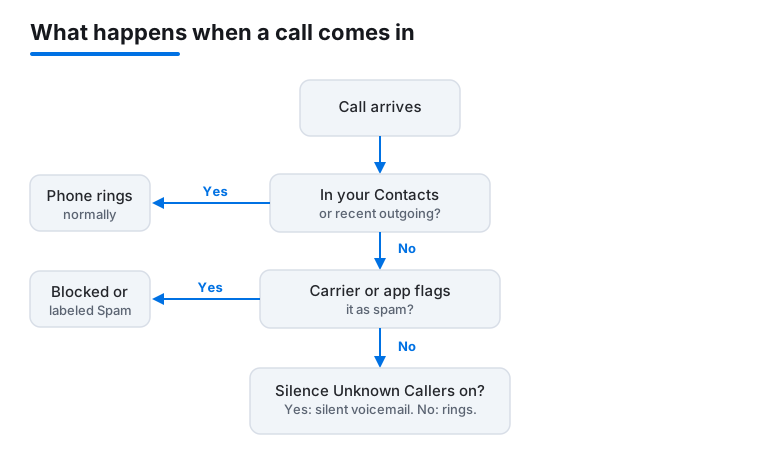
This is the most effective built-in feature, and it is free. When enabled, any call from a number that is not in your Contacts, your recent outgoing calls, or your Siri Suggestions is silenced, sent to voicemail, and listed in your Recents. Your phone does not ring at all.
How to turn it on
- Open Settings.
- Tap Apps, then Phone (on older iOS versions, scroll down and tap Phone directly).
- Tap Silence Unknown Callers.
- Toggle it on.
The big honest caveat: this silences every unknown caller, not just spammers. A new dentist, a delivery driver, a job recruiter, a school nurse calling from a number you have never saved, all go silently to voicemail. If you are waiting on an important call from someone new, turn this off temporarily or watch your Recents list. Because legitimate callers usually leave a voicemail and spammers usually do not, many people find this an acceptable trade. Apple documents the feature on its support site.
Tip: Add the numbers you genuinely expect (your bank's real number, your pharmacy, your kids' school) to Contacts so their calls always ring through even with this setting on.
Use your carrier's free spam-blocking tools
Carrier-level filtering is genuinely powerful because it works before the call ever reaches your phone, and it uses network-wide data to spot patterns. In the United States, all three major carriers offer free spam protection, and most have a paid tier with extra features. You usually have to opt in.
- T-Mobile offers Scam Shield, which labels and can block likely-scam calls for free. Set it up in the Scam Shield app or your account settings. Details at t-mobile.com.
- AT&T offers ActiveArmor, a free app that flags and blocks fraud and spam calls. See att.com.
- Verizon offers Call Filter, free for spam detection and blocking, with a paid tier for caller ID and a personal spam list. See verizon.com.
Two things to know. First, free tiers may only label a call as Scam Likely rather than block it outright, so you still see it ring unless you also flip on automatic blocking. Second, carriers occasionally mislabel a legitimate business, so if you are missing expected calls, check whether your carrier's tool blocked them. If you are outside the U.S., search your carrier's name plus "spam call blocking" to find the equivalent. The underlying technology most carriers use to verify caller ID and reduce spoofing is called STIR/SHAKEN, which is why "verified" caller labels have become more reliable in recent years.
Block and report a number the right way
Blocking individual numbers has limited value against spoofers, but it is still worth doing for repeat offenders that use the same number, and for specific people you do not want to hear from. Here is how to do each.
Block from a call or voicemail
- Open the Phone app and tap Recents.
- Tap the small info (i) button next to the number.
- Scroll down and tap Block this Caller, then confirm.
Block from a text message
- In Messages, open the conversation.
- Tap the contact name or number at the top.
- Tap Info, then Block this Caller.
Report scam texts and iMessages
When a spam iMessage arrives from an unknown sender, you will often see a Report Junk link under the message. Tapping it deletes the message and reports the sender and message to Apple. For SMS spam in the U.S., you can also forward the text to 7726 (which spells SPAM), a free service that reports it to your carrier.
See and manage your block list
Go to Settings > Apps > Phone > Blocked Contacts to review or remove blocked numbers. Reporting scam calls and texts to the FTC at reportfraud.ftc.gov does not block them on your device, but it helps regulators pursue the operations behind them.
Stop calls at the right times with Focus modes
Focus modes do not identify spam, but they give you precise control over when any call can reach you, which is a powerful blunt instrument for protecting your sleep, work, or downtime. A Focus can allow calls only from specific people while silencing everyone else.
Set up a Focus that only lets trusted people through
- Open Settings and tap Focus.
- Choose a Focus such as Do Not Disturb, Sleep, or Work, or tap the plus to create a custom one.
- Under People (or Notifications), choose Allowed People and tap Calls From.
- Select Allowed People Only and add your favorites, or pick Allow Calls From Everyone if you only want to silence notifications, not calls.
You can also enable Allow Repeated Calls, which lets a second call from the same number within three minutes ring through. That is a smart safety valve: a genuine emergency caller usually rings twice, while a robocaller moves on. Schedule a Focus to turn on automatically (for example, Sleep from 11 p.m. to 7 a.m.) so you are protected without remembering to toggle anything. Apple explains Focus in detail at support.apple.com.
Add a third-party call-blocker app (and how it works)
If the built-in tools are not enough, a dedicated call-blocking app can identify and silence known spam numbers using a constantly updated database, often labeling who is really calling. Well-known options include Hiya, Truecaller, Robokiller, and Nomorobo. These appear in the App Store and most offer a free tier plus a paid subscription.
How to enable a call-blocking app
- Download the app from the App Store.
- Open Settings and go to Apps > Phone > Call Blocking & Identification.
- Toggle the app on so iOS lets it screen and label incoming calls.
iOS deliberately limits these apps for privacy: they cannot see your call content, and they rely on a list of numbers iOS checks calls against. That is why identification is reliable but never perfect. Read the privacy policy before you commit, because some free call-ID apps make money by uploading your contacts or building a reverse-lookup directory. Apple's App Store guidelines require apps to disclose this, but you should still check. Stick to well-reviewed apps from established companies, and be skeptical of any app that demands access to far more than it needs to do its job.
What actually works versus what does not
After all the options, here is the honest scorecard so you can spend your effort where it counts.
What genuinely helps
- Silence Unknown Callers plus saving your real contacts: the highest impact for most people, at zero cost and zero risk.
- Carrier spam filtering with automatic blocking turned on: stops many calls before they reach you.
- A reputable call-blocker app: adds caller ID and catches known spam the carrier misses.
- A scheduled Focus mode: protects specific hours regardless of who is calling.
What barely moves the needle
- Blocking numbers one by one: useless against spoofed caller ID, which is most spam. Worth it only for a persistent real number.
- Answering to ask for removal: answering confirms your number is live and often increases calls. Do not engage.
- The U.S. Do Not Call Registry: registering at donotcall.gov stops legitimate telemarketers who follow the law, but scammers ignore it entirely. Still worth doing, just do not expect it to stop fraud.
What to never do
- Never press a number to "opt out" of a robocall: it tells the system a human answered.
- Never give out one-time passcodes, banking details, or remote-access permission to an inbound caller, no matter who they claim to be. Hang up and call the company back using the number on its official website or the back of your card.
- Never trust caller ID alone; it is trivially faked.
FAQ
Will Silence Unknown Callers make me miss important calls?
It can. Any caller not in your Contacts, recent outgoing calls, or Siri Suggestions goes silently to voicemail. A new doctor, delivery driver, or recruiter would be silenced. The practical fix is to save the numbers you expect to Contacts, and to glance at your Recents list and voicemail when you are waiting on someone new. If you are job hunting or expecting deliveries, consider turning the feature off temporarily.
Why do I still get spam calls after blocking so many numbers?
Because almost all spam uses spoofed caller ID. The number you see is fake and changes constantly, often mimicking your own area code (neighbor spoofing), so blocking it does nothing for the next call. This is exactly why pattern-based tools (carrier filtering, Silence Unknown Callers, and call-blocker apps) work far better than manually blocking numbers.
Are third-party call-blocker apps safe and worth it?
Reputable ones from established companies are generally safe and can add useful caller ID and spam detection beyond the built-in tools. The main concern is privacy: some free caller-ID apps fund themselves by uploading contacts or building public reverse-lookup directories. Read the privacy policy, prefer well-reviewed paid options if caller ID matters to you, and avoid any app that asks for far more access than its job requires.
What should I do if a scammer pretends to be my bank or the IRS?
Hang up. Do not give any information, codes, or payment, and never grant remote access to your device. Legitimate organizations do not demand gift cards, wire transfers, or cryptocurrency, and they will not ask you to read back a one-time passcode. Call the organization back using the number on its official website or the back of your card, and report the scam at reportfraud.ftc.gov.
Is there one setting that blocks all spam calls?
No. There is no single switch. The most effective single setting is Silence Unknown Callers, but real protection comes from layering: that setting plus carrier spam filtering with automatic blocking, plus a reputable call-blocker app for caller ID, plus a scheduled Focus mode for quiet hours. Each catches a different type of unwanted call.
Does adding my number to the Do Not Call Registry stop scam calls?
Only partly. Registering at donotcall.gov stops legitimate telemarketers who follow the law, which reduces some unwanted calls. Scammers and illegal robocallers ignore the registry completely, so it will not stop fraud. It is free and worth doing, but treat it as one small layer rather than a solution on its own.