
Why Is My iPhone Overheating and How to Fix It
A warm iPhone is not always a broken one. Phones run hot when they work hard: restoring a backup, charging on a hot car seat, running navigation in the sun. Most of the time the heat is temporary and the phone protects itself. The trick is knowing the difference between normal warmth and a real problem, what to do in the moment, and which panic moves can ruin the phone for good. This guide walks through all of it in plain steps, with the exact settings to check.
How warm is too warm
Apple designs the iPhone to run in air temperatures between 32 and 95 degrees Fahrenheit (0 to 35 Celsius), as listed on its support page for hot and cold devices. Stored and turned off, it tolerates a wider band: -4 to 113 Fahrenheit (-20 to 45 Celsius). Inside that range, a phone that feels warm to the touch during heavy use is doing exactly what it should.
Warm after a long video call or a software update is normal. A phone hot enough to be uncomfortable to hold, paired with a black screen, slow charging, or a fuzzy cellular signal, has hit its limit. The temperature reading you sometimes hear about (like 101 Fahrenheit) is the air around the phone, not its internal chip, which runs hotter by design.
One quick reality check: feel the back of the phone near the camera and top edge, where the processor and modem sit and heat shows up first.
What is actually making it hot
Heat almost always traces back to one of a handful of causes. Apple lists most of these directly, and they match what people see day to day:
- Setting up or restoring. A brand new phone, or one restoring from an iCloud or computer backup, runs warm for a while. It is downloading apps, syncing photos, and indexing everything so search works. This can take a few hours on a large backup and is completely normal. Let it finish.
- Charging, especially wireless. Charging generates heat. Wireless and MagSafe pads run warmer than a cable. Fast charging adds to it. Charging while you also game or stream stacks two heat sources on top of each other.
- Direct sun and hot enclosed spaces. A phone on a dashboard, a windowsill, or a beach towel heats up fast. A parked car in summer can pass 120 Fahrenheit inside in minutes.
- Graphics-heavy games and long video. 3D games, long 4K recording, and high-quality streaming push the chip hard. Frame rates may drop on purpose to shed heat.
- GPS navigation. Turn-by-turn directions keep the screen bright, the GPS active, and cellular working, often while the phone sits in a sunny mount. That combination is a classic culprit.
- A runaway app. Sometimes one app gets stuck working in the background and never stops. This is the cause worth hunting down, because it makes the phone hot even when you are barely using it.
If your phone got hot right after a new iOS install, that is usually the last category in disguise: the system is re-indexing files and finishing background jobs. Give it a day before you worry.
What to do the moment it gets too hot
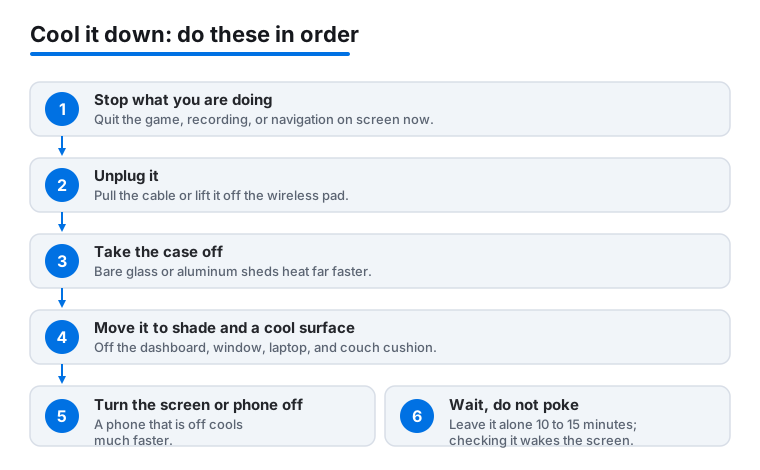
If the phone is uncomfortably hot, work through these in order. Each step removes a heat source or lets heat escape.
- Stop what you are doing. Quit the game, end the recording, close the navigation. The single biggest cause is usually whatever is on screen right now.
- Unplug it. If it is charging, pull the cable or lift it off the wireless pad. Charging and cooling do not mix.
- Take the case off. A case traps heat. Thick or rugged cases trap the most. Bare aluminum or glass sheds heat far faster.
- Move it out of the sun and off warm surfaces. Get it off the dashboard, out of the window, off the laptop, off the couch cushion. A shaded table or a cool tiled counter is ideal.
- Turn the screen off, or turn the phone off. Press the side button to sleep the screen. If it is very hot, hold the side and volume buttons and slide to power off. A phone that is off cools much faster.
- Wait, do not poke. Set it down and leave it alone for ten to fifteen minutes. Checking it every thirty seconds wakes the screen and slows cooling.
A small worked example: you are using maps in a sunny car mount and the phone gets hot. Unplug it, pop it out of the mount and case, and lay it on the passenger seat in the shade with the air conditioning vent pointed at it. Within a few minutes it is back to normal.
The temperature warning screen, explained
When the iPhone passes its safe limit, it stops most activity and shows a full screen message: Temperature: iPhone needs to cool down. The display goes dark and the phone becomes mostly unusable on purpose. This is a safety feature, not a fault.
Two reassuring things happen even at this point. You can still place an emergency call. And if you are mid-navigation, the phone keeps giving you spoken turn-by-turn directions while the screen is off, so you are not stranded.
Apple's official fix is three short steps: turn the device off, move it somewhere cooler and out of direct sun, and let it cool down. Do not try to force it back on. It will come back on its own once the internals drop to a safe temperature, usually within several minutes.
You may also see a quieter message on the Lock Screen: Charging On Hold. Charging will resume when iPhone returns to normal temperature. That one is not an emergency at all. The phone is simply pausing charging to protect the battery and will pick it back up once it cools.
What you should never do
Some instincts make things much worse. Avoid all of these:
- Never put the phone in the freezer or fridge. Cooling it that fast causes condensation, tiny water droplets that form inside the phone on the cold metal and glass, a risk repair specialists warn about. That moisture can reach circuit boards that heat alone would never have harmed, and it can trigger the Liquid Detected warning.
- Never run it under cold water or wrap it in an ice pack. Same problem: a sudden temperature swing and a real risk of moisture getting in through ports and seams.
- Never blast it with a hairdryer or set it near a heater to dry it. That is the opposite mistake and it pushes any internal moisture deeper while adding more heat.
- Do not keep charging or gaming while it is hot. You are feeding the fire. Let it cool first.
- Do not leave it in a parked car. Even with the warning showing, a hot car will keep cooking it.
The right move is boring and it works: room temperature, in the shade, left alone. Gradual cooling protects both the battery and the electronics.
Find the app that is overworking the phone
If the phone gets hot when you are barely touching it, one app is probably stuck running. You can find it in the battery screen, because a runaway app burns battery and creates heat at the same time. Apple's guide to battery usage and health explains what these readings mean.
- Open Settings > Battery.
- Scroll to the usage chart and tap View All Battery Usage, then tap a specific day.
- Look under App & System Activity for any app with an unusually high percentage.
- Tap Show Activity to see how many minutes each app spent active on screen versus in the background. A lot of background time for an app you barely opened is the red flag.
Found a culprit? Two fixes. First, force-quit it: swipe up from the bottom of the screen and pause in the middle to open the app switcher, then swipe that app's card up and off. Second, stop it from working in the background: go to Settings > General > Background App Refresh and turn the toggle off for that app. If a single app keeps overheating the phone, delete and reinstall it, or check the App Store for an update, since a buggy version is a common cause.
For more on which apps quietly drain power and how to rein them in, our guide to the best utilities apps for iPhone covers tools that monitor battery and storage, and the best productivity apps for iPhone roundup flags ones that tend to run heavy in the background.
Cool down charging habits
Charging is one of the most common reasons a phone gets warm overnight, and a few settings keep it gentle.
- Charge on a cable, not a hot pad, when you can. Wireless charging is convenient but warmer. If a wireless pad makes your phone hot, move to a cable for overnight charging.
- Take the case off for wireless charging. A thick case between the phone and a MagSafe or Qi pad traps heat and slows the charge.
- Do not charge under a pillow or blanket. Trapped heat with no airflow is the worst case for a charging phone. A hard, open surface like a nightstand is fine.
- Use a charge limit or optimized charging. As Apple describes in its notes on charge limit and optimized charging, on iPhone 15 and later you open Settings > Battery > Charging and tap Charge Limit, then pick 80, 85, 90, or 95 percent. The phone tops up to that level and stops, which runs cooler and is easier on the battery. On iPhone 14 and earlier, open Settings > Battery > Battery Health & Charging and turn on Optimized Battery Charging, which pauses at 80 percent overnight and finishes just before you usually wake up.
One more thing worth knowing in 2026: recent iPhones can quietly slow a charge on their own when they sense the battery is getting too warm, a feature Apple calls thermally limited charging. So if an overnight charge looks slower than usual on a hot night, the phone is protecting itself, not failing.
Settings that lower heat without hurting your experience
A handful of changes cut the workload, which means less heat and longer battery life. None of them cripple the phone.
- Lower screen brightness. A bright screen in the sun is a major heat source. Swipe down from the top-right corner to open Control Center and drag the brightness slider down, or turn on Auto-Brightness in Settings > Accessibility > Display & Text Size.
- Update your software. Overheating bugs get patched. Check Settings > General > Software Update and install what is offered. Do the update while plugged in, in a cool room, and expect some warmth during and just after.
- Turn on Low Power Mode when you need a break from heat. Go to Settings > Battery and toggle Low Power Mode, or add it to Control Center. It trims background activity and effects, which cools things down.
- Rein in Background App Refresh. In Settings > General > Background App Refresh, set it to Wi-Fi only or off for apps that do not need live updates.
- Trim location access. Apps using GPS in the background add heat. Open Settings > Privacy & Security > Location Services and set chatty apps to While Using the App instead of Always. The best security and privacy apps for iPhone can help you audit which ones track you in the background.
If you also want to cut down the constant pinging from messages and unknown numbers, which keeps the screen lighting up, our walkthrough on how to stop spam calls and texts on iPhone pairs well with this.
When it is the hardware, and what a repair costs
If the phone overheats constantly, even sitting idle in a cool room after a restart, with no demanding app to blame, the cause may be physical. A swollen or worn-out battery is the usual suspect, and a damaged charging port or a phone that took a hard knock can also run hot.
Check the battery first. On iPhone 15 and later, go to Settings > Battery, then tap Battery Health to see Maximum Capacity and cycle count. On iPhone 14 and earlier, the path is Settings > Battery > Battery Health & Charging. If Maximum Capacity has dropped well below 80 percent, or you see a message that the battery needs service, a replacement often fixes both the heat and the short battery life.
Apple's out-of-warranty battery replacement runs roughly 89 to 119 US dollars for most iPhone models in 2026, depending on the model, and is cheaper or free if you have AppleCare or the phone is under warranty. Prices vary by country and model, so confirm yours before booking. A phone that is physically swollen (the screen lifting at an edge) should be powered down and taken in promptly rather than used.
Before paying for anything, two free steps are worth trying: update to the latest iOS in case a software bug is the cause, and back up your data, then erase and set up the phone fresh by going to Settings > General > Transfer or Reset iPhone > Erase All Content and Settings. A clean setup clears out a misbehaving app or a corrupted background process that no amount of toggling will fix.
FAQ
Is it bad for my iPhone to feel warm while charging or gaming?
No, mild warmth during charging, gaming, or a software update is normal and expected. The phone is working hard and shedding heat. It only becomes a concern if it gets hot enough to be uncomfortable to hold, the screen dims or goes black, or you see the temperature warning. In that case, stop, unplug, and let it cool.
How long does it take for an iPhone to cool down?
Usually about ten to fifteen minutes once you stop using it, remove the case, and move it somewhere cool and shaded. Turning it off speeds this up. The temperature warning screen clears on its own as soon as the internals reach a safe level, so you do not need to force a restart.
Can I put my iPhone in the fridge or freezer to cool it faster?
Never. Rapid cooling causes condensation inside the phone, and that trapped moisture can damage circuit boards or trigger a Liquid Detected warning. The same applies to cold water and ice packs. Gradual cooling at room temperature is both safe and effective.
My new iPhone got hot right after setup. Should I worry?
No. A new phone, or one restoring from a backup, runs warm while it downloads apps, syncs photos, and indexes content for search. On a large backup this can take a few hours. Take the case off, keep it off warm surfaces, and let it finish. It should return to normal once everything has loaded.
How do I tell which app is overheating my phone?
Open Settings, tap Battery, tap View All Battery Usage, then tap a day and look under App and System Activity. Tap Show Activity to see background time. An app you barely opened that shows heavy background use is the likely cause. Force-quit it, turn off its Background App Refresh, and update or reinstall it.
Does overheating permanently damage the battery?
A single hot afternoon will not ruin it, but repeatedly using or storing the phone above 95 degrees Fahrenheit can permanently shorten battery life. That is why prevention matters: keep it out of hot cars and direct sun, charge it in a cool spot, and use a charge limit or optimized charging to keep things gentle.