
How to Turn On RCS Messaging Between iPhone and Android
Texting an Android phone from an iPhone used to mean SMS and MMS: postage-stamp video, no typing indicators, and group chats that broke in creative ways. Since iOS 18 the iPhone also speaks RCS (Rich Communication Services), and in mid 2026 the feature grew up: iOS 26.5 began rolling out end-to-end encryption for RCS chats in beta. This guide covers what RCS actually gets you, the exact toggle that turns it on, why your bubbles stay green regardless, and what to do when RCS shows as unavailable or a conversation quietly drops back to SMS.
RCS replaces the twenty-year-old SMS and MMS pipeline with a data-based protocol, so a conversation with an Android user picks up most of the table stakes you already had in iMessage:
- Typing indicators, so you can see the other person composing a reply.
- Delivery and read receipts, as long as both sides leave them on.
- Full-quality photos and video. MMS crushes video down to a blurry few hundred kilobytes; RCS sends the real file over your data connection.
- Group chats that behave. Mixed iPhone and Android groups stop degrading to MMS, and reactions show up as actual emoji reactions instead of a text line reading Liked an image.
- Messaging over Wi-Fi. RCS travels over Wi-Fi or cellular data, so texts to Android keep flowing in places with Wi-Fi but no usable cell signal.
What it does not get you: message editing, unsend, iMessage screen effects, stickers, or Apple Cash. Those stay iMessage-only. Think of RCS as a floor raise for cross-platform texting, not iMessage for Android.
The toggle takes about thirty seconds, assuming your carrier supports it:
- Open Settings and scroll to Apps, near the bottom of the list on iOS 26.
- Tap Messages.
- Under the Text Messaging heading, tap RCS Messaging.
- Turn on RCS Messaging.
Two requirements worth spelling out. Your iPhone needs iOS 18 or later, so anything running iOS 26 qualifies. And your carrier must have enabled RCS for iPhone; Apple ships that support inside carrier settings, which is why the toggle is invisible on unsupported carriers rather than grayed out. If you run Dual SIM, the setting is per line, so confirm it is on for the number you actually text from.
The other side matters too. Your Android contact needs Google Messages as their default texting app with RCS chats turned on. If they use a third-party SMS app, the conversation falls back to plain SMS no matter what you toggle.
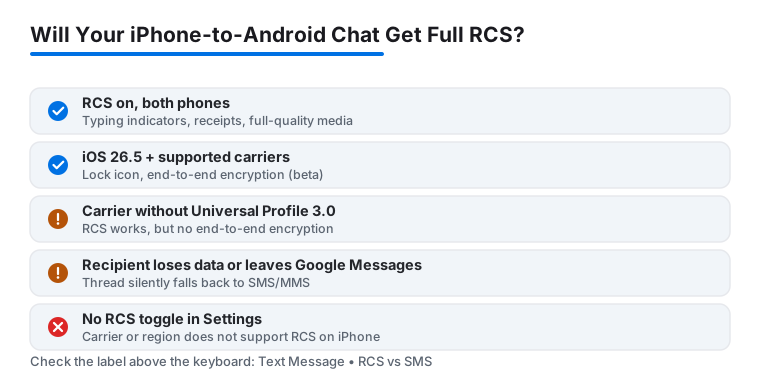
Open a conversation with an Android contact and look at the empty text field before you type. It reads Text Message • RCS when the chat is running over RCS and Text Message • SMS when it is not. The same label sits under the contact name at the top of the thread.
Two quick functional tests: send a photo and ask whether it arrived sharp on the other end, and watch for a Delivered status under your outgoing bubble. If the other person has read receipts enabled, Delivered flips to Read. If none of that appears and photos land compressed, the thread is still riding SMS and MMS, and the troubleshooting section below applies.
Turning on RCS does not change bubble colors. Apple reserves blue for iMessage; everything else, SMS and RCS alike, renders green. Apple's own support page on green messages states it plainly: a green bubble means the message was sent with RCS or SMS/MMS instead of iMessage.
So green now means two different things. An old-style green thread is bare SMS. A green thread labeled Text Message • RCS carries receipts, typing indicators, and full-quality media, and on iOS 26.5 with the right carriers it can be end-to-end encrypted too. The color survived as a brand boundary, not a quality indicator. Google's multi-year Get The Message campaign pushed Apple toward adopting RCS, but it never got blue bubbles, and nothing Apple has shipped or said suggests that will change.
Practical takeaway: stop reading green as second-class and start reading the label instead.
Until May 2026, RCS between iPhone and Android had a genuine privacy gap: unlike iMessage, those chats were not end-to-end encrypted, so carrier and relay infrastructure could in principle read them. iOS 26.5, released May 11, 2026, started closing that gap with end-to-end encrypted RCS messaging, shipped as a beta and built on the Messaging Layer Security (MLS) protocol from the GSMA's RCS Universal Profile 3.0 specification.
There is nothing to switch on manually. When a chat qualifies, encryption applies by default and a small lock icon appears in the conversation. The qualification list is the catch:
- Your iPhone must run iOS 26.5 or later.
- Your Android contact needs a current version of Google Messages.
- Both carriers must support Universal Profile 3.0. Apple is enabling carriers gradually through 2026, and plenty are not there yet.
No lock icon means the chat still works but is not end-to-end encrypted. Treat it accordingly: fine for logistics, the wrong place for anything sensitive. And any fallback to SMS drops encryption entirely.
iMessage runs on Apple's servers, so it works on any carrier that gives you a data connection. RCS is different: your carrier provisions it, and Apple delivers carrier-specific support through carrier settings updates. That has three consequences.
First, if your carrier has not enabled RCS for iPhone, the RCS Messaging toggle simply does not appear in Settings. The major US carriers and most large international ones support it in 2026, but smaller prepaid brands and MVNOs still lag, sometimes even when they ride on a host network that supports it.
Second, encrypted RCS is a narrower club than RCS itself. A carrier can support RCS perfectly well without supporting the Universal Profile 3.0 encryption layer, in which case you get everything except the lock icon.
Third, roaming behaves inconsistently. Some travelers watch RCS drop to SMS abroad and come back on its own at home. If RCS dies exactly when you cross a border, the network is the variable, not your phone.
RCS can get stuck the same way iMessage activation does. Work through these in order:
- Confirm a cellular connection. RCS activates over the cell network, not Wi-Fi. No bars, no registration. Toggle Airplane Mode on for ten seconds and off again; this alone clears a surprising share of stuck activations.
- Flip the toggle. Settings > Apps > Messages > RCS Messaging, turn it off, restart the iPhone, turn it back on.
- Check for a carrier settings update. Open Settings > General > About and stay on that screen for fifteen seconds. If an update prompt appears, install it; carrier settings are exactly where RCS support ships.
- Update iOS. Settings > General > Software Update. Carrier-side RCS changes often assume the current release.
- Recently ported your number? Wait. After a carrier port, RCS activation can take anywhere from half an hour to a day while the number registers on the new network.
- Reset network settings. Settings > General > Transfer or Reset iPhone > Reset > Reset Network Settings. This wipes saved Wi-Fi passwords, so keep it near the end of the list.
- Call the carrier. Some accounts need RCS provisioned manually, especially business lines and older plans.
If iMessage is misbehaving at the same time, the cause is usually shared, such as network registration or an Apple Account sign-in problem, and the fixes overlap; see our guide to fixing iMessage when it will not activate.
Fallback is intentional: when RCS cannot deliver, Messages silently downgrades to SMS or MMS so the text still arrives. But it downgrades everything at once, including encryption and media quality, and the only notice you get is the label changing to Text Message • SMS.
Common triggers: the other person's phone loses data coverage, they switch their default app away from Google Messages, they turn RCS chats off, or one member of a group thread has no RCS at all. Group chats are all-or-nothing; a single SMS-only participant pulls the whole group down to MMS.
One side effect of RCS worth knowing: spammers like it too, since it carries images and rich link previews. You can report junk from unknown senders in RCS threads the same way as SMS. If the problem is volume rather than one thread, work through stopping spam calls and texts on iPhone, and stay skeptical of delivery and account-alert texts on any protocol; our guide to spotting fake Apple scam texts covers the patterns.