
Best Health & Fitness Apps for Mac (2026)
The Mac is not where most people picture a workout, and that is exactly why a good health app on the big screen feels like a small luxury. We spent weeks logging runs, reading lab results and planning rest days on macOS, and the apps below are the ones we kept coming back to. A few are full Mac apps, a few run beautifully through Apple silicon, and a couple are web dashboards we live in. For the pocket side of the story, see our best iPhone health and fitness apps, and browse the wider Health and Fitness hub or all our best Mac apps when you are done here.
1. Strava
Strava is the first thing we open after a ride or run, and the Mac browser view is where it shines. The bigger map, the segment leaderboards and the side by side activity comparisons read far better than on a phone. It suits cyclists and runners who care about progress over time. The free tier covers basic logging, while the paid subscription unlocks the route planner we lean on most.
2. Garmin Connect
If you wear a Garmin watch or device, the Garmin Connect web dashboard at connect.garmin.com opens in Safari on your Mac and turns a wrist full of numbers into something you can study. It is free to view your data in the browser, and you do need a Garmin device to feed it. The standouts for us were the training load and the sleep stages, both of which read much more clearly on a large display than on a phone.
3. MyChart
MyChart is the unglamorous app we are quietly grateful for. Run it on your Mac and you can read lab results, message your doctor and book appointments without squinting at a phone. It suits anyone juggling a clinic, a pharmacy and a specialist. It is free, tied to your provider, and the large screen makes reviewing long visit summaries and test history genuinely calm rather than stressful.
4. Apple Health
Apple Health quietly gathers everything your iPhone and Apple Watch collect, and while it lives on those devices, your Mac is where it pays off. We use Handoff to review trends during work breaks, and it is the hub almost every other app here writes into. It is free and built in. Think of it as the honest scorecard that keeps your steps, sleep and heart data together.
5. Peloton
Peloton is not just for the bike. On a Mac, the web player streams strength, yoga and stretching classes onto a screen big enough to follow the instructor's form. We found it perfect for living room mat workouts with the laptop propped nearby. You do not need any Peloton hardware, but the catalog now sits behind a paid App membership: App One covers most non-hardware classes, while App+ adds the full library. A free trial lets you test it first. The catalog is deep enough that boredom rarely sets in.
6. Nike
Nike Training Club and the running side of Nike's app give you a coach without a price tag. We like queuing a guided session on the Mac, casting the audio to a speaker and following along in the room. It suits beginners who want structure rather than a pile of random workouts. Everything is free now, with clearly explained drills, and the clean layout reads well on a wide display.
7. Walgreens
The Walgreens app on a Mac is prescription management without the phone fumbling. We use it to refill prescriptions, check what is ready and order photo prints from the same browser tab we keep open all day. It suits anyone managing regular medications for themselves or family. It is free, and seeing your pharmacy account on a real keyboard makes typing names, dosages and insurance details far less error prone.
8. Flo
Flo is one of the most thoughtful period and cycle trackers around, and reviewing its insights on a Mac browser feels less rushed than tapping through a phone. We appreciated the clear charts and the calm, jargon free explanations of each phase. It suits anyone tracking a cycle, planning or simply curious about patterns. The basics are free, while Flo Premium adds deeper health reports and a private, anonymous mode.
9. Hudl
Hudl is the sleeper pick for anyone who plays a team sport or coaches one. On a Mac you can scrub through game footage frame by frame, draw on plays and share clips with teammates, all of which feel cramped on a phone. It suits athletes and coaches reviewing performance seriously. Plans vary by team and sport, but the big screen turns film study into something you will actually do.
10. Calorie counter apps
Logging food is tedious, and that is precisely why doing it on a Mac helps. Typing meals on a real keyboard and scanning a week of nutrition at a glance beats thumb tapping. A good calorie counter keeps you honest without nagging. Most offer a capable free tier with paid upgrades for macros. Pair one with our best Mac music apps and meal prep flies by.
11. Sleep apps
A dedicated sleep app turns your nights into something you can read like a chart. The tracking usually happens on a watch or phone, but the Mac is where we review weekly patterns and adjust a wind down routine. It suits anyone who suspects their rest is the missing piece of their fitness. Many are free to start, with subscriptions adding smart alarms, soundscapes and longer sleep history.
12. Bike apps
For cyclists, a good bike app on the Mac is a planning desk. We map routes, study elevation profiles and review past rides on a screen where every climb is easy to see before we clip in. It suits weekend riders and commuters mapping safer streets. Free versions handle the essentials, while paid tiers add turn by turn navigation and offline maps for the road.
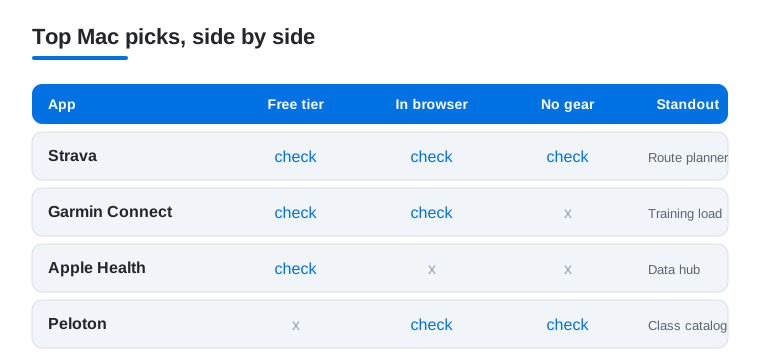
Not sure which of these to open first on your Mac? This quick comparison lines up four favorites against the things that matter on a desktop: a usable free tier, whether it runs right in a browser, and whether you need extra hardware to get started.
How to choose health and fitness apps for a Mac
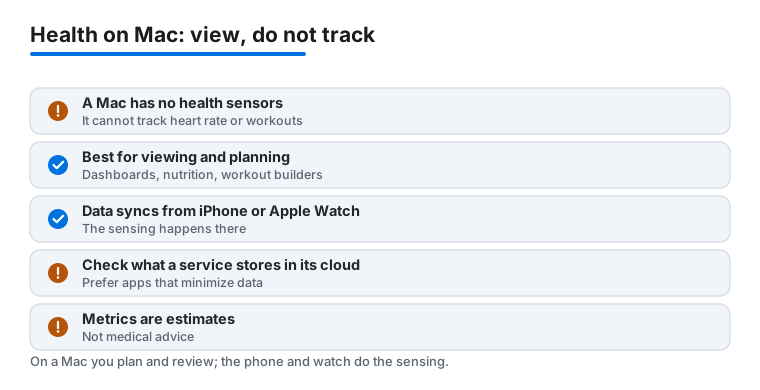
Before we go any further, it helps to be honest about what a Mac can and cannot do. A Mac has no health sensors. There is no heart rate sensor, no accelerometer counting your steps, no GPS strapped to your wrist. That means the Mac is not the place where you track a workout or measure a heart rate. It is the place where you view, plan and analyze data that your iPhone or Apple Watch already collected. Once you accept that, choosing the right app gets much simpler, because you stop looking for something the Mac was never built to be.
So the first question is not which app tracks the most, it is which app helps you make sense of numbers you have already captured elsewhere. A Mac screen is large, the keyboard is real, and you have room to lay a whole week side by side. That is a genuine advantage for reading and planning, and a poor fit for moment to moment sensing.
Know what kind of app you are really installing
Most apps marketed as Mac health and fitness apps fall into a few honest categories, and it helps to recognize which one you are dealing with.
- Web dashboards. Tools like Strava, the Garmin Connect dashboard and MyChart open in a browser and show data that was gathered somewhere else. The Mac is a window onto a cloud account, not a tracker.
- Planners and workout builders. Apps that help you map a route, schedule rest days or queue a class. The thinking happens on the Mac, the doing happens away from it.
- Nutrition and logging tools. A calorie counter is far easier on a real keyboard, so the Mac is a reasonable home for food logs even though it senses nothing.
- Companion apps that sync from your iPhone. Many entries here, including Apple Health, live on your phone or watch and simply surface on the Mac through Handoff or a shared account. The on device sensing happens on the phone or watch, every time.
If you keep these categories in mind, you will not waste an afternoon hunting for a Mac app that measures your pulse. That app does not exist, and that is fine.
Treat your health data as sensitive
Health data is some of the most personal information you own. Sleep patterns, cycle tracking, lab results and medication lists say a great deal about you, so it is worth slowing down before you hand any of it to a service. Many of these apps store your data in their cloud so it can sync across devices, which is convenient and also a real consideration.
A few practical habits help here.
- Check what the service actually stores. Read the privacy summary on the App Store listing and, where it exists, the in app data and privacy section. Look for what is collected, whether it is linked to your identity, and whether it is used for advertising.
- Prefer apps that minimize data. When two tools do the same job, the one that asks for less and keeps more on device is usually the calmer long term choice. Apple Health, for example, keeps its core data on your devices and in your encrypted iCloud rather than on a third party server.
- Use the privacy modes you are given. Some apps offer an anonymous or private mode for the most sensitive categories. If you are tracking a cycle or a medical condition, turning those on is a small step worth taking.
- Be deliberate about sharing. Sharing a workout or a doctor message is useful, but check who can see it before you tap send, especially on a shared family Mac.
None of this requires paranoia. It just means treating a cycle tracker or a lab result with the same care you would give a bank statement left open on the screen.
Match the app to a real goal
The best app is the one that answers a question you actually have. If you want to understand your training over months, a tool with strong history and trends matters more than flashy daily badges. If you are managing appointments and prescriptions, an app that connects to your clinic and pharmacy beats anything with leaderboards. Pick the single goal that is bugging you right now, choose the app that serves it, and ignore the rest until a new need appears.
Let the Mac do what the phone cannot
Once you have picked a tool, lean into the things a desktop genuinely does better. A wide screen lets you compare a month of runs side by side instead of swiping through one day at a time. A real keyboard makes logging meals, naming routes and writing a note to your doctor far quicker and less error prone. And a calm review session at your desk, rather than a glance at a wrist mid workout, is when most people actually notice the patterns that change a habit. In other words, do your moving with your phone or watch, and do your thinking on the Mac. That division of labor is the whole point, and it is what keeps these apps from feeling like clutter.
What the numbers really mean
One more honest note, and it matters. The figures these apps show are consumer estimates, not medical readings. Calories burned, sleep stages, readiness scores and stress numbers are calculated from sensors and models that are good enough to spot trends and bad enough to be wrong on any single day. They are useful for noticing that you slept poorly all week or that your easy runs are getting easier. They are not a diagnosis.
So use these apps the way they deserve to be used. Watch the direction of the line over weeks rather than fixating on one number, and let a rising or falling trend prompt a sensible change in habit. If a reading genuinely worries you, or you are making a decision about medication, treatment or a symptom, talk to a clinician. An app on your Mac is a thoughtful planning and review desk. It is not a doctor, and the calmest users are the ones who never ask it to be.
Frequently asked questions
Can I actually use health and fitness apps on a Mac?
Yes, in three ways. Some run as native Mac apps, many Apple silicon Macs can install the iPhone or iPad version straight from the App Store, and others, like Strava, Peloton and MyChart, work through any browser. The big screen and keyboard make planning, logging and reviewing data far more comfortable than on a phone.
Do these apps replace an Apple Watch or fitness tracker?
Not really. A watch or band is still the best way to capture steps, heart rate and sleep as you move through the day. The Mac is where that data becomes useful. You review trends, plan workouts and read results on a screen big enough to see the whole picture rather than a single day.
Are the best Mac health apps free?
Many start free. The Garmin Connect dashboard, Apple Health, Nike's workouts and MyChart cost nothing to use. Others, like Peloton classes or Strava's route planner, sit behind a monthly subscription. Our advice is to live in the free version for a couple of weeks, then pay only for the one feature you keep wishing you had.
Which app should I start with?
Start with whatever matches your goal. If you run or ride, begin with Strava. If you wear a Garmin device, open the Garmin Connect dashboard. For managing appointments and results, MyChart is the one. You do not need all of them at once. Pick a single app, use it for two weeks, and add another only when a real gap appears.
Is my health data safe in these apps?
It depends on the app, so it is worth checking. Most store your data in their cloud so it can sync across your devices, which means you are trusting that company with sensitive information. Before signing up, read the privacy summary on the App Store listing, prefer tools that collect less, and turn on any anonymous or private mode the app offers. Apple Health is a good baseline here because it keeps its core data on your devices and in encrypted iCloud rather than on a third party server.
Can a Mac app track my workout or heart rate directly?
No. A Mac has no health sensors, so it cannot count steps, measure heart rate or record a run on its own. That sensing happens on your iPhone or Apple Watch. The Mac comes in afterward, as the place where you view, plan and analyze the data those devices collected. Treat the numbers as helpful estimates for spotting trends, not as medical measurements.