
Best Health & Fitness Apps for iPhone (2026)
Your iPhone is already a quietly capable health coach, and the right apps turn it into something you actually open every day. We spent weeks logging meals, chasing rings, and following along to living-room workouts to sort the genuinely useful from the gimmicky. Below are the apps we kept on our home screen, with honest notes on free versus paid and who each one really suits. If you want the wider picture, browse the full health and fitness collection or the rest of our best iPhone apps guides.
1. Apple Watch
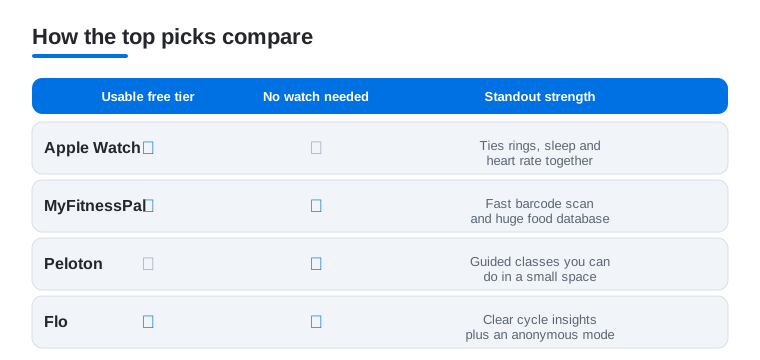
The Apple Watch app on your iPhone is mission control for everything your watch records. In our testing it is where the daily story comes together: rings, heart rate trends, sleep, and workouts in one tidy timeline. It is free with any watch, and if you wear one, this is the first thing to open. Prefer a bigger screen for your numbers? Our health and fitness apps for Mac guide covers the desktop side.
2. MyFitnessPal
Still the food diary to beat. The barcode scanner is fast, the database is enormous, and logging a repeat lunch on iPhone takes seconds once your favorites are saved. The free tier covers basic calorie and macro tracking, while Premium unlocks detailed macros and ad removal. We found honest logging for two weeks taught us more than any crash diet did. Pair it with a few food and drink apps and meal planning gets easier.
3. Peloton
You do not need the bike. The Peloton app turns your iPhone into a pocket studio packed with running, strength, yoga, and stretching classes led by instructors who somehow make 6am feel doable. Casting to a TV is smooth, and the class filters help you find a 20 minute session when that is all you have. New users get a 7 day free trial, after which a paid App membership is required to keep using the classes. Good for variety without a gym.
4. Flo
The cycle and ovulation tracker most of our testers trusted. Flo predicts periods, logs symptoms, and explains what your body is doing in plain, judgment free language. On iPhone the daily check in is quick and the insights feel personal rather than generic. It is free to use with a paid Premium tier for deeper health content. If privacy worries you, dig into the anonymous mode settings first so you control exactly what is stored.
5. fitness games
Some days a workout only happens if it feels like play, and fitness games make that bargain work. Rhythm boxing, dance challenges, and ring based movement apps turn reps into a score you want to beat. On iPhone they pair nicely with AirPods and your Apple Watch for live heart rate. Most offer a free trial with a subscription after. In our testing they are the secret weapon for anyone who finds traditional routines boring and quits by week two.
6. meditation apps
The calmest corner of the App Store. Meditation apps like Calm and Headspace lead short breathing sessions, sleep stories, and focus timers that genuinely lower the shoulders after a long day. On iPhone, a three minute session before bed became a habit we actually kept. Both offer a free taste before asking for a yearly subscription. Pick one and stick with it for a week rather than collecting five, since consistency matters far more than the logo.
7. weight loss apps
Beyond plain calorie counting, weight loss apps lean on habit coaching, psychology, and gentle daily prompts to keep you moving in the right direction. Options like Noom and Lose It pair tracking with lessons rather than guilt. On iPhone the reminders are easy to tune so they help instead of hound. Expect a free trial followed by a subscription. We found the ones that focus on small repeatable habits beat the ones promising dramatic results by Friday.
8. period tracker apps
If Flo is not your fit, the wider field of period tracker apps offers everything from minimalist calendars to detailed fertility planners. Many sync with Apple Health so your cycle sits alongside the rest of your data on iPhone. Look closely at how each one handles your information, since this is sensitive stuff and policies vary a lot. Most are free with optional paid extras. We leaned toward the apps that let you export or delete your history without a fuss.
9. golf fitness apps
A pleasant surprise for weekend players. Golf fitness apps build mobility, rotation, and core routines aimed squarely at a smoother swing and fewer aches afterward. Following the video drills from your iPhone between rounds is easy, and some sync session data to your Apple Watch. Typically you get a few free workouts then a subscription for full programs. We noticed real improvement in flexibility after a couple of weeks, and the warmups alone are worth the download before a round.
10. speedometer apps
Handy for cyclists, runners, and indoor training. Speedometer apps use your iPhone GPS to show live pace, distance, and top speed, and many overlay the numbers in a big clear readout you can glance at mid effort. They are great paired to a handlebar mount or a turbo trainer setup. Most are free with ads and a small paid upgrade to remove them. In our testing the GPS held up well outdoors, though indoors you will want a speed sensor for accuracy.
How to choose health and fitness apps for iPhone
Health and fitness apps are easy to download and easy to abandon. The ones that last tend to share a few honest qualities, and knowing what to look for saves you from a home screen full of trials you never opened twice. Before chasing features, get clear on what you actually want: more daily movement, better food awareness, calmer sleep, or a closer eye on your cycle. A single app that matches one goal beats five that each promise everything.
Start with what is already on your iPhone
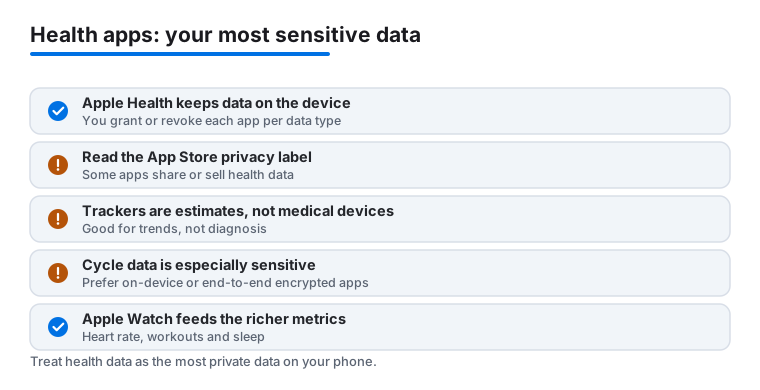
Apple Health is built in and free, and it quietly becomes the hub for the rest. Most good apps can read from or write to it, so steps, workouts, sleep, and cycle data can live in one place rather than scattered across separate accounts. If you own an Apple Watch, the Apple Watch app is the natural first stop, since it feeds most of the richer metrics like continuous heart rate, automatic workout detection, and detailed sleep stages. The watch is not required to get value, but it does most of the heavy lifting for accurate, hands free tracking.
It also helps to think in terms of what you will realistically do, not what you wish you would do. A dance based app you open three times a week beats an elite training plan you dread. Be honest about your schedule, your space, and whether you want guidance or just a record of what you already do. The apps in our list above span both styles, from passive trackers that sit in the background to guided classes that walk you through each session.
Weigh the things that actually matter
- A usable free tier. Many apps gate the basics behind a subscription. Try the free side first and confirm it does the core job before you pay for analytics or larger class libraries.
- Apple Health support. An app that reads and writes Apple Health fits into your wider picture instead of trapping your data in its own silo.
- Works for your setup. Some apps assume an Apple Watch. If you only have an iPhone, check that the app still delivers without one.
- Easy to leave. Look for clear export and delete options. An app that lets you take your history with you is one you can trust more.
- Quiet reminders. Notifications you can tune help. Notifications you cannot turn down become noise you mute, then ignore the app entirely.
An honest look at data and accuracy
Health data is among the most sensitive information you carry, so it deserves a more careful eye than the average app. The good news is that Apple has built a sensible foundation, and a few habits on your side close most of the gaps.
Where your data lives
Apple Health, built on a framework called HealthKit, keeps your health data on the device and encrypted. Access is granted per data type, so an app might see your steps but not your heart rate unless you allow it, and you can grant or revoke each permission at any time in Settings. That granular control is worth using. When an app asks for access, give it only the data types it genuinely needs to do its job.
Read the label and deny tracking
Before you install anything health related, take a minute on its App Store page to read the Privacy Nutrition Label, which lists what data the app collects and whether that data is linked to you or used to track you. When you open a new app, App Tracking Transparency will ask whether it can track you across other apps and websites. For health apps there is rarely a reason to say yes, so deny tracking. Be wary of any app that is vague about what it shares, and treat free apps that seem to have no business model with extra caution, since the data may be the product. An app that sells or broadly shares health data is one to skip.
Trackers estimate, they do not diagnose
Consumer trackers for steps, calories burned, heart rate, and sleep are useful, but they are estimates, not medical devices. They are built to show trends over time, not to deliver a clinical reading. A step count that drifts a little, a calorie figure that is a rough model, or a sleep score that disagrees with how you feel are all normal. Use these numbers to spot patterns, such as whether you moved more this week than last, rather than as a diagnosis. For anything that worries you, a real symptom, a persistent change, an unexpected reading, talk to a clinician. The app is a prompt to pay attention, not a substitute for medical advice.
Cycle and women's health data deserves extra care
Cycle and women's health information is especially sensitive, and the privacy stakes are higher. Prefer apps that store this data on the device or protect it with end to end encryption, and check whether the app offers an anonymous mode or lets you log without a tied account. Apple Health stores cycle tracking on the device by default, which makes it a reasonable home for that information. Whatever you choose, confirm you can export and delete your history easily, and read how the app handles data before you trust it with months of entries.
Watch out for subscriptions and dark patterns
Most health apps run on subscriptions now, and the free trial is often the real product pitch. Before you tap accept, check the renewal price and the billing period, since a cheap monthly trial can quietly roll into a pricey annual plan. On iPhone you can review and cancel any subscription in Settings under your name, then Subscriptions, and it is worth a look every few months to clear out the ones you no longer use. Be cautious with apps that bury the cancel button, push constant upgrade prompts, or make the free tier almost unusable to nudge you toward paying. A fair app earns the subscription by being useful, not by making you afraid to leave.
Build the habit, then layer on
The best app is the one you keep opening. Start with one that matches your main goal, give it a couple of weeks, and only add another once the first has stuck. Consistency does more for your health than any feature list, and a calmer, smaller set of apps is far easier to keep up with than a crowded screen of good intentions. If an app starts to feel like a chore or a guilt machine, that is useful information too, and you are allowed to delete it and try something gentler.
Not sure where to start? Here is how the four standout named picks compare on the things this guide weighs most: a usable free tier, whether they work without an Apple Watch, and the one thing each does best.
Frequently asked questions
Do I need an Apple Watch to get value from these apps?
No. Plenty of these apps shine on iPhone alone, especially MyFitnessPal, Peloton, Flo, and the meditation picks. A watch adds richer heart rate and automatic tracking, but it is a bonus rather than a requirement. Start with the iPhone apps and add a watch later if you want hands free data.
Are the free versions actually usable, or just a teaser?
Most free tiers are genuinely useful. Apple Watch and Apple Health cost nothing, MyFitnessPal handles core logging for free, and Calm and Headspace both offer real free content. Peloton is different: it gives a 7 day free trial and then needs a paid membership, so plan to pay if you stick with it. Paid plans mainly unlock deeper analytics, larger class libraries, and ad removal, so try the free side first.
Which app should I download first if I just want to get moving?
Start with the Apple Watch app if you own a watch, since it ties everything together, or Peloton if you want guided workouts you can do in a small space. For food awareness, add MyFitnessPal. Begin with one, build the habit, then layer in others rather than installing everything at once.
How private is my health and cycle data in these apps?
It varies, so read each privacy policy before you commit. Flo offers an anonymous mode, and many period and weight apps let you sync with Apple Health, which keeps data on device by default. Look for clear export and delete options, and avoid apps that are vague about what they share.
How do I control which apps can see my Apple Health data?
Open Settings, then Health, then Data Access and Devices, where you can see every app and toggle each data type on or off. Access is granted per type, so you might let an app read steps but not heart rate. Review this list now and then, and revoke anything you no longer use.
Are the step, calorie, and sleep numbers accurate enough to trust?
Treat them as estimates that are good for trends, not as medical readings. Consumer trackers are not medical devices, so a step count or sleep score that is slightly off is normal. Use them to watch patterns over time, and see a clinician for anything that genuinely concerns you.